SUITOK Dual-Bay NVMe SATA Cloner Review: Specs, Pros and Cons
As an Amazon Associate we earn from qualifying purchases. Links on this page are affiliate links.
This suitok m 2 SSD cloner dock review covers the STK07 Pro, a standalone device for duplicating drives without a computer. It features dual bays that accept both NVMe and SATA M.2 SSDs. The unit supports USB 3.2 Gen 2 for 10Gbps transfers. You can clone drives offline by pressing a single button. It handles various form factors, including the long 22110 size. The design uses a tool-free slide-in tray. This dock simplifies drive migration for upgrades or backups.
What stands out
- Dual bays support NVMe (PCIe Gen 3/4) and SATA M.2 drives
- 10Gbps transfer speed via USB 3.2 Gen 2 interface
- Tool-free slide-in trays for quick drive installation
- Offline cloning requires no PC, software, or IT skills
- Built-in ventilation channels manage heat during extended sessions
Who it fits
Good fit for
This dock suits IT professionals who need to deploy drives across multiple machines without connecting to a host PC. Gamers using Steam Deck, ROG Ally, or PS5 expansion slots will appreciate the offline cloning of game libraries and save files. Users upgrading from smaller 2280 drives to larger 22110 models benefit from the broad form factor support. It also works well for creating exact sector-level backups of encrypted volumes or OS partitions safely.
Who should skip it
You should look elsewhere if you need to clone 2.5-inch SATA SSDs or 3.5-inch hard drives, as this unit only accepts M.2 form factors. Users requiring higher transfer speeds than 10Gbps will find this interface limiting compared to USB 3.2 Gen 2x2 alternatives. If you prefer a hardware solution with physical buttons and indicators for each drive individually, note that this model uses a single button and RGB lighting for status. It is not designed for internal installation.
Verdict: The SUITOK STK07 Pro offers a practical, tool-free way to clone M.2 NVMe and SATA drives at 10Gbps speeds. It is a solid choice for offline duplication and drive management without a host computer.
Key specs explained for the SUITOK dock
Drive Bay Count: 2 bays
This device holds two M.2 SSDs at once. You place the source drive in one slot and the target drive in the other. This setup allows you to duplicate data or clone an operating system without needing a computer. It is useful for IT professionals who need to prepare multiple drives quickly. You can also use both slots for external storage when not cloning.
Max Transfer Speed: 10Gbps
The dock uses the USB 3.2 Gen 2 interface. This standard allows data to move at speeds up to 10 gigabits per second. This is twice as fast as older USB 3.0 docks. You can clone a large drive in roughly half the time compared to slower devices. This speed helps when you are moving large game libraries or video files between drives.
Drive Interface: M.2 NVMe (PCIe Gen 3/4), SATA
The unit works with both NVMe and SATA M.2 SSDs. NVMe drives use the PCIe bus for faster communication, while SATA drives use a different protocol. This dock supports both types, so you can mix and match drives. It covers PCIe Gen 3 and Gen 4 standards. You do not need separate tools for different drive technologies.
Supported Form Factors: 2230, 2242, 2260, 2280, 22110
M.2 drives come in different lengths. The number indicates the width and length in millimeters. This dock accepts the common 2280 size for desktops, as well as shorter 2230 and 2242 sizes often used in laptops and handhelds. It also handles the very long 22110 format. You can use this single tool for various devices without worrying about drive length.
Design and physical build
The SUITOK STK07 Pro measures 3.87 by 2.68 by 0.71 inches and weighs 3.58 ounces, according to the listing. Its compact footprint allows it to sit on any desk without consuming much space. The black finish provides a neutral look that blends into most workstations. The tool-free slide-in tray design means you can swap drives in seconds. This layout removes the need for screws or extra tools, which simplifies the cloning process for users who do not have a screwdriver nearby.
The device uses a single button for offline cloning, so you do not need to connect a PC or install software. You insert both M.2 SSDs, press the button, and the unit handles the sector-level 1:1 duplication. The RGB ambient lighting confirms the clone status, giving you a visual cue without needing to check a screen. This standalone approach is useful for IT teams deploying drives across multiple machines or for gamers cloning their Steam Deck or ROG Ally storage.
Built-in ventilation channels are included to manage heat during extended sessions. This thermal management helps prevent throttling when you are cloning large files at the rated 10Gbps transfer speed. The unit also supports USB-C and USB-A via an included adapter, making it compatible with a wide range of host computers. You can use the dock as an external enclosure for up to 16TB of total capacity when not cloning. The durable plastic housing protects the drives while allowing for easy access to the bays.
Setup and daily operation
You do not need a computer to use this dock. The device performs offline cloning. You simply insert your source M.2 SSD into one bay and your target drive into the other. Then you press one button. The process copies data sector by sector. This includes operating system partitions, encrypted volumes, and hidden recovery sectors. You do not need to install software or connect to a laptop. The unit handles the duplication independently. This makes it suitable for OS migration or creating exact backups while your main PC remains in use.
The dock accepts a wide range of drive sizes. You can load 2230, 2242, 2260, 2280, and 22110 form factors. It supports both NVMe (PCIe Gen 3/4) and SATA interfaces. This covers most modern storage drives. You can also use it with handheld consoles like the Steam Deck or ROG Ally, as well as PlayStation 5 expansion slots. The tool-free slide-in tray design lets you swap drives quickly without screws.
When not cloning, you can connect the dock to your PC or Mac via the USB-C port. It acts as an external enclosure. You get up to 10Gbps transfer speeds. This allows you to access up to 16TB of total storage across both bays. The built-in ventilation channels help manage heat during long cloning sessions. An RGB light indicates the status of the clone. You get clear visual feedback without needing to check a screen.
Before You Buy This Cloner
You should verify that your target drives are compatible with the supported form factors. The dock accepts 2230, 2242, 2260, 2280, and 22110 sizes. Ensure your source and destination drives fit within these dimensions. Check if your drives are NVMe PCIe Gen 3/4 or SATA. The unit supports both interfaces, but mixing types may affect performance depending on the source drive speed. You will need a power source for the dock. The listing does not specify the power adapter details, so confirm you have a compatible USB-C power delivery source. Keep the device in a well-ventilated area. Built-in ventilation channels help prevent thermal throttling during long cloning sessions. This dock is designed for offline duplication. You do not need a PC for the cloning process itself. However, you may want a USB-C to USB-A adapter for older computers if you plan to use the dock as an external storage enclosure. This device sits alongside other SSD solutions by offering standalone functionality. It is ideal for users who frequently upgrade drives or need to duplicate data without installing software. It complements standard SSDs by simplifying the migration process.
Check before you buy
- Verify your drives fit 2230, 2242, 2260, 2280, or 22110 sizes.
- Confirm your drives are NVMe PCIe or SATA compatible.
- Ensure you have a USB-C power source for operation.
- Check if you need a USB-A adapter for older PCs.
The product at a glance
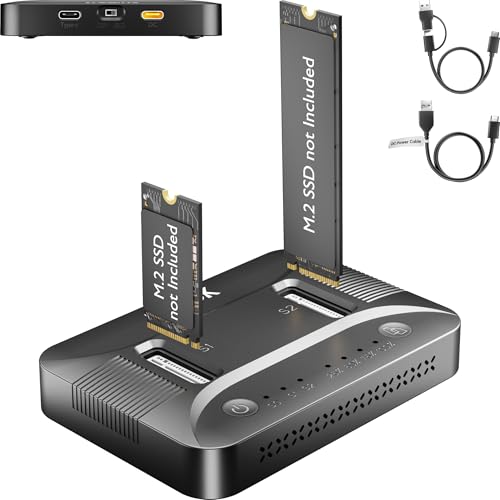
SUITOK Dual-Bay NVMe and SATA Cloner Dock
Best for: offline M.2 SSD cloning for handhelds and consoles
- Max Transfer Speed
- 10Gbps
- Host Interface
- USB-C, USB 3.2 Gen 2
- Drive Interface
- M.2 NVMe (PCIe Gen 3/4), SATA
- Supported Form Factors
- 2230, 2242, 2260, 2280, 22110
- Drive Bay Count
- 2 bays
- Cooling System
- Built-in ventilation channels
View on Amazon: SUITOK Dual-Bay NVMe and SATA Cloner Dock Affiliate link
The SUITOK STK07 Pro is a dual-bay M.2 SSD cloner dock that requires no PC for offline cloning. It supports NVMe PCIe Gen 3/4 and SATA drives in sizes 2230 through 22110. The device offers 10Gbps transfer speeds via USB 3.2 Gen 2. You can clone drives or use the dock as an external enclosure. It features a tool-free design and active thermal management for sustained performance.
Pros
- Supports offline 1:1 sector-level cloning without a computer
- Compatible with NVMe PCIe Gen 3/4 and SATA M.2 SSDs
- 10Gbps transfer speed via USB 3.2 Gen 2 interface
- Tool-free slide-in tray design for easy drive installation
- Active thermal management with built-in ventilation channels
Cons
- Limited to USB 3.2 Gen 2 speeds, not USB4 or Thunderbolt
- No software control for cloning parameters or monitoring
- Only supports M.2 form factors, not 2.5-inch SATA drives
Good fit if
- You need to clone drives without connecting to a PC
- You manage multiple M.2 SSDs for gaming handhelds or PS5
- You want a tool-free solution for rapid drive swapping
Skip if
- You require cloning speeds faster than 10Gbps
- You need to clone 2.5-inch SATA SSDs
- You prefer software-controlled cloning with detailed progress monitoring
Verdict: The SUITOK STK07 Pro Dual-Bay NVMe Cloner is a practical offline duplicator for users who frequently swap M.2 drives in handhelds or consoles. It fits those who value speed and simplicity over advanced software features.
Specifications side by side
| Spec | SUITOK Dual-Bay NVMe and SATA Cloner Dock |
|---|---|
| Max Transfer Speed | 10Gbps |
| Host Interface | USB-C, USB 3.2 Gen 2 |
| Drive Interface | M.2 NVMe (PCIe Gen 3/4), SATA |
| Supported Form Factors | 2230, 2242, 2260, 2280, 22110 |
| Drive Bay Count | 2 bays |
| Cooling System | Built-in ventilation channels |
| Maximum Capacity | 16TB |
| Installation Style | Tool-free |
| Interface | SATA III |
| Form Factor | M.2 |
| Compatibility | Laptop, PS5 |
| Transfer Speed | 10Gbps |
| Features | Tool-Free, Offline Clone |
| Bay Count | Dual-Bay |
| Dimensions | 3.87 × 2.68 × 0.71 inches |
| Weight | 3.58 ounces |
| Size | 3.87 x 2.68 x 0.71 inches |
| Color | Black |
| Model | STK07 Pro 10Gbps Dual Bay M.2 Cloner |
Frequently asked questions
Does the SUITOK STK07 Pro work without a computer?
Yes, it functions as a standalone offline cloner. You do not need to connect it to a PC or Mac. The device handles the duplication process internally. You simply insert your drives and press the start button. This makes it convenient for users who want to clone drives away from their main workstation.
What M.2 SSD sizes are supported by this dock?
The dock supports multiple M.2 form factors. It accepts 2230, 2242, 2260, 2280, and 22110 sizes. This range covers most standard NVMe and SATA drives used in laptops, handhelds, and consoles. You can verify your drive length before inserting it to ensure a proper fit in the dual bays.
How fast is the data transfer on this cloner?
The unit supports transfer speeds up to 10Gbps. This performance is achieved through its USB 3.2 Gen 2 interface connection. The speed allows for quicker cloning sessions compared to older USB standards. This is beneficial when duplicating large game libraries or operating system files.
Can I clone NVMe drives to SATA drives with this device?
The device features dual bays designed for M.2 drives. It accepts both NVMe and SATA M.2 SSDs. You can place a source drive in one bay and a target drive in the other. This flexibility allows you to mix drive types for your specific cloning needs.
Is the SUITOK cloner portable enough for travel?
The unit is compact and lightweight. It measures 3.87 by 2.68 by 0.71 inches and weighs only 3.58 ounces. Its small footprint allows it to fit easily in a bag or on a small desk. This makes it a practical choice for gamers who swap drives between handheld consoles.
What is the cloning process like for beginners?
The process is designed for simplicity. You insert the source drive into one bay and the target into the other. Then you press a single button to start. The device copies data sector by sector without requiring software installation. This offline approach reduces complexity for users unfamiliar with disk imaging tools.