SSK Dual-Bay NVMe SATA M.2 Alternatives: 6 Similar Picks Compared
As an Amazon Associate we earn from qualifying purchases. Links on this page are affiliate links.
The SSK Dual-Bay NVMe and SATA M.2 SSD Cloner Dock is a compact desktop station built for multi-drive access and standalone drive duplication. If you are comparing ssk nvme sata ssd alternatives, you likely want options tailored to your specific drive dimensions, speed targets, or build quality. The original SSK dock pairs a 10Gbps USB 3.2 Gen 2 interface with an RTL9210CDP controller, offering UASP support, S.M.A.R.T. monitoring, and adaptive TRIM. Its open-frame design facilitates airflow while delivering one-key offline cloning between matching NVMe or SATA protocols.
You might still prefer an alternative if your workflow demands different hardware specs. Some setups require physical support for longer 22110 M.2 drives, faster 20Gbps throughput, rugged aluminum protection, or a dedicated PCIe NVMe workflow without SATA bridging. We selected these 6 alternatives because their published specifications closely overlap with the SSK baseline. They share key features like dual-bay M.2 slots, tool-free access, 10Gbps or higher transfer rates, and standalone offline cloning so you can match the right unit to your storage tasks.
Comparing SSK Dual-Bay Cloner Alternatives
GODO Dual-Bay NVMe and SATA Clone Dock
The GODO cloner dock accommodates M.2 cards up to size 22110, giving you flexibility for longer drives that exceed the standard dimensions supported by the SSK dock. It also provides a tool-free slot layout and a narrower 0.69-inch width and height compared to SSK's 2.83-inch width and 0.86-inch height. However, the SSK model documents integrated S.M.A.R.T. health checks and adaptive TRIM optimization driven by its RTL9210CDP chip. Both units offer 10Gbps transfers and standalone offline duplication for SATA and NVMe. Pick GODO if you need tool-free insertion for mixed drive lengths reaching 22110.
MAIWO Dual-Bay NVMe & SATA SSD Cloner
MAIWO K2023CL features a flatter 0.5-inch profile compared to the 0.86-inch height of the SSK dock. This thinner enclosure makes it easier to pack into tight laptop bags. Both devices deliver dual-bay support for NVMe and SATA drives, 10Gbps transfer bandwidth, and computer-free offline cloning. You give up the square footprint of the SSK unit, as MAIWO is longer at 4 inches versus SSK's 2.83 inches. You also lose the documented RTL9210CDP controller, S.M.A.R.T. monitoring, and adaptive TRIM functionality found on the SSK. Choose MAIWO if you want a thinner dual-bay cloner for portable drive duplication.
SUITOK Dual-Bay NVMe and SATA Cloner Dock
The SUITOK cloner dock provides support for 22110 M.2 drives and a tool-free design, whereas the SSK dock focuses on standard form factors. At 0.71 inches tall, SUITOK has a lower vertical profile than SSK's 0.86-inch chassis. In exchange, SUITOK is larger and heavier overall, measuring 3.87 inches long and weighing 3.58 ounces compared to SSK's 2.83-inch length and 3.17-ounce weight. SSK also explicitly lists S.M.A.R.T. health checks and adaptive TRIM support for ongoing drive maintenance. Choose SUITOK if you need tool-free installation and compatibility with extended 22110 SSDs while maintaining 10Gbps transfers and standalone offline cloning.
AMZPILOT Dual-Bay M.2 NVMe SATA Cloner
AMZPILOT SD06 Pro handles drives up to 22110 size, giving you room for enterprise-length SSDs that do not fit into the standard SSK dock. It also features a slimmer profile at 0.56 inches tall compared to SSK's 0.86 inches. However, the AMZPILOT unit has a larger desktop footprint at 3.95 by 2.71 inches and weighs 3.9 ounces, making it heavier than the 3.17-ounce SSK dock. SSK also documents built-in S.M.A.R.T. health checks and adaptive TRIM optimization. Both support 10Gbps speeds and same-protocol offline cloning. Pick AMZPILOT if you require a slim dual-bay cloner that accepts 22110 M.2 drives.
ASUS TUF Gaming A2 Rugged 20Gbps SSD Enclosure
The ASUS TUF Gaming A2 doubles the host transfer bandwidth of the SSK dock, reaching 20Gbps over USB-C rather than 10Gbps. It also provides a rugged aluminum body for physical protection, whereas the SSK uses an open-frame construction. What you sacrifice is standalone offline cloning, as the ASUS enclosure requires a connected host device to manage data. The TUF Gaming A2 is also significantly heavier at 9.84 ounces compared to SSK's 3.17 ounces, and it measures 4.6 inches long. Choose ASUS TUF Gaming A2 if you need rugged protection and 20Gbps gaming data throughput instead of standalone drive duplication.
Pefishop Dual-Bay NVMe Cloner
Pefishop Dual-Bay Cloner supports PCIe NVMe drives up to size 22110, giving you standalone cloning capabilities for extended NVMe cards. In contrast, the SSK dock is limited to standard drive sizes. However, Pefishop sacrifices SATA interface support entirely, functioning exclusively with NVMe drives. The SSK dock supports both NVMe and SATA M.2 drives and integrates S.M.A.R.T. checking and adaptive TRIM optimization. Both docks deliver 10Gbps transfer bandwidth and one-touch offline cloning without a host computer. Pick Pefishop if your cloning and external storage needs involve only NVMe drives and include 22110 form factor cards.
Quick picks
Our 7 picks

SSK Dual-Bay NVMe and SATA M.2 SSD Cloner Dock
Best for: standalone same-protocol M.2 drive duplication
- Max Transfer Speed
- 10Gbps
- Host Interface
- USB 3.2 Gen 2
- Drive Interface
- NVMe, SATA
- Drive Bay Count
- 2 bays
- Cooling System
- Open-frame
- Form Factor
- M.2
View on Amazon: SSK Dual-Bay NVMe and SATA M.2 SSD Cloner Dock Affiliate link
This SSK docking station accommodates two M.2 SSDs across both NVMe and SATA interfaces. Powered by the RTL9210CDP controller, it operates over a 10Gbps USB 3.2 Gen 2 host connection with UASP, while supporting SATA drives at up to 6Gbps. It offers standalone one-key offline cloning without requiring a computer. This unit suits you if you need to duplicate drives or mount dual M.2 storage across mixed protocols.
Pros
- Supports both NVMe and SATA M.2 drives
- Standalone one-key offline cloning without a computer
- 10Gbps USB 3.2 Gen 2 transfer interface with UASP
- Built-in TRIM optimization and S.M.A.R.T. health checking
Cons
- Offline cloning is limited to matching protocols (NVMe to NVMe or SATA to SATA only)
- Open-frame construction leaves bare SSDs exposed during operation
- SATA drive speeds are limited to native 6Gbps bandwidth
Good fit if
- You need computer-free offline cloning between matching M.2 drive protocols.
- You work with both NVMe and SATA M.2 solid-state drives.
- You require USB 3.2 Gen 2 connection speeds up to 10Gbps.
Skip if
- You need cross-protocol offline duplication between an NVMe and a SATA drive.
- You require an enclosed casing to protect bare drives from direct contact.
Verdict: SSK Dual-Bay NVMe and SATA M.2 SSD Dock delivers dual-protocol support and standalone offline cloning in a compact 10Gbps desktop format. It handles regular drive duplication and data access efficiently provided you clone between matching protocols.

GODO Dual-Bay NVMe and SATA Clone Dock
Best for: offline cloning across mixed M.2 drive sizes
- Max Transfer Speed
- 10Gbps
- Host Interface
- USB 3.1 Gen 2 Type-C
- Drive Interface
- M.2 NVMe, SATA (M Key, B+M Key)
- Supported Form Factors
- M.2 2230, 2242, 2260, 2280, 22110
- Drive Bay Count
- 2 bays
- Cooling System
- Aluminum
View on Amazon: GODO Dual-Bay NVMe and SATA Clone Dock Affiliate link
The GODO Dual-Bay NVMe SATA M.2 Cloner Dock gives you standalone offline cloning and dual-drive reading without a computer. It operates over a 10Gbps USB 3.1 Gen 2 Type-C interface and accepts both NVMe and SATA M.2 drives in sizes from 2230 to 22110. With an aluminum build, tool-free installation, and support for drives up to 4TB, it suits you if you frequently duplicate or access multiple drive types.
Pros
- Supports both NVMe and SATA M.2 drives across M Key and B+M Key
- Standalone offline drive-to-drive cloning without a host computer
- Accommodates sizes from 2230 up to extended 22110 form factors
- 10Gbps USB 3.1 Gen 2 Type-C host connection with included C-to-C and C-to-A cables
- Tool-free drive insertion with non-slip silicone base
Cons
- Maximum drive capacity is limited to 4TB
- Target drive capacity must be strictly larger than the source drive for cloning
Good fit if
- You need to duplicate NVMe or SATA M.2 drives without tethering to a computer.
- You work with longer 22110 M.2 SSDs in addition to standard 2280 cards.
Skip if
- You need storage capacity exceeding 4TB.
- You plan to clone to a target drive that is equal in size to the source drive.
Verdict: GODO Dual-Bay NVMe SATA M.2 Cloner Dock provides standalone drive duplication and dual NVMe/SATA compatibility up to 22110 lengths. Its 10Gbps Type-C interface and tool-free slot layout make it a versatile bench dock for managing mixed M.2 drives.

MAIWO Dual-Bay NVMe & SATA SSD Cloner
Best for: portable offline cloning of mixed M.2 drives
- Max Transfer Speed
- 10Gbps
- Host Interface
- USB 3.2 Gen 2
- Drive Interface
- M.2 NVMe & SATA (M-Key, B+M Key)
- Supported Form Factors
- 2230, 2242, 2260, 2280
- Drive Bay Count
- Dual-Bay
- Cooling System
- Aluminium shell
View on Amazon: MAIWO Dual-Bay NVMe & SATA SSD Cloner Affiliate link
The MAIWO Dual-Bay NVMe and SATA SSD Cloner is a two-slot drive enclosure built for copying and reading bare M.2 solid-state drives. It handles both M Key and B+M Key drives across NVMe and SATA protocols over a 10Gbps USB 3.2 Gen 2 connection. It also includes standalone offline cloning functionality. This suits you if you need a pocket-sized dual-drive tool for drive duplication without carrying a separate computer.
Pros
- Supports both M.2 NVMe and M.2 SATA protocols (M Key and B+M Key)
- Built-in offline clone capability operates without host computer connection
- USB 3.2 Gen 2 interface delivers transfer speeds up to 10Gbps
- Compact 4-by-2.5-inch footprint with 0.5-inch thickness
Cons
- Peak transfer rate capped at 10Gbps without USB 3.2 Gen 2x2 support
- No built-in cooling fan listed in specifications
Good fit if
- You need to duplicate data between M.2 drives without boot software or a host PC.
- You regularly switch between M.2 NVMe and M.2 SATA form factors.
- You want a portable dual-bay dock measuring 4 inches long.
Skip if
- You require transfer speeds higher than the 10Gbps USB 3.2 Gen 2 cap.
- You need an enclosure with an integrated cooling fan for active thermal control.
Verdict: MAIWO Dual-Bay NVMe and SATA SSD Cloner delivers straightforward offline drive duplication and 10Gbps data transfer across both M.2 drive formats. Its compact 0.5-inch profile makes it a capable dual-drive utility when working with mixed NVMe and SATA SSDs.
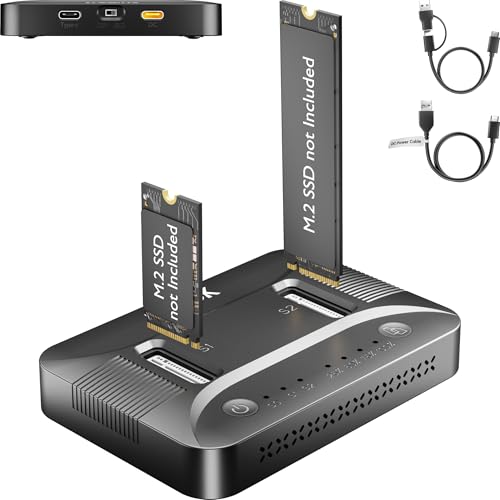
SUITOK Dual-Bay NVMe and SATA Cloner Dock
Best for: tool-free offline cloning and 22110 drive support
- Max Transfer Speed
- 10Gbps
- Host Interface
- USB-C, USB 3.2 Gen 2
- Drive Interface
- M.2 NVMe (PCIe Gen 3/4), SATA
- Supported Form Factors
- 2230, 2242, 2260, 2280, 22110
- Drive Bay Count
- 2 bays
- Cooling System
- Built-in ventilation channels
View on Amazon: SUITOK Dual-Bay NVMe and SATA Cloner Dock Affiliate link
The SUITOK Dual-Bay NVMe SATA M.2 Cloner Dock functions as a standalone duplicator and a two-bay 10Gbps USB-C external enclosure. It accepts NVMe and SATA M.2 SSDs in sizes from 2230 up to 22110. You can clone drives sector-by-sector without a PC or mount up to 16TB of total storage. It suits you if you need to upgrade handheld console drives or clone extended-length 22110 solid-state drives without tools.
Pros
- Supports both NVMe and SATA M.2 SSDs up to size 22110
- Performs offline sector-level cloning without an attached host computer
- Transfers data at up to 10Gbps over USB 3.2 Gen 2
- Uses a tool-free slide-in tray for drive swaps
Cons
- Relies on passive ventilation channels rather than an active cooling fan
- Caps external throughput at 10Gbps rather than 20Gbps or 40Gbps standards
Good fit if
- You need to clone or mount longer 22110 form factor M.2 drives.
- You want computer-free offline drive duplication across NVMe and SATA formats.
- You swap bare M.2 SSDs frequently and want a tool-free tray design.
Skip if
- You require host transfer rates faster than 10Gbps.
- You want active fan cooling to manage sustained drive temperatures.
Verdict: SUITOK Dual-Bay NVMe SATA M.2 Cloner Dock delivers broad compatibility by handling both SATA and NVMe drives up to size 22110 without tools. It provides reliable 10Gbps external connectivity and standalone sector duplication in a compact enclosure.
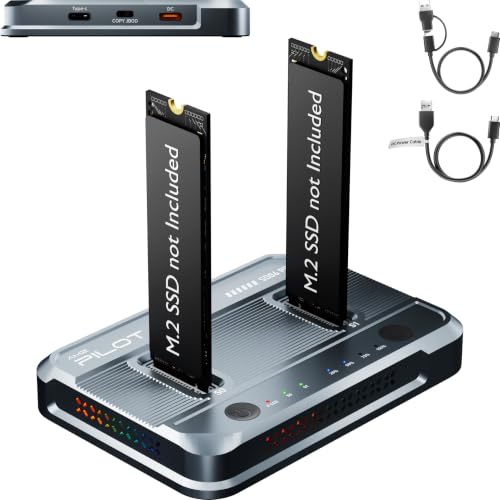
AMZPILOT Dual-Bay M.2 NVMe SATA Cloner
Best for: standalone cloning between identical SSD protocols
- Max Transfer Speed
- 10Gbps
- Host Interface
- USB 3.2 Gen 2
- Drive Interface
- M-Key (PCIe), B+M Key (NGFF)
- Supported Form Factors
- 2230, 2242, 2260, 2280, 22110
- Drive Bay Count
- 2 bays
- Cooling System
- Aluminum body, ventilation
View on Amazon: AMZPILOT Dual-Bay M.2 NVMe SATA Cloner Affiliate link
This dual-bay duplicator dock handles offline drive cloning and external storage over a 10Gbps USB 3.2 Gen 2 interface. It accepts both NVMe and SATA M.2 drives in sizes from 2230 up to 22110, supporting capacities up to 16TB across two slots. You can use it without a host computer for sector-level drive duplications. It suits you if you need tool-free drive swaps and regular backups across multiple drive form factors.
Pros
- Supports M.2 drive sizes from 2230 up to 22110
- Standalone 1:1 sector-level offline cloning without a computer
- USB 3.2 Gen 2 interface rated up to 10Gbps
- Tool-free vertical slot design for hot swapping
Cons
- Does not support cross-protocol cloning between NVMe and SATA
- Recognizes only one drive on a PC if NVMe and SATA are connected together
- Requires connection to a dedicated external Type-C power input
Good fit if
- You clone between matching NVMe drives or matching SATA drives.
- You work with long 22110 M.2 SSDs alongside standard form factors.
- You need a standalone dock for sector-by-sector drive duplication without a PC.
Skip if
- You need to clone an NVMe drive directly to a SATA drive or vice versa.
- You want to mount both an NVMe and a SATA drive to a computer simultaneously.
Verdict: AMZPILOT Dual-Bay M.2 NVMe SATA Cloner provides 10Gbps transfers and standalone drive duplication across sizes up to 22110. It serves as a versatile dual-slot tool as long as you do not need cross-protocol copying.

ASUS TUF Gaming A2 Rugged 20Gbps SSD Enclosure
Best for: rugged high-speed portable gaming storage
- Max Transfer Speed
- 20 Gbps
- Host Interface
- USB-C 3.2 Gen 2x2
- Drive Interface
- M.2 NVMe PCIe and SATA
- Supported Form Factors
- 2242, 2260, 2280
- Cooling System
- Aluminum chassis, thermal pad
- Installation Style
- Screw-free
View on Amazon: ASUS TUF Gaming A2 Rugged 20Gbps SSD Enclosure Affiliate link
The ASUS TUF Gaming A2 gives you a rugged dual-interface enclosure designed for portable speed. It pairs a USB-C 3.2 Gen 2x2 connection reaching up to 20 Gbps with support for both NVMe PCIe and SATA M.2 drives. With MIL-STD-810H drop testing, an IP68 rating, and a screw-free Q-Latch setup, it fits your needs if you want durable, high-bandwidth external storage for gaming libraries or large data transfers.
Pros
- Up to 20 Gbps transfer speeds over USB-C 3.2 Gen 2x2
- MIL-STD-810H drop resistance and IP68 protection with silicone bumper
- Screw-free Q-Latch mechanism for quick drive swaps
- Aluminum chassis and thermal pad for passive cooling
Cons
- No standalone offline drive cloning feature specified
- Does not support 2230 form factor M.2 drives
Good fit if
- You need 20 Gbps USB 3.2 Gen 2x2 transfer speeds for games or files
- You require drop-resistant and water-resistant external drive protection
- You want tool-free installation across 2242, 2260, or 2280 M.2 drives
Skip if
- You need a dedicated one-touch offline cloning dock
- You use compact 2230 size M.2 SSDs
Verdict: ASUS TUF Gaming A2 20Gbps SSD Enclosure delivers high-speed 20 Gbps performance and heavy-duty chassis protection for NVMe and SATA drives. It is a solid pick when you need rugged, portable storage for demanding workloads.

Pefishop Dual-Bay NVMe Cloner
Best for: standalone PCIe NVMe duplication up to 22110
- Max Transfer Speed
- 10Gbps
- Host Interface
- USB 3.2 Gen 2x2
- Drive Interface
- NVMe (M Key/B+M Key)
- Supported Form Factors
- 2230, 2242, 2260, 2280, 22110
- Drive Bay Count
- 2 bays
- Maximum Capacity
- 2x8TB
View on Amazon: Pefishop Dual-Bay NVMe Cloner Affiliate link
The Pefishop Dual-Bay NVMe M.2 SSD Cloner is a standalone drive duplicator and USB enclosure built strictly for PCIe NVMe drives. It supports M Key and B+M Key form factors from 2230 up to 22110, handling capacities up to 2x8TB. With 10Gbps transfers over USB 3.2 Gen 2x2 and computer-free offline cloning, this dock suits you if you need to duplicate or access large PCIe NVMe SSDs without handling SATA drives.
Pros
- Supports drives from size 2230 up to long 22110 form factors
- Standalone offline cloning requires no computer connection
- Accommodates up to 2x8TB storage capacity
- Tool-free drive installation with included 5V/3A power adapter
Cons
- Incompatible with M.2 SATA SSDs
- Requires an external adapter not included to read AHCI drives
- Source drive capacity must not exceed target drive capacity for offline cloning
Good fit if
- You work strictly with PCIe NVMe M.2 drives and do not need SATA support.
- You need offline duplication between drives up to 8TB each.
- You use longer 22110 M.2 SSDs alongside standard sizes.
Skip if
- You need to clone or read M.2 SATA solid-state drives.
- You want to clone from a larger drive to a smaller destination drive.
Verdict: Pefishop Dual-Bay NVMe M.2 SSD Cloner provides computer-free cloning and 10Gbps transfer speeds for NVMe drives up to 22110 in length. It serves as a dedicated duplication station when you do not require SATA drive compatibility.
Specifications side by side
| Spec | SSK Dual-Bay NVMe and SATA M.2 SSD Cloner Dock | GODO Dual-Bay NVMe and SATA Clone Dock | MAIWO Dual-Bay NVMe & SATA SSD Cloner | SUITOK Dual-Bay NVMe and SATA Cloner Dock | AMZPILOT Dual-Bay M.2 NVMe SATA Cloner | ASUS TUF Gaming A2 Rugged 20Gbps SSD Enclosure | Pefishop Dual-Bay NVMe Cloner |
|---|---|---|---|---|---|---|---|
| Max Transfer Speed | 10Gbps | 10Gbps | 10Gbps | 10Gbps | 10Gbps | 20 Gbps | 10Gbps |
| Host Interface | USB 3.2 Gen 2 | USB 3.1 Gen 2 Type-C | USB 3.2 Gen 2 | USB-C, USB 3.2 Gen 2 | USB 3.2 Gen 2 | USB-C 3.2 Gen 2x2 | USB 3.2 Gen 2x2 |
| Drive Interface | NVMe, SATA | M.2 NVMe, SATA (M Key, B+M Key) | M.2 NVMe & SATA (M-Key, B+M Key) | M.2 NVMe (PCIe Gen 3/4), SATA | M-Key (PCIe), B+M Key (NGFF) | M.2 NVMe PCIe and SATA | NVMe (M Key/B+M Key) |
| Supported Form Factors | not stated | M.2 2230, 2242, 2260, 2280, 22110 | 2230, 2242, 2260, 2280 | 2230, 2242, 2260, 2280, 22110 | 2230, 2242, 2260, 2280, 22110 | 2242, 2260, 2280 | 2230, 2242, 2260, 2280, 22110 |
| Drive Bay Count | 2 bays | 2 bays | Dual-Bay | 2 bays | 2 bays | not stated | 2 bays |
| Cooling System | Open-frame | Aluminum | Aluminium shell | Built-in ventilation channels | Aluminum body, ventilation | Aluminum chassis, thermal pad | not stated |
| Maximum Capacity | not stated | 4TB | not stated | 16TB | 16TB | not stated | 2x8TB |
| Installation Style | not stated | Tool Free | not stated | Tool-free | Tool-free | Screw-free | Tool-free |
| Interface | SATA III | SATA III | SATA III | SATA III | SATA III | SATA III | NVMe |
| Form Factor | M.2 | M.2 | M.2 2280 | M.2 | M.2 | M.2 | M.2 2280 |
| Compatibility | not stated | not stated | not stated | Laptop, PS5 | Gaming | Gaming | not stated |
| Transfer Speed | not stated | not stated | 10Gbps | 10Gbps | 10Gbps | 20Gbps | 10Gbps |
| Features | Offline Clone | Tool-Free, Offline Clone | Offline Clone | Tool-Free, Offline Clone | Tool-Free, Offline Clone | not stated | Offline Clone, UASP |
| Bay Count | Dual-Bay | Dual-Bay | Dual-Bay | Dual-Bay | Dual-Bay | Dual-Bay | Dual-Bay |
| Material | not stated | not stated | not stated | not stated | Aluminum | Aluminum | not stated |
| Dimensions | 2.83 × 2.83 × 0.86 inches | 3.14 × 0.69 × 0.69 inches | 4 × 2.5 × 0.5 inches | 3.87 × 2.68 × 0.71 inches | 3.95 × 2.71 × 0.56 inches | 4.6 × 2.2 × 0.6 inches | not stated |
| Weight | 3.17 ounces | not stated | not stated | 3.58 ounces | 3.9 ounces | 9.84 ounces | not stated |
| Size | 10Gbps NVMe & 6Gbps SATA | not stated | not stated | 3.87 x 2.68 x 0.71 inches | 3.95"L x 2.71"W x 0.56"H | TUF A2|up to 20Gbps | not stated |
| Model | DK204 | DK01-NVMe/SATA | K2023CL | STK07 Pro 10Gbps Dual Bay M.2 Cloner | SD06 Pro | TUF GAMING A2/BLK/G/AS | not stated |
| Color | not stated | Black | Gray | Black | Premium Gray [SD06 Pro 10Gbps M.2 Cloner] | A2|up to 20Gbps | Grey |
When you evaluate dedicated heatsinks, review bykski b nvme ct m 2 SSD aluminum alternatives to compare thermal mounting specifications.
Frequently asked questions
Can you clone an NVMe SSD directly to a SATA M.2 SSD using these docks?
No, you generally cannot clone across different drive protocols on these dual-bay docks. Models like the SSK DK204 and AMZPILOT SD06 Pro are designed for standalone cloning between matching SSD protocols. Attempting offline duplication between an NVMe source and a SATA target will not function. You can still access both drives simultaneously when connected to a host computer over USB.
Which alternative dock works if you only use NVMe M.2 drives?
The Pefishop Dual-Bay NVMe Cloner is built specifically for PCIe NVMe drives. Unlike dual-protocol alternatives from SSK or MAIWO, the Pefishop unit focuses entirely on an NVMe interface without SATA support. It delivers 10Gbps transfer speeds and standalone sector duplication. It also accommodates extended drive lengths up to size 22110, making it a targeted choice if you do not handle SATA cards.
Do you need a computer connected to clone an M.2 SSD?
No, you do not need a computer connected when using the offline cloning feature. Models like the SSK DK204, MAIWO K2023CL, and SUITOK STK07 Pro include standalone clone hardware built in. You place your source and target drives into their respective slots, power the unit, and initiate the clone directly. The hardware copies data sector by sector without host operating system software.
What is the highest transfer speed available among these M.2 alternatives?
The highest transfer speed in this comparison belongs to the ASUS TUF Gaming A2 at 20Gbps. While options like the SSK DK204, SUITOK STK07 Pro, and AMZPILOT SD06 Pro operate at 10Gbps, the ASUS model doubles the bandwidth over USB-C. Its aluminum body is built for rugged gaming storage rather than standalone offline duplication, giving you maximum performance during active computer workloads.
Which M.2 cloner alternative is the most compact for travel?
The MAIWO Dual-Bay NVMe & SATA SSD Cloner offers the slimmest profile for portable gear bags. Measuring 4 inches long, 2.5 inches wide, and 0.5 inches high, model K2023CL takes up less vertical space than the SSK dock at 0.86 inches. It retains dual-bay slots for both drive protocols, provides 10Gbps throughput, and supports standalone cloning without adding bulk.
Which alternatives support longer 22110 M.2 SSD form factors?
The SUITOK STK07 Pro, AMZPILOT SD06 Pro, and Pefishop cloner each support 22110 length cards. Many compact docks accommodate drives only up to 2280 dimensions. The SUITOK and AMZPILOT models fit longer 22110 drives across NVMe and SATA formats, while Pefishop offers 22110 compatibility specifically for NVMe. This extended slot clearance ensures your enterprise-length cards mount securely without physical interference.