Samsung T7 1TB Portable SSD vs Samsung 1TB M.2 2230 NVMe SSD (2026): Key Differences
As an Amazon Associate we earn from qualifying purchases. Links on this page are affiliate links.
When comparing the samsung t7 1tb portable SSD vs 1tb m 2 2230 nvme SSD, you see two distinct storage solutions from Samsung. Both offer 1TB of capacity and rely on NVMe technology for performance. The main difference lies in their form factor and connectivity. The T7 is an external drive with USB-C, while the M.2 version is an internal chip. This affects how you install and use each device in your setup.
Key differences
| Aspect | Samsung T7 1TB Portable SSD | Samsung 1TB M.2 2230 NVMe SSD |
|---|---|---|
| Interface | USB 3.2 Gen 2 | NVMe PCIe Gen3 x4 |
| Form Factor | Portable (2.2 x 3.3 x 0.3 inches) | M.2 2230 (0.9 x 1.2 x 0.1 inches) |
| Max Read Speed | 1,050 MB/s | Up to 3,100 MB/s |
| Max Write Speed | 1,000 MB/s | Up to 2,000 MB/s |
Which one should you choose?
Choose Samsung T7 1TB Portable SSD if
- You need a drive you can carry between computers or use with mobile devices.
- You want a durable, shock-resistant external drive with a protective casing.
Choose Samsung 1TB M.2 2230 NVMe SSD if
- You are upgrading a laptop or console like the Steam Deck that uses M.2 slots.
- You require higher sequential read and write speeds for internal system performance.
Verdict: The Samsung T7 is the better choice for users who need portable, external storage for data transfer and backups. The 1TB M.2 2230 NVMe SSD is the right option for internal upgrades in compatible devices like laptops or handheld consoles where higher speeds and compact size are essential.
T7 vs M.2 2230 NVMe Specs
Transfer Speeds
The Samsung 1TB M.2 2230 NVMe SSD offers significantly higher sequential speeds than the T7 Portable SSD. The M.2 drive reaches up to 3,100 MB/s read and 2,000 MB/s write speeds. In contrast, the T7 tops out at 1,050 MB/s read and 1,000 MB/s write. This makes the M.2 drive roughly three times faster for large file transfers. If you move huge video files or massive datasets often, the M.2 2230 NVMe SSD is the clear performance winner. The T7 is still fast for portable use, but it cannot match the raw throughput of the internal M.2 module.
Form Factor
These two drives serve completely different physical needs. The Samsung T7 Portable SSD is a standalone external unit measuring 3.3 x 2.2 x 0.3 inches. It includes a built-in USB cable and fits easily in your pocket or bag. The Samsung 1TB M.2 2230 NVMe SSD is a tiny internal component measuring just 1.2 x 0.9 x 0.1 inches. It must be installed directly into a motherboard or expansion card slot. You cannot plug the M.2 drive into a USB port without an adapter. Choose the T7 for portability and the M.2 for internal installation.
Interface
Connectivity options differ sharply between the two models. The T7 Portable SSD uses a USB 3.2 Gen 2 interface. This allows you to connect it to almost any computer, tablet, or phone via a standard USB cable. The Samsung 1TB M.2 2230 NVMe SSD uses an NVMe PCIe Gen3 x4 interface. This connects directly to an M.2 slot on a motherboard or laptop. It does not have a USB port. If you need a drive that works with multiple devices via USB, the T7 is the practical choice. The M.2 interface is designed for internal system expansion only.
Compatibility
Each drive targets different hardware ecosystems. The T7 Portable SSD is designed for broad compatibility. It works with PCs, laptops, and even mobile devices like iPhones. It supports direct 4K video recording from cameras and phones. The Samsung 1TB M.2 2230 NVMe SSD is built for specific internal slots. It is compatible with devices like the Steam Deck and Surface tablets that have an M.2 2230 slot. It is not a general-purpose external drive. You must check your device for an available M.2 2230 slot before buying the internal drive. The T7 works with almost any USB port.
Build Quality
Durability features vary based on the intended use case. The T7 Portable SSD features a solid aluminum unibody construction. It is rated for shock resistance and can withstand falls up to 6 feet. This makes it suitable for travel and field work. The Samsung 1TB M.2 2230 NVMe SSD is a bare circuit board. It has no external casing or shock protection listed in its specifications. It relies on the internal chassis of your laptop or console for protection. If you need a rugged drive for on-the-go use, the T7 is superior. The M.2 drive is only protected when installed inside a device.
Choose the right Samsung drive for your needs
Users needing internal storage for Steam Deck or Surface
You need a drive that fits inside compact devices like the Steam Deck or Surface tablets. This M.2 2230 model is designed specifically for those internal NVMe PCIe Gen3 x4 slots. Its small 30mm length allows it to replace existing internal drives without requiring extra space or external cables.
Users needing portable external storage for mobile devices
You want to record 4K 60fps videos directly from cameras or iPhone 15 Pro models. The T7 Portable SSD connects via USB 3.2 Gen 2 and offers shock resistance for up to 6 feet. Its durable aluminum unibody construction makes it a reliable companion for field work and travel.
Users backing up large files on the go
You need a rugged, easy-to-carry drive for backing up photos or blogs. The T7 provides fast read speeds up to 1,050 MB/s and write speeds up to 1,000 MB/s. Its compact size and compatibility with PCs and mobile phones make it a versatile tool for managing heavy-duty application usage.
Users maximizing sequential transfer speeds for internal use
You prioritize raw performance for internal system upgrades. This drive delivers sequential read speeds up to 3,100 MB/s and write speeds up to 2,000 MB/s. These figures significantly exceed portable external options, making it ideal for systems where you can utilize the full bandwidth of the NVMe PCIe Gen3 interface.
The products compared
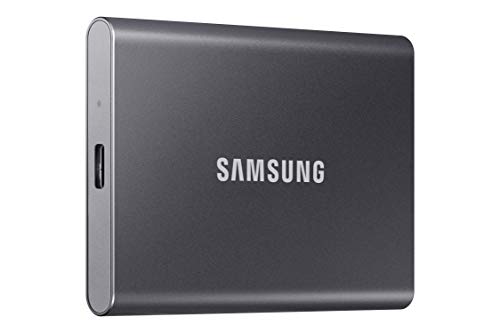
Samsung T7 1TB Portable SSD
Best for: Fast external storage for mobile creators
- Storage Capacity
- 1TB
- Interface
- USB 3.2 Gen 2
- Form Factor
- Portable SSD
- Max Read Speed
- 1,050 MB/s
- Max Write Speed
- 1,000 MB/s
- Compatibility
- Gaming
View on Amazon: Samsung T7 1TB Portable SSD Affiliate link
The Samsung T7 is a portable SSD with a USB 3.2 Gen 2 interface. It offers sequential read speeds up to 1,050 MB/s and write speeds up to 1,000 MB/s. The drive uses PCIe NVMe technology inside a compact aluminum enclosure. It weighs 2.08 ounces and measures 3.3 by 2.2 by 0.3 inches. This drive suits users who need fast external storage for video files or large backups.
Pros
- Read speeds up to 1,050 MB/s
- Write speeds up to 1,000 MB/s
- Shock resistance up to 6 feet
- Solid aluminum unibody construction
Cons
- Larger form factor than M.2 2230 drives
- Requires USB cable for connection
- No internal battery for wireless use
Good fit if
- You need fast external storage for 4K video
- You want a durable drive for travel
- You use USB 3.2 Gen 2 ports
Skip if
- You need an internal M.2 drive
- You require a wireless connection
- You need a drive smaller than 3 inches
Verdict: The Samsung T7 Portable SSD 1TB delivers high-speed external storage for users who prioritize portability and durability over internal installation space.
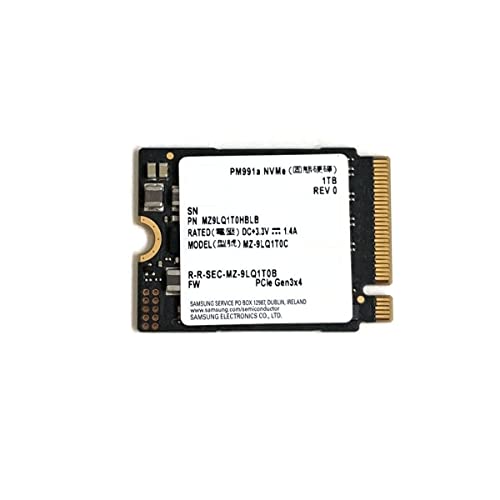
Samsung 1TB M.2 2230 NVMe SSD
Best for: Steam Deck and Surface Pro storage upgrades
- Storage Capacity
- 1TB
- Interface
- NVMe PCIe Gen3 x4
- Max Read Speed
- Up to 3100 MB/s
- Max Write Speed
- Up to 2000 MB/s
- Form Factor
- M.2 2230
- Compatibility
- Laptop
View on Amazon: Samsung 1TB M.2 2230 NVMe SSD Affiliate link
This Samsung drive is a compact 1TB M.2 2230 NVMe SSD designed for tight spaces. It offers sequential read speeds up to 3100 MB/s and write speeds up to 2000 MB/s. You should choose this if you need to upgrade a Steam Deck or a Surface Pro. The small form factor fits systems with M.2 2230 slots. It is not suitable for standard desktop motherboards that require the larger 2280 size.
Pros
- Sequential read speeds up to 3100 MB/s
- Compact M.2 2230 form factor
- Compatible with Steam Deck and Surface tablets
- NVMe PCIe Gen3 x4 interface
Cons
- Smaller physical size limits use to specific devices
- Slower write speeds than larger 2280 models
- Requires a system with an M.2 2230 slot
Good fit if
- You own a Steam Deck needing a storage upgrade
- You are upgrading a Surface Pro with limited space
- You need high-speed NVMe performance in a small drive
Skip if
- You have a standard desktop motherboard with only 2280 slots
- You need a portable external drive with a cable
- You require USB connectivity for plug-and-play use
Verdict: Samsung 1TB M.2 2230 NVMe SSD delivers fast NVMe performance in a tiny package. It is the right choice for Steam Deck or Surface Pro owners who need more storage without changing their device's form factor.
Specifications side by side
| Spec | Samsung T7 1TB Portable SSD | Samsung 1TB M.2 2230 NVMe SSD |
|---|---|---|
| Storage Capacity | 1TB | 1TB |
| Interface | USB 3.2 Gen 2 | NVMe PCIe Gen3 x4 |
| Form Factor | Portable SSD | not stated |
| Max Read Speed | 1,050 MB/s | Up to 3100 MB/s |
| Max Write Speed | 1,000 MB/s | Up to 2000 MB/s |
| Compatibility | Gaming | Laptop |
| Size | 1TB | 1TB SSD |
| Dimensions | 3.3 × 2.2 × 0.3 inches | 1.2 × 0.9 × 0.1 inches |
| Weight | 2.08 ounces | not stated |
| Color | Titan Gray | Black |
| Model | MU-PC1T0T | MZ9LQ1T0HBLB |
Frequently asked questions
Is the Samsung T7 faster than the M.2 2230 NVMe SSD?
No, the M.2 2230 NVMe SSD is significantly faster. It delivers sequential read speeds up to 3,100 MB/s and write speeds up to 2,000 MB/s. The Samsung T7 Portable SSD has lower maximum speeds, making the M.2 drive the better choice for high-throughput internal tasks.
Can I use the Samsung T7 as an internal drive?
You generally should not use the T7 as an internal drive. It is designed as a portable external SSD with USB connectivity. Its form factor, measuring 3.3 by 2.2 inches, does not fit standard internal M.2 slots. You need the M.2 2230 model for internal installation.
Which drive is better for a Steam Deck?
The Samsung 1TB M.2 2230 NVMe SSD is the correct choice. It is specifically sized at 2230 form factor to fit inside compact devices like the Steam Deck. The T7 is a bulky external drive that cannot be installed inside the handheld console's internal storage bay.
Does the Samsung T7 come with a cable?
The provided data does not list included accessories for the Samsung T7. It describes the drive itself, including its Titan Gray color and model number MU-PC1T0T. You should check the product packaging details to confirm if a USB cable is included for connecting it to your device.
How heavy is the Samsung T7 Portable SSD?
The Samsung T7 Portable SSD weighs 2.08 ounces. This lightweight design contributes to its portability for mobile creators. In comparison, the M.2 2230 drive is even smaller, measuring just 1.2 inches in length, but the T7 is built for external transport rather than internal mounting.
What interface does the M.2 2230 SSD use?
The Samsung 1TB M.2 2230 NVMe SSD uses a PCIe 3.0 interface. This allows it to connect directly to compatible laptops and devices via an M.2 slot. The T7, by contrast, connects externally via USB, which typically results in lower maximum transfer speeds than direct PCIe connections.
Is the M.2 2230 drive compatible with all laptops?
No, it is not compatible with all laptops. The data specifies it is for laptops with M.2 2230 slots, such as certain Surface Pro models. The T7 is more universally compatible with any device having a USB port. Always verify your device has the correct internal slot before buying the M.2 drive.