Samsung 970 EVO Plus 500GB vs Samsung PM991a 1TB M.2 2230 NVMe SSD: Spec Comparison
As an Amazon Associate we earn from qualifying purchases. Links on this page are affiliate links.
You are comparing the samsung 970 evo plus SSD vs 1tb m 2 2230 30mm. Both drives use PCIe Gen 3.0 x4 NVMe interfaces for fast data transfer. They share the same brand and similar thermal management features. The main difference lies in their physical size and storage capacity. One uses a standard M.2 form factor with 500GB of space. The other uses a compact 2230 shape with 1TB of storage.
Key differences
| Aspect | Samsung 970 EVO Plus 500GB NVMe M.2 SSD | Samsung PM991a 1TB M.2 2230 NVMe SSD |
|---|---|---|
| Storage Capacity | 500GB | 1TB |
| Form Factor | M.2 2280 (3.15 x 0.87 inches) | M.2 2230 (22 x 30mm) |
| Sequential Read Speed | Up to 3,500MB/s | 3,100MB/s |
| Sequential Write Speed | Up to 3,300MB/s | 2,000MB/s |
| NAND Type | V-NAND | TLC |
| Warranty | 5-year limited or 600 TBW | not listed |
Which one should you choose?
Choose Samsung 970 EVO Plus 500GB NVMe M.2 SSD if
- You need higher sequential read and write speeds for heavy file transfers.
- You require a standard M.2 2280 slot found in most desktops and laptops.
- You want a longer warranty coverage with a 600 TBW endurance rating.
Choose Samsung PM991a 1TB M.2 2230 NVMe SSD if
- You need double the storage capacity for more files and games.
- You are installing the drive in a compact device like a Steam Deck or Surface Pro.
- You prioritize physical size flexibility over maximum transfer speeds.
Verdict: Choose the 970 EVO Plus if you need maximum speed and standard dimensions. Pick the PM991a if you require 1TB of storage in a tiny 2230 package for portable devices.
Specs: Capacity, Speed, and Form Factor
Storage capacity
The Samsung 970 EVO Plus offers 500GB of storage, while the Samsung PM991a provides 1TB. This means the PM991a gives you double the space for files, games, and applications. If you need to store large media libraries or modern game titles, the 1TB drive is the more practical choice. The 500GB option is sufficient for basic system drives but fills up faster. You should choose based on how much data you plan to keep locally.
Sequential read speed
The Samsung 970 EVO Plus reaches up to 3,500MB/s in sequential read operations. The Samsung PM991a tops out at 3,100MB/s. The EVO Plus has a slight advantage in raw read throughput, which can help with loading large assets or booting the operating system. However, both speeds are well above the limits of most PCIe Gen 3.0 x4 interfaces. For everyday tasks, you will notice minimal difference between these two figures in real-world usage.
Sequential write speed
When writing data, the Samsung 970 EVO Plus achieves up to 3,300MB/s. The Samsung PM991a reaches 2,000MB/s. The EVO Plus is significantly faster for transferring large files, such as video projects or disk images. This higher write speed reduces the time needed to move data to the drive. If you frequently copy large files, the EVO Plus will complete these tasks more quickly. The PM991a is still fast enough for general computing.
Physical form factor
The Samsung 970 EVO Plus uses the standard M.2 2280 form factor, measuring 3.15 inches in length. The Samsung PM991a is a compact M.2 2230 drive, measuring only 30mm in length. The 2230 size is designed for slim laptops, handheld gaming devices like the Steam Deck, or compact builds where space is limited. The 2280 size is the standard for most desktops and larger laptops. You must check your device's slot compatibility before purchasing.
NAND technology
The Samsung 970 EVO Plus utilizes Samsung V-NAND technology. The Samsung PM991a uses TLC NAND. Both are modern flash memory types that offer good performance and endurance. V-NAND stacks memory cells vertically to increase density and efficiency. TLC stores three bits per cell, balancing cost and performance. The data does not specify the exact V-NAND generation for the EVO Plus, but both drives are built for reliable daily use with similar endurance characteristics.
Thermal management
The Samsung 970 EVO Plus features Dynamic Thermal Guard, which automatically monitors and maintains optimal operating temperatures to prevent performance drops. The PM991a supports Full Power Mode to drive continuous high performance, but specific thermal throttling features are not detailed in the provided data. The EVO Plus has a clear advantage in documented thermal protection. This helps maintain speed during long, sustained workloads. You should consider your system's airflow when choosing between these drives.
Choose the right drive for your needs
Users needing double the storage space
The Samsung PM991a provides 1TB of storage, which is double the 500GB capacity of the 970 EVO Plus. This extra space allows you to store more games, large video files, and extensive software libraries without needing to manage free space as frequently. If capacity is your primary constraint, the PM991a offers the clear advantage.
Those requiring standard M.2 2280 slots
The Samsung 970 EVO Plus uses the standard M.2 2280 form factor, fitting most desktop motherboards and many laptops. In contrast, the PM991a is an M.2 2230 drive, designed for compact devices like the Steam Deck or Surface Pro. If your computer expects a longer drive, the 970 EVO Plus is the compatible choice.
Gamers prioritizing higher sequential speeds
For tasks requiring fast file transfers, the 970 EVO Plus delivers up to 3,500MB/s read and 3,300MB/s write speeds. The PM991a offers 3,100MB/s read and 2,000MB/s write speeds. If you frequently move large datasets or load heavy applications, the higher throughput of the 970 EVO Plus provides a noticeable performance benefit.
Owners of compact handhelds or ultrabooks
The PM991a measures only 22mm by 30mm, making it ideal for space-constrained devices like the Steam Deck or newer ultrabooks. The 970 EVO Plus is significantly longer. If you are upgrading a small form-factor PC or handheld console, the compact dimensions of the PM991a ensure it fits where the standard drive cannot.
The products compared
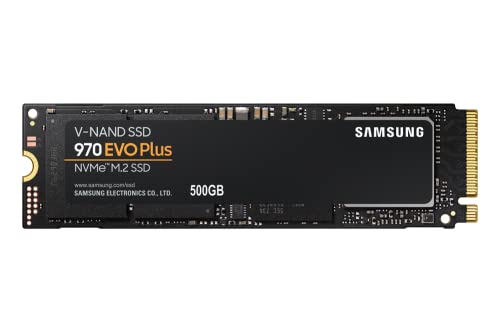
Samsung 970 EVO Plus 500GB NVMe M.2 SSD
Best for: Users prioritizing speed and thermal stability
- Storage Capacity
- 500GB
- Interface
- PCIe Gen 3.0 x4 NVMe 1.3
- Form Factor
- M.2
- Max Read Speed
- Up to 3,500MB s
- Max Write Speed
- Up to 3,300MB s
- Dimensions
- 0.87 × 0.09 × 3.15 inches
View on Amazon: Samsung 970 EVO Plus 500GB NVMe M.2 SSD Affiliate link
This Samsung drive uses PCIe Gen 3.0 x4 NVMe 1.3 to deliver up to 3,500MB/s read and 3,300MB/s write speeds. It features V-NAND technology and Dynamic Thermal Guard for stable performance. The 500GB capacity fits standard M.2 slots. You get Samsung Magician software for management. It suits users needing fast sequential transfers and reliable daily operation without bulk.
Pros
- Sequential read speeds up to 3,500MB/s
- Sequential write speeds up to 3,300MB/s
- Dynamic Thermal Guard manages operating temperatures
- AES 256-bit Full Disk Encryption included
Cons
- 500GB capacity is smaller than 1TB competitors
- M.2 form factor requires available slot space
- No display or physical controls on drive
Good fit if
- You need fast read and write speeds for content creation
- You want reliable thermal management for sustained workloads
- You require standard M.2 compatibility for upgrades
Skip if
- You need more than 500GB of storage space
- You prefer larger form factors like 2.5-inch drives
- You require PCIe Gen 4.0 or higher interfaces
Verdict: Samsung 970 EVO Plus 500GB NVMe SSD offers high-speed performance and thermal stability for users who prioritize speed over capacity. It fits those with standard M.2 slots needing reliable daily drive speeds.

Samsung PM991a 1TB M.2 2230 NVMe SSD
Best for: Compact laptops and handheld gaming devices
- Storage Capacity
- 1TB
- Interface
- PCIe Gen3 x4
- Form Factor
- M.2 2230
- Max Read Speed
- 3100 MB/s
- Max Write Speed
- 2000 MB/s
- Compatibility
- Laptop
View on Amazon: Samsung PM991a 1TB M.2 2230 NVMe SSD Affiliate link
The Samsung PM991a is a 1TB NVMe SSD built for tight spaces. Its M.2 2230 form factor measures just 22mm by 30mm, making it ideal for compact laptops and handheld gaming devices like the Steam Deck. It uses PCIe Gen3 x4 interface and TLC NAND. Sequential speeds reach 3100 MB/s read and 2000 MB/s write. This compact drive delivers high performance where space is limited.
Pros
- Generous 1TB storage capacity
- Compact M.2 2230 (22x30mm) size fits tight enclosures
- Fast PCIe Gen3 x4 interface with 3100 MB/s read speed
- Uses reliable TLC NAND flash memory
Cons
- Short 30mm length limits use in standard 2280 slots
- Lower sequential write speed of 2000 MB/s compared to larger drives
- Requires specific M.2 2230 compatible motherboard or adapter
Good fit if
- You need to upgrade a handheld console like the Steam Deck
- You are installing a drive in a compact laptop with limited space
- You require 1TB of storage in a small form factor
Skip if
- You need a standard M.2 2280 drive for a desktop PC
- You require PCIe Gen4 speeds for maximum throughput
- You want a drive with a heatsink included
Verdict: Samsung PM991a 1TB M.2 2230 NVMe SSD is the right choice for users upgrading compact devices like the Steam Deck or ultrabooks. It offers ample 1TB capacity and fast Gen3 speeds in a tiny footprint.
Specifications side by side
| Spec | Samsung 970 EVO Plus 500GB NVMe M.2 SSD | Samsung PM991a 1TB M.2 2230 NVMe SSD |
|---|---|---|
| Storage Capacity | 500GB | 1TB |
| Interface | PCIe Gen 3.0 x4 NVMe 1.3 | PCIe Gen3 x4 |
| Form Factor | M.2 | M.2 2230 |
| Max Read Speed | Up to 3,500MB s | 3100 MB/s |
| Max Write Speed | Up to 3,300MB s | 2000 MB/s |
| Compatibility | not stated | Laptop |
| NAND Type | not stated | TLC |
| Size | 500GB | 1TB 30mm |
| Dimensions | 0.87 × 0.09 × 3.15 inches | 0.87 × 0.87 × 0.09 inches |
| Weight | 1.76 ounces | not stated |
| Color | Black | Black |
| Model | MZ-V7S500B/AM | MZ9LQ1T0HBLB |
Frequently asked questions
Is the Samsung 970 EVO Plus compatible with M.2 2230 slots?
No, the Samsung 970 EVO Plus uses a standard M.2 form factor that does not fit 2230 slots. It measures 3.15 inches in length, whereas the PM991a is only 0.87 inches long. You must check your device's slot size before purchasing the 970 EVO Plus.
Which drive offers more storage capacity?
The Samsung PM991a provides 1TB of storage, which is double the 500GB capacity of the 970 EVO Plus. This makes the PM991a better for storing large media libraries or extensive game collections. The 970 EVO Plus is limited to half that space.
Does the PM991a use TLC NAND?
Yes, the Samsung PM991a utilizes TLC NAND type memory. This specification supports its 1TB capacity in a compact form factor. The 970 EVO Plus data does not explicitly list its NAND type, so you should verify that detail separately if it matters to you.
Can I use the PM991a in a desktop PC?
The PM991a is primarily designed for compact laptops and handheld devices like the Steam Deck due to its tiny 2230 footprint. It may not fit standard desktop M.2 slots without an adapter. The 970 EVO Plus fits standard slots better for desktop upgrades.
What is the model number for the 500GB Samsung drive?
The model number for the Samsung 970 EVO Plus 500GB is MZ-V7S500B/AM. The PM991a 1TB model number is MZ9LQ1T0HBLB. Knowing these helps you verify you are buying the correct specific variant for your system requirements.
Which drive is lighter?
The Samsung 970 EVO Plus weighs 1.76 ounces. The PM991a weight is not listed in the provided data, but its smaller physical dimensions suggest it may be lighter. Weight is rarely a critical factor for internal SSD performance.