Samsung 970 EVO Plus 500GB Review: Specs, Pros and Cons
As an Amazon Associate we earn from qualifying purchases. Links on this page are affiliate links.
This samsung 970 evo plus SSD review focuses on the 500GB M.2 NVMe drive from Samsung. It uses PCIe Gen 3.0 x4 NVMe 1.3 connectivity. The drive offers sequential read speeds of up to 3,500MB/s. Sequential write speeds reach 3,300MB/s. These numbers define its performance tier. The unit relies on Samsung V-NAND technology for data storage. It also includes Dynamic Thermal Guard to manage heat. This review explains how these specifications affect your daily tasks. You will see if the speed and capacity match your needs for gaming or content creation.
What stands out
- Sequential read speeds up to 3,500MB/s
- Sequential write speeds up to 3,300MB/s
- PCIe Gen 3.0 x4 NVMe 1.3 interface
- Dynamic Thermal Guard for temperature control
- AES 256-bit Full Disk Encryption support
Who it fits
Good fit for
This drive suits tech enthusiasts, high-end gamers, and 4K content designers who need fast data access. The NVMe interface provides low latency and enhanced bandwidth. You will benefit from the high random read speeds of 600,000 IOPS. The 500GB capacity is ideal for storing operating systems and several large games. The included Samsung Magician software helps with performance optimization. If you want reliable speed for demanding workloads, this spec sheet shows it fits your setup.
Who should skip it
You should look elsewhere if you need more than 500GB of space. The data shows larger options like 1TB or 2TB are available in the same series. If your motherboard only supports SATA, this M.2 NVMe drive will not work. You also need to check if your system supports PCIe Gen 3.0 x4. The drive operates between 0 and 70°C. If you require a different form factor, this specific M.2 model is not the right choice for your build.
Verdict: The Samsung 970 EVO Plus 500GB delivers strong PCIe Gen 3.0 speeds and reliable thermal management. It is a solid choice for users who prioritize bandwidth and latency in an M.2 NVMe form factor.
Samsung 970 EVO Plus Key Specs
Storage Capacity: 500GB
This capacity holds your operating system, applications, and a moderate library of games or media files. It is a standard size for a primary drive. If you store large video projects or many high-resolution games, you might run out of space quickly. Consider larger variants like 1TB or 2TB if you have heavy storage needs. This size fits well for most everyday users who need fast boot times.
Interface: PCIe Gen 3.0 x4 NVMe 1.3
This interface connects directly to the motherboard via the M.2 slot, bypassing slower SATA bottlenecks. It allows for much higher data transfer rates than traditional SATA SSDs. You get lower latency and better efficiency during heavy data loads. Ensure your motherboard supports PCIe Gen 3.0 or newer to utilize this speed. It is the current standard for high-performance internal drives.
Max Read Speed: Up to 3,500MB/s
This speed indicates how fast the drive retrieves data. You will notice quicker game loading times and faster file transfers compared to SATA drives. It helps when editing large 4K videos or copying many small files. This is a high-end speed for Gen 3.0 drives. Compare it with SATA SSDs that max out around 550MB/s to see the significant performance gap.
Max Write Speed: Up to 3,300MB/s
This metric shows how quickly the drive saves new data. Fast write speeds prevent stuttering when you are saving large files or installing games. It keeps the system responsive during intensive tasks. This speed is competitive for PCIe Gen 3.0 NVMe drives. It ensures that your workflow remains smooth without waiting for data to be written to the storage medium.
Design and build details
According to the listing, the Samsung 970 EVO Plus 500GB measures 0.87 inches in length, 0.315 inches in height, and 0.09 inches in width. It weighs 1.76 ounces. The drive uses an M.2 form factor with a black finish. These dimensions match the standard M.2 2280 size. This allows it to fit into most modern desktop motherboards and laptops that support M.2 slots. The low weight and small profile mean it adds minimal bulk to your system. You can install it in tight spaces without worrying about clearance issues. The black color helps it blend with other internal components. It does not have a visible heatsink in this specific model. However, the listing mentions Dynamic Thermal Guard. This feature monitors temperatures to prevent performance drops. You do not need to add external cooling for basic use. The compact layout ensures it stays secure in your drive bay. It is designed for internal use only. You cannot connect it externally via USB. The physical design prioritizes space efficiency. This makes it suitable for slim laptops or compact desktop builds. The build quality focuses on reliability within the chassis. You rely on the motherboard slot for power and data. The interface is PCIe Gen 3.0 x4 NVMe 1.3. This connection provides the necessary bandwidth for fast transfers. The physical connectors are gold-plated for durability. The drive sits flat against the motherboard. This reduces the chance of accidental dislodging. It is a straightforward internal storage solution.
Setup and everyday use details
Installing this drive requires an M.2 slot on your motherboard. The 2280 form factor fits most modern desktops and laptops. You connect it directly to the PCIe Gen 3.0 x4 interface. This connection provides the bandwidth needed for the listed speeds. The NVMe 1.3 protocol ensures compatibility with current operating systems. Samsung includes Magician Software for management. This tool handles firmware updates and performance optimization. It also supports seamless cloning for data transfers. This simplifies the move from an older drive. The drive uses V-NAND technology for data storage. This architecture helps maintain consistent performance over time. Thermal management is built into the hardware. Dynamic Thermal Guard monitors temperatures automatically. It keeps the drive within the 0 to 70 Celsius operating range. This prevents performance drops during heavy workloads. The drive supports AES 256-bit encryption. It also includes TCG/Opal V2.0 and IEEE1667 standards. These features protect your data against unauthorized access. The interface offers low latency and high power efficiency. Idle power consumption is listed at a maximum of 30 mW. This helps extend battery life in laptops. The drive is rated for 600 TBW or five years. This endurance level suits daily operating system use. You can run applications and games without concern. The sequential read speed of 3,500MB/s allows fast boot times. Load times for large files are reduced significantly. Random read speeds of 600,000 IOPS handle multitasking well. This makes the system feel responsive during everyday tasks. The drive is suitable for content designers and gamers. It handles 4K media and high-end applications effectively.
Things to check before buying
Before you install this drive, verify your motherboard has an available M.2 slot that supports PCIe Gen 3.0 x4 NVMe 1.3. The 2280 form factor is standard, but physical clearance in your case matters. You should also check if your BIOS is updated to ensure proper recognition. Samsung includes Magician software for firmware updates and drive management. Using this tool helps maintain performance and security over time. The drive operates within a 0 to 70 Celsius range. Dynamic Thermal Guard monitors heat to prevent throttling. This feature reduces the need for additional cooling solutions in most cases. Compared to SATA SSDs, this NVMe model offers significantly higher bandwidth. It suits users who need fast load times for games or large files. For those with older systems lacking NVMe support, this drive will not work. Ensure your platform is modern enough to handle the interface. Regular software updates keep the drive stable and efficient.
Check before you buy
- Verify your motherboard has an M.2 slot supporting PCIe Gen 3.0 x4 NVMe.
- Check physical space in your case for the 2280 form factor drive.
- Ensure your BIOS is updated for full compatibility with NVMe drives.
- Confirm you have Samsung Magician software installed for firmware management.
The product at a glance
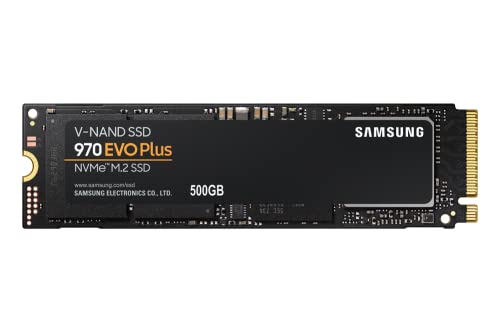
Samsung 970 EVO Plus 500GB NVMe M.2 SSD
Best for: fast NVMe storage in M.2 slots
- Storage Capacity
- 500GB
- Interface
- PCIe Gen 3.0 x4 NVMe 1.3
- Form Factor
- M.2
- Max Read Speed
- Up to 3,500MB s
- Max Write Speed
- Up to 3,300MB s
- Dimensions
- 0.87 × 0.09 × 3.15 inches
View on Amazon: Samsung 970 EVO Plus 500GB NVMe M.2 SSD Affiliate link
The Samsung 970 EVO Plus is a PCIe Gen 3.0 x4 NVMe drive with an M.2 form factor. It offers sequential read speeds up to 3,500 MB/s and write speeds up to 3,300 MB/s. The drive uses V-NAND technology and includes Dynamic Thermal Guard to manage heat. It supports AES 256-bit encryption and comes with a 5-year limited warranty or 600 TBW rating.
Pros
- Sequential read speeds up to 3,500 MB/s
- Sequential write speeds up to 3,300 MB/s
- Dynamic Thermal Guard for temperature management
- AES 256-bit Full Disk Encryption support
Cons
- 500GB capacity is smaller than 1TB or 2TB options
- No included physical mounting hardware or heatsink
- Relies on Samsung Magician software for cloning
Good fit if
- You need fast NVMe speeds for gaming or content creation
- You want reliable thermal management in a compact M.2 drive
- You prioritize data security with hardware encryption
Skip if
- You require more than 500GB of storage space
- You are building a system that only supports SATA interfaces
- You need a drive with a built-in active cooling fan
Verdict: The Samsung 970 EVO Plus 500GB NVMe SSD delivers high-speed performance with efficient thermal control. It is a solid choice for users who need reliable, fast storage for everyday computing and moderate creative workloads.
Specifications side by side
| Spec | Samsung 970 EVO Plus 500GB NVMe M.2 SSD |
|---|---|
| Storage Capacity | 500GB |
| Interface | PCIe Gen 3.0 x4 NVMe 1.3 |
| Form Factor | M.2 |
| Max Read Speed | Up to 3,500MB s |
| Max Write Speed | Up to 3,300MB s |
| Size | 500GB |
| Dimensions | 0.87 × 0.09 × 3.15 inches |
| Weight | 1.76 ounces |
| Color | Black |
| Model | MZ-V7S500B/AM |
Frequently asked questions
Is the Samsung 970 EVO Plus 500GB a good SSD for gaming?
Yes, this drive is well-suited for gaming. It features sequential read speeds of up to 3,500MB/s. This high speed helps load game assets quickly. The 500GB capacity holds your operating system and a moderate library of games. It fits into most modern desktops and laptops via the M.2 slot.
Does the Samsung 970 EVO Plus support NVMe?
Yes, it uses NVMe connectivity. The drive connects via PCIe Gen 3.0 x4 with NVMe 1.3 support. This interface allows for faster data transfer than older SATA drives. It is designed for users who need fast storage for everyday computing and moderate creative workloads.
What is the form factor of the Samsung 970 EVO Plus?
It uses the M.2 form factor. The specific size is 2280, measuring 3.15 inches in length. It is only 0.09 inches wide and weighs 1.76 ounces. This compact design allows it to fit directly into motherboards, saving space compared to larger 2.5-inch drives.
Can I use the Samsung 970 EVO Plus in a laptop?
Yes, it works in compatible laptops. The 2280 M.2 form factor fits most modern laptop models. You must verify your motherboard has an available M.2 slot supporting PCIe Gen 3.0 x4 NVMe 1.3. The drive’s low profile and light weight make it ideal for portable computers.
What are the sequential write speeds of this SSD?
The sequential write speeds reach up to 3,300MB/s. This performance level ensures efficient handling of large files. It supports reliable storage for everyday tasks and moderate creative work. These speeds are achieved through its NVMe interface and internal controller architecture.
Is 500GB enough space for a primary drive?
For many users, 500GB is sufficient. This capacity holds your operating system, applications, and a moderate library of games or media files. It is a standard size for a primary drive. If you store large video projects or many high-resolution games, you might need more space.
What model number is the Samsung 970 EVO Plus 500GB?
The model number is MZ-V7S500B/AM. This specific identifier helps you verify you are purchasing the correct drive. It distinguishes this 500GB version from other capacities in the EVO Plus lineup. Ensure your system compatibility matches the M.2 NVMe specifications.