SABRENT Rocket 2TB NVMe M.2 vs SABRENT Rocket Nano XTRM 2TB: Spec Comparison
As an Amazon Associate we earn from qualifying purchases. Links on this page are affiliate links.
You are looking at the sabrent 2tb rocket nvme pcie vs rocket nano xtrm 2tb. Both drives offer 2TB of storage capacity from SABRENT. The main difference lies in their form factor and connectivity. One is an internal PCIe NVMe drive for your motherboard. The other is an external Thunderbolt 3 portable drive. You need to decide based on your system requirements and portability needs.
Key differences
| Aspect | SABRENT Rocket 2TB NVMe M.2 SSD | Sabrent Rocket Nano XTRM 2TB |
|---|---|---|
| Interface | PCIe Gen3 x 4, NVMe 1.3 | Thunderbolt 3, USB 3.2 Gen 2 |
| Form Factor | M.2 2280 Internal | External Portable |
| Max Read Speed | not listed | 2700 MB/s |
| Material | not listed | Aluminum |
Which one should you choose?
Choose SABRENT Rocket 2TB NVMe M.2 SSD if
- You need an internal drive for a desktop or laptop motherboard slot.
- You want a drive that connects via PCIe Gen3 x 4 interface.
- You do not require external portability or bus-powered operation.
Choose Sabrent Rocket Nano XTRM 2TB if
- You need a portable drive for transferring files between computers.
- You want high-speed transfers via Thunderbolt 3 or USB 3.2 Gen 2.
- You prefer an aluminum chassis with included cables for travel.
Verdict: Choose the internal Rocket if you are building or upgrading a PC with an available M.2 slot. Choose the external Rocket Nano XTRM if you need portable, high-speed storage for video editing or field work. Your choice depends entirely on whether you need internal installation or external mobility.
Rocket NVMe vs Nano XTRM Specs
Interface type
The SABRENT Rocket 2TB NVMe M.2 SSD uses a PCIe Gen3 x 4 interface. It follows the NVMe 1.3 specification. This design connects directly to your motherboard. You need an available M.2 slot on your system board. The drive relies on the system's power and data lanes. The Sabrent Rocket Nano XTRM 2TB uses Thunderbolt 3. It offers up to 2700 MB/s over the 40 Gbps interface. It also supports USB 3.2 Gen 2 at 900 MB/s. This external drive connects via USB-C ports. It is not an internal drive. It requires a compatible port on your computer. The interface choice defines how you install each device.
Form factor
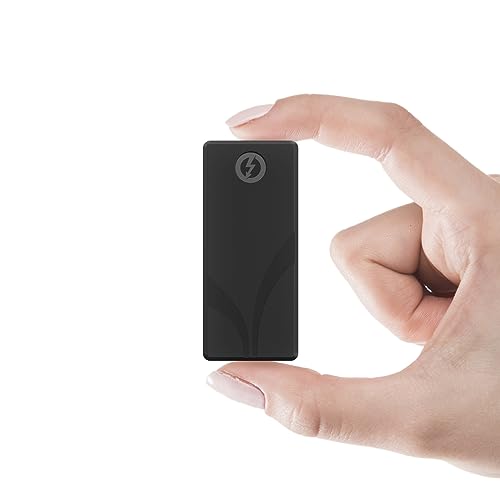
The internal drive has an M.2 2280 form factor. Its dimensions are 3.15 inches in length, 0.86 inches in width, and 0.11 inches in height. It fits into standard internal slots. The external drive has a compact aluminum body. Its dimensions are 2.95 inches in length, 1.34 inches in width, and 0.71 inches in height. It weighs 1.69 ounces. The external unit is bus-powered. It does not need a separate power adapter. You carry it in a shirt pocket. The internal unit stays inside your case. The external unit moves with you. This difference affects where you can use each drive.
Transfer speed
The internal SABRENT Rocket 2TB NVMe M.2 SSD does not list a specific read speed in the provided data. It is built for PCIe 3.1 compliance. The Sabrent Rocket Nano XTRM 2TB lists a maximum read speed of 2700 MB/s. This speed is achieved over the Thunderbolt 3 interface. It falls back to 900 MB/s on USB 3.2 Gen 2. The external drive specifies these performance numbers. The internal drive relies on the PCIe 3.0 bandwidth. You cannot compare exact numbers for the internal unit here. The external unit provides verified high-speed transfer rates for large files.
Build and cooling
The internal drive comes in blue. It has a standard PCB build for internal use. It does not list a specific external chassis material. The external drive has a solid aluminum body. This aluminum chassis improves heat dissipation during sustained transfers. It protects your data from thermal throttling. The external unit also includes a silicone sleeve. This sleeve adds drop and scratch protection. It is ready for travel and studio work. The internal drive lacks this external protection. The external drive is built for durability. It handles demanding field environments better than the internal unit.
Compatibility
The internal drive works with any motherboard with an M.2 slot. It supports SMART and TRIM commands. It is compatible with standard operating systems. The external drive works with Mac, PC, and Linux. It is plug-and-play with no drivers required. It includes both a Thunderbolt cable and a USB-C to USB-A cable. You do not need extra purchases. It is backward compatible with all USB ports. The external drive offers broader immediate connectivity. You can use it on more devices out of the box. The internal drive requires specific motherboard support.
Choose the right SABRENT drive for you
Users needing internal storage for desktops or laptops
Choose the Rocket NVMe if you need an internal drive. It uses a PCIe Gen3 x 4 interface and fits the M.2 2280 form factor. This connects directly to your motherboard. It lacks external ports. You get a compact blue drive that requires no extra cables. It supports standard power management features for efficient operation inside your system.
Professionals needing portable high-speed external storage
Pick the Rocket Nano XTRM if you need portability. It connects via Thunderbolt 3 for speeds up to 2700 MB/s. It also supports USB 3.2 Gen 2 at 900 MB/s. The aluminum chassis helps with heat dissipation. It is bus-powered, so you do not need a separate power adapter. It comes with both necessary cables for immediate use on Mac or PC systems.
Users wanting warranty coverage and software tools
The internal Rocket NVMe includes free cloning software. You can use Acronis True Image to clone existing drives. A utility allows you to choose sector sizes like 512 bytes or 4K bytes. This is useful for specific compatibility needs. The data does not list warranty details for this model, so you rely on standard coverage without the extended registration option mentioned for the external drive.
The products compared

SABRENT Rocket 2TB NVMe M.2 SSD
Best for: Standard desktop and laptop upgrades
- Storage Capacity
- 2TB
- Interface
- PCIe Gen3 x 4, NVMe 1.3
- Form Factor
- M.2 2280
- Dimensions
- 0.86 × 0.11 × 3.15 inches
View on Amazon: SABRENT Rocket 2TB NVMe M.2 SSD Affiliate link
This is a 2TB internal M.2 2280 SSD using a PCIe Gen3 x 4 interface. It supports NVMe 1.3 and includes power management features like APST and ASPM. The drive handles SMART and TRIM commands for maintenance. It also offers advanced wear leveling and bad block management. You get free cloning software included. It fits standard desktop or laptop slots.
Pros
- 2TB storage capacity
- PCIe Gen3 x 4 interface
- NVMe 1.3 compliant
- M.2 2280 form factor
- Includes cloning software
Cons
- Limited to PCIe Gen3 speeds
- No included heatsink
- Blue color only
Good fit if
- You need high capacity for local storage
- You have a PCIe Gen3 slot available
- You want included cloning tools
Skip if
- You require PCIe Gen4 speeds
- You need an external portable drive
- You prefer a black or silver finish
Verdict: SABRENT Rocket 2TB NVMe SSD is a solid internal drive for users who need reliable Gen3 performance and large storage without extra accessories. It suits those building or upgrading systems with standard M.2 slots.
Sabrent Rocket Nano XTRM 2TB
Best for: Thunderbolt users needing portable high-speed storage
- Storage Capacity
- 2TB
- Interface
- Thunderbolt 3, USB 3.2 Gen 2
- Form Factor
- External Portable
- Max Read Speed
- 2700 MB/s
- Compatibility
- Mac
- Material
- Aluminum
View on Amazon: Sabrent Rocket Nano XTRM 2TB Affiliate link
This external SSD uses a Thunderbolt 3 interface to deliver up to 2700 MB/s read speeds. It falls back to 900 MB/s on USB 3.2 Gen 2 connections. The 2TB capacity fits into a compact aluminum chassis measuring 2.95 by 1.34 inches. It is bus-powered and includes both necessary cables. This drive suits professionals who need high-speed transfers for large media files on the go.
Pros
- Thunderbolt 3 interface supports up to 2700 MB/s read speeds
- Compact aluminum chassis measures 2.95 by 1.34 by 0.71 inches
- Includes both Thunderbolt and USB-C to USB-A cables
- Bus-powered design requires no external power adapter
- 3-year standard warranty extendable to 5 years with registration
Cons
- Requires Thunderbolt 3 port for maximum 2700 MB/s speeds
- Speed drops to 900 MB/s on standard USB 3.2 Gen 2 ports
- No mention of hardware encryption or password protection features
Good fit if
- You need maximum transfer speeds for 4K or 6K video editing
- You work with large RAW files that require fast backups
- You travel frequently and need a durable, compact storage solution
Skip if
- You only have standard USB-A ports without Thunderbolt support
- You need built-in hardware encryption for sensitive data security
- You prefer a larger capacity like 4TB for extensive libraries
Verdict: Sabrent Rocket Nano XTRM 2TB External SSD delivers top-tier speeds for Thunderbolt users but limits you to 900 MB/s on standard USB connections. It is a practical solution for mobile professionals who prioritize portability and speed for large media workflows.
Specifications side by side
| Spec | SABRENT Rocket 2TB NVMe M.2 SSD | Sabrent Rocket Nano XTRM 2TB |
|---|---|---|
| Storage Capacity | 2TB | 2TB |
| Interface | PCIe Gen3 x 4, NVMe 1.3 | Thunderbolt 3, USB 3.2 Gen 2 |
| Form Factor | M.2 2280 | External Portable |
| Max Read Speed | not stated | 2700 MB/s |
| Compatibility | not stated | Mac |
| Size | 2TB | not stated |
| Material | not stated | Aluminum |
| Dimensions | 0.86 × 0.11 × 3.15 inches | 2.95 × 0.71 × 0.71 inches |
| Color | Blue | not stated |
| Model | SB-ROCKET-2TB | SB-XTMN-2TB |
Frequently asked questions
Is the Rocket 2TB NVMe M.2 compatible with my desktop motherboard?
Yes, if your board has an M.2 slot. This drive uses the M.2 2280 form factor and NVMe interface. It connects directly to your motherboard via PCIe Gen3 x 4. You need an available slot to install it internally. It is designed for standard desktop and laptop upgrades.
Can I use the Rocket Nano XTRM with my Mac?
Yes, this drive is compatible with Mac systems. It is designed for users who need portable high-speed storage. The aluminum material helps with durability. It delivers top-tier speeds when connected via Thunderbolt, making it practical for mobile professionals using Apple hardware.
What is the difference in size between these two SABRENT drives?
The Rocket NVMe is much smaller. It measures 0.11 by 0.86 by 3.15 inches. The Rocket Nano XTRM is larger and bulkier. It measures 0.71 by 2.95 by 0.71 inches. The internal drive fits inside a computer case, while the external drive is a portable unit.
Does the Rocket Nano XTRM work with standard USB ports?
Yes, but speeds change. It delivers top-tier speeds for Thunderbolt users. However, it limits you to 900 MB/s on standard USB connections. This makes it a practical solution for mobile professionals who prioritize portability and speed for large media workflows, even on slower ports.
Which drive is better for building a new PC?
The Rocket 2TB NVMe M.2 is the better choice. It is a solid internal drive for users who need reliable Gen3 performance. It suits those building systems with standard M.2 slots. The Nano XTRM is an external drive, which is not suitable for internal installation in a desktop case.
Is the Rocket NVM drive blue or black?
The SABRENT Rocket 2TB NVMe M.2 SSD comes in blue. This is the color specified for the model SB-ROCKET-2TB. The Rocket Nano XTRM uses aluminum material, which typically appears silver or gray. The internal drive has a distinct blue color for easy identification.
Do I need a cable for the Rocket NVMe drive?
No, you do not need a cable for installation. This drive connects directly to your motherboard via the M.2 slot. It uses the NVMe interface over PCIe Gen3 x 4. The Rocket Nano XTRM, however, is an external drive that requires a connection cable to your computer.