RayCue 40Gbps M.2 NVMe Enclosure Alternatives: 6 Similar Picks Compared
As an Amazon Associate we earn from qualifying purchases. Links on this page are affiliate links.
The RayCue 40Gbps M.2 NVMe Enclosure stands out for its ready-to-use 1TB capacity and passive aluminum cooling. It delivers up to 3600MB/s transfer speeds and supports multiple M.2 form factors. This combination makes it a strong choice for travelers needing a quiet, high-speed drive for Mac or Windows systems. Its double-sided fin design ensures efficient heat dissipation without fan noise.
You might look for RayCue 40Gbps M.2 NVMe Enclosure alternatives if you need different features. Some users prefer active cooling for sustained high-speed transfers. Others may require dual-drive capacity or specialized RAID configurations. The alternatives in this list were chosen because their specifications overlap with the original. They all support 40Gbps NVMe interfaces and aluminum construction. This guide compares 6 similar picks to help you find the best fit for your specific technical requirements.
Our top pick: RayCue 1TB 40Gbps NVMe Enclosure.
Alternatives Compared to RayCue
ANYOYO Tool-Free 40Gbps M.2 NVMe Enclosure
The ANYOYO enclosure offers a tool-free design, which simplifies drive installation compared to the RayCue. It shares the 40Gbps speed limit and aluminum build, but lacks the pre-installed 1TB SSD. You get a bare enclosure, so you must provide your own NVMe drive. It is slightly heavier at 5.29 ounces and thinner at 0.55 inches. This model suits users who already own fast NVMe drives and prefer easy access without screws. It maintains silent operation through passive cooling, similar to the RayCue, but omits the included storage capacity.
UGREEN 40Gbps Aluminum M.2 NVMe Fan Enclosure
The UGREEN enclosure distinguishes itself with an active cooling fan, unlike the RayCue’s passive aluminum fins. This fan helps sustain high transfer speeds during long file moves, preventing thermal throttling. It is heavier at 7.05 ounces and taller at 0.75 inches. Like the RayCue, it supports 40Gbps speeds and uses an aluminum chassis. However, you trade silent operation for active cooling. This option is best for users who frequently transfer large video files or datasets and need consistent performance over time. It does not include an SSD, requiring you to supply your own drive.
Qwiizlab Fanless 40Gbps USB4 SSD Enclosure
The Qwiizlab enclosure is a fanless, passive-cooled option similar to the RayCue in silence. It supports 40Gbps transfers via USB4 and Thunderbolt. It is heavier at 8.82 ounces and thicker at 0.92 inches, making it less portable. The build is rugged aluminum, matching the RayCue’s durability. You do not get a pre-installed SSD, so you must source your own NVMe drive. This enclosure is ideal for users who prioritize a completely silent experience and broad Thunderbolt compatibility. It lacks the convenience of the included 1TB storage found in the RayCue package.
FREEGENE 40Gbps Dual-Bay NVMe Dock with Fan
The FREEGENE dock provides dual NVMe bays, a significant upgrade from the single-bay RayCue. It includes a cooling fan for thermal management and supports 40Gbps speeds. It is much heavier at 1.5 pounds and lacks portability. This device is a desktop dock, not a portable enclosure. It also offers dual monitor expansion, a feature the RayCue does not have. You get tool-free assembly and robust heat dissipation. This option suits professionals who need to manage two drives simultaneously and require video output. It does not include SSDs, requiring you to provide both drives.
OWC Express 4M2 USB4 40Gb/s Enclosure
The OWC enclosure supports four NVMe drives in a RAID configuration, far exceeding the RayCue’s single-bay design. It is a large desktop unit weighing 3.9 pounds, making it non-portable. It supports 40Gbps USB4 connectivity. This model is for users needing massive storage capacity and array flexibility. It lacks the compact form factor and included SSD of the RayCue. You must supply all four NVMe drives. This option is best for professionals who prioritize data redundancy and high capacity over portability and ease of use. It is a specialized tool rather than a general-purpose external drive.
Rosewill RNE-01 40Gbps NVMe Enclosure
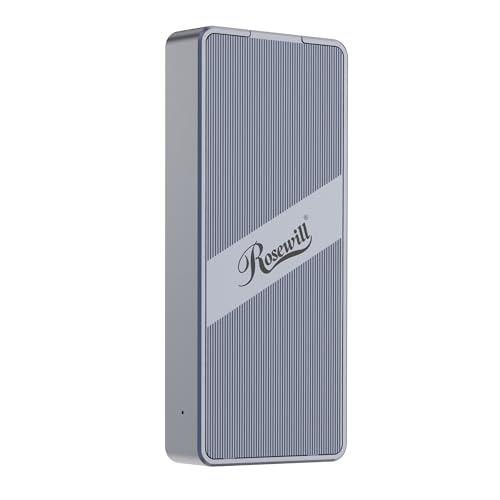
The Rosewill enclosure features an active cooling fan and a transparent design, offering visibility into the drive. It supports 40Gbps speeds and is compatible with Mac systems. It is heavier at 6.4 ounces and slightly thinner than the RayCue. The transparent casing is a unique aesthetic choice. You do not get a pre-installed SSD, so you must provide your own NVMe drive. This model suits users who want to monitor their drive’s activity visually. It trades the silent passive cooling of the RayCue for active fan noise. It is ideal for mobile professionals who need reliable performance and visibility.
Quick picks
Our 7 picks

RayCue 1TB 40Gbps NVMe Enclosure
Best for: Ready-to-use 1TB external SSDs
- Max Transfer Speed
- 40Gbps
- Host Interface
- USB4
- Drive Interface
- M.2 NVMe
- Supported Form Factors
- 2230, 2242, 2260, 2280
- Cooling System
- Aluminum double-sided fin
- Maximum Capacity
- 8TB
View on Amazon: RayCue 1TB 40Gbps NVMe Enclosure Affiliate link
The RayCue 1TB 40Gbps NVMe Enclosure pairs a 1TB drive with an aluminum case supporting up to 8TB. It delivers 3600MB/s speeds via USB4. The double-sided fin design provides passive cooling, ensuring quiet operation. It fits 2230 through 2280 form factors. This bundle suits users who want a ready-to-use external SSD without buying components separately.
Pros
- Includes a 1TB NVMe SSD
- Supports up to 8TB capacity
- Passive aluminum double-sided fin cooling
- 3600MB/s max transfer speed
Cons
- Requires Thunderbolt 4 for top speeds
- Does not support SATA NGFF drives
- No fan means heat under sustained load
Good fit if
- You want a pre-loaded 1TB drive
- You need quiet, fanless operation
- You use USB4 or Thunderbolt 4 hosts
Skip if
- You only have USB 3.0 ports
- You need SATA drive compatibility
- You prefer active cooling solutions
Verdict: RayCue 1TB 40Gbps NVMe Enclosure offers a complete 1TB solution with efficient passive cooling. It is ideal for travelers needing a quiet, high-speed drive for Mac or Windows systems.

ANYOYO Tool-Free 40Gbps M.2 NVMe Enclosure
Best for: Silent, tool-free 40Gbps connectivity
- Max Transfer Speed
- 40Gbps
- Host Interface
- Thunderbolt 4/3, USB4
- Drive Interface
- NVMe M-Key, B+M Key
- Supported Form Factors
- 2230, 2242, 2260, 2280
- Cooling System
- Aluminum alloy shell, thermal pad
- Maximum Capacity
- 8TB
View on Amazon: ANYOYO Tool-Free 40Gbps M.2 NVMe Enclosure Affiliate link
The ANYOYO 40Gbps NVMe enclosure connects your drive via Thunderbolt 4, USB4, or older USB standards. It uses an aluminum alloy shell and thermal pad for passive cooling. You get transfer speeds up to 40Gbps with read/write rates reaching 2700MB/s. It supports M.2 drives up to 8TB in various sizes. This tool-free case is designed for users who need reliable connectivity without fan noise.
Pros
- Supports 40Gbps transfer speeds via Thunderbolt 4 and USB4
- Passive cooling with aluminum alloy shell and thermal pad
- Tool-free installation for easy drive swapping
- Compatible with Windows, macOS, and Linux systems
Cons
- No active cooling fan for extreme thermal loads
- Does not support SATA or mSATA drives
- SSD not included in the package
Good fit if
- You want silent operation without a fan
- You need backward compatibility with USB 3.1 or 3.0
- You use a Mac or Linux system
Skip if
- You require active cooling for sustained heavy workloads
- You need to connect SATA or mSATA drives
- You want a complete kit with an included SSD
Verdict: The ANYOYO 40Gbps NVMe Enclosure is a solid choice for users who prioritize silent operation and broad OS compatibility. It fits those who value tool-free access and passive aluminum cooling over active fan solutions.

UGREEN 40Gbps Aluminum M.2 NVMe Fan Enclosure
Best for: sustained high-speed transfers with active cooling
- Max Transfer Speed
- 40Gbps
- Host Interface
- USB4, Thunderbolt 3/4
- Drive Interface
- NVMe (M/B+M Key)
- Supported Form Factors
- 2230, 2242, 2260, 2280
- Cooling System
- Aluminum alloy casing, cooling fan
- Maximum Capacity
- 4TB
View on Amazon: UGREEN 40Gbps Aluminum M.2 NVMe Fan Enclosure Affiliate link
The UGREEN 40Gbps NVMe enclosure uses an aluminum chassis and an active cooling fan to manage heat. It supports USB4 and Thunderbolt 3/4 for speeds up to 40Gbps. The ASM2464PD chip enables UASP acceleration. It fits M/B+M key drives in 2230 to 2280 sizes with up to 4TB capacity. This design suits users who need sustained performance for large file transfers.
Pros
- Active cooling fan with PWM speed control
- Aluminum alloy casing for heat dissipation
- Supports USB4, Thunderbolt 3/4, and USB 3.2
- Compatible with 2230, 2242, 2260, and 2280 form factors
- S.M.A.R.T. and TRIM support for drive health
Cons
- Active fan adds noise and moving parts
- Heavier at 7.05 ounces compared to fanless options
- Does not support M.2 PCIe 5.0 SSDs
Good fit if
- You transfer large files frequently and need active cooling
- You use a laptop or desktop with USB4 or Thunderbolt ports
- You want S.M.A.R.T. monitoring for drive health
Skip if
- You need a completely silent operation without fans
- You use an M.2 PCIe 5.0 SSD
- You prefer a lighter, passive aluminum-only design
Verdict: UGREEN 40Gbps NVMe Enclosure with Fan provides robust thermal management for sustained high-speed transfers. It is the best fit for users who prioritize active cooling and drive monitoring over silent operation.

Qwiizlab Fanless 40Gbps USB4 SSD Enclosure
Best for: silent 40Gbps desktop workspace storage
- Max Transfer Speed
- 40Gbps
- Host Interface
- USB4, Thunderbolt 5/4/3
- Drive Interface
- PCIe M.2 NVMe (M Key, B-M Key)
- Supported Form Factors
- 2280/2260/2242/2230 mm
- Cooling System
- Fanless aluminum chassis, thermal pads
- Maximum Capacity
- 8TB
View on Amazon: Qwiizlab Fanless 40Gbps USB4 SSD Enclosure Affiliate link
This external drive enclosure houses single M.2 NVMe drives up to 8TB using a passive aluminum shell. You get 40Gbps bandwidth across USB4 and Thunderbolt 3, 4, or 5 connections, reaching up to 3,840 MB/s transfer speeds. Because it relies entirely on thermal pads without an active fan, it suits you if you need silent high-speed operation.
Pros
- Up to 40Gbps speeds over USB4 and Thunderbolt 3, 4, and 5
- Supports M.2 NVMe drive capacities up to 8TB
- Accepts 2230, 2242, 2260, and 2280 form factor drives
- Fanless aluminum body operates without mechanical noise
Cons
- Weighs 8.82 ounces, making it relatively heavy for portable use
- Does not support legacy Thunderbolt 1 or Thunderbolt 2 connections
Good fit if
- You need 40Gbps transfer rates without any cooling fan buzz.
- You deploy high-capacity NVMe drives up to 8TB across USB4 or Thunderbolt.
Skip if
- You connect to legacy systems using Thunderbolt 1 or 2 ports.
- You want an ultra-lightweight pocket enclosure under 8 ounces.
Verdict: Qwiizlab Fanless 40Gbps USB4 SSD Enclosure delivers full 40Gbps transfer bandwidth to modern host systems without fan noise. Its thick aluminum build and wide M.2 length support suit users assembling silent 8TB desktop scratch drives.

FREEGENE 40Gbps Dual-Bay NVMe Dock with Fan
Best for: Dual NVMe storage and dual monitor expansion
- Max Transfer Speed
- 40Gbps
- Host Interface
- USB 4.0, USB-C
- Drive Interface
- M.2 NVMe
- Supported Form Factors
- 2230, 2242, 2260, 2280
- Drive Bay Count
- 2 bays
- Cooling System
- Built-in fan, aluminum alloy
View on Amazon: FREEGENE 40Gbps Dual-Bay NVMe Dock with Fan Affiliate link
This ACASIS dock expands your host with two M.2 NVMe bays and a 40Gbps USB-C interface. It supports up to 8TB per drive and includes a built-in cooling fan with an aluminum body for heat management. The unit also adds HDMI output for dual 4K displays. It is designed for users needing high-speed storage expansion and multi-monitor setups, provided their host device supports 40Gbps speeds.
Pros
- Dual M.2 NVMe bays for RAID 0 or separate drives
- 40Gbps transfer speed via USB-C host interface
- Built-in cooling fan and aluminum alloy body
- Tool-free installation for 2230/2242/2260/2280 drives
- HDMI output supporting dual 4K displays
Cons
- Incompatible with non-40Gbps host devices
- Read speeds capped at 2800 MB/s even with 40Gbps interface
- Requires external power for dock functionality
Good fit if
- You need to connect two M.2 NVMe drives simultaneously
- You require a host interface that supports 40Gbps speeds
- You want to expand your display output to two monitors
Skip if
- Your computer only supports USB 3.2 or lower speeds
- You need a simple single-drive portable enclosure
- You prefer a fanless passive cooling design
Verdict: ACASIS TBU405 Pro Max Dual-Bay NVMe Dock suits professionals who need dual drive capacity and video output on a 40Gbps host. It offers robust heat dissipation and tool-free assembly for users who can utilize its specific high-speed interface.

OWC Express 4M2 USB4 40Gb/s Enclosure
Best for: multi-drive RAID storage arrays
- Max Transfer Speed
- 40Gb/s
- Host Interface
- USB4, Thunderbolt 5/4/3, USB-C
- Drive Interface
- NVMe M.2
- Supported Form Factors
- M.2 2230, 2242, 2280
- Drive Bay Count
- 4 slots
- Cooling System
- Aluminum casing, adaptive fans
View on Amazon: OWC Express 4M2 USB4 40Gb/s Enclosure Affiliate link
This OWC unit houses four M.2 NVMe drives in a single chassis. It supports 2230, 2242, and 2280 form factors via USB4 or Thunderbolt. Real-world speeds reach 3200MB/s. The aluminum body includes adaptive fans for cooling. It includes SoftRAID for RAID 0, 1, 4, 5, or 10 setups. This is a high-capacity solution for users needing massive storage arrays.
Pros
- Four drive bays for expanded storage
- USB4 and Thunderbolt host compatibility
- Includes SoftRAID software for array management
- Adaptive cooling fans activate only when needed
- Supports 2230, 2242, and 2280 SSD sizes
Cons
- Weighs 3.9 pounds, making it heavy for portability
- Lacks the compact size of single-bay alternatives
- Requires specific USB4 or Thunderbolt ports for full speed
Good fit if
- You need to connect four NVMe drives simultaneously
- You want to create RAID arrays for performance or redundancy
- You use USB4 or Thunderbolt ports on your computer
Skip if
- You only need to connect one or two SSDs
- You require a lightweight, pocket-sized enclosure for travel
- Your computer only has standard USB-A or USB-C ports
Verdict: OWC Express 4M2 USB4 40Gb/s 4-Slot Enclosure is a specialized tool for users who need to manage four NVMe drives in a RAID configuration. It fits professionals who prioritize storage capacity and array flexibility over portability.
Rosewill RNE-01 40Gbps NVMe Enclosure
Best for: Users needing active cooling and transparent design
- Max Transfer Speed
- 40Gbps
- Host Interface
- Thunderbolt 4/3, USB4
- Drive Interface
- M.2 NVMe
- Supported Form Factors
- 2230-2280
- Cooling System
- Built-in fan and optimized vent design
- Maximum Capacity
- 8TB
View on Amazon: Rosewill RNE-01 40Gbps NVMe Enclosure Affiliate link
The Rosewill RNE-01 is a 40Gbps M.2 NVMe enclosure with a built-in cooling fan and transparent back plate. It supports Thunderbolt 4/3 and USB4, offering read/write speeds up to 3187MB/s. The unit handles M.2 NVMe drives from 2230 to 2280 sizes, with capacity support up to 8TB. It weighs 6.4 ounces and fits in a pocket. This design suits mobile professionals needing sustained performance for large file transfers on macOS or Windows.
Pros
- Built-in cooling fan maintains effective heat dissipation
- Supports M.2 NVMe SSDs up to 8TB capacity
- Transparent back plate reveals internal components
- Compact dimensions of 4.75 x 2 x 0.75 inches
- Compatible with Thunderbolt 4/3 and USB4 interfaces
Cons
- Requires a cooling fan, which adds moving parts
- Maximum speed capped at 3187MB/s, not 40Gbps theoretical limit
- No mention of included cable or power adapter
Good fit if
- You need active cooling for sustained 40Gbps transfers
- You want to see the SSD inside the case
- You use Thunderbolt 4 or USB4 hosts
Skip if
- You prefer a completely fanless, silent design
- You require maximum theoretical bandwidth without throttling
- You need a 2.5-inch SATA enclosure
Verdict: Rosewill 40Gbps M.2 NVMe Enclosure offers active cooling and a unique transparent design for users who prioritize thermal management and visibility. It is ideal for mobile professionals using Thunderbolt 4 or USB4 hosts who need reliable performance for large files.
Specifications side by side
| Spec | RayCue 1TB 40Gbps NVMe Enclosure | ANYOYO Tool-Free 40Gbps M.2 NVMe Enclosure | UGREEN 40Gbps Aluminum M.2 NVMe Fan Enclosure | Qwiizlab Fanless 40Gbps USB4 SSD Enclosure | FREEGENE 40Gbps Dual-Bay NVMe Dock with Fan | OWC Express 4M2 USB4 40Gb/s Enclosure | Rosewill RNE-01 40Gbps NVMe Enclosure |
|---|---|---|---|---|---|---|---|
| Max Transfer Speed | 40Gbps | 40Gbps | 40Gbps | 40Gbps | 40Gbps | 40Gb/s | 40Gbps |
| Host Interface | USB4 | Thunderbolt 4/3, USB4 | USB4, Thunderbolt 3/4 | USB4, Thunderbolt 5/4/3 | USB 4.0, USB-C | USB4, Thunderbolt 5/4/3, USB-C | Thunderbolt 4/3, USB4 |
| Drive Interface | M.2 NVMe | NVMe M-Key, B+M Key | NVMe (M/B+M Key) | PCIe M.2 NVMe (M Key, B-M Key) | M.2 NVMe | NVMe M.2 | M.2 NVMe |
| Supported Form Factors | 2230, 2242, 2260, 2280 | 2230, 2242, 2260, 2280 | 2230, 2242, 2260, 2280 | 2280/2260/2242/2230 mm | 2230, 2242, 2260, 2280 | M.2 2230, 2242, 2280 | 2230-2280 |
| Drive Bay Count | not stated | not stated | not stated | not stated | 2 bays | 4 slots | not stated |
| Cooling System | Aluminum double-sided fin | Aluminum alloy shell, thermal pad | Aluminum alloy casing, cooling fan | Fanless aluminum chassis, thermal pads | Built-in fan, aluminum alloy | Aluminum casing, adaptive fans | Built-in fan and optimized vent design |
| Maximum Capacity | 8TB | 8TB | 4TB | 8TB | 8TB | not stated | 8TB |
| Installation Style | not stated | Tool-free | not stated | not stated | Tool-free | not stated | not stated |
| Interface | NVMe | NVMe | NVMe | NVMe | NVMe | NVMe | NVMe |
| Form Factor | M.2 | M.2 | M.2 2280 | M.2 | M.2 | M.2 2230 | M.2 |
| Cooling | not stated | not stated | Cooling Fan | not stated | Cooling Fan | not stated | Cooling Fan |
| Compatibility | Mac | not stated | not stated | not stated | not stated | not stated | Mac |
| Transfer Speed | 40Gbps | 40Gbps | 40Gbps | 40Gbps | 40Gbps | 10Gbps | 40Gbps |
| Features | not stated | Tool-Free | not stated | not stated | Tool-Free | not stated | not stated |
| Material | Aluminum | Aluminum | Aluminum | Aluminum | Aluminum | not stated | not stated |
| Weight | 3.53 ounces | 5.29 ounces | 7.05 ounces | 8.82 ounces | 1.5 pounds | 3.9 pounds | 6.4 ounces |
| Dimensions | not stated | 3.94 × 2.24 × 0.55 inches | 4.72 × 1.89 × 0.75 inches | 4.92 × 2.55 × 0.92 inches | not stated | 7 × 2.4 × 5.5 inches | 4.75 × 2 × 0.75 inches |
| Size | 1 TB 40Gbps | TBU401 | not stated | not stated | not stated | not stated | 40 Gbps M.2 NVMe Enclosure |
| Color | not stated | Space Gray | Grey | Gray | blue | Aluminium | Silver |
| Model | not stated | TBU401 | 15976-40GB | ES40UR (Gray) | TBU405 Pro Max | OWCUS4EXP4M2S | RNE-01 |
If you require internal thermal management rather than an enclosure, review sgtkjsjs laptop nvme m 2 heatsink alternatives.
Frequently asked questions
Does the RayCue enclosure come with an SSD installed?
Yes, the RayCue 1TB 40Gbps NVMe Enclosure includes a pre-installed 1TB drive. This makes it a complete, ready-to-use solution. You do not need to purchase a separate M.2 NVMe SSD. It is ideal for travelers who want a quiet, high-speed external drive for Mac or Windows systems without extra setup steps.
Which alternative offers the best silent operation?
The ANYOYO Tool-Free 40Gbps M.2 NVMe Enclosure is designed for silent operation. It uses passive aluminum cooling instead of active fans. This makes it a solid choice for users who prioritize quiet performance. It also features a tool-free design and broad OS compatibility for easy installation.
Is there an option with active cooling for sustained transfers?
Yes, the UGREEN 40Gbps Aluminum M.2 NVMe Fan Enclosure includes a cooling fan. This active cooling system provides robust thermal management for sustained high-speed transfers. It is the best fit for users who prioritize drive temperature control over silent operation during heavy workloads.
Can I use these enclosures with Thunderbolt 4 ports?
Several options support Thunderbolt 4 or USB4 hosts. The Qwiizlab Fanless 40Gbps USB4 SSD Enclosure suits users who need broad Thunderbolt support. The Rosewill RNE-01 is also ideal for mobile professionals using Thunderbolt 4 hosts. Both deliver reliable performance for large files.
Are there enclosures that support multiple drives?
Yes, the FREEGENE 40Gbps Dual-Bay NVMe Dock with Fan supports two NVMe drives. It also offers dual monitor expansion. The OWC Express 4M2 USB4 40Gb/s Enclosure manages four NVMe drives in a RAID configuration. These are specialized tools for professionals needing high capacity and array flexibility.
Which enclosure is best for Mac users?
The RayCue 1TB 40Gbps NVMe Enclosure is explicitly compatible with Mac systems. It offers efficient passive cooling and high speed. The Rosewill RNE-01 is also listed as compatible with Mac. Both provide reliable performance for users in the Apple ecosystem who need fast external storage.
Do any alternatives include a transparent design?
The Rosewill RNE-01 40Gbps NVMe Enclosure features a unique transparent design. This allows you to see the internal components while benefiting from active cooling. It is ideal for users who prioritize thermal management and visibility in their external storage setup.