ORICO 128GB M.2 SATA SSD Alternatives: 6 Similar Picks Compared
As an Amazon Associate we earn from qualifying purchases. Links on this page are affiliate links.
The ORICO 128GB M.2 SATA SSD is designed for older systems that rely on M.2 SATA interfaces rather than modern NVMe connections. It offers sequential read speeds up to 500MB/s and write speeds up to 450MB/s, which is significantly faster than traditional hard drives. This drive fits the M.2 2280 form factor and includes features like TRIM and ECC for stability. However, you might want to look at ORICO M.2 2280 SATA SSD alternatives if your needs differ. You may require more storage capacity, faster NVMe speeds, or a different brand with specific caching technologies.
We selected 6 similar picks because their specifications overlap with the original product. The list includes other M.2 2280 drives, both SATA and NVMe options, to cover various use cases. Some alternatives offer higher capacities like 2TB, while others provide PCIe 3.0 speeds for better performance in compatible systems. You can choose based on whether you need basic SATA storage or a more robust NVMe solution. This comparison helps you find the right drive for your laptop or desktop without guessing which specs matter most.
How these alternatives compare
KingSpec NX 2TB NVMe M.2 SSD
The KingSpec NX 2TB NVMe SSD shifts from SATA to NVMe Gen3x4 technology. This interface change allows for much higher data transfer rates than the ORICO’s 500MB/s limit. You gain 2TB of storage instead of 128GB, which is a massive increase for file retention. The drive uses 3D NAND for consistent performance. It is best for users who need high capacity and faster speeds than SATA can provide. If your motherboard supports NVMe slots, this option offers superior throughput and space. It sacrifices the compatibility of older SATA-only systems for modern speed and volume.
KingSpec 512GB M.2 2280 NVMe SSD
This KingSpec 512GB NVMe SSD also moves away from the SATA protocol to NVMe. It provides a noticeable speed boost over the ORICO drive, making it better for general computing tasks. You get 512GB of storage, which is four times the capacity of the original. The drive uses 3D NAND technology for reliability. It is ideal for budget-conscious users who want NVMe performance without paying for high-end Gen4 drives. It fits laptops and desktops with M.2 NVMe slots. Choose this if you need more speed and space than the ORICO offers, but do not require the absolute fastest available on the market.
TEAMGROUP MS30 256GB M.2 SATA SSD
The TEAMGROUP MS30 256GB M.2 SATA SSD stays within the SATA III interface, ensuring compatibility with the same systems as the ORICO drive. It offers 256GB of storage, doubling your capacity. It uses 3D TLC NAND with SLC caching to manage performance. The physical dimensions are similar, fitting the M.2 2280 form factor. This drive is a practical choice for budget upgrades on older systems that do not support NVMe. It provides reliable SATA speeds without the need for newer motherboard features. Pick this if you prefer a known SATA solution with slightly more storage and cache technology for better sustained writes.
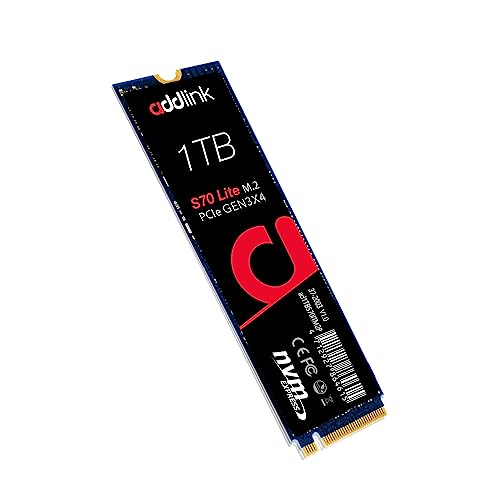
Addlink S70 Lite 1TB Gen3 NVMe SSD
The Addlink S70 Lite 1TB Gen3 NVMe SSD upgrades you from SATA to PCIe 3.0. This interface change delivers significantly faster read and write speeds than the ORICO’s 500MB/s limit. You get 1TB of storage, which is eight times the capacity of the original. It uses 3D NAND for efficient heat management and performance. The drive is designed for laptops and desktops, including gaming systems. It is best for users who prioritize low heat and reliable NVMe speeds. Choose this if your system supports NVMe and you need more space and speed than SATA can deliver.
SK Hynix 512GB PCIe 3.0 NVMe SSD
The SK Hynix 512GB PCIe 3.0 NVMe SSD replaces the SATA connection with a faster NVMe interface. It offers 512GB of storage, which is four times the capacity of the ORICO drive. The PCIe 3.0 protocol provides higher throughput, making it suitable for reliable upgrades in laptops and desktops. It fits the standard M.2 2280 form factor. This drive is ideal for users who need a fast, dependable storage solution without the bandwidth of Gen4. It is a strong alternative if you have an NVMe slot and want more space and speed than the basic SATA option provides.
TEAMGROUP MP33 256GB PCIe 3.0 M.2 SSD
The TEAMGROUP MP33 256GB PCIe 3.0 M.2 SSD moves from SATA to NVMe, offering faster data transfer rates. It provides 256GB of storage, which is double the capacity of the original. The drive uses 3D TLC NAND with SLC caching for improved performance. It is designed for laptops and desktops with M.2 NVMe slots. This option is best for light computing tasks and budget upgrades. It is a practical choice if you need more speed and storage than the ORICO drive offers, but do not require high-end Gen4 performance. It fits users who want a reliable, affordable NVMe solution.
Quick picks
Our 7 picks

ORICO 128GB M.2 SATA SSD
Best for: Basic storage on older M.2 SATA systems
- Storage Capacity
- 128GB
- Interface
- SATA III 6Gbps
- Max Read Speed
- Up to 500MB/s
- Max Write Speed
- Up to 450MB/s
- Form Factor
- M.2 2280
- Compatibility
- Laptop, Desktop
View on Amazon: ORICO 128GB M.2 SATA SSD Affiliate link
This ORICO drive is an M.2 2280 SATA SSD with a B+M key. It offers sequential read speeds up to 500MB/s and write speeds up to 450MB/s. The 128GB capacity fits laptops and desktops with M.2 SATA support. It includes TRIM and ECC for longevity. It is not NVMe compatible. You need a system that supports the SATA interface over M.2.
Pros
- Sequential read speed up to 500MB/s
- Sequential write speed up to 450MB/s
- M.2 2280 form factor with B+M key
- Supports TRIM and ECC technologies
Cons
- Limited to 128GB storage capacity
- SATA III interface limits speed compared to NVMe options
- Incompatible with PCIe NVMe motherboards or enclosures
Good fit if
- You need a budget upgrade for an older laptop
- Your motherboard supports M.2 SATA interfaces
- You only require basic storage for light tasks
Skip if
- You require NVMe PCIe speeds
- Your system only supports NVMe M.2 slots
- You need more than 128GB of space
Verdict: ORICO 128GB M.2 SATA SSD works well for basic storage on compatible older systems. It is a practical option if you are limited to M.2 SATA slots and have low storage needs.

KingSpec NX 2TB NVMe M.2 SSD
Best for: High-capacity Gen3x4 storage needs
- Storage Capacity
- 2TB
- Interface
- NVMe Gen3x4
- Form Factor
- M.2 2280
- Max Read Speed
- 3500 MB/s
- Compatibility
- Laptop, Desktop
- NAND Type
- 3D NAND
View on Amazon: KingSpec NX 2TB NVMe M.2 SSD Affiliate link
This KingSpec drive uses an M.2 2280 form factor with an NVMe Gen3x4 interface. It reaches read speeds of 3500 MB/s and uses 3D NAND flash. The 2TB capacity handles large files and games. It supports S.M.A.R.T and TRIM for stability. You get a 3-year limited warranty. It fits laptops and desktops running Windows or Unix.
Pros
- 3500 MB/s max read speed
- 2TB storage capacity
- NVMe Gen3x4 interface
- 3D NAND flash memory
- 3-year limited warranty
Cons
- No SLC cache mentioned
- Write speed not specified
- No DRAM cache mentioned
Good fit if
- You need 2TB of storage
- You want fast Gen3x4 speeds
- You use M.2 2280 slots
Skip if
- You require DRAM cache
- You need PCIe Gen4 speeds
- You want SLC caching
Verdict: KingSpec NX Series 2TB NVMe SSD offers high capacity and strong read speeds for users needing reliable Gen3x4 storage. It suits those prioritizing space and speed over advanced caching features.

KingSpec 512GB M.2 2280 NVMe SSD
Best for: budget-conscious NVMe upgrades
- Storage Capacity
- 512GB
- Interface
- M.2 NVMe Gen3x4
- Form Factor
- M.2 2280
- Max Read Speed
- 2400MB/s
- Compatibility
- Laptop, Desktop
- NAND Type
- 3D NAND
View on Amazon: KingSpec 512GB M.2 2280 NVMe SSD Affiliate link
This KingSpec drive offers 512GB of storage using M.2 NVMe Gen3x4 technology. It delivers read speeds up to 2400MB/s, which is faster than the SATA options on this list. The unit uses 3D NAND flash and fits the standard M.2 2280 form factor. It supports TRIM and S.M.A.R.T for data integrity. You get a 3-year warranty with lifetime technical support. This makes it a solid upgrade for laptops and desktops needing more space.
Pros
- Read speeds up to 2400MB/s
- M.2 NVMe Gen3x4 interface
- 512GB storage capacity
- 3-year warranty included
Cons
- Lower read speed than the KingSpec 2TB NVMe option
- Lower read speed than the Addlink S70 Lite
- Lower read speed than the SK Hynix PC601
Good fit if
- You want faster speeds than SATA drives
- You need 512GB of storage space
- You are upgrading a laptop or desktop
Skip if
- You need the highest possible read speeds
- You require more than 512GB of capacity
- You prefer established brand names like SK Hynix
Verdict: KingSpec 512GB NVMe SSD provides a noticeable speed boost over SATA alternatives for users who do not need the absolute fastest Gen4 or high-end Gen3 drives. It is a practical mid-tier option for general computing tasks.

TEAMGROUP MS30 256GB M.2 SATA SSD
Best for: budget SATA upgrades and HDD caching
- Storage Capacity
- 256GB
- Interface
- SATA III 6Gb/s
- Max Read Speed
- 500 MB/s
- Max Write Speed
- 400 MB/s
- Cache Type
- SLC Cache
- Form Factor
- M.2 2280
View on Amazon: TEAMGROUP MS30 256GB M.2 SATA SSD Affiliate link
The TEAMGROUP MS30 is a 256GB M.2 2280 SATA drive built for budget upgrades. It uses 3D TLC NAND with an SLC cache to reach 500 MB/s read and 400 MB/s write speeds. This B+M key model supports Intel Smart Response Technology for hybrid setups. It is a practical choice for laptops and desktops needing reliable storage without the cost of NVMe.
Pros
- SATA III 6Gb/s interface with 500 MB/s read speed
- SLC cache improves sustained write performance
- Supports Intel Smart Response Technology
- Compact M.2 2280 form factor
Cons
- Slower speeds compared to NVMe alternatives on this list
- Lower 256GB capacity limits large file storage
- Limited to SATA bandwidth ceiling
Good fit if
- You need a cheap upgrade for an older laptop
- You want to add cache to a hybrid HDD setup
- You prefer SATA compatibility over NVMe speeds
Skip if
- You require high-speed NVMe performance for gaming
- You need more than 256GB of storage space
- You want the fastest possible transfer rates
Verdict: TEAMGROUP MS30 256GB M.2 SATA SSD offers reliable SATA performance for budget-conscious buyers. It fits users upgrading older systems who do not need NVMe speeds.
Addlink S70 Lite 1TB Gen3 NVMe SSD
Best for: Laptops and desktops needing cool, fast Gen3 storage
- Storage Capacity
- 1TB
- Interface
- PCIe Gen3x4
- Form Factor
- M.2 2280
- Max Read Speed
- Up to 3200MB/s
- Max Write Speed
- 2600MB/s
- Cache Type
- SLC caching
View on Amazon: Addlink S70 Lite 1TB Gen3 NVMe SSD Affiliate link
The Addlink S70 Lite is a 1TB M.2 2280 NVMe drive using PCIe Gen3x4. It offers sequential speeds up to 3,200 MB/s read and 2,600 MB/s write. The drive uses 3D NAND with SLC caching to handle sustained workloads. Its low-power design runs cool without a heatsink, which helps preserve laptop battery life. This makes it a solid upgrade for desktops and laptops needing fast storage.
Pros
- Sequential read speeds up to 3,200 MB/s
- Sequential write speeds up to 2,600 MB/s
- SLC caching for sustained performance
- Low-power design runs cool without a heatsink
Cons
- PCIe Gen3x4 interface limits speed compared to Gen4 options
- No included M.2 heatsink for thermal management
- 5-year limited warranty is shorter than some competitors
Good fit if
- You need a fast NVMe upgrade for a laptop
- You want a cool-running drive without adding bulk
- You are building a desktop with Gen3 slots
Skip if
- You require the highest possible Gen4 transfer speeds
- You need a drive with an integrated heatsink
- You prefer a longer warranty period than five years
Verdict: Addlink S70 Lite 1TB NVMe SSD delivers strong Gen3 speeds and efficient thermals for gamers and daily users. It fits users who prioritize low heat and reliable performance in a standard M.2 2280 form factor.

SK Hynix 512GB PCIe 3.0 NVMe SSD
Best for: PCIe 3.0 laptop and desktop upgrades
- Storage Capacity
- 512GB
- Interface
- PCIe Gen3 x4
- Max Read Speed
- 3400 MB/s
- Max Write Speed
- 2500 MB/s
- Form Factor
- M.2 2280
- Compatibility
- Laptop, Desktop
View on Amazon: SK Hynix 512GB PCIe 3.0 NVMe SSD Affiliate link
This is a 512GB M.2 2280 NVMe drive using PCIe Gen3 x4. It offers sequential read speeds up to 3400 MB/s and write speeds up to 2500 MB/s. The controller handles random read/write operations up to 390K/420K IOPS. You get a compact black module that fits standard laptop and desktop slots. It is a solid upgrade for systems needing faster storage than SATA.
Pros
- Sequential read speeds reach 3400 MB/s
- Sequential write speeds reach 2500 MB/s
- Random read/write IOPS up to 390K/420K
- Standard M.2 2280 form factor
Cons
- Limited to PCIe Gen3 speeds
- Only 512GB capacity available
- No included software utilities listed
Good fit if
- You need a reliable NVMe drive for older PCIe 3.0 systems
- You want faster load times than SATA SSDs provide
- You are upgrading a laptop or desktop with an M.2 slot
Skip if
- You require PCIe Gen4 speeds for maximum performance
- You need more than 512GB of storage space
- You are looking for a SATA interface drive
Verdict: SK Hynix PC601 512GB NVMe SSD delivers strong Gen3 performance for users who need a reliable, fast upgrade for compatible laptops or desktops without needing the latest Gen4 bandwidth.

TEAMGROUP MP33 256GB PCIe 3.0 M.2 SSD
Best for: Light computing and budget upgrades
- Storage Capacity
- 256GB
- Interface
- PCIe Gen3x4
- Max Read Speed
- 1600 MB/s
- Max Write Speed
- 1000 MB/s
- Cache Type
- SLC Cache
- Form Factor
- M.2 2280
View on Amazon: TEAMGROUP MP33 256GB PCIe 3.0 M.2 SSD Affiliate link
The TEAMGROUP MP33 is a 256GB M.2 2280 NVMe drive using PCIe Gen3x4 and TLC 3D NAND. It offers read speeds up to 1600 MB/s and write speeds up to 1000 MB/s with an SLC cache. This internal SSD suits laptops and desktops needing faster data transfer than SATA. You get a compact form factor that supports next-generation Intel and AMD platforms.
Pros
- PCIe Gen3x4 interface for high performance
- Read speeds up to 1600 MB/s
- SLC Cache technology included
- M.2 2280 form factor
Cons
- 256GB capacity is limited
- Write speed of 1000 MB/s is modest
- No DRAM cache listed in specs
Good fit if
- You need a budget NVMe upgrade
- You use a laptop or desktop
- You store light workloads
Skip if
- You require large storage capacity
- You need high sequential write speeds
- You want a DRAM cache
Verdict: The TEAMGROUP MP33 256GB NVMe SSD delivers solid Gen3x4 speeds for basic tasks. It fits users who need a small, affordable internal drive for light computing.
Specifications side by side
| Spec | ORICO 128GB M.2 SATA SSD | KingSpec NX 2TB NVMe M.2 SSD | KingSpec 512GB M.2 2280 NVMe SSD | TEAMGROUP MS30 256GB M.2 SATA SSD | Addlink S70 Lite 1TB Gen3 NVMe SSD | SK Hynix 512GB PCIe 3.0 NVMe SSD | TEAMGROUP MP33 256GB PCIe 3.0 M.2 SSD |
|---|---|---|---|---|---|---|---|
| Storage Capacity | 128GB | 2TB | 512GB | 256GB | 1TB | 512GB | 256GB |
| Interface | SATA III 6Gbps | NVMe Gen3x4 | M.2 NVMe Gen3x4 | SATA III 6Gb/s | PCIe Gen3x4 | PCIe Gen3 x4 | PCIe Gen3x4 |
| Form Factor | not stated | M.2 2280 | M.2 2280 | not stated | M.2 2280 | not stated | not stated |
| Max Read Speed | Up to 500MB/s | 3500 MB/s | 2400MB/s | 500 MB/s | Up to 3200MB/s | 3400 MB/s | 1600 MB/s |
| Max Write Speed | Up to 450MB/s | not stated | not stated | 400 MB/s | 2600MB/s | 2500 MB/s | 1000 MB/s |
| Cache Type | not stated | not stated | not stated | SLC Cache | SLC caching | not stated | SLC Cache |
| Compatibility | Laptop, Desktop | Laptop, Desktop | Laptop, Desktop | Laptop, Desktop | Laptop, Desktop, Gaming | Laptop, Desktop | Laptop, Desktop |
| NAND Type | not stated | 3D NAND | 3D NAND | 3D NAND, TLC | 3D NAND | not stated | 3D NAND, TLC |
| Size | 128GB | 2TB | 512GB | 256GB | 1TB | not stated | 256GB |
| Weight | 1.41 ounces | not stated | not stated | 0.35 ounces | 0.7 ounces | not stated | not stated |
| Dimensions | not stated | not stated | not stated | 0.87 × 3.15 × 0.14 inches | 3.2 × 0.8 × 0.4 inches | 3.15 × 0.87 × 0.12 inches | 23.6 × 23.6 × 33.5 inches |
| Model | Y20M-128GB | 2 tb | 3f18df96-b2f4-46cf-b297-b9c29940122b | TM8PS7256G0C101 | ad1TBS70M2P | HFS512GD9TNG 0V4RWG V4RWG | TM8FP6256G0C101 |
| Color | not stated | Black | NE-2280, 2400MB/s | not stated | S70 Lite | Black | Multicoloured |
If you need liquid cooling for your drive, you can review barrow 2280 22110 m 2 SSD water alternatives.
Frequently asked questions
Can I use an NVMe SSD in an M.2 SATA slot?
No, you cannot. The ORICO drive you are looking at uses an NVMe interface, which is incompatible with M.2 SATA slots. You must use a drive specifically designed for SATA, like the TEAMGROUP MS30, if your motherboard only supports that older standard. Using the wrong interface will prevent the system from booting or recognizing the storage.
What is the best high-capacity alternative to the ORICO 128GB?
The KingSpec NX 2TB NVMe SSD is the best high-capacity option. It offers 2TB of storage using 3D NAND, which is a massive upgrade from the 128GB limit. This drive is ideal if you need significant space for files or games and have a motherboard that supports NVMe Gen3x4 connections for faster data transfer.
Is there a good budget NVMe option under 512GB?
Yes, the KingSpec 512GB M.2 2280 NVMe SSD is a practical mid-tier choice. It provides a noticeable speed boost over SATA alternatives for general computing tasks. It uses 3D NAND and fits standard M.2 2280 slots, making it a solid upgrade for users who want more speed and capacity without needing the highest-end Gen4 drives.
Which SSD is best for upgrading older laptops with SATA?
The TEAMGROUP MS30 256GB M.2 SATA SSD is designed for this purpose. It uses the SATA III interface, ensuring compatibility with older systems that lack NVMe support. It features SLC caching and 3D TLC NAND, providing reliable performance for budget-conscious buyers who need to replace a slow hard drive with a faster solid-state option.
Does the Addlink S70 Lite run cool for gaming?
Yes, the Addlink S70 Lite 1TB Gen3 NVMe SSD is noted for efficient thermals. It delivers strong Gen3 speeds while generating less heat, which is beneficial for laptops and compact desktops. It uses 3D NAND and fits the standard M.2 2280 form factor, making it a reliable choice for gamers who prioritize stable temperatures during intensive sessions.
What is the difference between PCIe 3.0 and NVMe?
NVMe is the protocol that manages data, while PCIe 3.0 is the physical connection interface. Most modern M.2 drives, like the SK Hynix 512GB, use both. The SK Hynix drive leverages PCIe 3.0 to deliver strong Gen3 performance, offering a fast upgrade for compatible laptops and desktops without requiring the latest Gen4 bandwidth or hardware.
Is the TEAMGROUP MP33 suitable for light daily computing?
Yes, the TEAMGROUP MP33 256GB PCIe 3.0 M.2 SSD is suitable for light tasks. It delivers solid Gen3x4 speeds and uses SLC caching with 3D TLC NAND. This makes it an affordable internal drive option for users who need a small, reliable storage solution for basic office work, web browsing, and general system operations on compatible motherboards.