ORICO 40Gbps Dual-Bay NVMe Cloner Alternatives: 6 Similar Picks Compared
As an Amazon Associate we earn from qualifying purchases. Links on this page are affiliate links.
The ORICO 40Gbps Dual-Bay NVMe Cloner Dock offers fast 40Gbps transfer speeds and one-button offline cloning for NVMe drives up to 16TB. If you are looking for orico 40gbps m 2 nvme hard alternatives, you might want a different interface speed, form factor, or brand. Some users prefer 10Gbps docks for everyday tasks or need SATA compatibility instead of pure NVMe support.
This list includes 6 similar picks that share key specs with the original product. All alternatives feature dual-bay designs and standalone cloning capabilities. We selected these options because their specifications overlap with the ORICO dock, such as transfer rates, cooling methods, and supported M.2 sizes. You can compare the 40Gbps models against 10Gbps or 20Gbps options to find the right balance of speed and cost for your workflow.
How Each Alternative Compares
SABRENT Dual-Bay NVMe Cloner Dock
SABRENT Dual-Bay NVMe Cloner Dock provides standalone offline drive duplication and active cooling, similar to the original ORICO. However, it runs at a 10Gbps transfer speed rather than 40Gbps USB4 bandwidth. The enclosure is smaller and lighter, measuring 4.3 inches long and weighing 4 ounces, compared to the original dock at 5.71 inches and 1.38 inches tall. While you give up 40Gbps throughput and dedicated aluminum heatsinks, you retain dual-bay USB-C connectivity and PC-free cloning. Choose this SABRENT unit if you prioritize a smaller desktop footprint for standard duplication tasks and do not need top-tier 40Gbps interface rates.
MAIWO Dual-Bay 10Gbps NVMe Cloner Dock handles offline cloning and fits drive lengths up to 22110. Compared to the original ORICO, its connection speed peaks at 10Gbps instead of 40Gbps. It features an integrated power switch and a heavier 1.46-pound chassis measuring 6.42 inches long by 4.92 inches wide, making it substantially larger than the original 5.71-inch dock. You lose 40Gbps USB4 speeds and the dual heatsink cooling system, but you gain a stable desktop footprint that accepts longer SSD sizes without tipping. Pick this MAIWO dock if you need standalone cloning across diverse drive lengths and do not require 40Gbps data bandwidth.
UGREEN 40Gbps Dual-Bay NVMe Cloner
UGREEN 40Gbps Dual-Bay NVMe Cloner matches the original ORICO with 40Gbps transfer rates, PC-free offline cloning, and active cooling fan ventilation. It expands capability by supporting software RAID configurations for connected drives. Its aluminum housing is lower in profile, standing just 0.59 inches tall compared to the original dock's 1.38-inch height. However, it does not include the separate dedicated aluminum heatsinks that clamp directly to drives on the ORICO model. Select this UGREEN cloner if you require high 40Gbps transfer speeds and want RAID support alongside standalone cloning in a slimmer desktop format.
SABRENT Dual-Bay SATA USB-C Cloner Dock
SABRENT Dual-Bay SATA Dock targets standard 2.5-inch and 3.5-inch SATA hard drives and solid-state drives rather than M.2 NVMe sticks. Like the original ORICO, it provides standalone offline cloning and connects over USB-C. However, it operates across a SATA III interface limited to 5Gbps transfer speeds instead of 40Gbps USB4 rates. The dock measures 6.2 inches by 4 inches to accommodate larger SATA form factors, and it cannot accept M.2 cards. You should choose this SABRENT dock if your primary duplicating workload involves legacy SATA drives and you do not require high-speed M.2 NVMe duplication.
AMZPILOT 40Gbps USB4 M.2 NVMe Dock matches the original ORICO's 40Gbps transfer speed and USB-C connectivity while reducing dimensions to a compact 2.74 by 2.74-inch aluminum frame weighing 3.5 ounces. It features a tool-free slot that accepts M.2 drives up to size 22110. In exchange for portability, it eliminates the second drive bay, which removes all standalone offline cloning capability. It also lacks active fan cooling. Choose the AMZPILOT dock if you need maximum 40Gbps transfer bandwidth for individual M.2 NVMe drives on the go and do not need PC-free drive cloning.
ORICO Dual-Bay M.2 NVMe Cloner Dock provides tool-free installation for quick drive swaps during offline cloning. Like the original ORICO, it offers dual-bay standalone duplication and an aluminum build. However, this model operates at 10Gbps USB 3.2 Gen 2 speeds instead of 40Gbps USB4 bandwidth. It also omits the original model's dual separate heatsinks and built-in active cooling fan. In return, you can swap drives without using mounting screws or tools. Pick this model if you frequently change drives and want tool-free offline cloning, provided you do not need 40Gbps transfer rates or active fan cooling.
Quick picks
Our 7 picks

ORICO 40Gbps Dual-Bay NVMe Cloner Dock
Best for: high-speed offline NVMe duplication and docking
- Transfer Speed
- 40Gbps
- Supported Drive Types
- M-Key NVMe
- Bay Count
- 2
- Offline Cloning
- One-button offline cloning
- Supported M.2 Sizes
- 2230, 2242, 2260, 2280, 22110
- Maximum Capacity
- 16TB
View on Amazon: ORICO 40Gbps Dual-Bay NVMe Cloner Dock Affiliate link
This dual-bay docking station gives you 40Gbps USB4 connectivity alongside standalone offline cloning. You can duplicate M-Key NVMe SSDs without a computer connection by pressing the dedicated clone button. It supports M.2 drives up to 16TB total across common sizes from 2230 to 22110. An integrated cooling fan and aluminum heatsinks manage drive temperatures. It suits you if you need rapid drive duplication or high-speed dual NVMe access.
Pros
- 40Gbps USB4 interface with Thunderbolt 4 compatibility
- One-button offline cloning without a host PC connection
- Active cooling system with built-in fan and aluminum heatsinks
- Supports M.2 form factors from 2230 up to 22110
Cons
- Supports M-Key NVMe drives only without SATA M.2 compatibility
- Target drive capacity must exceed source drive capacity for offline cloning
- Bandwidth is shared across both bays during simultaneous dual-drive use
Good fit if
- You need standalone offline cloning between NVMe SSDs without using a computer.
- You want 40Gbps USB4 transfer rates for high-capacity M.2 NVMe drives up to 16TB.
- You work with varied drive sizes from 2230 up to 22110 form factors.
Skip if
- You need to clone or read SATA-based M.2 SSDs.
- You plan to clone onto a drive of equal or smaller capacity than the source.
Verdict: ORICO Dual-Bay 40Gbps NVMe Cloner provides top-tier 40Gbps interface speeds and PC-free duplication for NVMe drives up to 16TB. Its built-in cooling fan and dual heatsinks keep high-bandwidth tasks stable.

SABRENT Dual-Bay NVMe Cloner Dock
Best for: standalone NVMe duplication and cooled dual-bay docking
- Transfer Speed
- 10Gbps
- Supported Drive Types
- PCIe NVMe M.2 SSD
- Bay Count
- 2
- Offline Cloning
- One-button offline clone
- Supported M.2 Sizes
- 2230, 2242, 2260, 2280
- Cooling Type
- Aluminum body, built-in fan
View on Amazon: SABRENT Dual-Bay NVMe Cloner Dock Affiliate link
The SABRENT Dual-Bay NVMe Cloner Dock is a dual-slot drive cloner and external USB-C dock. It transfers data at up to 10Gbps and performs standalone, computer-free drive clones at the push of a button. It fits M.2 PCIe NVMe drives in 2230, 2242, 2260, and 2280 sizes. An aluminum body and active cooling fan manage heat during operation. It suits you if you need reliable offline cloning and simultaneous dual-drive access.
Pros
- Push-button offline cloning without host computer connection
- Simultaneous read and write access for both bays over USB
- Aluminum body with built-in cooling fan to limit throttling
- Tool-free installation supporting 2230, 2242, 2260, and 2280 M.2 sizes
- Includes USB-C to USB-C and USB-C to USB-A cables plus 5V/4A power adapter
Cons
- Limits transfer speeds to 10Gbps rather than 40Gbps
- Cooling fan runs continuously while powered with no idle mode
- Does not support M.2 SATA, AHCI, or SATA drives
Good fit if
- You need standalone, computer-free drive cloning for PCIe NVMe M.2 drives.
- You want dual live drive bays with active fan cooling over a 10Gbps USB connection.
- You work with varying M.2 lengths from 2230 up to 2280.
Skip if
- You require 40Gbps transfer bandwidth.
- You need to clone or dock SATA-based M.2 or AHCI drives.
- You require a dock with an automatic sleep mode or silent passive cooling.
Verdict: SABRENT Dual-Bay NVMe Cloner Dock delivers dependable standalone cloning and dual-bay access with active cooling over a 10Gbps USB link. It serves everyday drive duplication well whenever 40Gbps speeds are not required.

StarTech.com M.2 NVMe to SATA Duplicator Dock
Best for: Cloning between NVMe and SATA drives
- Transfer Speed
- 10Gbps
- Supported Drive Types
- M.2 NVMe, 2.5/3.5" SATA
- Bay Count
- Dual-bay
- Offline Cloning
- Bidirectional
- Supported M.2 Sizes
- 2242, 2260, 2280
- Cooling Type
- Passive cooling
View on Amazon: StarTech.com M.2 NVMe to SATA Duplicator Dock Affiliate link
This StarTech dock bridges M.2 NVMe and 2.5/3.5-inch SATA drives. It offers bidirectional offline cloning at 10Gbps via USB-C. You can copy sector-by-sector without a computer. It supports 2242, 2260, and 2280 M.2 sizes. This tool suits IT staff imaging legacy systems or upgrading storage. The passive cooling design helps maintain performance during duplication tasks.
Pros
- Bidirectional cloning between NVMe and SATA drives
- 10Gbps USB-C host interface
- Supports 2.5 and 3.5-inch SATA drives
- Compatible with 2242, 2260, and 2280 M.2 sizes
Cons
- 10Gbps speed is lower than the 40Gbps options on this list
- Passive cooling may limit sustained performance under heavy loads
Good fit if
- You need to clone between NVMe and SATA drives
- You manage legacy hardware with 2.5 or 3.5-inch drives
- You require standalone cloning without a host computer
Skip if
- You need speeds higher than 10Gbps
- You only work with NVMe drives
- You prefer active cooling for thermal management
Verdict: StarTech NVMe to SATA Duplicator Dock is a specialized tool for bridging drive formats. It fits IT professionals who must image or migrate data between NVMe and SATA storage.

Pefishop Dual-Bay NVMe Cloner
Best for: Offline cloning of M.2 NVMe SSDs
- Transfer Speed
- 10Gbps
- Supported Drive Types
- M.2 NVMe
- Bay Count
- 2
- Offline Cloning
- Offline clone
- Supported M.2 Sizes
- 2230, 2242, 2260, 2280, 22110
- Maximum Capacity
- 2x8TB
View on Amazon: Pefishop Dual-Bay NVMe Cloner Affiliate link
This Pefishop docking station offers dual-bay cloning for M.2 NVMe SSDs. It uses a USB 3.2 Gen 2x2 interface to reach 10Gbps transfer speeds. The device supports offline cloning, allowing you to duplicate drives without connecting to a computer. It accepts M.2 sizes from 2230 to 22110 and handles up to 2x8TB of storage. This setup suits users needing reliable, standalone data duplication.
Pros
- Supports offline cloning for standalone operation
- USB 3.2 Gen 2x2 interface reaches 10Gbps
- Tool-free design for easy drive installation
- Accepts M.2 sizes from 2230 to 22110
Cons
- Transfer speed is 10Gbps, lower than 40Gbps competitors
- Requires a separate 5V/3A power adapter
- Does not support M.2 SATA clones
Good fit if
- You need offline cloning without a computer
- You use M.2 NVMe drives up to 22110 size
- You want a tool-free setup for frequent swaps
Skip if
- You require 40Gbps transfer speeds
- You need to clone M.2 SATA SSDs
- You prefer a single-cable powered device
Verdict: Pefishop 10Gbps Dual-Bay NVMe Cloner provides a practical offline cloning solution for users who do not need 40Gbps speeds. It fits those who prioritize standalone operation and tool-free drive access over maximum transfer rates.
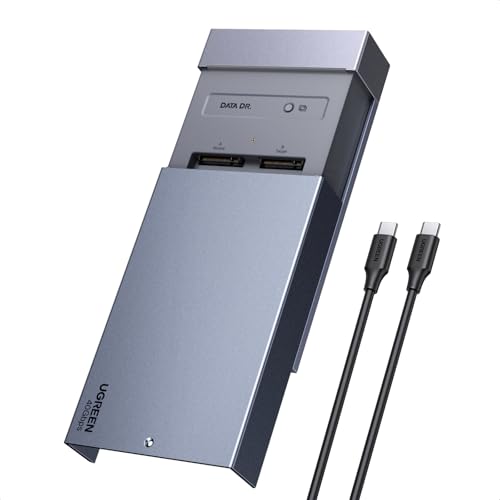
UGREEN 40Gbps Dual-Bay NVMe Cloner
Best for: high-speed workflows needing software RAID and active cooling
- Transfer Speed
- 40Gbps
- Offline Cloning
- One-click offline cloning
- Supported M.2 Sizes
- 2230/2242/2260/2280
- Maximum Capacity
- 16TB
- Cooling Type
- Aluminum alloy top shell, 40mm fan
- Interface
- NVMe
View on Amazon: UGREEN 40Gbps Dual-Bay NVMe Cloner Affiliate link
This dual-bay M.2 NVMe cloner connects at up to 40Gbps and duplicates drives offline with one click. It accommodates two SSDs up to 16TB total across 2230, 2242, 2260, and 2280 form factors. An aluminum top shell and internal 40mm fan provide active cooling, while software RAID support offers 0, 1, PM, and Union modes. It suits you if you need maximum interface throughput, managed thermals, and versatile multi-drive setups.
Pros
- 40Gbps USB-C data transfer speed
- Active cooling with an aluminum top shell and built-in 40mm fan
- Supports software RAID 0, 1, PM, and Union modes
- One-click offline cloning without a host computer
Cons
- Target drive capacity must be strictly larger than the source drive
- Does not support longer 22110 format SSDs
Good fit if
- You need 40Gbps interface throughput combined with PC-free cloning.
- You want active fan cooling to maintain lower drive temperatures.
- You intend to set up software RAID configurations across two NVMe drives.
Skip if
- You need to clone to a target drive of equal or smaller capacity.
- You use M.2 SATA drives or extra-long 22110 form factor NVMe cards.
Verdict: UGREEN 40Gbps Dual-Bay NVMe Cloner delivers high-speed 40Gbps operation, software RAID options, and active fan cooling for demanding data duplication tasks. It provides a comprehensive feature set for users requiring fast transfers and independent cloning.

ORICO Dual-Bay 20Gbps M.2 NVMe & SATA Dock
Best for: Silent same-protocol NVMe duplication
- Transfer Speed
- 20Gbps
- Supported Drive Types
- M.2 NVMe, M.2 SATA
- Bay Count
- 2
- Offline Cloning
- One-key offline clone
- Supported M.2 Sizes
- 2230, 2242, 2260, 2280
- Cooling Type
- Aluminum passive cooling
View on Amazon: ORICO Dual-Bay 20Gbps M.2 NVMe & SATA Dock Affiliate link
This ORICO dual-bay enclosure supports 20Gbps transfer speeds via USB 3.2 Gen 2x2. It offers one-key offline cloning for same-protocol drives, meaning NVMe to NVMe or SATA to SATA. The aluminum chassis provides passive cooling for silent operation. It accepts M.2 sizes from 2230 to 2280. You get tool-free installation and visual progress indicators. This unit suits users who need fast, quiet duplication without a PC connection.
Pros
- 20Gbps transfer speed via USB 3.2 Gen 2x2
- One-key offline cloning for same-protocol drives
- Silent aluminum passive cooling design
- Tool-free installation with smart LED progress
Cons
- 20Gbps speed is lower than the 40Gbps options on this list
- Cloning is restricted to same-protocol drives only
- No active fan cooling for extreme thermal loads
Good fit if
- You need faster 20Gbps speeds than standard 10Gbps docks
- You want silent operation without active fans
- You clone identical drive protocols frequently
Skip if
- You require 40Gbps transfer speeds
- You need to clone between NVMe and SATA protocols
- You prefer active fan cooling for heavy workloads
Verdict: ORICO 20Gbps Dual-Bay NVMe Enclosure delivers reliable same-protocol duplication with silent passive cooling. It fits users who prioritize quiet operation and tool-free swapping over maximum 40Gbps bandwidth.

SABRENT Dual-Bay SATA USB-C Cloner Dock
Best for: cloning 2.5-inch and 3.5-inch SATA drives
- Transfer Speed
- 5Gbps
- Supported Drive Types
- 2.5-inch & 3.5-inch SATA HDD/SSD
- Bay Count
- 2
- Offline Cloning
- One-button offline clone
- Interface
- SATA III
- Host Interface
- USB-C
View on Amazon: SABRENT Dual-Bay SATA USB-C Cloner Dock Affiliate link
This dual-bay docking station connects bare 2.5-inch and 3.5-inch SATA hard drives or SATA SSDs to your computer using a 5Gbps USB-C connection. It reads and writes to both bays simultaneously and includes standalone offline cloning at up to 60MBps without a PC. If you need to duplicate legacy SATA storage rather than NVMe drives, this unit handles your workflow directly.
Pros
- Supports both 2.5-inch and 3.5-inch SATA drives
- Standalone offline cloning operates without a host computer
- Mounts two drives at once over 5Gbps USB-C
- Tool-free hot-swappable bays with per-bay LED indicators
Cons
- No support for M.2 or NVMe SSDs
- Offline clone speed capped at 60MBps
- Maximum USB transfer rate limited to 5Gbps
Good fit if
- You want to duplicate or access standard 2.5-inch or 3.5-inch SATA drives.
- You need standalone, computer-free drive cloning.
- You require simultaneous access to two SATA disks over USB-C.
Skip if
- You need to clone or read M.2 NVMe drives.
- You require high-speed 10Gbps or 40Gbps data transfers.
Verdict: SABRENT Dual-Bay SATA HDD and SSD Dock serves users working with traditional 2.5-inch and 3.5-inch SATA drives instead of modern NVMe sticks. It provides straightforward standalone disk duplicating and dual-drive USB-C access up to 5Gbps.
Specifications side by side
| Spec | ORICO 40Gbps Dual-Bay NVMe Cloner Dock | SABRENT Dual-Bay NVMe Cloner Dock | StarTech.com M.2 NVMe to SATA Duplicator Dock | Pefishop Dual-Bay NVMe Cloner | UGREEN 40Gbps Dual-Bay NVMe Cloner | ORICO Dual-Bay 20Gbps M.2 NVMe & SATA Dock | SABRENT Dual-Bay SATA USB-C Cloner Dock |
|---|---|---|---|---|---|---|---|
| Transfer Speed | 40Gbps | 10Gbps | 10Gbps | 10Gbps | 40Gbps | 20Gbps | 5Gbps |
| Supported Drive Types | M-Key NVMe | PCIe NVMe M.2 SSD | M.2 NVMe, 2.5/3.5" SATA | M.2 NVMe | not stated | M.2 NVMe, M.2 SATA | 2.5-inch & 3.5-inch SATA HDD/SSD |
| Bay Count | 2 | 2 | Dual-bay | 2 | not stated | 2 | 2 |
| Offline Cloning | One-button offline cloning | One-button offline clone | Bidirectional | Offline clone | One-click offline cloning | One-key offline clone | One-button offline clone |
| Supported M.2 Sizes | 2230, 2242, 2260, 2280, 22110 | 2230, 2242, 2260, 2280 | 2242, 2260, 2280 | 2230, 2242, 2260, 2280, 22110 | 2230/2242/2260/2280 | 2230, 2242, 2260, 2280 | not stated |
| Maximum Capacity | 16TB | not stated | not stated | 2x8TB | 16TB | not stated | not stated |
| Cooling Type | Aluminum heatsinks, cooling fan | Aluminum body, built-in fan | Passive cooling | not stated | Aluminum alloy top shell, 40mm fan | Aluminum passive cooling | not stated |
| Interface | NVMe | SATA III | SATA III | NVMe | NVMe | NVMe | SATA III |
| Form Factor | M.2 2280 | M.2 2280 | M.2 2280 | M.2 2280 | M.2 | M.2 | 2.5 Inch |
| Cooling | not stated | Cooling Fan | not stated | not stated | not stated | not stated | not stated |
| Features | Offline Clone | Offline Clone | Offline Clone | Offline Clone, UASP | Offline Clone | Tool-Free, Offline Clone | Offline Clone |
| Material | not stated | not stated | not stated | not stated | not stated | Aluminum | not stated |
| Host Interface | USB-C | USB-C | USB-C | not stated | not stated | not stated | USB-C |
| Dimensions | 5.71 × 2.91 × 1.38 inches | 4.3 × 2.5 × 1.25 inches | 5.5 × 3.9 × 2.2 inches | not stated | 5.04 × 3.15 × 0.59 inches | not stated | 6.2 × 4 × 2.7 inches |
| Weight | not stated | 4 ounces | 10.9 ounces | not stated | not stated | not stated | 10 ounces |
| Size | IT28N | USB-C DUAL DOCK | not stated | not stated | not stated | not stated | 2-Bay SATA Dock – USB-C 5Gbps |
| Color | Silver | SILVER | Black | Grey | silver | not stated | Black |
| Model | IT28N-C | EC-SSD2 | N2-M2-SSD-DUPLICATOR | not stated | 65733US | N2-C | EC-CH2B |
If you need single-drive cooling hardware instead, review bykski b nvme ct m 2 SSD aluminum alternatives for your setup.
Frequently asked questions
Can these docks clone NVMe drives without a PC?
Yes, most options on this list support offline cloning. The ORICO 40Gbps model, SABRENT Dual-Bay dock, StarTech duplicator, Pefishop, and UGREEN all feature dedicated offline cloning modes. This allows you to duplicate drives by pressing a button, without connecting the device to a computer. You simply insert the source and target drives to begin the process.
Do I need active cooling for NVMe duplication?
Active cooling helps maintain stable speeds during long duplication tasks. The ORICO 40Gbps dock includes a built-in cooling fan and dual heatsinks. The SABRENT Dual-Bay dock also uses an active cooling fan. The UGREEN 40Gbps model features active fan cooling as well. These features manage heat when you are transferring large amounts of data at high speeds.
Which alternative supports cloning between NVMe and SATA drives?
The StarTech.com M.2 NVMe to SATA Duplicator Dock is designed for this specific task. It bridges the gap between NVMe and SATA III storage formats. This makes it ideal for IT professionals who need to image or migrate data between these different drive types. Other options on the list generally focus on cloning drives of the same interface type.
Are there options faster than 10Gbps?
Yes, several models offer 40Gbps transfer speeds. The ORICO 40Gbps Dual-Bay NVMe Cloner Dock and the UGREEN 40Gbps Dual-Bay NVMe Cloner both provide this high bandwidth. The ORICO Dual-Bay 20Gbps model offers an intermediate speed of 20Gbps. These faster interfaces reduce the time required to duplicate large NVMe drives compared to standard 10Gbps or 5Gbps enclosures.
Can I use these docks for 2.5-inch SATA drives?
Most listed docks are built for M.2 NVMe SSDs. However, the SABRENT Dual-Bay SATA USB-C Cloner Dock supports traditional 2.5-inch and 3.5-inch SATA drives. It provides standalone disk duplicating and dual-drive access up to 5Gbps. If you need to work with bulkier SATA drives, this is the specific alternative to choose over the M.2-focused models.
Is software RAID available on any of these docks?
The UGREEN 40Gbps Dual-Bay NVMe Cloner includes software RAID options. This feature allows you to configure the two drives for different performance or redundancy setups. While it still supports offline cloning, the RAID capability adds flexibility for users requiring advanced data management. Other models on the list focus primarily on standalone duplication and basic docking functions.
Which option is best for a tight budget?
The Pefishop Dual-Bay NVMe Cloner is listed as the best budget option. It provides a practical offline cloning solution for M.2 NVMe SSDs at a lower cost. It operates at 10Gbps, which is sufficient for users who prioritize standalone operation and tool-free drive access over maximum transfer rates. It delivers core cloning functionality without the premium features of higher-end models.