Netac vs 10Gtek Nvme SSDs: Which Brand Fits You?
As an Amazon Associate we earn from qualifying purchases. Links on this page are affiliate links.
You are looking at netac vs 10Gtek nvme SSD options, but these products serve very different needs. The Netac Z Slim is a portable external drive designed for everyday file storage and transfer. It connects via USB and fits in your pocket. The 10Gtek adapter is a PCIe switch card for servers and workstations. It expands a single slot to connect four U.2 NVMe drives. One is a consumer storage device; the other is enterprise infrastructure hardware.
Key differences
| Aspect | Netac Z Slim 250GB Portable SSD | 10Gtek Quad Port U.2 NVMe PCIe 3.0 Switch Adapter |
|---|---|---|
| Interface | USB 3.2 Gen 2 | PCIe 3.0 x8 |
| Form Factor | Portable External Drive | PCIe Switch Adapter Card |
| Primary Function | Direct Storage for Files | Expands Drive Connectivity |
| Max Read Speed | 550MB/s | not listed |
Which one should you choose?
Choose Netac Z Slim 250GB Portable SSD if
- You need a portable drive for documents and photos.
- You want a simple plug-and-play USB connection.
- You prefer a compact device that fits in a pocket.
Choose 10Gtek Quad Port U.2 NVMe PCIe 3.0 Switch Adapter if
- You are building a server or high-end workstation.
- You need to connect four U.2 NVMe drives to one slot.
- You require PCIe expansion without BIOS bifurcation settings.
Verdict: Choose the Netac Z Slim if you need simple, portable storage for daily files. Pick the 10Gtek adapter only if you are expanding server capacity with multiple U.2 drives. These products do not compete directly as they target entirely different use cases.
Netac vs 10Gtek: Key Differences
Primary Function
You need to understand what each device actually does before buying. The Netac Z Slim is a portable external SSD. It stores your daily files, photos, and documents in a pocket-sized form. It is a storage drive you carry with you. The 10Gtek product is not a drive. It is a PCIe switch adapter. It allows you to connect four U.2 NVMe SSDs to a computer. One is for storage; the other is for expansion hardware. They serve completely different roles in your setup.
Interface Type
Connection methods differ significantly between these two items. The Netac Z Slim uses a USB 3.2 Gen 2 interface. It connects via USB-C or USB-A using the included cable and adapter. This makes it plug-and-play for most modern laptops and desktops. The 10Gtek adapter uses a PCIe 3.0 x8 interface. It installs directly into a motherboard slot. It does not connect via USB. You must have an available PCIe slot on your motherboard to use this adapter for your drives.
Form Factor
Size and portability are major distinctions here. The Netac Z Slim measures 100 × 29.4 × 9mm and weighs about 30g. It is slim, lightweight, and designed to fit in a pocket or laptop bag. It is built for travel. The 10Gtek adapter is a full-height expansion card. It weighs 7.05 ounces and requires internal installation. It includes a standard bracket for tower cases or servers. It is not portable. You install it once and leave it there.
Capacity Options
Storage capacity is only relevant for the drive itself. The Netac Z Slim comes in specific sizes, with the listed model offering 250GB. You can choose from 250GB, 500GB, or 1TB variations. This gives you control over how much data you store. The 10Gtek adapter has no storage capacity. It is a controller board. It supports up to four U.2 SSDs, but you must buy those drives separately. The adapter itself holds no data. It only manages the connection for the drives you attach.
Speed Performance
Transfer speeds depend on the device type. The Netac Z Slim offers read speeds up to 550MB/s and write speeds up to 450MB/s. These are typical speeds for SATA-based portable SSDs. They are fast enough for daily file transfers and media editing. The 10Gtek adapter does not have its own read/write speed. It uses a Broadcom PEX8724 chipset to manage data flow. It ensures stability for connected U.2 drives. The actual speed depends on the NVMe drives you install in it, which are much faster than the Netac drive.
System Compatibility
Both products support a wide range of operating systems. The Netac Z Slim works with Windows, macOS, Linux, and Android. It is compatible with computers, phones, and tablets that have the right USB ports. The 10Gtek adapter supports Windows 11/10/8/7, Server versions, Linux distributions like Ubuntu and CentOS, FreeBSD, and VMware ESXi. It is designed for enterprise servers and high-end workstations. The Netac is for general consumers; the 10Gtek is for specialized IT environments.
Choose Your Netac Or 10Gtek Drive
Users needing portable daily file storage
The Netac Z Slim offers 250GB of capacity in a pocket-sized aluminum enclosure. It delivers read speeds up to 550MB/s and write speeds up to 450MB/s via USB 3.2 Gen 2. This makes it ideal for transferring photos, documents, and study materials across Windows, macOS, Linux, and Android devices without bulk.
Server admins adding U.2 NVMe drives
The 10Gtek adapter supports four U.2 NVMe SSDs through a PCIe 3.0 x8 interface. It uses a Broadcom PEX8724 chipset to manage lanes independently, ensuring stability for data-intensive workloads. It works on non-bifurcation motherboards, allowing you to expand storage in high-end workstations or enterprise servers without complex BIOS settings.
Professionals requiring cross-platform external drive
You need a lightweight drive that fits easily into a laptop bag. The Netac Z Slim weighs approximately 30g and measures 100 x 29.4 x 9mm. It includes a USB Type-C-to-A cable and adapter, ensuring compatibility with various computers. The aluminum alloy housing provides a solid feel for everyday carrying and handling.
The products compared
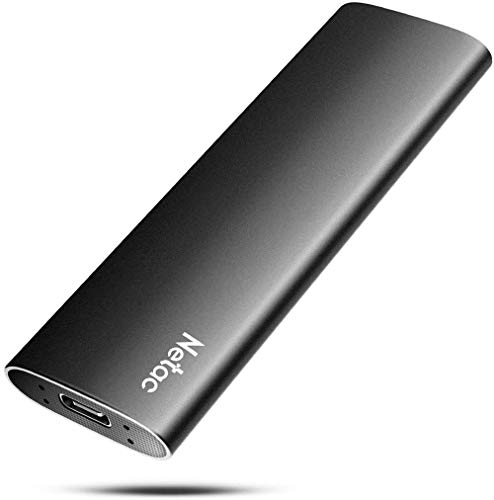
Netac Z Slim 250GB Portable SSD
Best for: compact portable storage for documents
- Storage Capacity
- 250GB
- Interface
- USB 3.2 Gen 2
- Form Factor
- Portable
- Max Read Speed
- 550MB/s
- Max Write Speed
- 450MB/s
- Compatibility
- Mac
View on Amazon: Netac Z Slim 250GB Portable SSD Affiliate link
The Netac ZSlim is a 250GB portable SSD with USB 3.2 Gen 2 connectivity. It offers read speeds up to 550MB/s and write speeds up to 450MB/s. The aluminum alloy enclosure weighs 30g and measures 100 × 29.4 × 9mm. It supports Windows, macOS, Linux, and Android. This drive suits users needing compact, reliable storage for daily files on the go.
Pros
- Read speeds up to 550MB/s via USB 3.2 Gen 2
- Lightweight aluminum alloy enclosure at 30g
- Compatible with Windows, macOS, Linux, and Android
- Includes USB Type-C-to-A cable and adapter
Cons
- 250GB capacity is limited for large media libraries
- No included USB-C to C cable
- Write speeds capped at 450MB/s
Good fit if
- You need a compact drive for documents and photos
- You use multiple operating systems like Windows and macOS
- You prioritize lightweight portability for travel
Skip if
- You require high-capacity storage over 500GB
- You need USB 3.1 Gen 2x2 speeds
- You want a drive with internal NAND caching
Verdict: Netac ZSlim 250GB Portable SSD is a practical portable drive for users who value compact size and cross-platform compatibility. It fits those who need reliable daily storage without bulk.

10Gtek Quad Port U.2 NVMe PCIe 3.0 Switch Adapter
Best for: connecting four U.2 NVMe drives without bifurcation
- Interface
- PCIe 3.0 x8
- Weight
- 7.05 ounces
View on Amazon: 10Gtek Quad Port U.2 NVMe PCIe 3.0 Switch Adapter Affiliate link
This 10Gtek adapter lets you connect four U.2 NVMe drives to a single PCIe slot. It uses the Broadcom PEX8724 switch chipset to manage lanes independently. You get PCIe 3.0 x8 connectivity without needing motherboard bifurcation settings. The card includes a full-height bracket for standard towers. It supports Windows, Linux, and VMware ESXi. This is a solid solution for adding multiple U.2 SSDs to high-end workstations or enterprise servers.
Pros
- Built-in Broadcom PEX8724 PCIe switch chipset for stable data throughput
- Supports non-bifurcation motherboards for easy installation in PCIe x8 or x16 slots
- Connects four U.2 SSDs simultaneously via SFF-8643 ports
- Compatible with Windows, Linux, FreeBSD, and VMware ESXi
Cons
- Does not support hot swapping
- Low-profile bracket is not included
- SFF-8643 to U.2 cables are sold separately
Good fit if
- You need to connect four U.2 NVMe drives to a server
- Your motherboard does not support PCIe bifurcation
- You are building a high-end workstation with multiple storage drives
Skip if
- You need hot-swappable drive bays
- You only have a low-profile case without the included bracket
- You are looking for a standard single-drive NVMe adapter
Verdict: 10Gtek Quad U.2 NVMe Adapter is a practical choice for users who need to expand storage with four U.2 drives without complex BIOS settings. It fits well in servers and workstations that require stable, multi-drive connectivity.
Specifications side by side
| Spec | Netac Z Slim 250GB Portable SSD | 10Gtek Quad Port U.2 NVMe PCIe 3.0 Switch Adapter |
|---|---|---|
| Storage Capacity | 250GB | not stated |
| Interface | USB 3.2 Gen 2 | PCIe 3.0 x8 |
| Form Factor | Portable | not stated |
| Max Read Speed | 550MB/s | not stated |
| Max Write Speed | 450MB/s | not stated |
| Compatibility | Mac | not stated |
| Material | Aluminum | not stated |
| Host Interface | USB-C | not stated |
| Dimensions | 3.9 × 1.1 × 0.35 inches | not stated |
| Weight | 1.06 ounces | 7.05 ounces |
| Size | 250 GB | (4x) SFF-8643 (PEX) |
| Color | Zslim | (4x) SFF-8643, PCIe X8 (PEX8724) |
| Model | Z Slim | NV9324-4I |
Frequently asked questions
Can I use the Netac Z Slim with my Mac?
Yes, the Netac Z Slim is compatible with Mac computers. You can connect it to your Mac using the included USB-C interface. This makes it a versatile option for users who switch between different operating systems. It ensures you can access your files regardless of your primary computer setup.
What is the exact size of the Netac Z Slim?
The Netac Z Slim measures 3.9 inches in length, 1.1 inches in width, and 0.35 inches in height. It weighs only 1.06 ounces. These dimensions make it extremely compact and easy to carry in a pocket or small bag. It is designed for users who prioritize portability above all else.
Does the 10Gtek adapter support PCIe 4.0?
No, the 10Gtek Quad Port U.2 NVMe adapter supports PCIe 3.0. It uses the PEX8724 chip to manage connections. This specification means it is designed for systems that utilize PCIe 3.0 standards. It is not intended for next-generation PCIe 4.0 bandwidth requirements.
How many U.2 drives can the 10Gtek adapter handle?
The 10Gtek adapter can connect four U.2 NVMe drives simultaneously. It features four SFF-8643 ports to accommodate these connections. This allows you to expand your storage capacity significantly without needing complex BIOS bifurcation settings. It is ideal for servers or workstations requiring multiple drive inputs.
Is the Netac Z Slim made of plastic or metal?
The Netac Z Slim features an aluminum enclosure. This material choice helps with heat dissipation and adds durability. The metal body also contributes to its sleek, professional appearance. It provides a sturdy housing for the internal components while keeping the overall weight low.
What interface does the 10Gtek adapter use for the host connection?
The 10Gtek adapter connects to the host system via PCIe x8. It utilizes the PEX8724 switch chip to manage the data flow. This interface allows for stable connectivity in server environments. It ensures that the four attached U.2 drives can communicate efficiently with the main system.