Lexar or XPG? Nvme SSDs Compared in 2026
As an Amazon Associate we earn from qualifying purchases. Links on this page are affiliate links.
This lexar vs XPG nvme SSD comparison looks at two distinct storage options for different system needs. Both drives offer faster performance than traditional hard drives, but they use different connection standards and physical shapes. The Lexar NS100 uses a standard SATA connection and a larger 2.5-inch form factor. The XPG SX8200 Pro uses a modern NVMe interface and a compact M.2 stick shape. You need to check your motherboard compatibility before buying either drive.
Key differences
| Aspect | Lexar NS100 128GB 2.5-Inch SATA SSD | XPG SX8200 Pro 512GB NVMe SSD |
|---|---|---|
| Interface | SATA III | PCIe NVMe Gen3x4 |
| Form Factor | 2.5 inch | M.2 2280 |
| Max Read Speed | 520 MB/s | 3500 MB/s |
| Max Write Speed | not listed | 3000 MB/s |
| NAND Type | not listed | 3D NAND |
Which one should you choose?
Choose Lexar NS100 128GB 2.5-Inch SATA SSD if
- You have an older laptop or desktop that only supports 2.5-inch SATA drives.
- You want a drive that fits in standard drive bays without needing an M.2 slot.
- You need a basic storage upgrade for everyday tasks like web browsing and document editing.
Choose XPG SX8200 Pro 512GB NVMe SSD if
- You have a modern motherboard with an available M.2 PCIe slot.
- You need high sequential read and write speeds for video editing or large file transfers.
- You want a compact drive that saves space inside your computer case.
Verdict: The Lexar NS100 is the practical choice for upgrading older systems that rely on SATA connections. The XPG SX8200 Pro offers significantly higher speeds for modern builds that support NVMe drives. Choose the Lexar if you are limited by older hardware interfaces, and pick the XPG if you need maximum performance and have compatible hardware.
Lexar vs XPG SSD Specs
Interface and Speed
The XPG SX8200 Pro uses a PCIe NVMe Gen3x4 interface, delivering sequential read speeds up to 3500 MB/s and write speeds up to 3000 MB/s. This connection allows for much higher data throughput compared to older standards. In contrast, the Lexar NS100 relies on a SATA III interface, which caps sequential read speeds at 520 MB/s. The SATA standard is older and physically limited in bandwidth. For users who need to move large files quickly, the NVMe connection on the XPG drive offers a significant performance advantage over the SATA connection on the Lexar model.
Form Factor
Physical size and shape determine where you can install these drives. The XPG SX8200 Pro comes in an M.2 2280 form factor, measuring approximately 3.15 inches in length and 0.87 inches in width. This small, stick-like shape fits directly into M.2 slots on modern motherboards. The Lexar NS100 is a 2.5-inch drive with a height of 0.28 inches and a width of 2.75 inches. This larger, boxier shape requires specific SATA data and power cables and a drive bay. The XPG is better for compact builds, while the Lexar suits systems with traditional drive bays.
NAND Type
The type of flash memory used affects endurance and efficiency. The XPG SX8200 Pro explicitly uses 3D NAND technology. This construction stacks memory cells vertically, often providing better performance and density. The Lexar NS100 data does not specify the NAND type. Without this information, we cannot confirm if it uses 3D NAND or a different architecture. Since the XPG clearly states its use of 3D NAND, it offers more transparency regarding its internal components. The Lexar leaves this detail unspecified in the provided specifications.
Storage Capacity
Both drives offer different base capacities in the compared models. The XPG SX8200 Pro is listed here with 512 GB of storage. The Lexar NS100 is shown with 128 GB. While the Lexar NS100 is available in larger sizes like 256 GB, 512 GB, and 1 TB, the specific unit compared has less space. The XPG provides four times the storage in this direct comparison. If you need more space without buying a larger model, the Lexar requires a different SKU. For the units listed, the XPG holds more data.
Compatibility
System compatibility varies significantly between these two drives. The XPG SX8200 Pro requires a motherboard with an M.2 slot that supports PCIe NVMe. It is explicitly stated as not compatible with Mac systems. The Lexar NS100 uses a standard SATA III connection, which is supported by almost all desktop and laptop computers, including older systems without M.2 slots. The Lexar is easier to install in legacy hardware. The XPG is limited to newer systems with specific M.2 NVMe support. The Lexar wins for broader general compatibility.
Which NVMe SSD suits your needs?
Budget desktop or laptop users
Choose the Lexar NS100 if you need a reliable 2.5-inch SATA drive for everyday tasks. Its 520 MB/s read speed improves boot times and application loads. The 128GB capacity fits basic storage needs, and the shock-resistant design protects your data without moving parts. It is a practical upgrade from a mechanical hard drive.
Content creators and gamers
Select the XPG SX8200 Pro for high-performance workloads like video editing or 3D rendering. Its PCIe NVMe Gen3x4 interface delivers up to 3500 MB/s read and 3000 MB/s write speeds. The 512GB capacity handles large files efficiently. This M.2 drive offers the throughput required for intense applications and fast data transfers.
Users with limited space
Pick the XPG SX8200 Pro if your system requires an M.2 2280 form factor. Its compact physical dimensions save space compared to bulkier 2.5-inch drives. The 3D NAND technology provides dense storage in a small package. This interface is ideal for modern motherboards that support PCIe NVMe slots for high-speed connectivity.
The products compared
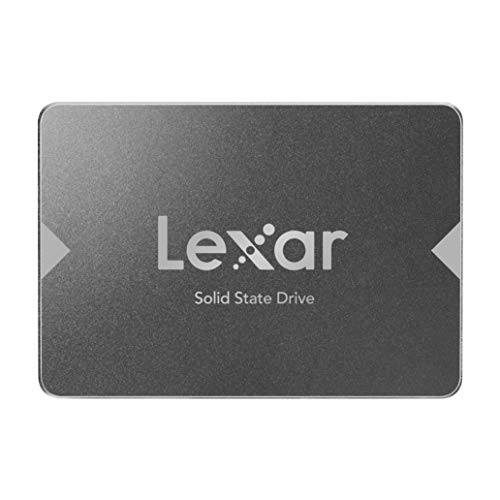
Lexar NS100 128GB 2.5-Inch SATA SSD
Best for: upgrading older SATA-based computers
- Storage Capacity
- 128GB
- Interface
- SATA III
- Form Factor
- 2.5"
- Max Read Speed
- 520MB/s
- Compatibility
- Laptop
- Dimensions
- 3.94 × 2.75 × 0.28 inches
View on Amazon: Lexar NS100 128GB 2.5-Inch SATA SSD Affiliate link
The Lexar NS100 is a 128GB 2.5-inch SATA SSD designed for older laptops and desktops. It offers sequential read speeds up to 520MB/s, significantly faster than traditional hard drives. The drive features 60TBW endurance and shock resistance due to its lack of moving parts. You will appreciate this drive if you need a reliable upgrade for legacy systems that do not support M.2 NVMe slots.
Pros
- SATA III interface ensures compatibility with most older motherboards
- Sequential read speeds reach up to 520MB/s
- 60TBW endurance rating for the 128GB capacity
- Shock and vibration resistant with no moving parts
Cons
- Limited to 128GB storage capacity
- SATA III interface is slower than NVMe standards
- Only 2.5-inch form factor available
Good fit if
- You are upgrading an older laptop or desktop with a SATA port
- You need a reliable drive for basic storage tasks
- You prefer a proven SATA interface over newer NVMe
Skip if
- You require high-speed NVMe performance for gaming or video editing
- You need more than 128GB of storage space
- Your system only supports M.2 NVMe drives
Verdict: Lexar 128GB NS100 2.5" SATA SSD is a solid choice for users with older systems that rely on SATA connections. It provides reliable performance for everyday computing tasks without the premium cost of NVMe drives.

XPG SX8200 Pro 512GB NVMe SSD
Best for: High-speed PC content creation
- Storage Capacity
- 512GB
- Interface
- PCIe NVMe Gen3x4
- Form Factor
- M.2 2280
- Max Read Speed
- 3500 MB/s
- Max Write Speed
- 3000 MB/s
- NAND Type
- 3D NAND
View on Amazon: XPG SX8200 Pro 512GB NVMe SSD Affiliate link
The XPG SX8200 Pro is a 512GB M.2 2280 drive using 3D NAND and a PCIe NVMe Gen3x4 interface. It offers sequential read speeds up to 3500 MB/s and write speeds up to 3000 MB/s. This makes it suitable for video editing and rendering tasks. It is not compatible with Mac systems. You should verify your motherboard supports PCIe NVMe M.2 slots before purchasing.
Pros
- Sequential read speeds up to 3500 MB/s
- Sequential write speeds up to 3000 MB/s
- Uses 3D NAND technology
- PCIe NVMe Gen3x4 interface
Cons
- Not compatible with Mac systems
- Requires motherboard support for PCIe NVMe M.2 slots
- Performance may vary based on system hardware
Good fit if
- You need fast sequential read and write speeds
- You are editing video or rendering 3D animations
- Your motherboard supports PCIe NVMe M.2 slots
Skip if
- You use a Mac system
- Your motherboard only supports SATA M.2 slots
- You need a 2.5-inch SATA drive
Verdict: XPG SX8200 Pro 512GB NVMe SSD delivers high-speed performance for content creators using compatible PC motherboards.
Specifications side by side
| Spec | Lexar NS100 128GB 2.5-Inch SATA SSD | XPG SX8200 Pro 512GB NVMe SSD |
|---|---|---|
| Storage Capacity | 128GB | 512GB |
| Interface | SATA III | PCIe NVMe Gen3x4 |
| Form Factor | 2.5" | M.2 2280 |
| Max Read Speed | 520MB/s | 3500 MB/s |
| Max Write Speed | not stated | 3000 MB/s |
| Compatibility | Laptop | not stated |
| NAND Type | not stated | 3D NAND |
| Size | 128GB | 512 GB |
| Dimensions | 3.94 × 2.75 × 0.28 inches | 3.15 × 0.87 × 0.14 inches |
| Weight | 1.2 ounces | not stated |
| Color | Gray | 512gb |
| Model | LNS100-128AMZN | XPGSSD |
Frequently asked questions
Which drive is better for older computers with SATA ports?
The Lexar NS100 is the correct choice. It uses a 2.5-inch form factor with a SATA III interface. This physical shape and connection standard fit directly into older desktops and laptops that lack M.2 slots. The XPG SX8200 Pro uses an NVMe interface, which requires a compatible motherboard slot that older systems typically do not have.
What is the main difference in interface between these two SSDs?
The Lexar NS100 relies on a SATA III connection. The XPG SX8200 Pro uses a PCIe NVMe Gen3x4 interface. NVMe interfaces allow for much higher data throughput and faster sequential read speeds. SATA III is an older standard that offers lower maximum speeds but remains widely supported in legacy hardware.
Which SSD is suitable for high-speed PC content creation?
The XPG SX8200 Pro is designed for this task. It delivers high sequential read speeds up to 3500 MB/s and write speeds up to 3000 MB/s. This performance handles large file transfers and complex editing workflows efficiently. The Lexar NS100 is a standard SATA drive with lower speeds, making it less ideal for demanding creative workloads.
Do these drives use the same physical size?
No, they have different form factors. The Lexar NS100 is a 2.5-inch drive, which is the standard size for traditional internal storage. The XPG SX8200 Pro is an M.2 2280 stick. The M.2 form factor is smaller and plugs directly into the motherboard. You must check your system specifications to see which physical shape your computer supports.
What type of NAND flash does the XPG drive use?
The XPG SX8200 Pro utilizes 3D NAND technology. This type of NAND allows for higher storage densities and improved performance compared to older planar NAND. The Lexar NS100 is a SATA drive, and its specific NAND type is not highlighted in the provided specifications. The 3D NAND in the XPG drive supports its high-speed NVMe performance.
Which drive is better for upgrading an older system?
The Lexar NS100 is the recommended option. It is explicitly noted as a solid choice for users with older systems relying on SATA connections. Its 2.5-inch size fits standard drive bays. The XPG SX8200 Pro requires an M.2 slot, which is not present in many older computers. Choose the Lexar drive for compatibility with legacy hardware.