KOOTION 1TB Shockproof Portable SSD vs KOOTION 1TB NVMe PCIe 3.0 (2026): Key Differences
As an Amazon Associate we earn from qualifying purchases. Links on this page are affiliate links.
This comparison covers the KOOTION 1TB shockproof portable SSD vs 1TB NVMe PCIe 3.0. Both drives offer 1TB of storage and use A+ memory chips for reliable performance. The main difference lies in their form factor and connection type. One is an external USB drive built for portability, while the other is an internal M.2 drive designed for direct motherboard installation. You need to decide which form factor fits your hardware setup.
Key differences
| Aspect | KOOTION 1TB Shockproof Portable SSD | KOOTION 1TB NVMe PCIe 3.0 SSD |
|---|---|---|
| Interface | USB 3.2 Gen 2x2 | PCIe Gen3x4 |
| Form Factor | Portable External | M.2 2280 Internal |
| Max Read Speed | 2000 MB/s | 3500 MB/s |
| Max Write Speed | 1800 MB/s | 3000 MB/s |
| Durability Features | Shockproof silicone case, metal body | Shock resistance, mechanical-free design |
Which one should you choose?
Choose KOOTION 1TB Shockproof Portable SSD if
- You need an external drive you can carry between devices.
- You want protection against drops and bumps for travel.
- You connect to devices via USB-C or USB-A ports.
Choose KOOTION 1TB NVMe PCIe 3.0 SSD if
- You are installing a drive inside a desktop or laptop.
- You require higher sequential read and write speeds.
- Your motherboard has an available M.2 slot.
Verdict: Choose the portable SSD if you need a rugged, plug-and-play solution for external use. Pick the NVMe PCIe 3.0 drive if you are upgrading the internal storage of a computer and want faster transfer rates. Your choice depends entirely on whether you need external mobility or internal performance.
KOOTION Portable vs Internal SSD Specs
Transfer Speed
The KOOTION 1TB NVMe PCIe 3.0 SSD offers higher sequential speeds than the portable model. It reaches up to 3500 MB/s for reads and 3000 MB/s for writes. This uses the PCIe 3.0x4 interface, which provides a wider data path for internal components. The KOOTION 1TB Shockproof Portable SSD tops out at 2000 MB/s read and 1800 MB/s write. It relies on USB 3.2 Gen 2x2 technology. While fast for an external drive, the internal NVMe drive moves data significantly quicker, especially for large file transfers or system booting.
Form Factor
These drives serve different physical needs. The KOOTION 1TB Shockproof Portable SSD is an external device with a portable form factor. It measures 3.68 inches in length, 2.03 inches in width, and 0.43 inches in height. It weighs 1.28 ounces and includes a protective silicone case. The KOOTION 1TB NVMe PCIe 3.0 SSD is an internal M.2 2280 drive. It is much smaller and designed to fit directly onto a motherboard. You cannot use the NVMe drive as a plug-and-play external unit without an enclosure, while the portable SSD is ready for immediate external use.
Build and Durability
The KOOTION 1TB Shockproof Portable SSD emphasizes physical protection. It features an all-metal body for heat dissipation and a removable silicone case that adds shockproof, drop-proof, and waterproof resistance. This makes it suitable for travel and rough handling. The KOOTION 1TB NVMe PCIe 3.0 SSD uses a mechanical-free design for shock resistance and silent operation. However, it lacks the explicit external casing or waterproofing features of the portable model. If you need a drive that survives drops and water exposure, the portable SSD has a clear advantage in physical resilience.
Compatibility
Portability defines the compatibility of the KOOTION 1TB Shockproof Portable SSD. It works with Windows, Mac, Linux, and Android systems. It includes USB-C to USB-C and USB-A cables, allowing connection to PCs, smartphones, tablets, and game consoles. The KOOTION 1TB NVMe PCIe 3.0 SSD is compatible with motherboards, desktops, and laptops that have an M.2 interface. It requires internal installation and cannot connect to mobile devices or consoles directly. If you need to move data between different types of devices, the portable SSD is the more versatile choice.
NAND Type
The KOOTION 1TB NVMe PCIe 3.0 SSD explicitly uses A+ TLC chips and 3D NAND flash memory technology. This helps accelerate gaming and improve efficiency for office tasks and video editing. The KOOTION 1TB Shockproof Portable SSD mentions backed by top-quality A+ memory chips. It does not specify whether the chips are TLC, QLC, or MLC, nor does it confirm the use of 3D NAND. For buyers who want to know the specific flash memory structure, the internal NVMe drive provides more detailed specifications regarding its NAND type.
Which drive fits your workflow
Creators needing fast external transfers
Choose the portable model if you move large files between devices. It delivers read speeds up to 2000 MB/s via USB 3.2 Gen 2x2. The shockproof metal body protects your data during travel. You get versatile compatibility with Windows, Mac, and Android systems for easy plug-and-play usage.
Users upgrading desktop or laptop storage
Pick the internal NVMe drive to boost system performance. It reaches sequential read speeds of 3500 MB/s using the PCIe 3.0x4 interface. This M.2 2280 form factor fits directly into motherboards, reducing latency for operating systems and games. It is designed for silent, stable internal operation.
Those prioritizing raw sequential speed
The internal NVMe SSD offers higher maximum throughput for large file transfers. With write speeds up to 3000 MB/s, it outperforms the portable drive. This speed advantage is ideal for video editing or heavy data workloads where sequential transfer rates matter most for your daily workflow efficiency.
People needing drop protection
Select the portable SSD if you need physical durability on the go. It features a shockproof, drop-proof, and waterproof silicone case. The all-metal body aids heat dissipation while resisting bumps. This design ensures your 1TB of data remains safe during transport across different environments.
The products compared

KOOTION 1TB Shockproof Portable SSD
Best for: Rugged external storage for media creators
- Storage Capacity
- 1TB
- Interface
- USB 3.2 Gen 2x2
- Form Factor
- Portable
- Max Read Speed
- 2000 MB/s
- Max Write Speed
- 1800 MB/s
- Compatibility
- Mac
View on Amazon: KOOTION 1TB Shockproof Portable SSD Affiliate link
This KOOTION drive is a 1TB external SSD built for durability and speed. It uses a USB 3.2 Gen 2x2 interface to reach read speeds of 2000 MB/s and write speeds of 1800 MB/s. The all-metal body with a silicone case offers shockproof protection. It works with Windows, Mac, Linux, and Android devices, making it a versatile option for transferring large files on the go.
Pros
- USB 3.2 Gen 2x2 interface supports up to 2000 MB/s read speed
- All-metal body with silicone case provides shockproof durability
- Compatible with Windows, Mac, Linux, and Android systems
- Includes USB-C to USB-C and USB-A cables
Cons
- External form factor requires a cable connection
- No internal PCIe slot for direct motherboard installation
- Thicker profile than internal M.2 drives
Good fit if
- You need a rugged drive for travel
- You want fast transfers for 8K video editing
- You need compatibility with multiple operating systems
Skip if
- You require an internal drive for a desktop PC
- You need a drive smaller than 1TB
- You prefer a drive without external cables
Verdict: KOOTION 1TB Shockproof Portable SSD delivers high-speed external storage with rugged protection. It fits users who move large media files between different devices and need reliable durability.
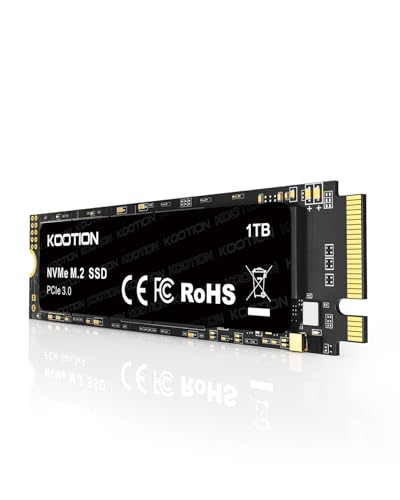
KOOTION 1TB NVMe PCIe 3.0 SSD
Best for: Upgrading laptops or desktops with M.2 slots
- Storage Capacity
- 1TB
- Interface
- PCIe Gen3x4
- Max Read Speed
- Up to 3500 MB/s
- Max Write Speed
- Up to 3000 MB/s
- Form Factor
- M.2 2280
- Compatibility
- Laptop
View on Amazon: KOOTION 1TB NVMe PCIe 3.0 SSD Affiliate link
This is a 1TB M.2 2280 internal SSD using PCIe 3.0 Gen 3x4. It offers sequential read speeds up to 3500 MB/s and write speeds up to 3000 MB/s. The drive uses 3D NAND flash and A+ TLC chips. It fits laptops and desktops with M.2 slots. You get fast data access and low latency for games or office work. It is a mechanical-free design for silent operation.
Pros
- Sequential read speeds up to 3500 MB/s
- Sequential write speeds up to 3000 MB/s
- M.2 2280 form factor for laptops and desktops
- Mechanical-free design for shock resistance and silence
Cons
- PCIe 3.0 interface is slower than PCIe 4.0 options
- No included heatsink for thermal management
- Limited to M.2 2280 slot compatibility
Good fit if
- You need a fast internal drive for a laptop or desktop
- You want high read speeds for gaming or video editing
- You prefer a silent, mechanical-free storage solution
Skip if
- You require PCIe 4.0 speeds over 3500 MB/s
- You need an external portable drive with a cable
- Your motherboard lacks an M.2 slot
Verdict: KOOTION 1TB NVMe PCIe 3.0 SSD delivers strong 3500 MB/s read speeds for users upgrading laptops or desktops with M.2 slots. It suits those prioritizing speed and silence over the latest PCIe 4.0 interface.
Specifications side by side
| Spec | KOOTION 1TB Shockproof Portable SSD | KOOTION 1TB NVMe PCIe 3.0 SSD |
|---|---|---|
| Storage Capacity | 1TB | 1TB |
| Interface | USB 3.2 Gen 2x2 | PCIe Gen3x4 |
| Form Factor | Portable | not stated |
| Max Read Speed | 2000 MB/s | Up to 3500 MB/s |
| Max Write Speed | 1800 MB/s | Up to 3000 MB/s |
| Compatibility | Mac | Laptop |
| Size | 1TB | 1TB |
| Protection | Shockproof | not stated |
| Host Interface | USB-C | not stated |
| Dimensions | 3.68 × 2.03 × 0.43 inches | not stated |
| Weight | 1.28 ounces | not stated |
| Color | Black | not stated |
| Model | KT-X1max-1TB | KOOTION-1TB-NVMe-PCIe3.0 |
Frequently asked questions
Can I use the KOOTION NVMe PCIe 3.0 SSD as an external drive?
No, this model is designed for internal installation only. It uses an M.2 2280 form factor that connects directly to a motherboard’s slot. You cannot plug it into a USB port without a specialized enclosure. The other KOOTION drive is built for external use with a USB-C connection.
Is the shockproof portable SSD compatible with Mac computers?
Yes, the KOOTION 1TB Shockproof Portable SSD supports Mac devices. It connects via a USB-C interface, which is standard for modern Apple hardware. This makes it a reliable choice for creators who need to move large media files between their Mac and other devices without compatibility issues.
What is the physical size of the KOOTION portable SSD?
The portable model measures 3.68 inches in length, 2.03 inches in width, and 0.43 inches in height. It weighs just 1.28 ounces. These compact dimensions allow it to fit easily into a pocket or bag, making it highly portable for users who travel frequently with their storage devices.
Does the internal NVMe SSD come with a heat sink?
The provided specifications do not mention a built-in heat sink for the KOOTION 1TB NVMe PCIe 3.0 SSD. It relies on its internal M.2 2280 design for thermal management. You should ensure your laptop or desktop has adequate airflow or consider adding a separate thermal pad if your system runs hot.
Which drive is better for protecting data during travel?
The KOOTION 1TB Shockproof Portable SSD is the better choice for travel. It features a rugged, shockproof metal body designed to withstand physical impacts. This durability protects your data when you are moving between locations. The internal NVMe drive lacks this external protection and is meant to stay inside a computer case.
Can I install the NVMe SSD in a desktop computer?
Yes, the KOOTION 1TB NVMe PCIe 3.0 SSD is suitable for desktop upgrades. It uses the M.2 2280 form factor, which is standard for most modern desktop motherboards. You can install it directly into an available M.2 slot to expand your storage capacity with high-speed PCIe 3.0 connectivity.
What interface does the portable SSD use for data transfer?
The portable SSD uses a USB-C host interface for data transfer. This connection type allows for high-speed communication with your devices. It supports USB 3.2 Gen 2x2 speeds, enabling you to move large files quickly compared to older USB standards. The USB-C port is reversible for easier plugging.
Is the KOOTION NVMe drive suitable for gaming laptops?
Yes, this drive is well-suited for gaming laptops with M.2 slots. It offers sequential read speeds up to 3500 MB/s, which helps load games and assets quickly. The PCIe 3.0x4 interface provides ample bandwidth for most modern games. It is a silent, internal upgrade that fits directly into your laptop.