KingSpec 512GB M.2 SATA III or KingSpec 256GB M.2 2242 PCIe 3.0 NVMe SSD? Which KingSpec Model to Buy
As an Amazon Associate we earn from qualifying purchases. Links on this page are affiliate links.
You are deciding between the kingspec 512gb m 2 sata iii vs 256gb m 2 2242 nvme SSD. Both drives offer a three-year warranty and support TRIM and S.M.A.R.T. for data reliability. The main difference lies in their interface and form factor. One uses a SATA connection in a standard 2280 size. The other uses a faster PCIe NVMe interface in a compact 2242 size. Your choice depends on your motherboard slots and speed needs.
Key differences
| Aspect | KingSpec 512GB M.2 SATA III SSD | KingSpec 256GB M.2 2242 PCIe 3.0 NVMe SSD |
|---|---|---|
| Interface | SATA III | PCIe 3.0 x 2 |
| Form Factor | M.2 2280 | M.2 2242 |
| Max Read Speed | 560MB/s | 1200MB/s |
| Max Write Speed | 540MB/s | 1000MB/s |
| Storage Capacity | 512GB | 256GB |
Which one should you choose?
Choose KingSpec 512GB M.2 SATA III SSD if
- You need more storage space for files and games.
- Your motherboard only supports M.2 SATA drives.
- You are upgrading a desktop or older laptop with a standard M.2 slot.
Choose KingSpec 256GB M.2 2242 PCIe 3.0 NVMe SSD if
- You want faster boot times and application loading speeds.
- Your device requires the shorter M.2 2242 form factor.
- You are installing a secondary drive in a mini PC or ultrabook.
Verdict: Choose the SATA model if you prioritize capacity and broad compatibility with older systems. Select the NVMe model if your device supports the smaller 2242 size and you need significantly higher sequential transfer speeds.
Speed, Size, and Slot Fit
Transfer speed
The KingSpec 256GB M.2 2242 NVMe SSD offers significantly higher sequential speeds than its SATA counterpart. It delivers up to 1200MB/s read and 1000MB/s write performance via PCIe Gen3x2. This interface allows for faster file transfers and quicker application loading. In contrast, the KingSpec 512GB M.2 SATA III SSD tops out at 560MB/s read and 540MB/s write. While still much faster than traditional hard drives, its SATA III connection imposes a lower ceiling. If raw throughput is your priority, the NVMe model provides a clear performance advantage for demanding tasks.
Storage capacity
Capacity is the primary differentiator for storage needs. The KingSpec 512GB M.2 SATA III SSD provides double the space of the NVMe option, offering 512GB of storage. This makes it ideal for users who need more room for games, photos, and large files without upgrading to a 1TB or 2TB model. The KingSpec 256GB M.2 2242 NVMe SSD offers 256GB, which is sufficient for an operating system and essential applications but fills up quickly with media. You must choose between more space on the SATA drive or faster speeds on the smaller NVMe drive.
Form factor
Physical dimensions determine which motherboard slot each drive can occupy. The KingSpec 512GB M.2 SATA III SSD uses the standard 2280 form factor, measuring 22mm by 80mm. This is the most common size for desktops and many laptops. The KingSpec 256GB M.2 2242 NVMe SSD is much shorter, measuring only 42mm in length. This compact 2242 size is designed for ultrabooks, mini PCs, and tight spaces where a full-length drive will not fit. You must check your device manual to ensure it supports the specific length and width you are considering.
Interface compatibility
Interface type dictates whether the drive will work in your specific slot. The KingSpec 512GB M.2 SATA III SSD requires an M.2 slot that supports the SATA III protocol. It will not function in NVMe-only slots, which are common on newer motherboards. The KingSpec 256GB M.2 2242 NVMe SSD uses a PCIe 3.0 x 2 interface. It requires an M.2 slot that supports NVMe protocols. Using the wrong type will result in the drive not being recognized. You must verify your motherboard supports the specific interface before purchasing either model.
Flash memory type
The type of NAND flash affects durability and performance characteristics. The KingSpec 256GB M.2 2242 NVMe SSD is built with 3D NAND flash memory. This technology stacks memory cells vertically, offering better endurance and density compared to planar NAND. The KingSpec 512GB M.2 SATA III SSD does not specify its NAND type in the provided data. While SATA drives often use similar technologies, the explicit mention of 3D NAND on the NVMe model suggests a focus on long-term reliability and data integrity under heavy workloads.
Choose the right KingSpec SSD for you
Users needing more storage space
You should choose the KingSpec 512GB M.2 SATA III SSD if storage capacity is your priority. It offers double the space of the NVMe model, holding 512GB of data. This drive uses the SATA III interface with sequential read speeds up to 560MB/s and write speeds up to 540MB/s. It fits standard M.2 2280 slots. Note that this drive is not compatible with NVMe-only motherboards or Mac computers.
Owners of compact laptops or mini PCs
If your device has limited space, pick the KingSpec 256GB M.2 2242 NVMe SSD. Its smaller 2242 form factor fits into ultrabooks and mini PCs where larger drives will not. It delivers faster performance with PCIe 3.0 x 2 interface, reaching 1200MB/s read and 1000MB/s write speeds. The single-sided design ensures it fits into tight motherboard slots without clearance issues.
Buyers wanting higher transfer speeds
Choose the KingSpec 256GB M.2 2242 NVMe SSD for faster data movement. Its PCIe 3.0 x 2 interface provides significantly higher bandwidth than SATA III. You get up to 1200MB/s read and 1000MB/s write speeds. This speed advantage helps with quick boot times and faster loading of games or large files. The drive also includes LDPC ECC and over-provisioning for sustained performance.
The products compared

KingSpec 512GB M.2 SATA III SSD
Best for: Upgrading PCs with M.2 SATA slots
- Storage Capacity
- 512GB
- Interface
- SATA III 6Gb/s
- Form Factor
- M.2 2280
- Max Read Speed
- 560MB/s
- Max Write Speed
- 540MB/s
- Compatibility
- Laptop, Desktop
View on Amazon: KingSpec 512GB M.2 SATA III SSD Affiliate link
This KingSpec drive uses the M.2 2280 form factor with a SATA III interface. It offers 512GB of storage and reaches up to 560MB/s read speeds. You must ensure your motherboard supports M.2 SATA, as it will not work in NVMe-only slots. It suits users upgrading older laptops or desktops who need more space than the 256GB NVMe option provides.
Pros
- 512GB storage capacity
- Up to 560MB/s read speed
- M.2 2280 form factor
- 3-year manufacturer warranty
Cons
- SATA III interface limits speed compared to NVMe
- Incompatible with NVMe-only motherboard slots
- Not compatible with Mac computers
Good fit if
- You need 512GB of storage space
- Your motherboard supports M.2 SATA slots
- You are upgrading an older PC or laptop
Skip if
- Your motherboard only supports NVMe slots
- You are using a Mac computer
- You need PCIe NVMe performance
Verdict: KingSpec 512GB M.2 SATA SSD is the right choice if you have an M.2 SATA slot and need double the storage of the 256GB NVMe alternative. It delivers reliable SATA speeds for general computing tasks.
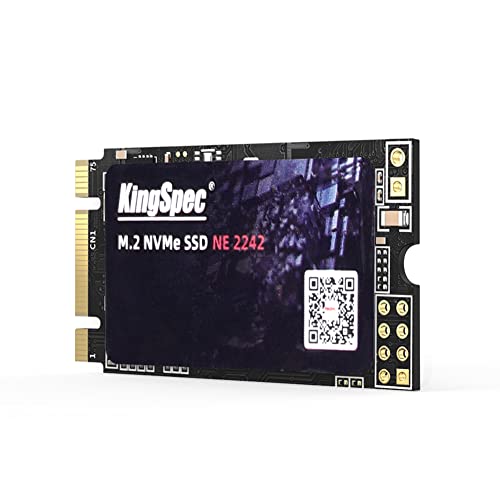
KingSpec 256GB M.2 2242 PCIe 3.0 NVMe SSD
Best for: tight laptop and mini PC upgrades
- Storage Capacity
- 256GB
- Interface
- PCIe 3.0 x2
- Form Factor
- M.2 2242
- Max Read Speed
- 1200MB/s
- Max Write Speed
- 1000MB/s
- Compatibility
- Laptop
View on Amazon: KingSpec 256GB M.2 2242 PCIe 3.0 NVMe SSD Affiliate link
This KingSpec drive uses PCIe 3.0 x 2 to reach 1200MB/s reads and 1000MB/s writes. Its M.2 2242 form factor fits tight spaces in laptops and mini PCs. You get 3D NAND durability and essential features like TRIM and wear leveling. It is a solid upgrade for older systems needing faster boot times and smaller footprints.
Pros
- Sequential read speeds up to 1200MB/s
- Compact M.2 2242 form factor
- Supports TRIM, S.M.A.R.T., and LDPC ECC
- Single-sided design for slim devices
Cons
- Limited to PCIe 3.0 x 2 interface
- Only 256GB storage capacity
- Smaller physical size than standard 2280 drives
Good fit if
- You need a small SSD for a mini PC
- Your laptop only accepts M.2 2242 slots
- You want faster boot times than SATA offers
Skip if
- You require maximum PCIe 3.0 x 4 speeds
- You need more than 256GB of space
- Your motherboard only supports M.2 2280 drives
Verdict: KingSpec 256GB M.2 2242 NVMe SSD is a practical option for users with space-constrained devices like ultrabooks or mini PCs who need a reliable, fast boot drive. It fits perfectly if your hardware supports the 2242 form factor.
Specifications side by side
| Spec | KingSpec 512GB M.2 SATA III SSD | KingSpec 256GB M.2 2242 PCIe 3.0 NVMe SSD |
|---|---|---|
| Storage Capacity | 512GB | 256GB |
| Interface | SATA III 6Gb/s | PCIe 3.0 x2 |
| Form Factor | M.2 2280 | M.2 2242 |
| Max Read Speed | 560MB/s | 1200MB/s |
| Max Write Speed | 540MB/s | 1000MB/s |
| Compatibility | Laptop, Desktop | Laptop |
| NAND Type | not stated | 3D NAND |
| Size | 512GB | 256GB |
| Dimensions | 3.15 × 0.87 × 0.14 inches | not stated |
| Weight | 0.35 ounces | not stated |
| Color | 22x80mm | 22x42mm |
| Model | NT-512 | 6d6f20d0-ccc5-44f5-b027-3a9c6e9a0ca0 |
Frequently asked questions
Can the KingSpec 512GB M.2 SATA III SSD fit in any M.2 slot?
No, it only fits M.2 slots that support the SATA protocol. This drive uses the M.2 2280 form factor, measuring 22 by 80 millimeters. You must verify that your motherboard has an available M.2 SATA slot, as many newer slots are NVMe-only and will not work with this interface.
Is the KingSpec 256GB NVMe SSD suitable for small form factor PCs?
Yes, it is designed for tight spaces. This model uses the M.2 2242 form factor, which is significantly shorter than standard drives. It measures only 22 by 42 millimeters, making it an ideal choice for mini PCs or ultrabooks where space is limited and standard 2280 drives do not fit.
Which KingSpec model offers faster file transfer speeds?
The KingSpec 256GB M.2 2242 NVMe SSD offers faster speeds. It utilizes the PCIe 3.0 interface, which provides higher bandwidth than the SATA III connection used by the 512GB model. This allows for quicker data movement between your storage and system memory during intensive tasks.
Does the KingSpec 512GB SATA drive support large file storage?
Yes, it provides double the capacity of the NVMe alternative. With 512GB of storage, it holds more documents, photos, and applications than the 256GB NVMe option. This makes it a practical choice if you need extra room for data without upgrading to a larger capacity drive.
What is the physical difference between the two KingSpec drives?
The primary difference is their length. The SATA SSD is an M.2 2280 drive, measuring 3.15 inches in length. The NVMe SSD is an M.2 2242 drive, which is much shorter. Both share the same width, but the length determines which motherboard slots or device bays they can occupy.
Can I use the KingSpec 256GB NVMe SSD in a desktop PC?
You can use it if your motherboard supports the M.2 2242 form factor. Most standard desktop motherboards provide M.2 2280 slots. You must check your motherboard specifications to confirm it accepts the shorter 2242 size. If your slot only fits 2280 drives, this NVMe model will not fit physically.