INLAND vs XPG: Nvme SSDs Compared by Specs
As an Amazon Associate we earn from qualifying purchases. Links on this page are affiliate links.
This INLAND vs XPG nvme SSD comparison highlights two distinct storage options. Both drives use 3D NAND flash memory for reliable data retention. The main difference lies in their connection standards. The INLAND model uses a SATA III interface, while the XPG drive utilizes a faster PCIe NVMe Gen3x4 connection. You need to match the drive to your motherboard's available slots and performance needs.
Key differences
| Aspect | INLAND Pro 120GB 2.5-Inch SATA SSD | XPG SX8200 Pro 512GB NVMe SSD |
|---|---|---|
| Interface | SATA III 6Gb/s | PCIe NVMe Gen3x4 |
| Form Factor | 2.5" 7mm | M.2 2280 |
| Max Read Speed | up to 520MB/s | 3500 MB/s |
| Max Write Speed | up to 410MB/s | 3000 MB/s |
| Warranty | 3 Year Limited | 5 Year |
Which one should you choose?
Choose INLAND Pro 120GB 2.5-Inch SATA SSD if
- You have an older desktop or laptop with only SATA ports.
- You need a budget-friendly upgrade for basic computing tasks.
- You prefer a drive with a 2.5-inch form factor for easy installation in standard bays.
Choose XPG SX8200 Pro 512GB NVMe SSD if
- You require high throughput for video editing or large file transfers.
- Your motherboard has an available M.2 slot supporting PCIe NVMe.
- You want a longer warranty period for peace of mind.
Verdict: Choose the INLAND drive if you are upgrading an older system with limited SATA connectivity. Select the XPG SX8200 Pro if your motherboard supports M.2 NVMe and you need significantly faster data transfer speeds.
INLAND vs XPG SSD Specs
Transfer speed
The XPG SX8200 Pro offers significantly higher sequential speeds than the INLAND Pro. The XPG drive reaches up to 3500 MB/s for reads and 3000 MB/s for writes. In contrast, the INLAND Pro tops out at 520 MB/s for reads and 410 MB/s for writes. This large gap means the XPG moves large files, such as video projects or game assets, much faster. The INLAND speed is typical for SATA drives and handles basic tasks well. If you edit high-resolution media or load heavy games frequently, the XPG performance advantage is clear and measurable.
Interface
Connection standards define how data travels between the drive and your system. The XPG SX8200 Pro uses a PCIe NVMe Gen3x4 interface. This allows for direct communication with the CPU, bypassing the slower SATA bottleneck. The INLAND Pro relies on a SATA III 6Gb/s interface. SATA is an older standard that limits maximum throughput. The PCIe NVMe connection on the XPG supports higher bandwidth and lower latency. This makes the XPG better suited for modern motherboards that support M.2 slots. The INLAND interface is compatible with a wider range of older systems that lack PCIe storage support.
Form factor
Physical dimensions determine which devices can accept these drives. The INLAND Pro is a 2.5-inch drive with a 7mm thickness. This is the standard size for desktops and many laptops with dedicated drive bays. The XPG SX8200 Pro is an M.2 2280 drive. It is a small stick that plugs directly into the motherboard. The M.2 form factor saves space and eliminates cables. You must check your motherboard for an available M.2 slot to use the XPG. The INLAND drive fits into traditional SATA bays found in most computers. Your choice depends on the available physical slots in your specific hardware.
NAND type
Both drives utilize 3D NAND flash memory for storage. This technology stacks memory cells vertically to increase density and improve efficiency. The INLAND Pro specifies 3D TLC NAND. The XPG SX8200 Pro also uses 3D NAND. This shared characteristic means both drives offer similar data retention and endurance profiles for general use. The 3D structure helps manage heat and power consumption better than older planar NAND. Since both products employ this modern flash architecture, neither has a distinct advantage in this category. You can expect comparable reliability from the memory cells in both the INLAND and XPG drives.
Compatibility
System requirements vary between the two interfaces. The XPG SX8200 Pro is not compatible with Mac systems and requires a motherboard with an M.2 slot that supports PCIe NVMe. You must verify your motherboard manual before purchasing. The INLAND Pro uses a standard SATA interface, which is supported by almost all PCs and laptops, including older models. It also works with many gaming consoles. The INLAND drive is the safer choice for mixed systems or older hardware. The XPG drive demands a modern PC with specific M.2 support. Check your system specifications carefully to ensure the drive fits your computer.
Which drive fits your needs?
Laptop or desktop upgrade with SATA port
Choose the INLAND Pro if your system relies on a standard SATA III connection. Its 2.5-inch form factor fits most traditional drives bays. The 520 MB/s read speed handles everyday tasks well. It is a practical choice for replacing older mechanical drives without needing new motherboard slots.
Content creator needing fast file transfers
Select the XPG SX8200 Pro for heavy workloads like video editing or 3D rendering. Its PCIe NVMe Gen3x4 interface delivers up to 3500 MB/s read speeds. This speed significantly reduces time waiting for large files to load or save. The M.2 2280 form factor saves space in modern builds.
User wanting maximum capacity and speed
The XPG drive offers larger capacity options up to 2 TB with much higher throughput. If you store large media libraries or games, the 3000 MB/s write speed keeps your system responsive. The NVMe protocol provides lower latency than SATA, making the system feel faster during intensive operations.
The products compared
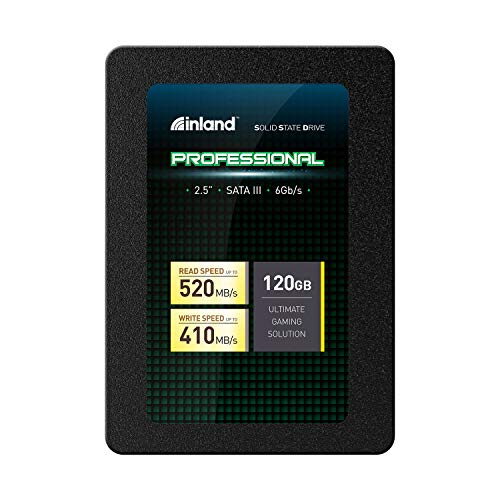
INLAND Pro 120GB 2.5-Inch SATA SSD
Best for: basic storage upgrades on older systems
- Storage Capacity
- 120GB
- Interface
- SATA III 6Gb/s
- Form Factor
- 2.5" 7mm
- Max Read Speed
- Up to 520MB/s
- Max Write Speed
- Up to 410MB/s
- Compatibility
- Laptop, Desktop
View on Amazon: INLAND Pro 120GB 2.5-Inch SATA SSD Affiliate link
The INLAND Pro 120GB is a 2.5-inch SATA III solid state drive built for mainstream PCs and laptops. It uses 3D TLC NAND flash and delivers sequential read speeds up to 520MB/s and write speeds up to 410MB/s. This drive offers a compact 7mm form factor and includes a 3-year limited warranty. It suits users needing basic storage upgrades for personal or business use without requiring high-end performance.
Pros
- SATA III 6Gb/s interface for reliable compatibility
- Sequential read speeds up to 520MB/s
- 3D TLC NAND flash for shock resistance
- Compact 2.5-inch 7mm form factor
Cons
- Small 120GB storage capacity
- Lower sequential write speed of 410MB/s
- Slower interface compared to NVMe drives
Good fit if
- You need a budget upgrade for an older laptop
- You want a reliable drive for basic file storage
- You are building a simple desktop PC
Skip if
- You require large storage for media libraries
- You need fast load times for modern gaming
- You want the highest possible transfer speeds
Verdict: INLAND Pro 120GB 2.5" SATA SSD is a practical entry-level drive for users who need basic storage expansion on a budget. It fits those prioritizing cost and compatibility over raw speed.

XPG SX8200 Pro 512GB NVMe SSD
Best for: PC users needing fast Gen3x4 NVMe performance
- Storage Capacity
- 512GB
- Interface
- PCIe NVMe Gen3x4
- Form Factor
- M.2 2280
- Max Read Speed
- 3500 MB/s
- Max Write Speed
- 3000 MB/s
- NAND Type
- 3D NAND
View on Amazon: XPG SX8200 Pro 512GB NVMe SSD Affiliate link
The XPG SX8200 Pro is a 512GB M.2 2280 NVMe drive using PCIe Gen3x4 and 3D NAND. It offers sequential read speeds up to 3500 MB/s and write speeds up to 3000 MB/s. This interface delivers faster data transfer than SATA options. It suits users needing quick load times for editing or gaming. The drive fits standard M.2 slots on compatible motherboards.
Pros
- Sequential read speed up to 3500 MB/s
- Sequential write speed up to 3000 MB/s
- Uses PCIe NVMe Gen3x4 interface
- Built with 3D NAND flash memory
Cons
- Not compatible with Mac systems
- Requires motherboard M.2 slot to support PCIe NVMe
- Not compatible with SATA M.2 2280 slots
Good fit if
- You need high sequential read speeds for video editing
- You want faster performance than SATA drives provide
- You have a PC motherboard with an NVMe M.2 slot
Skip if
- You own a Mac computer
- Your motherboard only supports SATA M.2 slots
- You require a drive compatible with non-NVMe M.2 slots
Verdict: XPG SX8200 Pro 512GB NVMe SSD provides strong Gen3x4 speeds for PC users. It fits those upgrading storage for intensive tasks who have compatible NVMe slots.
Specifications side by side
| Spec | INLAND Pro 120GB 2.5-Inch SATA SSD | XPG SX8200 Pro 512GB NVMe SSD |
|---|---|---|
| Storage Capacity | 120GB | 512GB |
| Interface | SATA III 6Gb/s | PCIe NVMe Gen3x4 |
| Form Factor | 2.5" 7mm | M.2 2280 |
| Max Read Speed | Up to 520MB/s | 3500 MB/s |
| Max Write Speed | Up to 410MB/s | 3000 MB/s |
| Compatibility | Laptop, Desktop | not stated |
| NAND Type | 3D NAND, TLC | 3D NAND |
| Dimensions | 3.94 × 2.75 × 0.28 inches | 3.15 × 0.87 × 0.14 inches |
| Size | 120GB | 512 GB |
| Color | 120GB | 512gb |
| Model | 4335233676 | XPGSSD |
Frequently asked questions
Is the INLAND Pro a true NVMe drive?
No, it is not. The INLAND Pro uses a SATA III interface, not NVMe. It connects via a 2.5-inch form factor. This limits its speed compared to modern NVMe drives. You should only choose this model if your system lacks an M.2 slot or requires SATA compatibility.
What interface does the XPG SX8200 Pro use?
The XPG SX8200 Pro uses an NVMe interface. It fits into an M.2 2280 slot on your motherboard. This allows for faster data transfer than SATA drives. It is designed for users who need high performance for intensive computing tasks.
Do both drives use the same type of memory?
Yes, both drives use 3D NAND flash memory. This technology offers better density and reliability than older planar NAND. You get consistent performance and data retention from either brand. The difference lies in how they connect to your system, not the memory type itself.
Which drive is better for older computers?
The INLAND Pro is better for older systems. Its 2.5-inch form factor fits standard drive bays. Older motherboards often lack M.2 slots for NVMe drives. The SATA III connection ensures compatibility with legacy hardware. It provides a practical upgrade path for these machines.
Does the XPG drive fit in laptops?
It depends on your laptop model. The XPG SX8200 Pro uses an M.2 2280 form factor. Many modern laptops support this slot. Check your device manual for M.2 compatibility. The INLAND Pro is too large for most laptop bays due to its 2.5-inch size.
What is the main difference between these two SSDs?
The main difference is the connection standard. The INLAND Pro uses SATA III, while the XPG SX8200 Pro uses NVMe. This affects speed and physical fit. NVMe drives offer higher throughput for compatible systems. SATA drives remain useful for older or basic storage needs.