INLAND vs Transcend: Nvme SSDs Compared by Specs
As an Amazon Associate we earn from qualifying purchases. Links on this page are affiliate links.
You are comparing INLAND vs transcend nvme SSD options, though both drives actually use SATA III interfaces rather than NVMe. They share the same 120GB capacity and 3D TLC NAND flash. The main difference lies in their physical form factors and speed ratings. One uses a traditional 2.5-inch shape, while the other fits into compact M.2 slots. This guide breaks down the spec sheets to help you choose the right drive for your system.
Key differences
| Aspect | INLAND Pro 120GB 2.5-Inch SATA SSD | Transcend 120GB M.2 2242 SATA SSD |
|---|---|---|
| Form Factor | 2.5-inch 7mm | M.2 2242 |
| Interface | SATA III 6Gb/s | SATA III 6GB/s |
| Max Read Speed | up to 520MB/s | up to 560MB/sec |
| Max Write Speed | up to 410MB/s | up to 500MB/sec |
| Cache Type | not listed | SLC Cache |
Which one should you choose?
Choose INLAND Pro 120GB 2.5-Inch SATA SSD if
- You need a drive that fits standard 2.5-inch drive bays in desktops or older laptops.
- Your motherboard lacks M.2 slots or you prefer the security of a cased drive.
- You want a widely available option with multiple capacity variations including bulk packs.
Choose Transcend 120GB M.2 2242 SATA SSD if
- You are building or upgrading a compact laptop or mini PC with M.2 slots.
- You want slightly higher sequential read and write speeds according to the spec sheet.
- You prefer a drive that explicitly lists SLC Cache for potential performance benefits.
Verdict: Choose the INLAND Pro if your system requires a standard 2.5-inch drive bay or if you prioritize a rugged, cased form factor. Select the Transcend MTS420S if you are working with a compact system that uses M.2 2242 slots and you want the slightly higher published transfer speeds. Both drives offer reliable SATA III performance for basic storage upgrades.
INLAND vs Transcend SATA SSD Specs
Transfer speed
You get different sequential performance numbers from each drive. The Transcend MTS420S lists a maximum read speed of 560MB/s and a write speed of 500MB/s. The INLAND Pro offers a maximum read speed of 520MB/s and a write speed of 410MB/s. This means the Transcend drive is faster for both reading large files and writing new data. If you move big files often, the higher numbers on the Transcend model matter. The INLAND drive is still quick for general tasks, but the Transcend edge is clear in raw throughput metrics provided by the manufacturers.
Form factor
The physical shape of these drives is completely different, which dictates where you can install them. The INLAND Pro is a 2.5-inch drive with a 7mm thickness, fitting into standard desktop and laptop bays. The Transcend is an M.2 2242 drive, which is much smaller and sticks directly onto the motherboard. You must check your device to see which slot it has. A standard laptop bay takes the INLAND. A modern thin laptop or mini PC likely needs the Transcend M.2 slot. They are not interchangeable without an adapter.
Cache type
Cache helps the SSD manage data efficiently during bursts of activity. The Transcend MTS420S explicitly lists SLC Cache in its specifications. This type of cache can help maintain higher speeds when writing smaller files or when the main TLC NAND becomes full. The INLAND Pro specifications do not mention any specific cache technology. It relies on its 3D TLC NAND for performance. For users who do many small file writes, the explicit SLC Cache on the Transcend drive is a technical advantage that the INLAND drive does not advertise.
NAND type
Both drives use the same type of memory chip for storage. The INLAND Pro uses 3D TLC NAND flash. The Transcend MTS420S also uses premium 3D TLC NAND flash memory chips. This is a tie in terms of the core storage technology. 3D TLC offers a good balance of capacity and endurance for most users. Since both products rely on this same architecture, there is no performance difference to highlight here based solely on the NAND type. You get similar underlying storage characteristics from both brands.
Compatibility
Both drives use the SATA III 6Gb/s interface, which is a standard connection for older and many newer systems. However, the connector type differs. The INLAND uses a standard SATA power and data connector, fitting any device with a 2.5-inch bay. The Transcend uses an M.2 B+M Key connector. This requires a motherboard with an M.2 slot that supports SATA signals. Many M.2 slots only support NVMe. You must verify your motherboard supports SATA over M.2. The INLAND is easier to fit in legacy systems, while Transcend requires specific M.2 support.
Which SSD fits your system best
Users with tight M.2 2242 slots
This Transcend drive uses a compact M.2 2242 form factor. It fits into smaller laptops and mini PCs where standard 2.5-inch drives will not fit. The SATA III interface ensures compatibility with most modern motherboards that support M.2 SATA connections. You get a reliable storage solution designed specifically for space-constrained systems without needing extra mounting hardware or adapters.
Users needing standard 2.5-inch drive bay
This INLAND drive uses a standard 2.5-inch form factor. It fits into most desktop computers and larger laptops that have a dedicated drive bay. The 7mm thickness is compatible with most chassis. You get a familiar installation process using standard SATA cables and screws. This option is ideal if you are upgrading an older PC or a desktop tower that lacks M.2 slots.
Users prioritizing higher sequential speeds
The Transcend MTS420S lists higher maximum speeds for both reading and writing data. It offers up to 560MB/s read and 500MB/s write performance. The INLAND Pro offers 520MB/s read and 410MB/s write. If you transfer large files frequently, the Transcend specs suggest faster data movement. The SLC cache also helps maintain performance during sustained writes compared to the INLAND drive.
The products compared
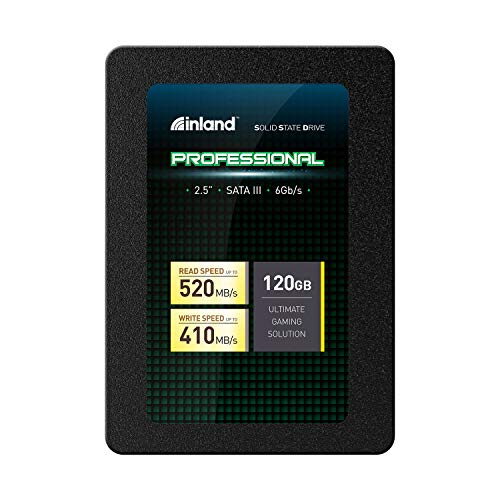
INLAND Pro 120GB 2.5-Inch SATA SSD
Best for: Budget 2.5-inch SATA upgrades
- Storage Capacity
- 120GB
- Interface
- SATA III 6Gb/s
- Form Factor
- 2.5" 7mm
- Max Read Speed
- Up to 520MB/s
- Max Write Speed
- Up to 410MB/s
- Compatibility
- Laptop, Desktop
View on Amazon: INLAND Pro 120GB 2.5-Inch SATA SSD Affiliate link
The INLAND Pro 120GB is a 2.5-inch SATA III drive built with 3D TLC NAND flash. It offers sequential read speeds up to 520MB/s and write speeds up to 410MB/s. This compact 7mm unit fits mainstream PCs and laptops. It provides shock resistance and silent operation. You should choose this drive if you need a reliable, budget-friendly upgrade for older systems or basic storage needs.
Pros
- SATA III 6Gb/s interface for fast boot-up and file transfers
- Sequential read speed up to 520MB/s
- 3D TLC NAND flash resistant to shock and vibration
- Slim 7mm form factor fits most laptops
Cons
- 120GB capacity is limited for modern workloads
- No NVMe interface for higher throughput
- SATA III speed ceiling restricts performance
Good fit if
- You are upgrading a desktop or laptop with a 2.5-inch bay
- You need silent operation without moving parts
- You want a cost-effective solution for basic storage
Skip if
- You require NVMe M.2 speeds
- You need more than 120GB of space
- You are building a high-performance gaming rig
Verdict: INLAND Pro 120GB 2.5" SATA SSD delivers solid SATA III performance for everyday tasks. It fits users who prioritize reliability and silence over raw speed or large capacity.
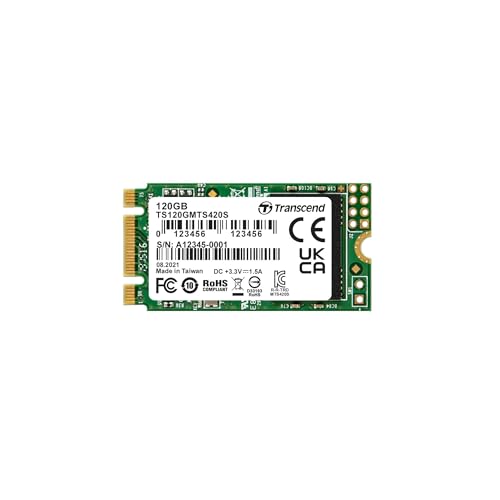
Transcend 120GB M.2 2242 SATA SSD
Best for: Compact M.2 2242 SATA upgrades
- Storage Capacity
- 120GB
- Interface
- SATA III 6GB/s
- Max Read Speed
- 560MB/sec
- Max Write Speed
- 500MB/sec
- Cache Type
- SLC Cache
- Form Factor
- M.2 2242
View on Amazon: Transcend 120GB M.2 2242 SATA SSD Affiliate link
The Transcend MTS420S is a 120GB M.2 2242 SSD using SATA III 6GB/s. It offers read speeds up to 560MB/sec and write speeds up to 500MB/sec. The drive uses 3D TLC NAND with SLC Cache. It supports Trim, s.M.A.R.T., and NCQ. This compact drive fits small form factor builds. You get a 3-year warranty for peace of mind.
Pros
- SATA III 6GB/s interface
- 560MB/sec read speed
- SLC Cache technology
- 3-year warranty
Cons
- 120GB capacity is small
- M.2 2242 size limits compatibility
- No NVMe speeds
Good fit if
- You need a compact M.2 2242 drive
- You are upgrading an older SATA system
- You want a reliable 3-year warranty
Skip if
- You need large storage capacity
- Your motherboard only supports M.2 2280
- You require NVMe performance
Verdict: Transcend MTS420S 120GB M.2 SATA SSD is a solid choice for small form factor builds. It fits users who prioritize compact size and SATA reliability over raw speed or large capacity.
Specifications side by side
| Spec | INLAND Pro 120GB 2.5-Inch SATA SSD | Transcend 120GB M.2 2242 SATA SSD |
|---|---|---|
| Storage Capacity | 120GB | 120GB |
| Interface | SATA III 6Gb/s | SATA III 6GB/s |
| Form Factor | 2.5" 7mm | not stated |
| Max Read Speed | Up to 520MB/s | 560MB/sec |
| Max Write Speed | Up to 410MB/s | 500MB/sec |
| Cache Type | not stated | SLC Cache |
| Compatibility | Laptop, Desktop | Laptop, Desktop |
| NAND Type | 3D NAND, TLC | not stated |
| Dimensions | 3.94 × 2.75 × 0.28 inches | 0.87 × 0.15 × 3.15 inches |
| Size | 120GB | 120GB |
| Color | 120GB | Multicoloured |
| Model | 4335233676 | TS120GMTS420S |
Frequently asked questions
Are these INLAND and Transcend drives actually NVMe?
No, despite the search term, both drives use the SATA III interface. The INLAND Pro is a 2.5-inch SATA SSD, while the Transcend model is an M.2 2242 SATA SSD. Neither uses the NVMe protocol. You will get standard SATA speeds, not the higher bandwidth associated with NVMe drives.
Which drive is better for a small laptop?
The Transcend MTS420S is the better choice for compact laptops. It uses an M.2 2242 form factor, which fits into tight spaces where a standard 2.5-inch drive cannot. The INLAND Pro requires a 2.5-inch bay, making it suitable only for desktops or larger laptops with dedicated drive bays.
Do both SSDs use the same NAND flash type?
Yes, both drives utilize 3D NAND technology. The INLAND Pro specifies 3D NAND for its storage cells. The Transcend MTS420S also relies on this same NAND architecture. This shared technology helps ensure comparable reliability and endurance characteristics for everyday computing tasks on both units.
Can I use the Transcend drive in a desktop PC?
You can use the Transcend drive if your motherboard has an M.2 slot that supports SATA signals. It is a 2242 size, so you need a slot that accepts that specific length. If your desktop only has 2.5-inch bays, the INLAND Pro is the more compatible option for direct installation.
Is there a difference in physical dimensions?
Yes, the form factors differ significantly. The INLAND Pro measures 3.94 inches in length and 2.75 inches in width. The Transcend drive is much smaller at 3.15 inches in length and 0.87 inches in width. These dimensions dictate which computer chassis or motherboard slots can accommodate each drive.
Which drive includes SLC caching?
The Transcend MTS420S explicitly lists SLC Cache in its attributes. This caching method can help maintain higher write speeds during burst transfers. The provided data for the INLAND Pro does not mention SLC caching, so you should assume it relies on standard TLC caching or no explicit cache layer.
Do these SSDs support NVMe protocol?
No, neither drive supports the NVMe protocol. Both are built on the SATA III interface. The INLAND Pro is a traditional 2.5-inch SATA drive. The Transcend MTS420S is an M.2 SATA drive. You will not see the performance benefits of NVMe, such as lower latency or higher parallelism.