Looking Beyond the ICY BOX Triple-Bay NVMe & SATA? 6 Alternatives Worth a Look
As an Amazon Associate we earn from qualifying purchases. Links on this page are affiliate links.
The ICY BOX Triple-Bay NVMe & SATA Cloner Dock offers three independent slots for simultaneous drive access and one-touch offline cloning. It supports cross-format transfers between M.2 NVMe and 2.5/3.5-inch SATA media at 10 Gbps speeds. If you are searching for icy box m 2 nvme sata alternatives, you may need a different form factor or interface configuration. Some users prefer dual-bay designs for compact setups, while others require dedicated NVMe-only duplication or high-capacity multi-drive arrays.
The alternatives listed here were chosen because their specifications overlap with the original product’s core capabilities. Each option provides offline cloning and high-speed USB-C connectivity. However, they differ in bay count, supported drive types, and physical dimensions. You might select a dual-bay model for portability or a 10-bay station for bulk media management. These variations allow you to match the hardware precisely to your workflow requirements without compromising on essential transfer speeds.
How the alternatives compare
ICY BOX M.2 NVMe & SATA SSD/HDD Dock
This ICY BOX model replaces the triple-bay setup with a compact dual-slot design focused on M.2 NVMe and 2.5-inch SATA drives. It maintains the same 10 Gbps transfer speed and one-touch offline cloning feature found in the original. The primary difference is form factor. It lacks the third bay for 3.5-inch drives, making it smaller and lighter at 5.47 ounces. This version is ideal if you primarily work with M.2 SSDs and do not need to manage large desktop hard drives. It offers the same cross-format cloning versatility in a more portable package.
ICY BOX M.2 NVMe & SATA Cloner Dock
The budget ICY BOX option strips the triple-bay complexity down to a dual-bay configuration. It retains the 10 Gbps transfer rate and standalone offline cloning capabilities for mixed NVMe and SATA drives. You lose the third slot for simultaneous access but gain a lower price point and a slimmer profile. This dock is suited for users who need to clone between formats but do not require accessing three drives at once. It keeps the tool-free design and LED progress indicators, ensuring straightforward operation without the bulk of the original triple-bay unit.
SABRENT Dual-Bay NVMe Cloner Dock
SABRENT offers a dual-bay solution that focuses exclusively on PCIe M.2 NVMe drives. It omits SATA support entirely, which simplifies the hardware but limits compatibility. This dock includes an active fan for cooling, a feature absent in the original ICY BOX. It is best for professionals who only clone NVMe drives and need sustained thermal management during long duplication tasks. The silver finish and compact 4-ounce weight make it distinct from the black, heavier ICY BOX model. Choose this if SATA is unnecessary and you prioritize cooling for high-speed NVMe operations.
SABRENT Dual-Bay SATA USB-C Cloner Dock
This SABRENT dock is designed solely for 2.5 and 3.5-inch SATA drives. It lacks NVMe support, so it cannot handle the cross-format cloning that defines the original ICY BOX. The transfer speed is limited to 5 Gbps via USB-C, which is half the speed of the original. It is a practical choice if you only need to clone or access SATA media. The larger footprint and 10-ounce weight reflect its focus on bulkier drives. Select this alternative if your workflow involves only SATA storage and you do not require NVMe connectivity or faster 10 Gbps transfers.
SABRENT 10-Bay USB-C SATA Docking Station
The SABRENT 10-Bay dock scales up significantly for high-capacity workflows. It supports ten 3.5-inch SATA drives, offering massive expansion compared to the original three-bay limit. It features active dual-fan cooling and independent bay controls for managing large backup sets. The transfer speed reaches 10 Gbps over USB-C, matching the original. However, it is strictly for SATA drives and lacks NVMe support. This unit is for users who need to manage dozens of drives simultaneously. It is much larger and heavier, making it unsuitable for portable use but ideal for stationary desktop storage expansion.
SABRENT Lay-Flat NVMe and SATA Dock
SABRENT provides a lay-flat design that supports both M.2 NVMe and 2.5/3.5-inch SATA drives. It matches the original’s 10 Gbps speed and offline cloning capability. The key difference is the horizontal orientation and tool-free access for all drive types. It offers similar cross-format flexibility but in a different physical form factor. This dock is suitable if you prefer a low-profile setup or need to switch between NVMe and SATA media frequently. It lacks the third bay of the original, limiting simultaneous access to two drives. Choose this for efficient desktop space usage with broad drive compatibility.
Quick picks
Our 7 picks

ICY BOX Triple-Bay NVMe & SATA Cloner Dock
Best for: offline cross-format drive cloning and transfers
- Transfer Speed
- 10Gbps
- Supported Drive Types
- M.2 NVMe, 2.5"/3.5" SATA
- Bay Count
- 3
- Offline Cloning
- One-touch offline cloning
- Interface
- SATA III
- Form Factor
- 2.5 Inch
View on Amazon: ICY BOX Triple-Bay NVMe & SATA Cloner Dock Affiliate link
This ICY BOX docking station gives you three independent drive bays supporting M.2 PCIe NVMe SSDs alongside 2.5-inch and 3.5-inch SATA drives. It runs on a USB 3.2 Gen 2 host interface delivering up to 10 Gbps transfer speeds. A standalone one-touch offline cloning function lets you duplicate data between drives without a computer. It suits you if you frequently migrate files across mixed storage form factors.
Pros
- One-touch offline cloning without a host computer connection
- Triple-bay design supports M.2 NVMe, 2.5-inch SATA, and 3.5-inch SATA drives
- USB 3.2 Gen 2 interface delivers transfer speeds up to 10 Gbps
- Includes combo USB-C/USB-A cable and dedicated power adapter
Cons
- Requires an external power adapter to operate
- Open-bay upright slot design leaves inserted drives exposed
Good fit if
- You need to clone data between SATA and NVMe drives without a PC.
- You manage mixed storage form factors including 2.5-inch, 3.5-inch, and M.2 drives.
- You want simultaneous access to three drives over a single 10 Gbps USB-C connection.
Skip if
- You only handle M.2 NVMe drives and prefer a pocket-sized enclosure.
- You need more than three active drive bays at once.
Verdict: ICY BOX Triple-Bay NVMe & SATA Dock combines three multi-format drive slots with 10 Gbps host speeds and PC-free cloning. It handles data migrations across NVMe and SATA media without extra software.

ICY BOX M.2 NVMe & SATA SSD/HDD Dock
Best for: offline cloning SATA and NVMe drives to NVMe
- Transfer Speed
- 10Gbps
- Supported Drive Types
- M.2 NVMe, M.2 SATA, 2.5"/3.5" SATA
- Offline Cloning
- One-touch offline cloning
- Cooling Type
- Open-frame cooling design
- Interface
- SATA III
- Features
- Tool-Free, Offline Clone
View on Amazon: ICY BOX M.2 NVMe & SATA SSD/HDD Dock Affiliate link
This ICY BOX docking station functions as an external drive reader and standalone cloner. You can connect 2.5-inch or 3.5-inch SATA drives, M.2 SATA drives, or M.2 NVMe SSDs. It operates over a USB 3.2 Gen 2 interface delivering up to 10 Gbps transfer speeds. The open-frame design facilitates passive cooling during heavy use. This unit suits you if you frequently duplicate SATA or NVMe drives directly to an M.2 NVMe target.
Pros
- Supports one-touch offline cloning to an M.2 NVMe target
- USB 3.2 Gen 2 interface with transfer speeds up to 10 Gbps
- Tool-free installation for M.2, 2.5-inch, and 3.5-inch drives
- Includes a 2-in-1 USB cable and dedicated power adapter
Cons
- Offline cloning requires an M.2 NVMe drive as the target
- Target drive capacity must be strictly larger than the source drive
- Open-frame structure leaves installed drives physically exposed
Good fit if
- You need to clone SATA drives or NVMe SSDs directly to an M.2 NVMe SSD without a computer.
- You require a single tool-free dock that handles 2.5-inch, 3.5-inch, and M.2 form factors over a 10 Gbps connection.
Skip if
- You want to clone an NVMe SSD onto a 2.5-inch or 3.5-inch SATA hard drive.
- You plan to clone to a target drive that is equal to or smaller in capacity than the source.
Verdict: ICY BOX M.2 NVMe & SATA Docking Station provides straightforward 10 Gbps transfers and offline cloning from mixed storage formats into M.2 NVMe. It serves as a practical, tool-free bench dock for drive migrations and data access.
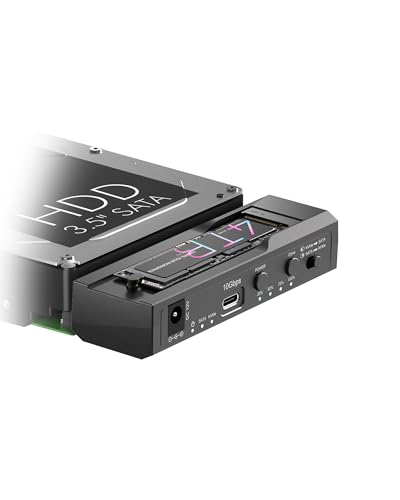
ICY BOX M.2 NVMe & SATA Cloner Dock
Best for: cross-interface offline cloning and dual-drive access
- Transfer Speed
- 10Gbps
- Supported Drive Types
- M.2 NVMe, 2.5"/3.5" SATA
- Bay Count
- 2
- Offline Cloning
- One-Key Offline Cloning
- Supported M.2 Sizes
- 2230–2280
- Interface
- SATA III
View on Amazon: ICY BOX M.2 NVMe & SATA Cloner Dock Affiliate link
This dual-bay docking station connects one M.2 NVMe SSD and one 2.5-inch or 3.5-inch SATA drive at the same time. It runs over a 10Gbps USB 3.2 Gen 2 Type-C interface and includes a 12V/3A power adapter. You get standalone one-key offline cloning with 25% to 100% LED indicators. It suits you if you need direct drive-to-drive data duplication without an active host computer connection.
Pros
- Supports standalone one-button offline cloning between M.2 NVMe and SATA
- Reads and writes to an M.2 NVMe SSD and a SATA drive simultaneously
- Provides up to 10Gbps transfer speeds via USB 3.2 Gen 2 Type-C
- Accepts both 2.5-inch and 3.5-inch SATA form factors alongside M.2 sizes 2230 to 2280
Cons
- Limited to two total drive bays
- Requires external power adapter connection
Good fit if
- You need to clone data between an M.2 NVMe drive and a SATA disk without a computer.
- You want simultaneous 10Gbps desktop access to both an M.2 stick and a 3.5-inch SATA drive.
Skip if
- You need three or more drive bays available at the same time.
- You want to clone directly between two M.2 NVMe drives.
Verdict: ICY BOX Dual-Bay NVMe & SATA Cloner Dock delivers 10Gbps transfer rates and standalone cross-format offline cloning for mixed drive setups. It handles simultaneous access across M.2 NVMe and SATA interfaces with dedicated LED progress tracking.

SABRENT Dual-Bay NVMe Cloner Dock
Best for: standalone PCIe M.2 NVMe duplication
- Transfer Speed
- 10Gbps
- Supported Drive Types
- PCIe NVMe M.2 SSD
- Bay Count
- 2
- Offline Cloning
- One-button offline clone
- Supported M.2 Sizes
- 2230, 2242, 2260, 2280
- Cooling Type
- Aluminum body, built-in fan
View on Amazon: SABRENT Dual-Bay NVMe Cloner Dock Affiliate link
The SABRENT Dual-Bay NVMe Cloner Dock is a two-slot external station designed strictly for PCIe M.2 drives. You get standalone, push-button offline drive cloning without needing a computer, alongside 10Gbps USB-C data transfers with both bays active at once. It includes an active cooling fan and an aluminum chassis to manage heat during sustained operations. This setup suits you if you frequently duplicate or swap high-speed NVMe solid-state storage.
Pros
- Standalone push-button offline cloning without host software
- 10Gbps USB 3.2 transfers with both bays live at once
- Aluminum enclosure with an active built-in cooling fan
- Tool-free design fitting 2230, 2242, 2260, and 2280 sizes
- Includes 5V/4A power supply and cables for both USB-C and USB-A
Cons
- Does not support M.2 SATA, AHCI, or 2.5-inch and 3.5-inch SATA drives
- Cooling fan runs continuously while plugged in without a sleep state
Good fit if
- You need to duplicate PCIe M.2 SSDs without connecting to a PC
- You want simultaneous 10Gbps access to two NVMe drives
- You use M.2 NVMe drives in 2230, 2242, 2260, or 2280 lengths
Skip if
- You need compatibility with M.2 SATA or standard SATA drives
- You require an enclosure that shuts off its fan when idle
Verdict: SABRENT Dual-Bay NVMe Cloner Dock delivers high-speed dual-slot transfers and standalone drive duplication strictly for PCIe M.2 hardware. Active fan cooling keeps sustained operations stable, provided you do not require legacy SATA support.

SABRENT Dual-Bay SATA USB-C Cloner Dock
Best for: Offline cloning of 2.5 and 3.5 inch SATA drives
- Transfer Speed
- 5Gbps
- Supported Drive Types
- 2.5-inch & 3.5-inch SATA HDD/SSD
- Bay Count
- 2
- Offline Cloning
- One-button offline clone
- Interface
- SATA III
- Host Interface
- USB-C
View on Amazon: SABRENT Dual-Bay SATA USB-C Cloner Dock Affiliate link
This dual-bay dock supports 2.5-inch and 3.5-inch SATA drives via USB-C. It features offline cloning, allowing you to copy one drive to another without a computer. The interface handles up to 5Gbps speeds. It is designed for users who need to manage multiple SATA drives or clone data independently of a host PC.
Pros
- Offline cloning button for copying drives without a PC
- Supports both 2.5-inch and 3.5-inch SATA drives
- USB-C interface with up to 5Gbps transfer speed
- Hot-swappable bays with individual access LEDs
Cons
- SATA III only, no NVMe or M.2 support
- Limited to 5Gbps speeds, slower than 10Gbps alternatives
- Requires separate USB-C to USB-A cable for older ports
Good fit if
- You need to clone SATA drives without a computer
- You manage both 2.5-inch and 3.5-inch drives
- You want a simple plug-and-play SATA docking solution
Skip if
- You require NVMe or M.2 drive support
- You need transfer speeds above 5Gbps
- You prefer a single-bay compact form factor
Verdict: Sabrent Dual-Bay SATA Dock EC-CH2B is a practical choice for users who need to clone or access multiple SATA drives offline. It fits those who prioritize offline cloning capabilities over high-speed NVMe connectivity.

SABRENT 10-Bay USB-C SATA Docking Station
Best for: high-capacity multi-drive SATA backups and media storage
- Transfer Speed
- 10Gbps
- Supported Drive Types
- 3.5in SATA HDD
- Bay Count
- 10
- Maximum Capacity
- 200TB
- Cooling Type
- Dual 120mm fans
- Interface
- SATA III
View on Amazon: SABRENT 10-Bay USB-C SATA Docking Station Affiliate link
This SABRENT dock connects up to ten 3.5-inch SATA hard drives to your computer through a single 10Gbps USB-C cable. It delivers non-RAID operation with independent power switches for every slot, supporting up to 200TB across all ten bays. Two 120mm fans provide active cooling inside the aluminum chassis. It suits you if you need massive, direct-attached mass storage for backups or large media libraries rather than compact M.2 NVMe drives.
Pros
- Holds up to ten 3.5-inch SATA hard drives up to 200TB total
- 10Gbps USB 3.2 Gen 2 Type-C host interface
- Tray-less design with independent power switches and LEDs per bay
- Dual 120mm cooling fans inside a rigid aluminum enclosure
Cons
- No native M.2 NVMe drive slots
- Requires a separate adapter for 2.5-inch drives
- No built-in hardware RAID modes
Good fit if
- You need high-capacity external storage for up to ten 3.5-inch SATA hard drives.
- You want individual power control over each drive bay.
- You connect through a 10Gbps USB-C or USB-A host port.
Skip if
- You need direct slots for M.2 NVMe or M.2 SATA SSDs.
- You require hardware RAID array functionality.
- You want a compact, travel-friendly drive enclosure.
Verdict: SABRENT 10-Bay USB-C 3.5-inch SATA Dock provides massive desktop storage capacity with independent bay controls and active dual-fan cooling. It delivers high-volume 3.5-inch SATA connectivity over 10Gbps USB-C for large backup and media workflows.

SABRENT Lay-Flat NVMe and SATA Dock
Best for: offline cloning between NVMe and SATA drives
- Transfer Speed
- 10Gbps
- Supported Drive Types
- M.2 NVMe, 2.5in/3.5in SATA HDD/SSD
- Offline Cloning
- Offline clone
- Supported M.2 Sizes
- 2242, 2260, 2280
- Interface
- SATA III
- Form Factor
- 2.5 Inch
View on Amazon: SABRENT Lay-Flat NVMe and SATA Dock Affiliate link
This dock pairs an M.2 PCIe NVMe slot with a 2.5-inch or 3.5-inch SATA bay in a lay-flat enclosure. You get 10Gbps USB 3.2 Gen 2 host speeds, an included 12V power adapter for mechanical hard drives, and offline cloning via physical buttons. It suits you if you need fast drive swaps and direct NVMe-to-SATA duplicates without keeping your computer running.
Pros
- Supports M.2 PCIe NVMe (2242, 2260, 2280) and 2.5/3.5-inch SATA drives
- Standalone offline cloning with directional switch and progress LEDs
- 10Gbps USB 3.2 Gen 2 interface with both USB-C and USB-A cables included
- Tool-free lay-flat design with hinged lid
Cons
- Offline cloning requires target drive capacity to equal or exceed source drive
- Does not support M.2 SATA SSDs
- Requires external 12V power adapter for 3.5-inch drives
Good fit if
- You need to clone directly between an M.2 NVMe SSD and a SATA drive without a host PC
- You want a lay-flat, tool-free dock with cables for both USB-C and legacy USB-A ports
Skip if
- You need to read or clone M.2 SATA drives
- You need to dock more than one M.2 drive and one SATA drive simultaneously
Verdict: SABRENT Lay-Flat NVMe and SATA Dock delivers dual-interface flexibility and computer-free cloning at up to 10Gbps transfer rates. It is an efficient, tool-free alternative when you bridge M.2 PCIe and standard SATA storage.
Specifications side by side
| Spec | ICY BOX Triple-Bay NVMe & SATA Cloner Dock | ICY BOX M.2 NVMe & SATA SSD/HDD Dock | ICY BOX M.2 NVMe & SATA Cloner Dock | SABRENT Dual-Bay NVMe Cloner Dock | SABRENT Dual-Bay SATA USB-C Cloner Dock | SABRENT 10-Bay USB-C SATA Docking Station | SABRENT Lay-Flat NVMe and SATA Dock |
|---|---|---|---|---|---|---|---|
| Transfer Speed | 10Gbps | 10Gbps | 10Gbps | 10Gbps | 5Gbps | 10Gbps | 10Gbps |
| Supported Drive Types | M.2 NVMe, 2.5"/3.5" SATA | M.2 NVMe, M.2 SATA, 2.5"/3.5" SATA | M.2 NVMe, 2.5"/3.5" SATA | PCIe NVMe M.2 SSD | 2.5-inch & 3.5-inch SATA HDD/SSD | 3.5in SATA HDD | M.2 NVMe, 2.5in/3.5in SATA HDD/SSD |
| Bay Count | 3 | not stated | 2 | 2 | 2 | 10 | not stated |
| Offline Cloning | One-touch offline cloning | One-touch offline cloning | One-Key Offline Cloning | One-button offline clone | One-button offline clone | not stated | Offline clone |
| Supported M.2 Sizes | not stated | not stated | 2230–2280 | 2230, 2242, 2260, 2280 | not stated | not stated | 2242, 2260, 2280 |
| Maximum Capacity | not stated | not stated | not stated | not stated | not stated | 200TB | not stated |
| Cooling Type | not stated | Open-frame cooling design | not stated | Aluminum body, built-in fan | not stated | Dual 120mm fans | not stated |
| Interface | SATA III | SATA III | SATA III | SATA III | SATA III | SATA III | SATA III |
| Form Factor | 2.5 Inch | M.2 | 2.5 Inch | M.2 2280 | 2.5 Inch | not stated | 2.5 Inch |
| Cooling | not stated | not stated | not stated | Cooling Fan | not stated | not stated | not stated |
| Compatibility | not stated | not stated | not stated | not stated | not stated | not stated | Mac |
| Features | Tool-Free, Offline Clone | Tool-Free, Offline Clone | Tool-Free, Offline Clone | Offline Clone | Offline Clone | not stated | Tool-Free, Offline Clone |
| Material | not stated | not stated | not stated | not stated | not stated | Aluminum | not stated |
| Host Interface | USB-C | USB-C | not stated | USB-C | USB-C | USB-C | USB-C |
| Dimensions | 5.47 × 3.03 × 2.32 inches | 6.45 × 1.57 × 0.71 inches | 4.27 × 1.74 × 0.55 inches | 4.3 × 2.5 × 1.25 inches | 6.2 × 4 × 2.7 inches | 5.7 × 10.5 × 13.4 inches | 7.17 × 4.83 × 1.77 inches |
| Weight | 10.3 ounces | 5.47 ounces | not stated | 4 ounces | 10 ounces | 11 pounds | 10.8 ounces |
| Color | Black | Black | Black | SILVER | Black | Black | Multicolor |
| Model | 3 Bay Cloner | not stated | not stated | EC-SSD2 | EC-CH2B | DS-UCTB | DS-UFNC |
| Size | not stated | NVMe/SATA to NVMe | not stated | USB-C DUAL DOCK | 2-Bay SATA Dock – USB-C 5Gbps | 10 Bay | M.2/2.5/3.5 inch Docking Station |
If you need a single drive solution, compare bykski b nvme ct m 2 SSD aluminum alternatives.
Frequently asked questions
Can I clone NVMe drives to SATA drives offline?
Yes, several docks support this cross-format cloning without a computer. The ICY BOX M.2 NVMe & SATA Dock allows offline transfers from mixed storage formats into M.2 NVMe. The SABRENT Lay-Flat Dock also enables offline cloning between NVMe and SATA interfaces at up to 10 Gbps speeds.
Which dock is best for cloning only PCIe NVMe drives?
The SABRENT Dual-Bay NVMe Cloner Dock is designed strictly for PCIe M.2 hardware. It provides standalone drive duplication with active fan cooling to keep operations stable. You should avoid this model if you need to support legacy SATA drives, as it does not offer that compatibility.
Are there options for cloning 3.5-inch SATA drives?
Yes, the SABRENT Dual-Bay SATA USB-C Cloner Dock handles both 2.5 and 3.5-inch SATA drives. It is a practical choice for users prioritizing offline cloning capabilities over high-speed NVMe connectivity. This dock fits those who need to manage larger desktop hard drives.
What is the fastest transfer speed available on these docks?
Most listed docks offer 10 Gbps transfer rates via USB-C host interfaces. This includes the ICY BOX Triple-Bay, M.2, and Dual-Bay models, as well as the SABRENT NVMe and Lay-Flat docks. The SABRENT 10-Bay SATA Dock also delivers 10 Gbps connectivity for high-volume workflows.
Do I need a computer to clone drives with these devices?
No, offline cloning is a standard feature on these specific docks. You can perform one-touch cloning directly on the hardware without extra software or a PC. This applies to the ICY BOX and SABRENT models that feature dedicated offline cloning capabilities for drive migrations.
Which dock supports the most drives at once?
The SABRENT 10-Bay USB-C SATA Dock supports ten drives simultaneously. It provides massive desktop storage capacity with independent bay controls for large backup and media workflows. It is the only option listed that handles ten 3.5-inch SATA drives at once.
Is tool-free installation available on these docking stations?
Yes, tool-free drive installation is a key feature on several models. The ICY BOX Triple-Bay, M.2, and Dual-Bay docks all support tool-free setup. The SABRENT Lay-Flat Dock is also described as a tool-free alternative, making drive access and cloning straightforward.