GLOTRENDS PU41 Quad U.2 SFF-8639 Review: Who It Fits and Who Should Skip It
As an Amazon Associate we earn from qualifying purchases. Links on this page are affiliate links.
This glotrends pu41 quad u 2 sff 8639 review covers the GLOTRENDS PU41 adapter. It lets you install four 2.5-inch U.2 NVMe SSDs into a single PCIe 4.0 x16 slot. The card offers 256Gbps of total bandwidth. It has no onboard switch chip, which reduces heat and potential failure points. You must enable PCIe bifurcation in your BIOS for all drives to work. This adapter is designed for workstations and servers that need to handle enterprise-grade U.2 drives efficiently.
What stands out
- Supports up to four 2.5-inch U.2 NVMe SSDs in one slot
- No onboard switch chip for lower heat and fewer failure points
- Backward compatible with PCIe 3.0 enterprise drives
- Supports large capacity drives like 4TB and 6TB models
- Backed by lifetime technical support from GLOTRENDS
Who it fits
Good fit for
This card suits users with motherboards that support PCIe x16 bifurcation. It is ideal for building Intel or AMD soft RAID arrays using Windows Disk Management or Linux mdadm. You can also boot from a U.2 drive after updating your BIOS or UEFI settings. It works well for integrating Intel Optane 905P or P4800X drives. If you need to add multiple enterprise drives to a single slot, this adapter provides a straightforward solution without complex switch hardware.
Who should skip it
You should skip this adapter if your motherboard does not support PCIe bifurcation. Without enabling X4X4X4X4 in the BIOS, only the first port will work. If you enable X8X4X4, you will only detect three drives. It is also not suitable for legacy boards if you need boot support, as they only support data disk use. Additionally, Intel VROC requires a separately purchased key, so factor that into your setup if you need that feature.
Verdict: The GLOTRENDS PU41 is a practical choice for bifurcation-ready systems needing to house four enterprise U.2 drives. Ensure your motherboard supports the required BIOS settings before purchasing.
Key specs explained
Interface: PCIe 4.0 x16
This card connects to a standard PCIe 4.0 x16 slot on your motherboard. It provides up to 256Gbps of total bandwidth for all four drives. This speed supports modern NVMe SSDs efficiently. You benefit from high throughput without needing multiple slots. Compare this to PCIe 3.0 cards, which offer less bandwidth. Ensure your system supports this interface for optimal performance.
Bifurcation: Required (no onboard switch)
The adapter lacks an internal switch chip, so it relies on your motherboard to split the x16 slot into four x4 lanes. You must enable X4X4X4X4 bifurcation in your BIOS settings. Without this, only one drive will work. This design reduces heat and potential failure points. Check your motherboard manual to confirm bifurcation support before purchasing this specific model.
Capacity: Up to four 2.5" U.2 drives
You can install four enterprise-grade U.2 SSDs simultaneously. The card supports large capacities like 4TB and 6TB drives, with no stated limit. This is ideal for workstations or servers needing massive storage density. It works with Intel Optane and other U.2 NVMe drives. Verify that your case has space for four 2.5-inch drives to utilize this full capacity effectively.
Model: PU41
The PU41 is the specific model identifier for this quad U.2 adapter. It denotes the four-slot form factor and U.2 SFF-8639 compatibility. Knowing this model helps you find drivers, support documentation, and compatible motherboards. It distinguishes this card from other GLOTRENDS products. Use this model number when searching for technical specifications or troubleshooting guides online.
Design and Build Overview
The GLOTRENDS PU41 adapter measures as a four-slot expansion card. According to the listing, the unit weighs 7.37 ounces. This mass suggests a sturdy metal bracket and heatsink assembly, though specific material grades are not detailed. The physical footprint requires four consecutive expansion slots on your motherboard. You must verify your chassis has sufficient clearance for this width before installation.
The layout features four U.2 SFF-8639 connectors arranged to accommodate standard 2.5-inch enterprise drives. There are no external controls, buttons, or status LEDs on the card. The design relies entirely on the motherboard’s PCIe x16 slot for power and data. This minimalist approach reduces active components, which the listing notes helps lower heat generation and potential failure points compared to switch-based alternatives.
The finish appears utilitarian, focusing on function rather than aesthetics. The lack of onboard bifurcation chips means the card depends on your motherboard’s BIOS settings. You must enable PCIe x16 bifurcation (typically X4X4X4X4) to utilize all four ports. Without this configuration, only the first drive will be detected. This design choice keeps costs down but requires technical setup in your system firmware.
Setup and Everyday Use
Setting up this adapter requires specific motherboard support. You must enable PCIe bifurcation in your BIOS. The listing specifies that you need to select the X4X4X4X4 mode. This setting allows the single x16 slot to split into four x4 lanes. If you select X8X4X4, the system detects only three drives. Without any bifurcation enabled, only the first port functions. You cannot rely on the card to manage this split automatically. There is no onboard switch chip to handle lane distribution. This design choice reduces active components, heat, and potential failure points. You handle the configuration directly through your system firmware.
Daily use involves managing four enterprise U.2 SSDs simultaneously. The card supports drives with no capacity limit, including 4TB and 6TB models. You can use older PCIe 3.0 drives, as the card is backward compatible. You may build Intel or AMD soft RAID configurations using Windows Disk Management or Linux mdadm. Booting from a U.2 drive is possible after OS reinstallation and BIOS setup. Legacy boards restrict these drives to data-only use. Intel VROC support requires a separately purchased key. New drives require initialization and formatting before use. The card provides lifetime technical support from GLOTRENDS. This setup suits users who need to repurpose enterprise drives in workstations or servers. It is not for casual users lacking motherboard bifurcation support.
Before You Buy This Adapter
You must verify your motherboard supports PCIe x16 bifurcation. The listing states you need to enable X4X4X4X4 in your BIOS. Without this setting, only the first port works. If you select X8X4X4, you will only detect three drives. This card has no onboard switch chip, so it relies entirely on your system’s ability to split lanes. You should also plan for drive initialization and formatting. New enterprise U.2 drives require this setup before use. You may need an Intel VROC key for RAID features on compatible systems. This adapter fits well if you have spare enterprise drives like Intel Optane or P4800X models. It is not for standard consumer M.2 or SATA SSDs. Ensure your case has space for four 2.5-inch drives. The card requires a full-height, four-slot opening. Check your power supply for adequate PCIe power connectors if required by your specific setup.
Check before you buy
- Confirm motherboard BIOS supports PCIe x16 bifurcation.
- Ensure you can set X4X4X4X4 lane splitting.
- Verify case fits four 2.5-inch U.2 drives.
- Check if Intel VROC key is needed for RAID.
- Prepare to initialize and format new enterprise drives.
The product at a glance
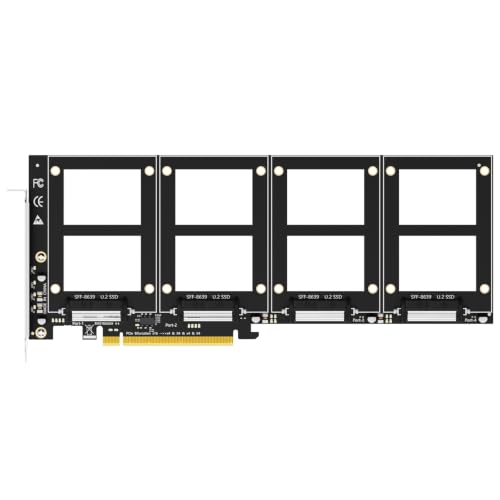
GLOTRENDS PU41 Quad U.2 Adapter
Best for: connecting four U.2 drives to one slot
- Interface
- PCIe 4.0 x16
- Weight
- 7.37 ounces
View on Amazon: GLOTRENDS PU41 Quad U.2 Adapter Affiliate link
This card adds four 2.5-inch U.2 NVMe drives to a single PCIe 4.0 x16 slot. It delivers 256Gbps of total bandwidth without an onboard switch. This design reduces heat and failure points. You can use enterprise drives like Intel Optane or large capacity SSDs. It requires motherboard support for PCIe bifurcation to detect all four ports.
Pros
- Supports up to four U.2 NVMe drives in one slot
- PCIe 4.0 x16 interface with 256Gbps bandwidth
- No onboard switch chip reduces heat and failure points
- Backward compatible with PCIe 3.0 enterprise drives
Cons
- Requires motherboard PCIe x16 bifurcation support
- No onboard bifurcation chip limits flexibility
- Intel VROC requires a separate key
Good fit if
- You need to connect four U.2 SSDs to a single slot
- You have a motherboard that supports PCIe bifurcation
- You want to use enterprise U.2 drives in a workstation
Skip if
- Your motherboard does not support PCIe bifurcation
- You need a plug-and-play solution without BIOS changes
- You want to use Intel VROC without buying a key
Verdict: GLOTRENDS PU41 Quad U.2 Adapter fits users with bifurcation-ready motherboards who need to connect four U.2 drives. It offers a simple, low-heat solution for enterprise storage expansion.
Specifications side by side
| Spec | GLOTRENDS PU41 Quad U.2 Adapter |
|---|---|
| Interface | PCIe 4.0 x16 |
| Weight | 7.37 ounces |
| Size | 4-slot |
| Color | Black |
| Model | PU41 |
Frequently asked questions
Does the GLOTRENDS PU41 support PCIe 5.0?
No, this adapter is built for PCIe 4.0. It connects to a standard PCIe 4.0 x16 slot on your motherboard. This interface provides up to 256Gbps of total bandwidth for all four connected drives. You should verify that your system uses PCIe 4.0 components to ensure full compatibility and optimal performance.
What size drives does this adapter accept?
The GLOTRENDS PU41 accepts four 2.5-inch U.2 NVMe SSDs. It is designed to fit these specific enterprise storage form factors into a single expansion slot. You must ensure your drives are U.2 compatible, as the card does not support other form factors like M.2 or SATA.
Is a switch chip included on this card?
No, the GLOTRENDS PU41 does not include an onboard switch chip. This design choice helps reduce heat generation during operation. The adapter relies on direct lane splitting from the motherboard instead. This simplifies the signal path but requires specific BIOS settings to function correctly.
How much does the GLOTRENDS PU41 weigh?
The adapter weighs 7.37 ounces according to the product listing. This weight suggests a sturdy metal bracket and heatsink assembly. The mass helps stabilize the card in your case. You should ensure your motherboard has adequate support for the four-slot physical footprint.
Who is this adapter best for?
This adapter fits users with bifurcation-ready motherboards who need to connect four U.2 drives. It offers a simple, low-heat solution for enterprise storage expansion. You should use this card if you require high-density NVMe storage in a standard PCIe slot without adding extra controllers.
What is the model number of this adapter?
The model number is PU41. It is part of the GLOTRENDS lineup of storage adapters. This specific model is designed for quad U.2 connectivity. You can identify this unit by its model designation when checking compatibility or ordering replacement parts.
Does this card support SATA U.2 drives?
The product data specifies support for NVMe SSDs via the U.2 interface. It does not explicitly mention SATA compatibility. You should assume it is optimized for NVMe protocols. Verify your drive specifications to ensure they match the PCIe 4.0 NVMe requirements of this adapter.