6 Best Alternatives to the FIDECO 2-Bay NVMe & SATA (2026)
As an Amazon Associate we earn from qualifying purchases. Links on this page are affiliate links.
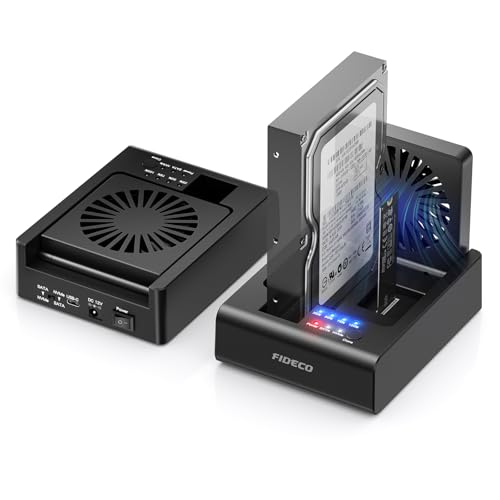
Finding the right fideco hard drive docking station m 2 nvme SSD alternatives depends on your specific drive management setup. The original FIDECO MS01 docking station handles both an M.2 PCIe NVMe SSD and a 2.5-inch or 3.5-inch SATA drive over a 10Gbps USB 3.2 Gen 2 interface. It provides standalone bidirectional offline cloning between NVMe and SATA media without host computer software, supported by a foldable cooling fan to manage drive heat.
However, you might want a different form factor, alternative brand options, or expanded bay capacity. Your workload might require a 3-bay cloner dock, an internal four-bay mobile rack for 2.5-inch drives, or a lightweight single-drive aluminum enclosure from brands such as Rosewill, YINNCEEN, Kingwin, or SABRENT. This guide presents 6 options for 2026 chosen because their core specifications overlap with the original, including SATA III connectivity, M.2 slots, offline duplication features, and multi-bay layouts.
Our top pick: FIDECO 2-Bay NVMe & SATA Dock with Fan.
Comparing the FIDECO Dock Alternatives
FIDECO 3-Bay M.2 NVMe and SATA Cloner Dock
The FIDECO MS02 expands your drive capacity to a 3-bay layout with tool-free slots, giving you an extra bay over the 2-bay MS01. Like the original, it includes a cooling fan, SATA III support, and 10Gbps connectivity. It clones multiple drives simultaneously offline. However, you give up bidirectional versatility. The MS02 requires your target drive to always be an NVMe SSD, whereas the MS01 allows bidirectional cloning from SATA to NVMe or NVMe to SATA. It also omits standard 3.5-inch drive specifications. You should pick the MS02 if you manage multi-drive duplications specifically targeting M.2 NVMe SSDs and need the extra bay.
YINNCEEN M.2 and 2.5-Inch SATA Enclosure
The YINNCEEN SATA C-III provides a single-drive vertical dock with a carbon fiber textured shell. It matches the original dock’s 10Gbps transfer speed and supports both M.2 and 2.5-inch SATA formats. Compared to the original FIDECO dock, you give up dual-bay functionality, meaning you cannot mount two drives at the same time. You also lose standalone offline cloning, 3.5-inch desktop hard drive compatibility, and the integrated cooling fan. Pick the YINNCEEN dock if you only need to connect one M.2 or 2.5-inch SATA drive at a time for quick backups and prefer a smaller desktop footprint without complex cloning hardware.
Kingwin 4-Bay 2.5" SATA/SAS Mobile Rack
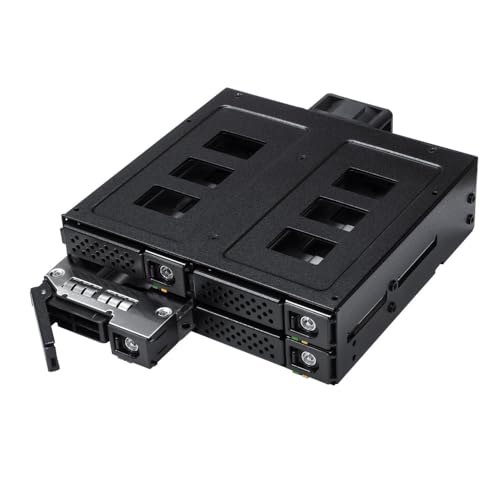
The Kingwin K-49SS offers four internal bays for 2.5-inch SATA or SAS drives, doubling the drive count of the original two-bay FIDECO dock. Like the FIDECO, it includes an integrated cooling fan to manage drive temperatures. However, the Kingwin is an internal mobile rack weighing 1.45 pounds, not an external USB desktop dock. You lose M.2 NVMe connectivity completely, as well as 3.5-inch disk support, plug-and-play USB cabling, and push-button offline cloning. Choose the Kingwin K-49SS if you want permanent, multi-drive 2.5-inch SATA or SAS storage inside a computer chassis rather than a portable, cross-format USB cloning station.
Rosewill Triple Bay Drive Dock and Cloner
The Rosewill RS-N2S-CL provides three tool-free drive bays, giving you one more slot than the two-bay original FIDECO unit. It matches the original unit’s 10Gbps transfer speed and supports offline cloning across M.2 and SATA formats. At 4 ounces, it is significantly lighter than the 1.28-pound FIDECO dock, making it easy to reposition on a workbench. However, you give up the integrated cooling fan that comes with the original model, and it lists support for 2.5-inch drives rather than full 3.5-inch hard drives. Pick the Rosewill model if you need triple-bay offline cloning versatility in a lightweight, tool-free form factor.
SANOXY 2.5-Inch Aluminum SATA Enclosure
The SANOXY enclosure houses a single 2.5-inch SATA drive inside an aluminum shell, offering a fully enclosed protective casing rather than an open top-loading dock. However, it operates over legacy USB 2.0 speeds, trailing far behind the FIDECO dock's 10Gbps USB 3.2 Gen 2 interface. You also sacrifice M.2 NVMe SSD support, 3.5-inch drive compatibility, dual-drive offline cloning, and the cooling fan. It measures 7.9 by 1.9 by 14.9 inches in a silver finish. Choose this SANOXY model if you only need an enclosed aluminum case for an older 2.5-inch SATA hard drive where data transfer speeds and cloning capabilities do not matter.
SABRENT 2.5-Inch SATA USB 3.0 Aluminum Enclosure
The SABRENT EC-UK30 provides a dedicated aluminum enclosure for a single 2.5-inch SATA drive. At just 2.4 ounces and 0.68 inches thick, it offers a compact, pocketable format compared to the 1.28-pound FIDECO desktop dock. However, its connection uses USB 3.0, which provides lower bandwidth than the FIDECO dock's 10Gbps USB 3.2 Gen 2 port. You also give up the secondary bay, M.2 NVMe SSD compatibility, 3.5-inch drive support, offline cloning, and the cooling fan. Pick the SABRENT EC-UK30 if you need a lightweight, protective aluminum enclosure for a single 2.5-inch SATA drive on the go rather than a dual-bay cloning dock.
Quick picks
Our 7 picks
FIDECO 2-Bay NVMe & SATA Dock with Fan
Best for: cross-format cloning between NVMe and SATA drives
- Max Transfer Speed
- 10Gbps
- Host Interface
- USB 3.2 Gen 2
- Drive Interface
- PCIe NVMe (M-Key, M+B Key), SATA
- Supported Form Factors
- 2.5-inch, 3.5-inch
- Drive Bay Count
- 2-Bay
- Cooling System
- Foldable cooling fan
View on Amazon: FIDECO 2-Bay NVMe & SATA Dock with Fan Affiliate link
This 2-bay docking station connects one M.2 PCIe NVMe drive and one 2.5-inch or 3.5-inch SATA drive simultaneously over a 10Gbps USB 3.2 Gen 2 connection. It features standalone bidirectional offline cloning without a host computer and includes an integrated foldable cooling fan for thermal control. It suits you if you need to read, write, or clone data directly between NVMe and SATA drives without opening your computer case.
Pros
- Bidirectional standalone offline cloning between NVMe and SATA drives
- USB 3.2 Gen 2 interface with up to 10Gbps transfer speeds
- Integrated foldable cooling fan for active drive heat dissipation
- Includes USB-C cable with attached USB-A adapter
Cons
- SATA drive transfers cap at 5Gbps
- Only holds one NVMe drive and one SATA drive at a time
- Offline cloning requires target drive capacity to equal or exceed source drive
Good fit if
- You need to clone data directly between an NVMe SSD and a SATA drive without a computer.
- You switch frequently between 2.5-inch, 3.5-inch, and M.2 PCIe storage across USB-A or USB-C ports.
Skip if
- You need to duplicate directly between two NVMe SSDs.
- You need sustained 10Gbps transfer speeds for SATA media.
Verdict: FIDECO 2-Bay NVMe and SATA Docking Station provides versatile cross-format drive access and bidirectional offline cloning in a single desktop unit. Its integrated cooling fan and dual-format bays make it a practical tool for direct SATA-to-NVMe migrations.

FIDECO 3-Bay M.2 NVMe and SATA Cloner Dock
Best for: multi-drive cloning to NVMe targets
- Max Transfer Speed
- 10Gbps
- Host Interface
- USB 3.2 Gen 2
- Drive Interface
- M.2 PCIe NVMe (M/M+B Key), SATA
- Supported Form Factors
- 2.5-inch, 3.5-inch
- Drive Bay Count
- 3 bays
- Cooling System
- Foldable cooling fan
View on Amazon: FIDECO 3-Bay M.2 NVMe and SATA Cloner Dock Affiliate link
This 3-bay external dock holds two M.2 PCIe NVMe drives and one 2.5-inch or 3.5-inch SATA drive at the same time. You get USB 3.2 Gen 2 host speeds up to 10Gbps, standalone offline cloning without a computer, and an integrated foldable cooling fan. It suits you if you frequently duplicate NVMe drives or migrate data from SATA to NVMe storage.
Pros
- Simultaneously mounts two M.2 NVMe SSDs and one 2.5-inch or 3.5-inch SATA drive
- Hardware offline cloning from NVMe to NVMe or SATA to NVMe
- USB 3.2 Gen 2 interface with transfer rates up to 10Gbps
- Built-in foldable cooling fan for active thermal dissipation
Cons
- Offline cloning cannot clone from NVMe to SATA
- SATA drive bay transfer rate is capped at 5Gbps
Good fit if
- You need to clone directly from a SATA drive or NVMe SSD onto another NVMe SSD without a PC.
- You require simultaneous access to two NVMe drives and a standard 2.5-inch or 3.5-inch SATA drive.
Skip if
- You need to clone data from an NVMe drive onto a SATA hard drive.
- You only use SATA-based M.2 SSDs, which are not supported by the PCIe slots.
Verdict: FIDECO 3-Bay NVMe and SATA Cloner delivers high-bandwidth 10Gbps connectivity and multi-drive offline duplication in a single fan-cooled desktop dock. It provides versatile drive copying as long as your target destination is always an NVMe SSD.

YINNCEEN M.2 and 2.5-Inch SATA Enclosure
Best for: single-drive M.2 and 2.5-inch SATA backups
- Max Transfer Speed
- Up to 10Gbps
- Host Interface
- USB 3.2 Gen 2
- Drive Interface
- M.2 NVMe, M.2 SATA, 2.5" SATA
- Supported Form Factors
- 2230, 2242, 2260, 2280, 22110, 2.5-inch
- Installation Style
- Tool-Free
View on Amazon: YINNCEEN M.2 and 2.5-Inch SATA Enclosure Affiliate link
This YINNCEEN docking station accepts M.2 NVMe, M.2 SATA, and 2.5-inch SATA drives via a tool-free vertical slot. Its USB 3.2 Gen 2 interface delivers up to 10Gbps for NVMe SSDs and 6Gbps for SATA drives. The dock reads only one drive at a time, making it ideal if you need a compact single-drive adapter for quick backups, file transfers, and drive maintenance across Windows, Mac, or Linux systems.
Pros
- Supports M.2 form factors from 2230 up to 22110
- Up to 10Gbps transfer speeds over USB 3.2 Gen 2
- Tool-free vertical slot design with included 2-in-1 USB cable
- Compatible with M.2 NVMe, M.2 SATA, and 2.5-inch SATA drives
Cons
- Reads only one drive at a time
- Does not support 3.5-inch desktop hard drives
- Does not support drive hot-plugging
Good fit if
- You want a single tool-free dock for both M.2 SSDs and 2.5-inch SATA drives.
- You need transfer speeds up to 10Gbps over USB 3.2 Gen 2.
- You use longer M.2 22110 form factor solid-state drives.
Skip if
- You need to access or clone two drives simultaneously.
- You require support for standard 3.5-inch desktop drives.
- You swap drives frequently without disconnecting the dock.
Verdict: YINNCEEN NVMe and 2.5-Inch SATA Dock delivers versatile 10Gbps USB 3.2 Gen 2 connectivity for individual M.2 and 2.5-inch drives in a tool-free vertical footprint. It fits single-drive maintenance tasks well, provided you do not need dual-drive access or 3.5-inch disk support.
Kingwin 4-Bay 2.5" SATA/SAS Mobile Rack
Best for: multi-drive 2.5-inch SATA and SAS storage
- Max Transfer Speed
- 12 Gbps
- Drive Interface
- SATA, SAS
- Supported Form Factors
- 2.5" (7-15mm)
- Drive Bay Count
- 4 bays
- Cooling System
- 4cm cooling fan
- Installation Style
- Tool-less
View on Amazon: Kingwin 4-Bay 2.5" SATA/SAS Mobile Rack Affiliate link
The Kingwin 4-Bay 2.5-Inch SATA SAS Mobile Rack is an internal hot-swap enclosure built from metal and stainless steel. It holds up to four 2.5-inch SATA or SAS drives up to 15 mm thick in a single cage powered by one 15-pin connector. With support for 6 Gbps SATA and 12 Gbps SAS, plus a 4 cm cooling fan, this suits you if you need dense, swap-ready internal storage.
Pros
- Houses four 2.5-inch SATA or SAS drives up to 15 mm in height
- Supports SAS 3.0 up to 12 Gbps and SATA 3.0 up to 6 Gbps
- Requires only one 15-pin power connector for all four bays
- Tool-less trays include vibration-reducing springs
- Integrated 4 cm fan provides active cooling
Cons
- No support for M.2 NVMe solid-state drives
- Incompatible with 3.5-inch hard drives
- Requires internal chassis bay installation instead of external USB connectivity
Good fit if
- You need to mount and hot-swap up to four 2.5-inch SATA or SAS drives.
- You want a single 15-pin power connection to run multiple internal drives.
- You require metal construction with active fan cooling for drive bays.
Skip if
- You need to read or clone M.2 NVMe SSDs.
- You prefer an external USB desktop docking station.
- You use full-size 3.5-inch desktop hard drives.
Verdict: Kingwin 4-Bay 2.5-Inch SATA SAS Mobile Rack provides rugged, fan-cooled internal storage density for multi-drive systems. It offers fast hot-swap capabilities for 2.5-inch drives, provided you do not need M.2 NVMe connectivity.

Rosewill Triple Bay Drive Dock and Cloner
Best for: offline cloning across M.2 and SATA drives
- Max Transfer Speed
- 10Gbps
- Host Interface
- USB 3.2 Gen 2x1
- Drive Interface
- NVMe, SATA
- Supported Form Factors
- M.2, 2.5", 3.5"
- Drive Bay Count
- 3 bays
- Installation Style
- Tool-Free
View on Amazon: Rosewill Triple Bay Drive Dock and Cloner Affiliate link
This Rosewill docking station gives you three drive bays that handle M.2 NVMe and SATA drives in 2.5-inch and 3.5-inch sizes. It connects using a USB 3.2 Gen 2x1 host interface with transfer speeds up to 10Gbps. You can run standalone offline clones without connecting a host computer, and the tool-free design lets you swap bare drives quickly. It suits technicians and power users managing multi-drive backups across different storage formats.
Pros
- Supports M.2 NVMe, 2.5-inch SATA, and 3.5-inch SATA drives
- Standalone offline cloning without a host computer
- USB 3.2 Gen 2x1 interface supports transfer speeds up to 10Gbps
- Tool-free drive insertion and removal
Cons
- Capped at 10Gbps rather than faster 20Gbps or 40Gbps interface options
- Exposed vertical drive slots provide no enclosure protection
Good fit if
- You need to duplicate or access M.2 NVMe and SATA drives in one station.
- You want standalone offline drive cloning without using a PC.
- You require tool-free drive swapping for bench work.
Skip if
- You need transfer speeds faster than 10Gbps USB 3.2 Gen 2x1.
- You prefer a fully enclosed housing for drive protection during transport.
Verdict: Rosewill 3-Bay NVMe & SATA Cloner Dock delivers 10Gbps transfers and offline drive duplication across M.2 and SATA form factors. It is an effective multi-drive workbench solution when you need flexible format support without opening a computer.

SANOXY 2.5-Inch Aluminum SATA Enclosure
Best for: basic 2.5-inch SATA drive access over USB 2.0
- Max Transfer Speed
- Up to 480 Mbps
- Host Interface
- USB 2.0
- Drive Interface
- SATA
- Supported Form Factors
- 2.5-inch
- Material
- Aluminum
- Dimensions
- 14.9 × 7.9 × 1.9 inches
View on Amazon: SANOXY 2.5-Inch Aluminum SATA Enclosure Affiliate link
This enclosure houses a single 2.5-inch SATA hard drive inside an aluminum shell. You connect drives via a USB 2.0 interface that reaches transfer rates up to 480 Mbps. The unit uses bus power, supports hot swapping, and shuts off automatically when your notebook powers down. It suits you if you need basic external access for an older 2.5-inch notebook drive without needing NVMe speeds or multi-bay cloning capabilities.
Pros
- Silver aluminum casing
- Plug and play and hot-swappable
- Self powered without external power adapter
- Automatic shut-off when notebook powers down
Cons
- Lacks M.2 and NVMe drive support
- Transfer speed capped at 480 Mbps over USB 2.0
- Does not accommodate 3.5-inch desktop drives
Good fit if
- You need a pocket-sized aluminum enclosure for a 2.5-inch SATA drive.
- You want a self-powered drive reader that connects over USB 2.0.
- You need automatic power shut-off tied to your notebook.
Skip if
- You require M.2 NVMe SSD support.
- You need transfer speeds faster than 480 Mbps.
- You use 3.5-inch desktop hard drives.
Verdict: SANOXY 2.5-Inch Aluminum USB 2.0 SATA Enclosure delivers portable, bus-powered access for 2.5-inch SATA drives at USB 2.0 speeds. It provides basic single-drive access if you do not require M.2 NVMe slots or multi-bay cloning.

SABRENT 2.5-Inch SATA USB 3.0 Aluminum Enclosure
Best for: housing a single 2.5-inch SATA drive
- Host Interface
- USB 3.0
- Drive Interface
- SATA
- Supported Form Factors
- 2.5-inch
- Cooling System
- Aluminum case
- Features
- UASP
- Dimensions
- 8.03 × 5.91 × 0.68 inches
View on Amazon: SABRENT 2.5-Inch SATA USB 3.0 Aluminum Enclosure Affiliate link
This SABRENT external drive enclosure houses a single 2.5-inch SATA hard drive or solid-state drive inside an aluminum body. It connects to your computer via a USB 3.0 host interface, providing backward compatibility with USB 2.0 and USB 1.1 ports. You get hot-swappable plug-and-play operation and an integrated LED activity indicator. It suits you if you need a lightweight portable enclosure for an existing notebook drive.
Pros
- Aluminum casing aids passive heat dissipation
- USB 3.0 host interface with USB 2.0 and 1.1 backward compatibility
- Plug-and-play connectivity with hot-swap support
- Lightweight 2.4-ounce design
Cons
- Fits only 2.5-inch drives, omitting 3.5-inch and M.2 form factors
- Supports SATA drives only, with no NVMe interface support
- Single-bay design lacks standalone drive cloning
Good fit if
- You need an external enclosure specifically for a 2.5-inch SATA drive.
- You want a lightweight aluminum enclosure weighing 2.4 ounces.
- You require driver-free, plug-and-play operation over USB 3.0.
Skip if
- You need to connect an M.2 NVMe SSD or a 3.5-inch desktop drive.
- You require a multi-bay dock with offline drive cloning capabilities.
Verdict: SABRENT 2.5-Inch SATA Aluminum Enclosure provides a dedicated, lightweight aluminum housing for standard 2.5-inch SATA drives using USB 3.0 connectivity. It is a focused solution for single-drive portable storage when multi-bay or NVMe features are unnecessary.
Specifications side by side
| Spec | FIDECO 2-Bay NVMe & SATA Dock with Fan | FIDECO 3-Bay M.2 NVMe and SATA Cloner Dock | YINNCEEN M.2 and 2.5-Inch SATA Enclosure | Kingwin 4-Bay 2.5" SATA/SAS Mobile Rack | Rosewill Triple Bay Drive Dock and Cloner | SANOXY 2.5-Inch Aluminum SATA Enclosure | SABRENT 2.5-Inch SATA USB 3.0 Aluminum Enclosure |
|---|---|---|---|---|---|---|---|
| Max Transfer Speed | 10Gbps | 10Gbps | Up to 10Gbps | 12 Gbps | 10Gbps | Up to 480 Mbps | not stated |
| Host Interface | USB 3.2 Gen 2 | USB 3.2 Gen 2 | USB 3.2 Gen 2 | not stated | USB 3.2 Gen 2x1 | USB 2.0 | USB 3.0 |
| Drive Interface | PCIe NVMe (M-Key, M+B Key), SATA | M.2 PCIe NVMe (M/M+B Key), SATA | M.2 NVMe, M.2 SATA, 2.5" SATA | SATA, SAS | NVMe, SATA | SATA | SATA |
| Supported Form Factors | 2.5-inch, 3.5-inch | 2.5-inch, 3.5-inch | 2230, 2242, 2260, 2280, 22110, 2.5-inch | 2.5" (7-15mm) | M.2, 2.5", 3.5" | 2.5-inch | 2.5-inch |
| Drive Bay Count | 2-Bay | 3 bays | not stated | 4 bays | 3 bays | not stated | not stated |
| Cooling System | Foldable cooling fan | Foldable cooling fan | not stated | 4cm cooling fan | not stated | not stated | Aluminum case |
| Installation Style | not stated | Tool-Free | Tool-Free | Tool-less | Tool-Free | not stated | not stated |
| Interface | SATA III | SATA III | SATA III | SATA III | SATA III | SATA III | SATA III |
| Form Factor | 2.5 Inch | 2.5 Inch | 2.5 Inch | 2.5 Inch | 2.5 Inch | 2.5 Inch | 2.5 Inch |
| Cooling | Cooling Fan | Cooling Fan | not stated | Cooling Fan | not stated | not stated | not stated |
| Transfer Speed | not stated | not stated | 10Gbps | not stated | 10Gbps | not stated | not stated |
| Features | Offline Clone | Tool-Free, Offline Clone | not stated | not stated | Tool-Free, Offline Clone | not stated | UASP |
| Material | not stated | not stated | not stated | not stated | not stated | Aluminum | Aluminum |
| Weight | 1.28 pounds | not stated | not stated | 1.45 pounds | 4 ounces | not stated | 2.4 ounces |
| Dimensions | not stated | not stated | not stated | not stated | 2.95 × 1.89 × 4.72 inches | 14.9 × 7.9 × 1.9 inches | 8.03 × 5.91 × 0.68 inches |
| Size | 2-Bay | 3-Bay | Carbon fiber textured shell | SATA Four Bay | 10 Gbps Triple Bay Cloner | 2.5" | Enclosure |
| Color | Black | Black | Carbon Fiber-textured | Black | Black | silver | Black |
| Model | MS01 | MS02 | SATA C-III | K-49SS | RS-N2S-CL | 2.5USB_SATA-ENCL | EC-UK30 |
If you need a single bay, you can compare bykski b nvme ct m 2 SSD aluminum alternatives.
Frequently asked questions
Which alternative allows offline cloning without connecting to a computer?
The Rosewill RS-N2S-CL and FIDECO MS02 provide standalone offline cloning functionality. The Rosewill RS-N2S-CL features a triple-bay design with tool-free drive installation and 10Gbps transfer speeds across M.2 and SATA drives. Similarly, the 3-bay FIDECO MS02 includes a built-in cooling fan and tool-free slots for copying directly to an NVMe target drive. Both eliminate the need for host software during cloning.
Can you access both NVMe and SATA drives in the YINNCEEN enclosure at the same time?
No, the YINNCEEN SATA C-III dock is designed for single-drive tasks rather than simultaneous dual-drive operation. It handles individual M.2 NVMe SSDs or 2.5-inch SATA drives through a 10Gbps connection with a tool-free setup. If your workflow requires dual-bay reading or direct drive-to-drive cloning between formats, you will need a multi-bay dock like the FIDECO MS01 or Rosewill RS-N2S-CL instead.
Does the Kingwin 4-bay mobile rack support M.2 NVMe drives?
No, the Kingwin K-49SS does not support M.2 NVMe drives. This mobile rack is designed strictly for up to four 2.5-inch SATA or SAS drives using SATA III connections. It installs internally and features an integrated cooling fan for thermal management. If you need M.2 NVMe drive connectivity, consider the FIDECO MS01, FIDECO MS02, or Rosewill RS-N2S-CL docks instead.
What is the main difference between the SABRENT EC-UK30 and SANOXY enclosures?
The primary difference lies in their transfer interfaces and exterior finishes. The SABRENT EC-UK30 uses USB 3.0 connectivity with a black aluminum casing weighing 2.4 ounces. In contrast, the SANOXY model operates on USB 2.0 speeds and features a silver aluminum shell. Both enclosures house a single 2.5-inch SATA III drive, but neither unit provides M.2 NVMe slots or multi-bay cloning capabilities.
Which docks feature an integrated cooling fan for temperature control?
The FIDECO MS01, FIDECO MS02, and Kingwin K-49SS include built-in cooling fans. Active cooling helps dissipate heat during sustained operations, such as offline drive cloning or multi-drive transfers. The FIDECO models use their fans to cool both NVMe and SATA drives, whereas the Kingwin mobile rack applies active cooling across its four 2.5-inch SATA/SAS drive bays to keep internal temperatures stable.
How many drive bays does the Rosewill RS-N2S-CL provide?
The Rosewill RS-N2S-CL provides three drive bays in a compact, tool-free layout. It supports both M.2 and SATA drives, allowing you to run offline duplication without a host PC. The unit delivers transfer speeds up to 10Gbps across its bays while weighing just 4 ounces. Its physical dimensions measure 1.89 inches wide, 4.72 inches high, and 2.95 inches long.
Are single-bay 2.5-inch SATA enclosures suitable alternatives to NVMe docking stations?
They are suitable only if you exclusively need basic access to standard 2.5-inch SATA drives. Enclosures like the SABRENT EC-UK30 and SANOXY provide lightweight aluminum housings for individual 2.5-inch SATA III drives. However, they lack M.2 slots, multi-bay capability, and offline cloning. If you handle high-speed M.2 NVMe SSDs, a dock like the YINNCEEN or FIDECO MS01 is required instead.