FIDECO 40Gbps M.2 NVMe SSD vs FIDECO 2-Bay NVMe & SATA (2026): Key Differences
As an Amazon Associate we earn from qualifying purchases. Links on this page are affiliate links.
You are comparing the fideco 40gbps m 2 nvme SSD vs hard drive docking station m 2 nvme SSD. Both devices allow you to connect M.2 NVMe drives to your computer via USB. They share plug-and-play compatibility with Windows, Mac, and Linux. The main difference lies in their purpose. One is a single-drive enclosure for high-speed data access. The other is a dual-bay docking station that also supports SATA drives and includes cloning capabilities.
Key differences
| Aspect | FIDECO 40Gbps M.2 NVMe Enclosure with RGB | FIDECO 2-Bay NVMe & SATA Dock with Fan |
|---|---|---|
| Host Interface | USB4 | USB 3.2 Gen 2 |
| Max Transfer Speed | 40Gbps | 10Gbps |
| Drive Support | M.2 NVMe only | M.2 NVMe and 2.5/3.5 SATA |
| Cooling | Not listed | Foldable cooling fan |
| Special Features | RGB lighting | Offline clone |
Which one should you choose?
Choose FIDECO 40Gbps M.2 NVMe Enclosure with RGB if
- You need the fastest possible transfer speeds for large NVMe files.
- You want a compact solution for a single M.2 drive.
- You prefer visual feedback with RGB lighting.
Choose FIDECO 2-Bay NVMe & SATA Dock with Fan if
- You need to access both NVMe and SATA drives simultaneously.
- You want to clone drives without using software.
- You require active cooling for long data transfers.
Verdict: Choose the single enclosure if your priority is maximum speed and portability for M.2 drives. Pick the docking station if you need to manage multiple drive types or require offline cloning. Your choice depends on whether you value raw throughput or versatile drive management.
Speed, Cooling, and Clone Features
Transfer Speed
The FIDECO 40Gbps M.2 NVMe Enclosure with RGB offers a significant speed advantage for data-intensive tasks. It supports USB4, delivering a maximum transfer speed of 40Gbps. This high bandwidth allows for rapid read and write operations, which is ideal for moving large files quickly. In contrast, the FIDECO 2-Bay NVMe & SATA Dock with Fan uses the USB 3.2 Gen 2 interface. This limits its maximum transfer speed to 10Gbps for NVMe drives. While 10Gbps is fast for everyday use, it is one-quarter the speed of the 40Gbps model. If your workflow involves frequent large file transfers, the higher speed of the single-bay enclosure provides a clear benefit.
Drive Compatibility
The FIDECO 2-Bay NVMe & SATA Dock with Fan provides greater versatility in drive support. It features a 2-bay design that allows you to connect one M.2 NVMe SSD and one 2.5-inch or 3.5-inch SATA hard drive simultaneously. This setup is useful if you need to access both SSD and HDD storage at the same time. The FIDECO 40Gbps M.2 NVMe Enclosure with RGB is limited to a single M.2 NVMe drive. It supports various M.2 sizes, including 2230, 2242, 2260, and 2280, but cannot accommodate SATA drives. If you only use M.2 NVMe drives, the enclosure is sufficient. However, the dock is better for mixed storage needs.
Data Cloning
The FIDECO 2-Bay NVMe & SATA Dock with Fan includes a dedicated offline clone feature. This allows you to copy data between an M.2 NVMe SSD and a SATA hard drive without using a computer. You simply push the clone conversion switch to start the process. This is helpful for quick backups or migrations when a PC is not available. The FIDECO 40Gbps M.2 NVMe Enclosure with RGB does not list any cloning capabilities. It functions strictly as a USB adapter for reading and writing data. If you frequently need to duplicate drives without a host system, the dock’s hardware cloning is a distinct advantage.
Cooling System
Thermal management is handled differently between the two devices. The FIDECO 2-Bay NVMe & SATA Dock with Fan is equipped with a foldable cooling fan. This active cooling system helps maintain lower operating temperatures, which is beneficial for protecting drives during long sessions or heavy data loads. The FIDECO 40Gbps M.2 NVMe Enclosure with RGB does not mention an active cooling fan in its specifications. It relies on passive cooling through its grey metal casing. While passive cooling is simpler, the dock’s fan offers better heat dissipation for sustained performance under load.
Visual Design
The FIDECO 40Gbps M.2 NVMe Enclosure with RGB distinguishes itself with aesthetic features. It includes an RGB light that adds a visual element to your setup. This may appeal to users who want a more personalized desk appearance. The FIDECO 2-Bay NVMe & SATA Dock with Fan has a utilitarian black design focused on function rather than form. It features four blue status lights for drive activity and cloning status, but no decorative lighting. If you prefer a sleek, illuminated device for your workspace, the RGB enclosure is the better choice. For a purely functional black dock, the other option is suitable.
Which FIDECO enclosure suits your needs?
Users needing maximum transfer speeds
If speed is your priority, choose the FIDECO 40Gbps enclosure. It uses USB4 to deliver a maximum transfer speed of 40Gbps. This is significantly faster than the 10Gbps limit of the other model. You will save time when moving large files. The RGB lighting is a nice visual bonus. It supports M.2 NVMe drives in sizes 2230 through 2280.
Those managing multiple drive types
Choose the 2-Bay dock if you need to connect different drive types. It supports both M.2 NVMe SSDs and 2.5-inch or 3.5-inch SATA hard drives simultaneously. You can access two drives at once. This versatility makes it ideal for users who mix SSDs and traditional HDDs in their workflow without needing multiple separate adapters.
Users wanting offline cloning capabilities
The 2-Bay dock includes a dedicated offline clone feature. You can copy data between NVMe and SATA drives without using software or a computer. This is useful for backups or migrations. The device also includes a foldable cooling fan to protect drives from overheating during intensive tasks. It supports both M-Key and M+B Key NVMe drives.
The products compared

FIDECO 40Gbps M.2 NVMe Enclosure with RGB
Best for: portable single NVMe drive access
- Max Transfer Speed
- 40Gbps
- Host Interface
- USB4
- Supported Form Factors
- 2230, 2242, 2260, 2280
- Features
- RGB Lighting, UASP, TRIM
View on Amazon: FIDECO 40Gbps M.2 NVMe Enclosure with RGB Affiliate link
This FIDECO enclosure connects M.2 NVMe SSDs to USB4 ports for high-speed data transfer. It supports 2230, 2242, 2260, and 2280 form factors with M or M+B keys. The device offers a maximum transfer speed of 40Gbps, though USB-A to USB-C connections are limited to 10Gbps. It features RGB lighting and works with Windows, Mac OS, and Linux without drivers. This unit suits users needing portable NVMe access.
Pros
- USB4 interface with 40Gbps max transfer speed
- Supports 2230, 2242, 2260, and 2280 SSD sizes
- Plug-and-play compatibility with Windows, Mac OS, and Linux
- Includes RGB lighting for visual feedback
Cons
- USB-A to USB-C connections are limited to 10Gbps
- New drives require initialization before recognition
- No mention of included cables or power supply
Good fit if
- You need to transfer large files quickly via USB4
- You use various M.2 SSD sizes like 2230 or 2280
- You want a simple plug-and-play solution for Mac or Linux
Skip if
- You only have USB-A ports and need full 40Gbps speeds
- You require a docking station for multiple drives simultaneously
- You prefer a minimalist design without RGB lighting
Verdict: FIDECO 40Gbps M.2 NVMe Enclosure delivers high-speed mobility for single NVMe drives via USB4. It is ideal for users who frequently swap between different M.2 SSD sizes and need fast data access on Windows, Mac, or Linux systems.
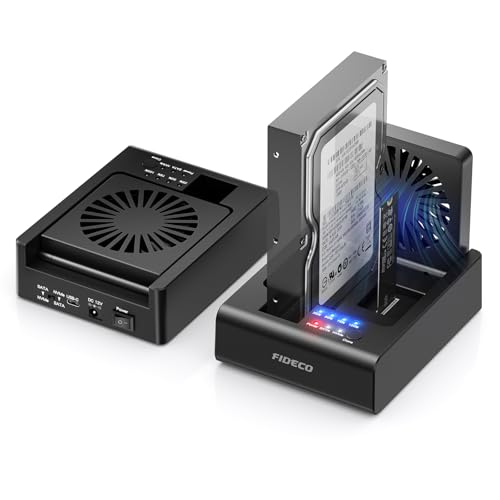
FIDECO 2-Bay NVMe & SATA Dock with Fan
Best for: cloning between NVMe and SATA drives
- Max Transfer Speed
- 10Gbps
- Host Interface
- USB 3.2 Gen 2
- Drive Interface
- PCIe NVMe (M-Key, M+B Key), SATA
- Supported Form Factors
- 2.5-inch, 3.5-inch
- Drive Bay Count
- 2-Bay
- Cooling System
- Foldable cooling fan
View on Amazon: FIDECO 2-Bay NVMe & SATA Dock with Fan Affiliate link
This 2-bay docking station handles M.2 NVMe SSDs and 2.5 or 3.5-inch SATA drives simultaneously. It offers offline cloning between these formats without software. The unit features a foldable cooling fan and USB 3.2 Gen 2 connectivity for up to 10Gbps transfer speeds. You get plug-and-play compatibility with Windows, Mac, and Linux systems. It suits users needing versatile drive management and cloning capabilities.
Pros
- Supports M.2 NVMe and 2.5/3.5-inch SATA drives simultaneously
- Bidirectional offline cloning without software
- Foldable cooling fan for heat dissipation
- USB 3.2 Gen 2 interface with 10Gbps max speed
Cons
- SATA drive transfer speed limited to 5Gbps
- Requires manual capacity check before cloning
- New drives need initialization in Disk Management
Good fit if
- You need to clone between NVMe and SATA drives
- You manage multiple drive formats simultaneously
- You want plug-and-play compatibility across operating systems
Skip if
- You require speeds faster than 10Gbps
- You only use M.2 NVMe drives
- You prefer automatic cloning software
Verdict: FIDECO 2-Bay NVMe & SATA Docking Station is ideal for users who need to manage and clone both NVMe and SATA drives without software. It offers a practical solution for mixed-format storage needs.
Specifications side by side
| Spec | FIDECO 40Gbps M.2 NVMe Enclosure with RGB | FIDECO 2-Bay NVMe & SATA Dock with Fan |
|---|---|---|
| Max Transfer Speed | 40Gbps | 10Gbps |
| Host Interface | USB4 | USB 3.2 Gen 2 |
| Drive Interface | not stated | PCIe NVMe (M-Key, M+B Key), SATA |
| Supported Form Factors | 2230, 2242, 2260, 2280 | 2.5-inch, 3.5-inch |
| Drive Bay Count | not stated | 2-Bay |
| Cooling System | not stated | Foldable cooling fan |
| Interface | NVMe | SATA III |
| Form Factor | M.2 | 2.5 Inch |
| Cooling | not stated | Cooling Fan |
| Transfer Speed | 40Gbps | not stated |
| Features | RGB Lighting, UASP, TRIM | Offline Clone |
| Weight | not stated | 1.28 pounds |
| Color | Grey | Black |
| Model | MT402 | MS01 |
| Size | not stated | 2-Bay |
Frequently asked questions
Does the FIDECO 40Gbps enclosure support offline cloning?
No. The FIDECO 40Gbps M.2 NVMe Enclosure with RGB does not feature offline cloning. It is designed primarily for high-speed data transfer via USB4. If you need to clone drives without software, the 2-Bay Dock is the better choice. It includes dedicated offline clone functionality for managing storage tasks directly on the device.
Which model is better for cooling?
The FIDECO 2-Bay NVMe & SATA Dock includes a cooling fan. This helps manage heat during intensive operations like cloning. The 40Gbps M.2 NVMe Enclosure does not list active cooling features. It relies on passive heat dissipation through its grey metal casing. For sustained high-speed transfers, the dock’s fan provides a thermal advantage.
Can I use the 40Gbps enclosure for SATA drives?
No. The FIDECO 40Gbps M.2 NVMe Enclosure is built specifically for NVMe interfaces. It does not support SATA drives. If you need to connect both NVMe and SATA drives, use the 2-Bay Dock. That model supports SATA III interfaces alongside NVMe, offering flexibility for mixed-format storage needs.
What is the weight difference between the two models?
The FIDECO 2-Bay NVMe & SATA Dock weighs 1.28 pounds. The 40Gbps M.2 NVMe Enclosure does not list a specific weight in its specifications. The dock is slightly heavier due to its dual-bay design and internal fan. The enclosure is lighter and more compact, making it easier to carry for portable use.
Is the 40Gbps enclosure compatible with Mac and Linux?
Yes. The FIDECO 40Gbps M.2 NVMe Enclosure offers plug-and-play compatibility with Windows, Mac, and Linux systems. You can connect it to any of these operating systems without installing additional drivers. This makes it a versatile option for users who switch between different platforms for their portable storage needs.
Does the 2-Bay dock support USB4?
No. The FIDECO 2-Bay NVMe & SATA Dock does not support USB4. It operates at a lower bandwidth suitable for SATA III and standard NVMe transfers. The 40Gbps enclosure is the only model that supports USB4, delivering significantly higher transfer speeds up to 40Gbps for demanding data-intensive tasks.