Looking Beyond the FIDECO 3-Bay M.2 NVMe SATA? 6 Alternatives Worth a Look
As an Amazon Associate we earn from qualifying purchases. Links on this page are affiliate links.
The FIDECO 3-Bay M.2 NVMe SATA Cloner Dock handles mixed storage setups with ease. It supports simultaneous access to two NVMe drives and one SATA drive. Its offline cloning feature lets you copy data without software. This makes it a strong choice for managing different drive types. However, you might look for FIDECO 3-Bay M.2 NVMe SATA alternatives if your needs differ. You may prefer a smaller footprint or a higher transfer speed. Some users prioritize pure NVMe performance over SATA compatibility.
This list includes 6 options that share key specifications with the original dock. We selected these alternatives because their specs overlap with the FIDECO model. You will find docks with dual-bay configurations for focused tasks. Some offer faster USB interfaces for quicker data migration. Others provide specialized cooling or compact designs for portability. Each product addresses specific gaps in the original’s feature set. Review the drive bay counts and interface standards to find the right fit. These tools are designed for practical use in various storage environments.
Our top pick: FIDECO 3-Bay M.2 NVMe and SATA Cloner Dock.
How these alternatives compare
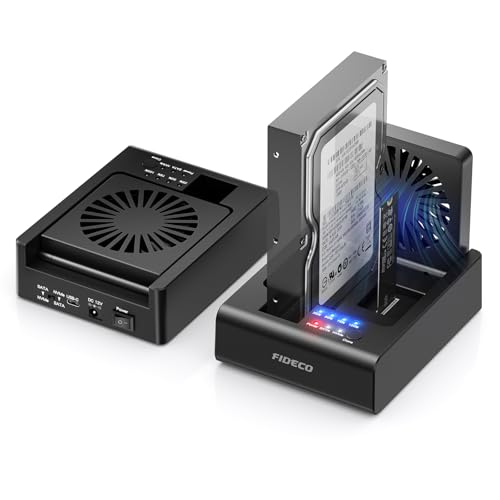
FIDECO 2-Bay NVMe & SATA Dock with Fan
The FIDECO MS01 2-Bay NVMe SATA Dock offers a more compact and budget-friendly option if you do not need the third bay. It retains the offline cloning feature and the foldable cooling fan found in the 3-bay model. However, it supports only one NVMe drive and one SATA drive simultaneously. This reduction in capacity makes it less suitable for heavy mixed-storage workflows. It is a practical choice for users who clone occasionally and value a smaller footprint over the ability to manage three drives at once. The tool-free installation remains consistent with the larger model.
Rosewill Triple Bay Drive Dock and Cloner
The Rosewill Triple Bay Drive Dock and Cloner provides similar versatility with three bays for mixed NVMe and SATA management. Like the FIDECO, it supports offline cloning and tool-free installation. The key difference lies in its physical dimensions and weight, which are significantly lighter and smaller than typical docking stations. It offers a 10Gbps transfer speed, matching the FIDECO’s NVMe capability. This model is ideal for users who prioritize a compact form factor without sacrificing the ability to handle multiple drive types. It serves as a direct alternative for those who need mixed-drive support but prefer a different brand or physical design.
GODO Dual-Bay NVMe and SATA Clone Dock
The GODO Dual-Bay NVMe and SATA Clone Dock focuses exclusively on M.2 drives, offering a dual-bay setup for cloning two NVMe drives offline. It lacks support for 2.5-inch or 3.5-inch SATA drives, which is a major difference from the FIDECO 3-Bay model. This makes it unsuitable for users who need to manage traditional SATA storage. However, it features a USB-C host interface, which may offer better connectivity for newer laptops. It is best for users who only need to clone NVMe drives and want a dedicated, tool-free solution without the bulk of a multi-format dock.
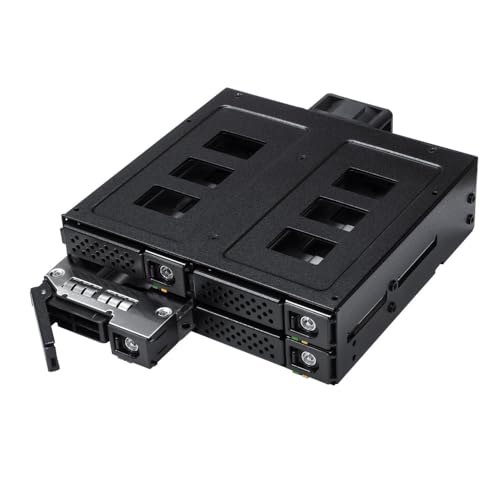
Kingwin 4-Bay 2.5" SATA/SAS Mobile Rack
The Kingwin 4-Bay 2.5-inch SATA/SAS Mobile Rack is designed for users who need to expand SATA storage capacity rather than clone drives. It supports four 2.5-inch SATA or SAS drives, offering significantly more storage slots than the FIDECO. It does not support NVMe drives or offline cloning features. This makes it a poor choice for data migration tasks but an excellent option for managing large volumes of SATA drives. It is suited for users who value quick drive swaps and robust metal construction over the versatility of mixed-format support and cloning capabilities found in the FIDECO model.
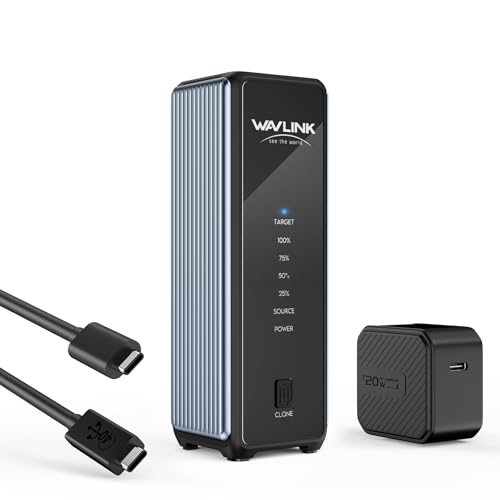
WAVLINK 40Gbps Dual-Bay NVMe Cloner
The WAVLINK 40Gbps Dual-Bay NVMe Cloner is built for speed and portability, supporting only NVMe drives. It offers a massive 40Gbps transfer speed, which is four times faster than the FIDECO’s 10Gbps limit. It features offline cloning and a cooling fan, similar to the FIDECO. However, it lacks SATA support, limiting it to NVMe-only workflows. Its compact size makes it highly portable. This model is ideal for users who prioritize raw speed and portability for migrating large NVMe datasets, rather than the mixed-format flexibility provided by the FIDECO 3-Bay dock.
SANOXY 2.5-Inch Aluminum SATA Enclosure
The SANOXY 2.5-Inch Aluminum SATA Enclosure is a basic housing for a single 2.5-inch SATA drive. It lacks any cloning functionality, multiple bays, or NVMe support. It uses a USB 2.0 interface, which is significantly slower than the USB 3.2 Gen 2 interface on the FIDECO. This enclosure is not suitable for data migration or high-speed transfers. It is designed for users who need a durable aluminum housing for a single SATA drive and prioritize physical build quality over performance. It serves as a simple, low-cost option for basic drive access rather than a cloning or docking solution.
Quick picks
Our 7 picks

FIDECO 3-Bay M.2 NVMe and SATA Cloner Dock
Best for: Mixed NVMe and SATA drive cloning
- Max Transfer Speed
- 10Gbps
- Host Interface
- USB 3.2 Gen 2
- Drive Interface
- M.2 PCIe NVMe (M/M+B Key), SATA
- Supported Form Factors
- 2.5-inch, 3.5-inch
- Drive Bay Count
- 3 bays
- Cooling System
- Foldable cooling fan
View on Amazon: FIDECO 3-Bay M.2 NVMe and SATA Cloner Dock Affiliate link
This docking station supports M.2 NVMe and 2.5 or 3.5-inch SATA drives in a single unit. It offers offline cloning between NVMe drives or from SATA to NVMe without software. The host interface uses USB 3.2 Gen 2 for 10Gbps transfer speeds. A foldable cooling fan helps manage heat during operation. It works with Windows, Mac, and Linux systems.
Pros
- Supports M.2 NVMe and 2.5/3.5-inch SATA drives simultaneously
- Offline cloning between NVMe or SATA to NVMe
- USB 3.2 Gen 2 interface with 10Gbps max speed
- Includes foldable cooling fan for heat dissipation
Cons
- SATA drive transfer speed limited to 5Gbps
- No mention of hardware RAID support
- Requires manual capacity checks before cloning
Good fit if
- You need to clone both NVMe and SATA drives
- You want offline cloning without installing software
- You manage large amounts of data and need cooling
Skip if
- You require transfer speeds faster than 10Gbps
- You only need to clone one drive type
- You prefer automatic cloning without manual checks
Verdict: FIDECO 3-Bay NVMe SATA Cloner is a versatile solution for users who need to handle both NVMe and SATA drives. It is best for professionals managing mixed storage setups who value offline cloning capabilities.
FIDECO 2-Bay NVMe & SATA Dock with Fan
Best for: occasional NVMe to SATA cloning
- Max Transfer Speed
- 10Gbps
- Host Interface
- USB 3.2 Gen 2
- Drive Interface
- PCIe NVMe (M-Key, M+B Key), SATA
- Supported Form Factors
- 2.5-inch, 3.5-inch
- Drive Bay Count
- 2-Bay
- Cooling System
- Foldable cooling fan
View on Amazon: FIDECO 2-Bay NVMe & SATA Dock with Fan Affiliate link
The FIDECO MS01 is a 2-bay docking station that reads M.2 NVMe SSDs and 2.5-inch or 3.5-inch SATA drives. It supports bidirectional offline cloning between these formats without software. The host interface is USB 3.2 Gen 2, offering up to 10Gbps for NVMe and 5Gbps for SATA. A foldable cooling fan helps manage heat during transfers.
Pros
- Supports M.2 NVMe and 2.5/3.5-inch SATA drives simultaneously
- Bidirectional offline cloning between NVMe and SATA
- USB 3.2 Gen 2 interface with 10Gbps max speed
- Includes a foldable cooling fan for heat dissipation
Cons
- Only has 2 drive bays, limiting capacity
- SATA drives are capped at 5Gbps transfer speed
- Requires manual capacity checks in Disk Management before cloning
Good fit if
- You need to clone between NVMe and SATA drives
- You want to access two different drive types at once
- You prefer a compact 2-bay solution for occasional use
Skip if
- You need to clone more than two drives at once
- You require high-speed cloning for large 3.5-inch HDDs
- You want automatic cloning without manual disk checks
Verdict: FIDECO MS01 2-Bay NVMe SATA Dock is a practical tool for users who need to bridge NVMe and SATA storage formats. It fits those who clone occasionally and value a compact, fan-cooled design over high-volume throughput.

Rosewill Triple Bay Drive Dock and Cloner
Best for: Mixed drive type cloning and management
- Max Transfer Speed
- 10Gbps
- Host Interface
- USB 3.2 Gen 2x1
- Drive Interface
- NVMe, SATA
- Supported Form Factors
- M.2, 2.5", 3.5"
- Drive Bay Count
- 3 bays
- Installation Style
- Tool-Free
View on Amazon: Rosewill Triple Bay Drive Dock and Cloner Affiliate link
The Rosewill RS-N2S-CL is a triple-bay docking station that supports M.2 NVMe, 2.5-inch, and 3.5-inch drives. It offers offline cloning without a host PC and reaches 10Gbps via USB 3.2 Gen 2x1. The tool-free design simplifies installation. This compact unit suits users who need versatile drive management and portable cloning capabilities for mixed drive types.
Pros
- Supports M.2 NVMe, 2.5-inch, and 3.5-inch drives
- Offline cloning without a host computer
- USB 3.2 Gen 2x1 interface for 10Gbps transfer
- Tool-free installation for easy drive access
Cons
- 10Gbps speed is lower than 40Gbps alternatives
- Only three drive bays limit bulk cloning
- No mention of hardware encryption or erasing features
Good fit if
- You need to clone mixed drive types simultaneously
- You prefer tool-free drive installation
- You require offline cloning without a PC
Skip if
- You need more than three drive bays
- You require transfer speeds above 10Gbps
- You need hardware-based drive erasing functions
Verdict: Rosewill 3-Bay NVMe SATA Cloner fits users who need to manage mixed drive types with offline cloning. It is a practical choice for those prioritizing versatility over raw speed or high capacity.

GODO Dual-Bay NVMe and SATA Clone Dock
Best for: Cloning two M.2 drives offline
- Max Transfer Speed
- 10Gbps
- Host Interface
- USB 3.1 Gen 2 Type-C
- Drive Interface
- M.2 NVMe, SATA (M Key, B+M Key)
- Supported Form Factors
- M.2 2230, 2242, 2260, 2280, 22110
- Drive Bay Count
- 2 bays
- Cooling System
- Aluminum
View on Amazon: GODO Dual-Bay NVMe and SATA Clone Dock Affiliate link
This GODO docking station supports two M.2 drives in NVMe or SATA formats. It offers offline cloning via a single button, requiring no computer connection. The USB-C host interface delivers 10Gbps transfer speeds. You can use it with various systems like Windows, Mac, or Linux. The aluminum chassis provides passive cooling. It handles drive sizes from 2230 to 22110 with a maximum capacity of 4TB per drive.
Pros
- Dual-bay design for simultaneous cloning
- Offline one-key clone function
- USB 3.1 Gen 2 Type-C interface
- 10Gbps max transfer speed
- Supports M.2 sizes 2230 to 22110
Cons
- Only two drive bays, not three
- No mention of hot-swap capability
- Limited to M.2 form factor only
Good fit if
- You need to duplicate two M.2 SSDs quickly
- You want offline cloning without a PC
- You use M.2 drives in standard sizes
Skip if
- You require a three-bay cloning solution
- You need to clone 2.5-inch SATA drives
- You prefer hot-swappable drive bays
Verdict: GODO Dual-Bay NVMe/SATA Duplicator is a focused tool for users who only need to clone two M.2 drives at once. It fits those who value offline cloning and USB-C connectivity over multi-drive capacity.
Kingwin 4-Bay 2.5" SATA/SAS Mobile Rack
Best for: expanding 2.5-inch SATA storage capacity
- Max Transfer Speed
- 12 Gbps
- Drive Interface
- SATA, SAS
- Supported Form Factors
- 2.5" (7-15mm)
- Drive Bay Count
- 4 bays
- Cooling System
- 4cm cooling fan
- Installation Style
- Tool-less
View on Amazon: Kingwin 4-Bay 2.5" SATA/SAS Mobile Rack Affiliate link
The Kingwin K-49SS is a mobile rack designed for four 2.5-inch SATA or SAS drives. It supports transfer rates up to 12 Gbps and features a 4cm cooling fan to manage heat. The tool-less design allows you to swap drives quickly. It is a practical solution for expanding storage capacity in a home or office setup without needing complex installation tools.
Pros
- Supports four 2.5-inch SATA or SAS drives
- Tool-less installation with stainless steel trays
- 12 Gbps transfer speed capability
- Built-in 4cm cooling fan for thermal management
Cons
- Limited to SATA and SAS interfaces, not NVMe
- Only supports 2.5-inch form factors
- Requires a single 15-pin power connector for all bays
Good fit if
- You need to expand storage with multiple 2.5-inch drives
- You want to swap drives without using tools
- You require high-speed SATA data transfer
Skip if
- You need to use NVMe M.2 drives
- You need to house 3.5-inch hard drives
- You prefer a passive cooling design without fans
Verdict: Kingwin 4-Bay SATA Mobile Rack is a sturdy option for users who need to manage four 2.5-inch SATA or SAS drives efficiently. It suits those who value quick drive swaps and robust metal construction over NVMe speed.
WAVLINK 40Gbps Dual-Bay NVMe Cloner
Best for: fast dual-NVMe cloning and portability
- Max Transfer Speed
- 40Gbps
- Host Interface
- USB4
- Drive Interface
- PCIe NVMe (M-Key, B+M Key)
- Supported Form Factors
- 2230, 2242, 2260, 2280
- Drive Bay Count
- 2 bays
- Cooling System
- Active cooling fan, aluminum housing
View on Amazon: WAVLINK 40Gbps Dual-Bay NVMe Cloner Affiliate link
This WAVLINK enclosure offers dual M.2 NVMe slots in a compact, tool-free design. It supports USB4 with 40Gbps bandwidth, delivering read speeds up to 3300MB/s and write speeds up to 3000MB/s. The device includes an active cooling fan to manage heat during sustained transfers. You can clone drives offline with one click, provided the target drive is equal to or larger than the source. It fits 2230, 2242, 2260, and 2280 SSDs.
Pros
- 40Gbps USB4 interface for high-speed data transfer
- One-click offline cloning function for easy migration
- Active cooling fan prevents thermal throttling
- Tool-free installation for quick drive swaps
Cons
- Only two drive bays, limiting bulk cloning capacity
- Active fan adds noise during heavy workloads
- Target drive must be larger than or equal to source for cloning
Good fit if
- You need fast transfers between two NVMe drives
- You want a portable, palm-sized cloning solution
- You require active cooling for sustained performance
Skip if
- You need to clone more than two drives at once
- You require silent operation without a fan
- You need SATA or HDD support
Verdict: WAVLINK 40Gbps Dual NVMe Enclosure is a fast, compact tool for users who need to migrate data between two NVMe drives quickly. It suits photographers and travelers who value portability and active cooling.

SANOXY 2.5-Inch Aluminum SATA Enclosure
Best for: Basic 2.5-inch SATA drive housing
- Max Transfer Speed
- Up to 480 Mbps
- Host Interface
- USB 2.0
- Drive Interface
- SATA
- Supported Form Factors
- 2.5-inch
- Material
- Aluminum
- Dimensions
- 14.9 × 7.9 × 1.9 inches
View on Amazon: SANOXY 2.5-Inch Aluminum SATA Enclosure Affiliate link
This SANOXY enclosure houses 2.5-inch SATA drives via a USB 2.0 interface. The silver aluminum casing provides a lightweight, pocket-sized form factor. It supports plug-and-play hot swapping and automatic shut-off. You get up to 480 Mbps transfer speeds. This unit suits users needing a simple, durable external drive solution for older systems or basic storage expansion.
Pros
- Silver aluminum casing for durability
- Supports 2.5-inch SATA drives
- USB 2.0 interface with 480 Mbps speed
- Plug-and-play hot swappable design
Cons
- USB 2.0 limits speed to 480 Mbps
- No USB-C or modern high-speed interface
- Only supports 2.5-inch form factor
Good fit if
- You need a durable aluminum enclosure for 2.5-inch drives
- You require a plug-and-play solution without drivers
- You are connecting older SATA drives to a legacy USB 2.0 port
Skip if
- You need NVMe SSD support
- You require USB 3.0 or higher speeds
- You want to house 3.5-inch desktop drives
Verdict: SANOXY 2.5-Inch Aluminum SATA Enclosure offers a sturdy aluminum build for 2.5-inch drives but relies on slow USB 2.0 speeds. It fits users who prioritize physical durability and simplicity over data transfer performance.
Specifications side by side
| Spec | FIDECO 3-Bay M.2 NVMe and SATA Cloner Dock | FIDECO 2-Bay NVMe & SATA Dock with Fan | Rosewill Triple Bay Drive Dock and Cloner | GODO Dual-Bay NVMe and SATA Clone Dock | Kingwin 4-Bay 2.5" SATA/SAS Mobile Rack | WAVLINK 40Gbps Dual-Bay NVMe Cloner | SANOXY 2.5-Inch Aluminum SATA Enclosure |
|---|---|---|---|---|---|---|---|
| Max Transfer Speed | 10Gbps | 10Gbps | 10Gbps | 10Gbps | 12 Gbps | 40Gbps | Up to 480 Mbps |
| Host Interface | USB 3.2 Gen 2 | USB 3.2 Gen 2 | USB 3.2 Gen 2x1 | USB 3.1 Gen 2 Type-C | not stated | USB4 | USB 2.0 |
| Drive Interface | M.2 PCIe NVMe (M/M+B Key), SATA | PCIe NVMe (M-Key, M+B Key), SATA | NVMe, SATA | M.2 NVMe, SATA (M Key, B+M Key) | SATA, SAS | PCIe NVMe (M-Key, B+M Key) | SATA |
| Supported Form Factors | 2.5-inch, 3.5-inch | 2.5-inch, 3.5-inch | M.2, 2.5", 3.5" | M.2 2230, 2242, 2260, 2280, 22110 | 2.5" (7-15mm) | 2230, 2242, 2260, 2280 | 2.5-inch |
| Drive Bay Count | 3 bays | 2-Bay | 3 bays | 2 bays | 4 bays | 2 bays | not stated |
| Cooling System | Foldable cooling fan | Foldable cooling fan | not stated | Aluminum | 4cm cooling fan | Active cooling fan, aluminum housing | not stated |
| Maximum Capacity | not stated | not stated | not stated | 4TB | not stated | 8TB per drive | not stated |
| Installation Style | Tool-Free | not stated | Tool-Free | Tool Free | Tool-less | Tool-Free | not stated |
| Interface | SATA III | SATA III | SATA III | SATA III | SATA III | NVMe | SATA III |
| Form Factor | 2.5 Inch | 2.5 Inch | 2.5 Inch | M.2 | 2.5 Inch | M.2 2280 | 2.5 Inch |
| Cooling | Cooling Fan | Cooling Fan | not stated | not stated | Cooling Fan | Cooling Fan | not stated |
| Transfer Speed | not stated | not stated | 10Gbps | not stated | not stated | 40Gbps | not stated |
| Features | Tool-Free, Offline Clone | Offline Clone | Tool-Free, Offline Clone | Tool-Free, Offline Clone | not stated | Tool-Free, Offline Clone | not stated |
| Bay Count | not stated | not stated | not stated | Dual-Bay | not stated | not stated | not stated |
| Material | not stated | not stated | not stated | not stated | not stated | not stated | Aluminum |
| Weight | not stated | 1.28 pounds | 4 ounces | not stated | 1.45 pounds | 6.21 ounces | not stated |
| Dimensions | not stated | not stated | 2.95 × 1.89 × 4.72 inches | 3.14 × 0.69 × 0.69 inches | not stated | 1.6 × 1.6 × 1.7 inches | 14.9 × 7.9 × 1.9 inches |
| Size | 3-Bay | 2-Bay | 10 Gbps Triple Bay Cloner | not stated | SATA Four Bay | not stated | 2.5" |
| Color | Black | Black | Black | Black | Black | Black | silver |
| Model | MS02 | MS01 | RS-N2S-CL | DK01-NVMe/SATA | K-49SS | 40Gbps Offline Cloning | 2.5USB_SATA-ENCL |
Frequently asked questions
Can I clone NVMe to SATA drives with these docks?
Yes, several options support mixed-format cloning. The FIDECO 3-Bay and 2-Bay docks handle both NVMe and SATA drives. The GODO Dual-Bay dock also bridges these two formats. This feature lets you migrate data from older SATA drives to faster NVMe storage or vice versa without needing a computer.
Do these cloners work without a computer?
Most listed docks feature offline cloning capabilities. The FIDECO, Rosewill, GODO, and WAVLINK models allow you to copy data directly between drives. You simply connect the drives and press a button. This process runs independently, so you do not need to install software or keep your PC powered on.
Which dock is best for pure NVMe cloning?
The WAVLINK 40Gbps Dual-Bay NVMe Cloner is designed specifically for NVMe drives. It supports M.2 2280 form factors and offers a 40Gbps transfer speed. This model focuses on speed and portability, making it ideal if you only work with NVMe drives and need fast data migration between them.
How do these docks handle heat during cloning?
Active cooling is common in multi-bay models. The FIDECO 3-Bay, 2-Bay, Rosewill, and WAVLINK docks all include cooling fans. These fans help maintain stable temperatures during intensive cloning tasks. The Kingwin 4-Bay rack also uses a fan. This helps prevent thermal throttling and protects drive longevity.
Are these docks tool-free to use?
Many models offer tool-free installation for convenience. The FIDECO 3-Bay, Rosewill, GODO, and WAVLINK docks are designed for tool-free drive insertion. You can slide drives into their slots without screws. This feature speeds up the process of swapping drives or starting a new cloning job.
Can I use these for 2.5-inch SATA drives only?
Yes, you can use specific models for SATA drives alone. The Kingwin 4-Bay Mobile Rack supports 2.5-inch SATA and SAS drives. The SANOXY enclosure also houses 2.5-inch SATA drives. These options are practical if you need to expand storage capacity or manage multiple SATA drives without NVMe support.
What interface do these docks use to connect to a PC?
Connection methods vary by model. The GODO dock uses a USB-C host interface. The Rosewill cloner specifies a 10Gbps transfer speed, implying a high-speed USB connection. Other docks like the FIDECO and Kingwin rely on SATA III interfaces for internal drive communication, connecting to the host via standard USB cables.