Looking Beyond the DKARDU M.2 NVMe SSD? 6 Alternatives Worth a Look
As an Amazon Associate we earn from qualifying purchases. Links on this page are affiliate links.
The DKARDU M.2 NVMe SSD Adapter Card allows you to upgrade older MacBook models using standard M.2 drives. If you are looking for DKARDU NGFF M.2 NVMe SSD alternatives, you may need different specifications or brands. The DKARDU adapter converts the hard disk slot but has no built-in chip or driver. It supports M-key PCI-e NVMe SSDs for MacBook Pro and Air models from 2013 to 2017. You must ensure your system runs macOS 10.13 High Sierra or later for proper NVMe protocol support. Some older laptops may not recognize the drive without additional formatting steps.
You might want an alternative if you need a pre-installed SSD, a different capacity, or a drive for a non-Mac system. The selected alternatives share key specifications with the DKARDU adapter, such as the M.2 form factor and NVMe interface. Some options offer larger storage sizes like 1TB, while others provide specific performance tiers for gaming or budget builds. Each product listed here fits users who prioritize different specs, whether that is thermal stability, interface compatibility, or physical dimensions. These choices ensure you find a drive that matches your system's exact requirements without compromising on essential NVMe standards.
Our top pick: DKARDU M.2 NVMe SSD MacBook Adapter (2-Pack).
Comparing Key Differences
S Sharkspeed 1TB MacBook Pro Internal SSD
The S Sharkspeed drive targets the MacBook Pro A1708 specifically. Unlike the DKARDU adapter which requires you to source and install your own NVMe module, this unit is a complete 1TB SSD ready for immediate use. It includes pre-installed software to simplify the transfer process. This option removes the compatibility guesswork associated with the DKARDU adapter, which supports many models but requires manual macOS upgrades and driver management. You gain a higher capacity out of the box. However, you lose the flexibility to use different drive brands or capacities later. If you own a 2016-2017 Non-Touch Bar 13-inch MacBook Pro, this direct replacement is simpler than using an adapter.
Samsung 970 EVO Plus 500GB NVMe M.2 SSD
The Samsung 970 EVO Plus is a standalone 500GB NVMe drive, not an adapter. It offers Gen3 performance and thermal protection, focusing on speed and stability. The DKARDU product is merely a conversion card that requires a separate NVMe SSD to function. If you choose the Samsung drive, you must ensure your system has a compatible M.2 slot or use a different adapter. This option is better for users who prioritize proven Gen3 speeds and thermal management over the convenience of a pre-packaged upgrade solution. It fits systems that support standard M.2 NVMe drives directly. You get a reliable drive with established firmware support, but you must handle the physical installation and compatibility checks yourself, unlike the DKARDU bundle which simplifies the MacBook conversion process.
KIOXIA EXCERIA 500GB M.2 NVMe SSD
The Kioxia Exceria 500GB is a budget-friendly NVMe SSD designed for Gen3 systems. Like the Samsung option, it is a drive, not an adapter card. The DKARDU product serves as the bridge for older MacBooks, while this Kioxia unit is the storage component. If you already have an adapter or a compatible M.2 slot, this drive provides value. It lacks the specific MacBook compatibility guarantees of the DKARDU adapter. You get a solid budget drive for older or mid-range systems. However, you must verify that your specific laptop model supports the NVMe protocol natively or via an adapter. This option is best for users who want a cost-effective storage upgrade and are comfortable managing the hardware integration separately from the drive purchase.
GIGABYTE AORUS 1TB PCIe 4.0 NVMe SSD
The GIGABYTE AORUS 1TB is a PCIe 4.0 NVMe SSD built for gaming performance. It features an external DDR cache for consistent speeds under heavy loads. This is a significant step up from the Gen3 capabilities typically associated with the older MacBooks supported by the DKARDU adapter. The DKARDU card converts slots for older hardware, limiting you to Gen3 speeds. This GIGABYTE drive requires a motherboard with PCIe 4.0 support to reach its full potential. It is ideal for modern gaming PCs or workstations. You gain massive speed advantages but lose compatibility with the older MacBook models that the DKARDU adapter targets. Choose this if you need high throughput for gaming and have compatible hardware, rather than upgrading an older laptop.
Seagate Barracuda Q5 1TB M.2 NVMe SSD
The Seagate Barracuda Q5 1TB is a budget NVMe SSD suitable for standard laptops and desktops. It uses QLC NAND, which offers high capacity at a lower cost. The DKARDU adapter is a specialized tool for MacBooks, not a drive itself. This Seagate unit is a standalone storage solution. It fits users who want a large 1TB capacity without spending much. Unlike the DKARDU adapter, which solves a specific connectivity issue for older Macs, this drive requires a standard M.2 slot. It is a practical upgrade for modern systems. You get value and capacity. However, it does not address the compatibility challenges of older laptops. If you have a modern PC or laptop, this is a straightforward choice. If you have an older MacBook, you still need an adapter.
Mustpoint M.2 NVMe to U.2 Adapter
The Mustpoint M.2 to U.2 adapter allows you to use M.2 NVMe drives in 2.5-inch bays. This is a completely different use case than the DKARDU adapter, which converts laptop slots for MacBooks. The DKARDU product helps older Macs accept M.2 drives. This Mustpoint adapter helps desktops or servers accept M.2 drives in traditional bays. It is a practical tool for repurposing existing NVMe SSDs. You gain flexibility in drive placement for larger systems. You lose the specific MacBook compatibility that the DKARDU adapter provides. This option is best for users who need to reuse M.2 drives in desktop chassis with 2.5-inch drive bays. It is not suitable for upgrading older MacBooks. Choose this if you are working with desktop hardware and need to adapt form factors.
Quick picks
Our 7 picks

DKARDU M.2 NVMe SSD MacBook Adapter (2-Pack)
Best for: Upgrading storage in older MacBook Pro and Air models
- Interface
- NVMe
- Form Factor
- M.2
- Compatibility
- Mac
- Weight
- 0.71 ounces
View on Amazon: DKARDU M.2 NVMe SSD MacBook Adapter (2-Pack) Affiliate link
This adapter lets you install standard M.2 NVMe SSDs into older MacBook Pro and Air models. It supports M-key PCIe NVMe and AHCI sockets, converting the proprietary slot for broader compatibility. You need macOS 10.13 or later for proper NVMe protocol support. The unit weighs 0.71 ounces and comes in black. It is designed specifically for Mac users looking to upgrade storage in 2013-2017 devices.
Pros
- Supports M-key PCIe NVMe and AHCI SSD sockets
- Compatible with MacBook Pro 2013-2015 and Air 2013-2017
- Works with major NVMe brands like Samsung and WD
- Lightweight design at 0.71 ounces
Cons
- Does not support B-key or B/M-key SATA SSDs
- 2013 and 2014 laptops may not recognize NVMe drives without Mojave boot workaround
- Requires macOS 10.13 High Sierra or later for NVMe support
Good fit if
- You own a MacBook Pro (2013 late-2015) or Air (2013-2017) and want to use standard M.2 NVMe drives
- You are comfortable upgrading your macOS version to 10.13 or higher before installation
- You need a lightweight adapter to convert your laptop's proprietary drive slot
Skip if
- You have a MacBook 2013 Early model, which is not supported
- You plan to use B-key or SATA M.2 SSDs, as this adapter only accepts M-key NVMe/AHCI
- You own a 2013 or 2014 Mac and cannot boot from a Mojave USB to fix EFI firmware recognition issues
Verdict: DKARDU M.2 NVMe Adapter for MacBook enables storage upgrades for specific older Mac models using standard M.2 drives. It fits users who can manage the required macOS version and drive compatibility constraints.

S Sharkspeed 1TB MacBook Pro Internal SSD
Best for: MacBook Pro 13-inch A1708 upgrades
- Storage Capacity
- 1TB
- Interface
- PCIe Gen3.0x4
- Max Read Speed
- Up to 2500MB/s
- Max Write Speed
- Up to 2000MB/s
- Form Factor
- M.2
- Compatibility
- Mac
View on Amazon: S Sharkspeed 1TB MacBook Pro Internal SSD Affiliate link
This S Sharkspeed drive is a direct replacement for the MacBook Pro 13-inch A1708 (Non-Touch Bar). It uses NVMe PCIe Gen3.0x4 with read speeds up to 2500MB/s and write speeds up to 2000MB/s. The unit includes pre-installed macOS and features ECC technology for data protection. It fits users needing a native M.2 upgrade without adapters.
Pros
- Read speeds up to 2500MB/s
- Write speeds up to 2000MB/s
- Pre-installed macOS for easy setup
- Native NVMe PCIe Gen3.0x4 interface
Cons
- Limited to PCIe Gen3.0x4 speeds
- Compatible only with specific MacBook Pro models
- Requires macOS 10.13 or later for recognition
Good fit if
- You own a MacBook Pro 13-inch A1708 (Non-Touch Bar)
- You want a drive with pre-installed macOS
- You need a direct M.2 replacement without adapters
Skip if
- You have a MacBook Pro with a Touch Bar
- You need PCIe Gen4.0 performance
- You use a Windows PC
Verdict: S Sharkspeed 1TB NVMe SSD for MacBook Pro A1708 is a suitable upgrade for owners of the 2016-2017 Non-Touch Bar 13-inch MacBook Pro who want a straightforward replacement with pre-installed software.
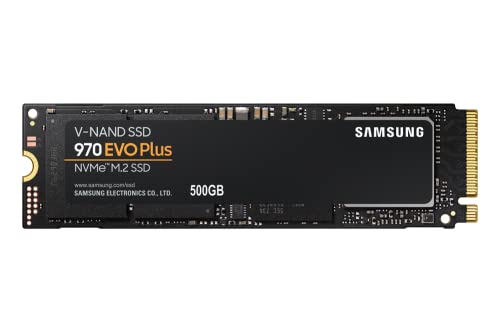
Samsung 970 EVO Plus 500GB NVMe M.2 SSD
Best for: Gen 3 performance and thermal stability
- Storage Capacity
- 500GB
- Interface
- PCIe Gen 3.0 x4 NVMe 1.3
- Form Factor
- M.2
- Max Read Speed
- Up to 3,500MB s
- Max Write Speed
- Up to 3,300MB s
- Dimensions
- 0.87 × 0.09 × 3.15 inches
View on Amazon: Samsung 970 EVO Plus 500GB NVMe M.2 SSD Affiliate link
The Samsung 970 EVO Plus is a PCIe Gen 3.0 x4 NVMe drive with a 500GB capacity. It delivers sequential read speeds up to 3,500MB/s and write speeds up to 3,300MB/s. The drive includes Dynamic Thermal Guard to manage heat and Samsung Magician software for management. It fits M.2 slots and suits users needing reliable performance for gaming or content creation.
Pros
- Sequential read speeds up to 3,500MB/s
- Sequential write speeds up to 3,300MB/s
- Dynamic Thermal Guard for temperature control
- Samsung Magician software for optimization
Cons
- 500GB capacity is smaller than 1TB options
- Limited to PCIe Gen 3.0 interface
- No included heatsink for passive cooling
Good fit if
- You need fast Gen 3 speeds for gaming
- You want reliable thermal management
- You prefer Samsung's management software
Skip if
- You require PCIe Gen 4 bandwidth
- You need more than 500GB storage
- You prefer a drive with a built-in heatsink
Verdict: Samsung 970 EVO Plus 500GB NVMe SSD offers strong Gen 3 performance and thermal protection. It fits users who prioritize speed and stability over maximum capacity or newer interface standards.
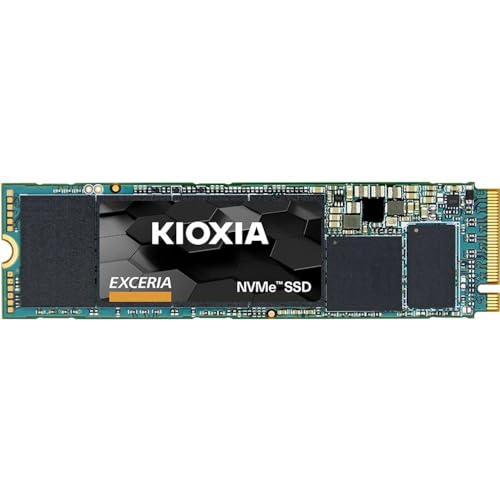
KIOXIA EXCERIA 500GB M.2 NVMe SSD
Best for: budget upgrades for Gen3 systems
- Storage Capacity
- 500 GB
- Interface
- PCIe Gen3 x4
- Form Factor
- M.2 2280
- Dimensions
- 3.94 × 2.76 × 0.28 inches
View on Amazon: KIOXIA EXCERIA 500GB M.2 NVMe SSD Affiliate link
This Kioxia drive uses PCIe Gen3 x4 and NVMe 1.3c technology. It offers 350,000 read and 400,000 write IOPS. The 500 GB capacity fits in an M.2 2280 slot. It is a practical option for users who need reliable storage without the higher cost of Gen4 models. The drive is designed for standard desktop and laptop builds.
Pros
- PCIe Gen3 x4 interface for fast data transfer
- 350,000 read IOPS performance
- 400,000 write IOPS performance
- Standard M.2 2280 form factor
Cons
- 500 GB capacity is smaller than 1 TB options
- PCIe Gen3 speed is lower than Gen4 drives
- No included heatsink for thermal management
Good fit if
- You need a reliable budget NVMe drive
- You have a PCIe Gen3 compatible system
- You want a standard M.2 2280 size
Skip if
- You require more than 500 GB of storage
- You need the latest PCIe Gen4 speeds
- You are building a high-end gaming PC
Verdict: Kioxia Exceria 500GB NVMe SSD is a solid budget choice for users who prioritize value over maximum speed. It fits perfectly in older or mid-range systems that use PCIe Gen3 slots.

GIGABYTE AORUS 1TB PCIe 4.0 NVMe SSD
Best for: Gaming performance and speed
- Storage Capacity
- 1 TB
- Interface
- NVMe 1.3, PCI-Express 4.0 x4
- Max Read Speed
- Up to 5000 MB/s
- Max Write Speed
- Up to 4400 MB/s
- Cache Type
- DDR4 1 GB
- Form Factor
- M.2
View on Amazon: GIGABYTE AORUS 1TB PCIe 4.0 NVMe SSD Affiliate link
This GIGABYTE drive uses a Phison E16 controller and 3D TLC NAND to deliver up to 5000 MB/s read speeds. It includes a 1 GB DDR4 external cache buffer to help manage data efficiently. The M.2 form factor fits standard NVMe slots. It suits gamers who need fast load times and consistent performance for demanding titles.
Pros
- PCIe 4.0 x4 interface for high bandwidth
- 1 GB DDR4 external cache buffer
- Up to 5000 MB/s sequential read speed
- 3D TLC NAND flash for reliable endurance
Cons
- Heavier build at 3.64 pounds
- Larger dimensions than standard M.2 sticks
- Limited to 1 TB capacity in this model
Good fit if
- You play graphically intensive games
- You need fast game loading times
- You want a PCIe 4.0 drive
Skip if
- You have a PCIe 3.0 only system
- You need more than 1 TB storage
- You prefer a lighter, smaller drive
Verdict: GIGABYTE AORUS 1TB PCIe 4.0 SSD delivers strong speeds for gamers. The external DDR cache supports consistent performance during heavy loads.

Seagate Barracuda Q5 1TB M.2 NVMe SSD
Best for: Budget laptop and desktop upgrades
- Storage Capacity
- 1TB
- Interface
- PCIe Gen3 ×4
- Form Factor
- M.2 2280
- Max Read Speed
- 2400 MB/s
- Max Write Speed
- 1800 MB/s
- Compatibility
- Laptop, Desktop
View on Amazon: Seagate Barracuda Q5 1TB M.2 NVMe SSD Affiliate link
The Seagate Barracuda Q5 is an M.2 2280 NVMe SSD designed for laptops and desktops. It uses PCIe Gen3 ×4 interface and 3D QLC NAND. Sequential read speeds reach 2400 MB/s, while writes hit 1800 MB/s. This drive offers a slim profile at 0.08 inches thick. It fits users who need reliable storage upgrades without the premium cost of TLC NAND drives.
Pros
- Sequential read speeds up to 2400 MB/s
- Compatible with both laptops and desktops
- Slim M.2 2280 form factor
- Includes free Seagate DiscWizard software for cloning
Cons
- Uses QLC NAND which may have lower endurance
- Slower write speeds compared to TLC alternatives
- Limited to PCIe Gen3 interface
Good fit if
- You are upgrading a laptop with limited space
- You need a budget-friendly NVMe upgrade
- You want to clone your existing drive easily
Skip if
- You require maximum write endurance for heavy workloads
- You need the fastest PCIe Gen4 speeds available
- You prefer TLC NAND for better longevity
Verdict: Seagate Barracuda Q5 1TB NVMe SSD fits users who prioritize value and compatibility over peak performance. It is a practical upgrade for standard laptops and desktops.

Mustpoint M.2 NVMe to U.2 Adapter
Best for: Reusing M.2 NVMe drives in 2.5-inch bays
- Interface
- NVMe
- Form Factor
- M.2
- Weight
- 4.83 ounces
View on Amazon: Mustpoint M.2 NVMe to U.2 Adapter Affiliate link
This adapter lets you install an M.2 NVMe SSD into a standard 2.5-inch drive bay using a U.2 interface. It supports PCIe NVMe drives and is backward compatible with earlier PCIe versions. The unit weighs 4.83 ounces and includes a two-year warranty with lifetime technical support. It is designed for desktop computers and servers that need to upgrade storage using existing M.2 drives.
Pros
- Converts M.2 NVMe SSDs to U.2 (SFF-8639) interface
- Fits in standard 2.5-inch drive bays
- Backward compatible with earlier PCIe versions
- Includes a two-year warranty
Cons
- Requires a separate M.2 NVMe SSD to function
- Only converts interface, not SATA M.2 drives
- Limited to PCIe NVMe protocol support
Good fit if
- You have spare M.2 NVMe SSDs to reuse
- You need to install an NVMe drive in a 2.5-inch bay
- You want to upgrade server storage cost-effectively
Skip if
- You need a complete storage solution without buying a drive separately
- Your system only supports SATA M.2 drives
- You require a compact solution without extra cabling
Verdict: Mustpoint M.2 to U.2 NVMe Adapter is a practical tool for reusing M.2 drives in systems with 2.5-inch bays. It fits users who need to repurpose existing NVMe SSDs for desktop or server upgrades.
Specifications side by side
| Spec | DKARDU M.2 NVMe SSD MacBook Adapter (2-Pack) | S Sharkspeed 1TB MacBook Pro Internal SSD | Samsung 970 EVO Plus 500GB NVMe M.2 SSD | KIOXIA EXCERIA 500GB M.2 NVMe SSD | GIGABYTE AORUS 1TB PCIe 4.0 NVMe SSD | Seagate Barracuda Q5 1TB M.2 NVMe SSD | Mustpoint M.2 NVMe to U.2 Adapter |
|---|---|---|---|---|---|---|---|
| Storage Capacity | not stated | 1TB | 500GB | 500 GB | 1 TB | 1TB | not stated |
| Interface | not stated | PCIe Gen3.0x4 | PCIe Gen 3.0 x4 NVMe 1.3 | PCIe Gen3 x4 | NVMe 1.3, PCI-Express 4.0 x4 | PCIe Gen3 ×4 | not stated |
| Form Factor | not stated | not stated | M.2 | M.2 2280 | not stated | M.2 2280 | not stated |
| Max Read Speed | not stated | Up to 2500MB/s | Up to 3,500MB s | not stated | Up to 5000 MB/s | 2400 MB/s | not stated |
| Max Write Speed | not stated | Up to 2000MB/s | Up to 3,300MB s | not stated | Up to 4400 MB/s | 1800 MB/s | not stated |
| Cache Type | not stated | not stated | not stated | not stated | DDR4 1 GB | not stated | not stated |
| Compatibility | Mac | Mac | not stated | not stated | Gaming | Laptop, Desktop | not stated |
| NAND Type | not stated | not stated | not stated | not stated | TLC | QLC | not stated |
| Size | not stated | 1TB | 500GB | 500 GB | not stated | 1TB | not stated |
| Weight | 0.71 ounces | 1.06 ounces | 1.76 ounces | not stated | 3.64 pounds | not stated | 4.83 ounces |
| Dimensions | not stated | not stated | 0.87 × 0.09 × 3.15 inches | 3.94 × 2.76 × 0.28 inches | 5.12 × 3.15 × 1.18 inches | 3.15 × 0.87 × 0.08 inches | not stated |
| Color | black | SSD For Macbook Pro A1708 | Black | Black | Black | Multicolor | Red |
| Model | NR-US-257 | A1708 SSD | MZ-V7S500B/AM | LRC10Z500GG8 | GP-AG41TB | ZP1000CV3A001 | U2M2E125 |
Looking Beyond the DKARDU M.2 NVMe SSD? bykski b nvme ct m 2 SSD aluminum alternatives offers similar picks compared.
Frequently asked questions
What is the best NVMe SSD for upgrading an older MacBook?
The S Sharkspeed 1TB SSD is a strong choice for MacBook Pro A1708 models. It is a complete drive rather than just an adapter, so you do not need to source a separate M.2 module. The unit comes with pre-installed software to simplify the installation process for specific 2016-2017 non-Touch Bar laptops.
Which NVMe SSD offers the best performance for gaming?
The GIGABYTE AORUS 1TB PCIe 4.0 SSD is designed for gaming performance. It features an external DDR cache to support consistent speeds during heavy loads. This drive utilizes TLC NAND type and delivers strong throughput suitable for gamers who prioritize speed and responsiveness in their systems.
Is there a budget-friendly NVMe SSD option for Gen3 systems?
The KIOXIA Exceria 500GB NVMe SSD is a solid budget choice. It fits well in older or mid-range systems that use PCIe Gen3 slots. This drive prioritizes value over maximum speed, making it a practical upgrade for users who want reliable storage without paying for premium features.
Can I use an M.2 NVMe drive in a 2.5-inch bay?
Yes, the Mustpoint M.2 to U.2 NVMe Adapter allows you to reuse M.2 drives in systems with 2.5-inch bays. This adapter is a practical tool for repurposing existing NVMe SSDs for desktop or server upgrades. It enables you to install standard M.2 modules into larger drive cages.
Which SSD is best for general laptop and desktop upgrades?
The Seagate Barracuda Q5 1TB NVMe SSD is a practical upgrade for standard laptops and desktops. It prioritizes value and broad compatibility over peak performance. This drive uses QLC NAND and offers a straightforward solution for users who need more storage space without requiring high-end specifications.
Does the Samsung 970 EVO Plus have thermal protection?
Yes, the Samsung 970 EVO Plus 500GB NVMe SSD includes thermal protection. It offers strong Gen 3 performance while maintaining stability under load. This drive is suitable for users who prioritize speed and thermal management over maximum capacity or newer interface standards.