Looking Beyond the DERSUR M.2 NVME SATA SSD? 6 Alternatives Worth a Look
As an Amazon Associate we earn from qualifying purchases. Links on this page are affiliate links.
The DERSUR M.2 NVMe SATA SSD enclosure supports both PCIe NVMe and M.2 SATA drives via USB-C 3.2 Gen2. If you are looking for dersur m 2 nvme sata SSD alternatives, you might want a different material or specific form factor support. This adapter handles 2230 through 2280 sizes and offers plug-and-play operation on Windows, Linux, and macOS. It is a practical choice for portable data access without requiring drivers.
However, you may prefer an aluminum chassis for better heat dissipation or a design optimized for PS5 expansion. Some users need offline cloning capabilities or ruggedized protection for gaming environments. The alternatives listed here were chosen because their specifications overlap with the original product. They all support 10Gbps transfer speeds and M.2 interfaces. Each option provides distinct features like tool-free installation or dual-bay cloning to suit different workflows. You can compare these specs to find the enclosure that best fits your specific drive types and use case.
Our top pick: DERSUR Dual-Protocol M.2 USB-C Enclosure.
Comparing the Top Alternatives
StarTech M.2 SATA USB-C Enclosure
The StarTech enclosure uses aluminum instead of the DERSUR’s plastic build. This material choice offers better heat dissipation for sustained transfers. It supports only M.2 SATA drives, excluding PCIe NVMe compatibility entirely. You lose dual-protocol flexibility but gain a rugged, professional chassis. The dimensions are larger, measuring 6.3 inches in length. It weighs 2.15 ounces. If you exclusively use SATA drives and prefer metal construction, this is a sturdy alternative. You cannot use it with NVMe drives, which limits its scope compared to the DERSUR model.
Sokiwi Tool-Free M.2 NVMe & SATA SSD Enclosure
Sokiwi offers a tool-free design similar to the DERSUR but in a gray finish. It supports the same full range of M.2 form factors, including 2230 and 2280. The transfer speed matches at 10Gbps. This unit weighs slightly more at 3.84 ounces. It includes dual cables for added convenience. You get broad OS support without drivers. If you value included accessories and a tool-free installation process, this is a practical budget option. It provides the same versatility for mixed drive types but with a different physical footprint and weight profile.
StarTech M.2 NVMe and SATA USB-C Enclosure
StarTech’s premium option supports both NVMe and SATA drives, matching the DERSUR’s dual-protocol capability. It features a space gray aluminum build for improved durability. The dimensions are compact at 4.1 inches long. It weighs just 1.76 ounces, making it lighter than the DERSUR. It includes USB-A cables for broader compatibility. You gain a more premium feel and included adapters. However, it lacks the specific ruggedized features of other models. If you want a versatile, lightweight enclosure with included cables for legacy ports, this is a strong contender.
MAIWO M.2 NVMe and SATA USB-C Enclosure
The MAIWO enclosure provides dual-format support for NVMe and SATA drives. It features a blue aluminum body for better thermal management. The tool-free design simplifies drive installation. It matches the 10Gbps transfer speed of the DERSUR. It weighs 1.76 ounces, offering a lighter profile. The dimensions are 4.33 inches in length. You get a robust build quality suitable for frequent data transfers. If you prioritize a metal chassis and easy tool-free access, this is a reliable alternative. It offers similar versatility but with a distinct aesthetic and weight distribution.
ASUS TUF Gaming A1 Rugged M.2 SSD Enclosure
ASUS targets gamers and PS5 users with a ruggedized design. It supports both NVMe and SATA drives via USB-C. The transfer speed reaches 10Gbps. It is significantly heavier at 8.78 ounces and larger in size. The build emphasizes durability for gaming setups. You gain specific compatibility certifications for PS5 expansion. If you need a tough enclosure for gaming consoles or rough handling, this is the choice. You sacrifice portability and weight savings for enhanced protection and console-specific optimization.
SUITOK Dual-Bay NVMe and SATA Cloner Dock
The SUITOK cloner is a dual-bay dock for offline sector-level cloning. It supports both NVMe and SATA drives. It does not require a PC for operation. The transfer speed is 10Gbps. It is larger, measuring 3.87 inches long. It weighs 3.58 ounces. You gain the ability to clone drives independently. If you need to duplicate drives without a computer, this is essential. You lose the simple plug-and-play external storage function. It is a specialized tool for IT pros rather than a general-purpose enclosure.
Quick picks
Our 7 picks

DERSUR Dual-Protocol M.2 USB-C Enclosure
Best for: Portable external storage for mixed M.2 drives
- Max Transfer Speed
- 10Gbps
- Host Interface
- USB-C 3.2 Gen 2
- Drive Interface
- PCIe NVMe, M.2 SATA (M/B+M Key)
- Supported Form Factors
- 2280, 2260, 2242, 2230
- Cooling System
- Aluminium Alloy Housing
View on Amazon: DERSUR Dual-Protocol M.2 USB-C Enclosure Affiliate link
This DERSUR enclosure bridges M.2 NVMe and SATA SSDs to USB-C 3.2 Gen2. It supports 10Gbps transfers for NVMe drives and 6Gbps for SATA units. You can use it with 2230, 2242, 2260, and 2280 form factors. The tool-free design and ABS plastic build make it portable. It works with Windows, Linux, macOS, and Android for easy data access.
Pros
- USB-C 3.2 Gen2 host interface
- 10Gbps max transfer speed for NVMe
- Supports M.2 SATA and PCIe NVMe
- Compatible with 2230, 2242, 2260, 2280 sizes
Cons
- ABS plastic build lacks metal cooling
- SATA speeds limited to 6Gbps
- Excludes drives with heat sinks
Good fit if
- You need to access NVMe or SATA SSDs externally
- You use Windows, Linux, macOS, or Android
- You require support for small form factors like 2230
Skip if
- You require metal enclosure for better heat dissipation
- You need transfer speeds exceeding 10Gbps
- You use SSDs with attached heat sinks
Verdict: DERSUR M.2 NVMe SATA Enclosure offers versatile support for both NVMe and SATA drives in a portable package. It is ideal for users needing a tool-free, cross-platform solution for data recovery or external storage.

StarTech M.2 SATA USB-C Enclosure
Best for: M.2 SATA drives needing 10Gbps USB-C
- Max Transfer Speed
- 10Gbps
- Host Interface
- USB-C, USB 3.1 Gen 2
- Drive Interface
- M.2 SATA (SATA I/II/III)
- Supported Form Factors
- 30mm, 42mm, 60mm, 80mm
- Cooling System
- Aluminum with ventilation
- Dimensions
- 6.3 × 5.12 × 1.18 inches
View on Amazon: StarTech M.2 SATA USB-C Enclosure Affiliate link
This StarTech enclosure turns an M.2 SATA drive into a portable USB-C storage solution. It supports 10Gbps host interfaces and handles 30mm, 42mm, 60mm, and 80mm form factors. The aluminum body with ventilation helps manage heat. It works with USB 3.1 Gen 2 and Thunderbolt 3 ports. You get reliable connectivity for laptops or desktops needing external SATA storage.
Pros
- Supports 10Gbps transfer speeds via USB-C
- Compatible with Thunderbolt 3 hosts
- Aluminum casing with ventilation for cooling
- Fits 30mm, 42mm, 60mm, and 80mm drives
Cons
- Only supports M.2 SATA drives, not NVMe
- Requires separate M.2 SATA SSD purchase
- Heavier than plastic alternatives at 2.15 ounces
Good fit if
- You own an M.2 SATA SSD and need external access
- You use a Thunderbolt 3 or USB-C laptop
- You prefer metal enclosures for better heat dissipation
Skip if
- You have an M.2 NVMe drive only
- You need a tool-free design for quick swaps
- You want a built-in drive included in the box
Verdict: StarTech M.2 SATA SSD Enclosure is a sturdy option for users with M.2 SATA drives who need 10Gbps connectivity. It fits well with Thunderbolt 3 laptops but excludes NVMe users entirely.

Sokiwi Tool-Free M.2 NVMe & SATA SSD Enclosure
Best for: users needing versatile M.2 size support
- Max Transfer Speed
- 10Gbps
- Host Interface
- USB-C 3.2 Gen 2
- Drive Interface
- PCIe NVMe, SATA (M-Key, B+M Key)
- Supported Form Factors
- 2230, 2242, 2260, 2280
- Cooling System
- Aluminum alloy shell
- Maximum Capacity
- 2TB
View on Amazon: Sokiwi Tool-Free M.2 NVMe & SATA SSD Enclosure Affiliate link
The Sokiwi enclosure uses the RTL9210 chipset to support up to 10Gbps transfer speeds for NVMe drives and 6Gbps for SATA models. Its tool-free design allows quick installation of M.2 drives in 2230, 2242, 2260, and 2280 sizes. The aluminum alloy shell provides heat dissipation, and it includes both USB-C and USB 3.1 Type-A cables. It supports capacities up to 2TB and works with Windows, Mac, Linux, and Android.
Pros
- RTL9210 chipset supports 10Gbps NVMe speeds
- Tool-free installation mechanism
- Aluminum alloy shell for cooling
- Includes USB-C and USB 3.1 cables
- Supports 2230, 2242, 2260, and 2280 form factors
Cons
- Max capacity limited to 2TB
- Does not support M.2 PCIe AHCI SSDs
- Not compatible with WiFi or capture cards
Good fit if
- You need a tool-free way to access M.2 SSDs
- You require support for multiple M.2 sizes like 2230 or 2280
- You want compatibility with both NVMe and SATA drives
Skip if
- You plan to use M.2 PCIe AHCI SSDs
- You need to support SSDs larger than 2TB
- You require compatibility with mSATA or non-M.2 drives
Verdict: The Sokiwi Tool-Free M.2 NVMe SATA Enclosure is a practical option for users needing quick access to various M.2 sizes without tools. It fits those who value the included dual cables and broad OS support.

StarTech M.2 NVMe and SATA USB-C Enclosure
Best for: Users needing NVMe and SATA support
- Max Transfer Speed
- 10Gbps
- Host Interface
- USB-C, USB-A
- Drive Interface
- PCIe NVMe (M-Key), SATA (B+M-Key)
- Supported Form Factors
- 2230, 2242, 2260, 2280
- Cooling System
- Aluminum housing heatsink
- Installation Style
- Tool-less
View on Amazon: StarTech M.2 NVMe and SATA USB-C Enclosure Affiliate link
This StarTech enclosure supports both M.2 NVMe and SATA SSDs via USB 3.2 Gen 2. It delivers 10Gbps transfer speeds and includes both USB-C and USB-A cables. The tool-less aluminum design acts as a heatsink for 2230, 2242, 2260, and 2280 drives. It is a practical solution for users needing broad compatibility with multiple drive types.
Pros
- Supports both PCIe NVMe and SATA M.2 drives
- 10Gbps transfer speed via USB 3.2 Gen 2
- Includes both USB-C and USB-A host cables
- Tool-less installation with aluminum heatsink housing
Cons
- Does not support 22110mm drive form factors
- Limited to USB 3.2 Gen 2 speeds
- Only available in Space Gray color
Good fit if
- You need to use both NVMe and SATA M.2 drives
- You require a USB-A connection alongside USB-C
- You want a tool-less installation process
Skip if
- You plan to use 22110mm length SSDs
- You need speeds faster than 10Gbps
- You prefer a ruggedized protective case
Verdict: StarTech M.2 NVMe SATA Enclosure is a versatile choice for users who need to connect both NVMe and SATA drives. It fits those who value broad compatibility and included USB-A cables over ruggedized protection.

MAIWO M.2 NVMe and SATA USB-C Enclosure
Best for: Dual-format M.2 drive users
- Max Transfer Speed
- 10Gbps
- Host Interface
- USB 3.1 Gen 2x1 Type-C
- Drive Interface
- PCIe NVMe (M-Key), SATA NGFF (B+M-Key)
- Supported Form Factors
- 2230, 2242, 2260, 2280
- Cooling System
- Aluminum alloy shell, thermal pads
- Maximum Capacity
- 8TB
View on Amazon: MAIWO M.2 NVMe and SATA USB-C Enclosure Affiliate link
The MAIWO enclosure supports both PCIe NVMe and M.2 SATA drives in 2230 through 2280 sizes. It uses the RTL9210B chipset to deliver 10Gbps transfer speeds over USB 3.1 Gen 2x1. The aluminum alloy shell includes thermal pads for cooling. You can install drives up to 8TB. It features a tool-free design and an LED indicator for status.
Pros
- Supports both PCIe NVMe and SATA M.2 drives
- 10Gbps transfer speed with UASP support
- Aluminum alloy shell with thermal pads
- Tool-free installation design
- Handles up to 8TB capacity
Cons
- Does not support M.2 SATA B-Key SSDs
- Only one color option available
- Requires manual initialization for new drives
Good fit if
- You need to use both NVMe and SATA M.2 drives
- You want a compact aluminum enclosure with active cooling
- You require 10Gbps transfer speeds for large files
Skip if
- You only use M.2 SATA B-Key SSDs
- You prefer a plastic enclosure for lighter weight
- You want a drive that works without initial setup
Verdict: The MAIWO M.2 NVMe/SATA USB-C Enclosure is a solid choice for users who need flexibility between NVMe and SATA formats. Its aluminum build and 10Gbps speed make it reliable for frequent data transfers.
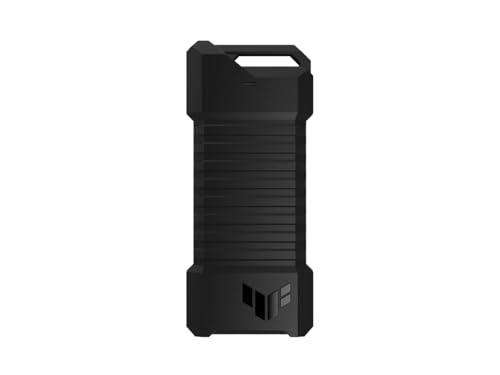
ASUS TUF Gaming A1 Rugged M.2 SSD Enclosure
Best for: PS5 and rugged external storage needs
- Max Transfer Speed
- Up to 10 Gbps
- Host Interface
- USB-C 3.2 Gen 2x1
- Drive Interface
- M.2 NVMe PCIe, SATA
- Supported Form Factors
- 2242, 2260, 2280
- Installation Style
- M.2 Q-Latch
- Compatibility
- PS5, Gaming
View on Amazon: ASUS TUF Gaming A1 Rugged M.2 SSD Enclosure Affiliate link
This enclosure supports both M.2 NVMe PCIe and SATA drives in 2242, 2260, and 2280 form factors. It uses a USB-C 3.2 Gen 2x1 interface for up to 10 Gbps transfer speeds. The design includes a Q-latch for tool-free installation and meets MIL-STD-810H drop resistance standards. It is compatible with PS5 and other gaming consoles, making it a durable option for external storage.
Pros
- Supports M.2 NVMe PCIe and SATA SSDs
- USB-C 3.2 Gen 2x1 interface for 10 Gbps speeds
- Tool-free Q-latch installation mechanism
- MIL-STD-810H drop resistance and IP68 rating
Cons
- Heavier at 8.78 ounces compared to lighter alternatives
- 10 Gbps speed limit excludes 20 Gbps options
- Only includes USB-C cable, no USB-A adapter
Good fit if
- You need a rugged enclosure for PS5 or gaming
- You want to use both NVMe and SATA drives
- You prefer tool-free installation with the Q-latch
Skip if
- You require transfer speeds faster than 10 Gbps
- You need a USB-A connection without an adapter
- You prefer a lighter, more compact enclosure
Verdict: ASUS TUF A1 M.2 NVMe/SATA Enclosure is a durable choice for gamers and users needing a rugged, tool-free solution for PS5 or PC storage expansion.
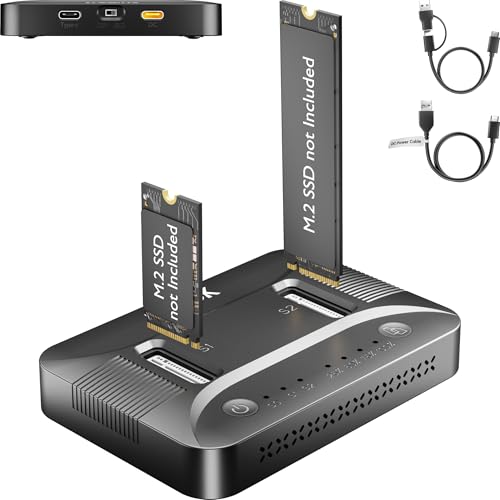
SUITOK Dual-Bay NVMe and SATA Cloner Dock
Best for: offline sector-level cloning of M.2 drives
- Max Transfer Speed
- 10Gbps
- Host Interface
- USB-C, USB 3.2 Gen 2
- Drive Interface
- M.2 NVMe (PCIe Gen 3/4), SATA
- Supported Form Factors
- 2230, 2242, 2260, 2280, 22110
- Drive Bay Count
- 2 bays
- Cooling System
- Built-in ventilation channels
View on Amazon: SUITOK Dual-Bay NVMe and SATA Cloner Dock Affiliate link
The SUITOK STK07 Pro is a dual-bay M.2 dock that supports both NVMe and SATA drives. It offers 10Gbps transfer speeds via USB 3.2 Gen 2. You can clone drives offline without a PC. It fits 2230 to 22110 form factors. This tool suits users who need sector-level backups or OS migrations without software.
Pros
- Dual-bay design for simultaneous drive access
- 10Gbps USB-C transfer speed
- Offline cloning without PC or software
- Supports NVMe and SATA M.2 drives
- Tool-free slide-in tray installation
Cons
- Larger 3.87-inch length limits portability
- No included power adapter listed
- 3.58-ounce weight adds bulk to carry
Good fit if
- You need to clone drives without a computer
- You manage multiple M.2 SSDs for upgrades
- You want sector-level backup for system partitions
Skip if
- You only use single-bay enclosures
- You require a compact travel size
- You only need SATA III speeds
Verdict: The SUITOK STK07 Pro Dual Bay M.2 Cloner fits IT pros and gamers who need offline sector-level cloning for NVMe and SATA drives without using a PC.
Specifications side by side
| Spec | DERSUR Dual-Protocol M.2 USB-C Enclosure | StarTech M.2 SATA USB-C Enclosure | Sokiwi Tool-Free M.2 NVMe & SATA SSD Enclosure | StarTech M.2 NVMe and SATA USB-C Enclosure | MAIWO M.2 NVMe and SATA USB-C Enclosure | ASUS TUF Gaming A1 Rugged M.2 SSD Enclosure | SUITOK Dual-Bay NVMe and SATA Cloner Dock |
|---|---|---|---|---|---|---|---|
| Max Transfer Speed | 10Gbps | 10Gbps | 10Gbps | 10Gbps | 10Gbps | Up to 10 Gbps | 10Gbps |
| Host Interface | USB-C 3.2 Gen 2 | USB-C, USB 3.1 Gen 2 | USB-C 3.2 Gen 2 | USB-C, USB-A | USB 3.1 Gen 2x1 Type-C | USB-C 3.2 Gen 2x1 | USB-C, USB 3.2 Gen 2 |
| Drive Interface | PCIe NVMe, M.2 SATA (M/B+M Key) | M.2 SATA (SATA I/II/III) | PCIe NVMe, SATA (M-Key, B+M Key) | PCIe NVMe (M-Key), SATA (B+M-Key) | PCIe NVMe (M-Key), SATA NGFF (B+M-Key) | M.2 NVMe PCIe, SATA | M.2 NVMe (PCIe Gen 3/4), SATA |
| Supported Form Factors | 2280, 2260, 2242, 2230 | 30mm, 42mm, 60mm, 80mm | 2230, 2242, 2260, 2280 | 2230, 2242, 2260, 2280 | 2230, 2242, 2260, 2280 | 2242, 2260, 2280 | 2230, 2242, 2260, 2280, 22110 |
| Drive Bay Count | not stated | not stated | not stated | not stated | not stated | not stated | 2 bays |
| Cooling System | Aluminium Alloy Housing | Aluminum with ventilation | Aluminum alloy shell | Aluminum housing heatsink | Aluminum alloy shell, thermal pads | not stated | Built-in ventilation channels |
| Maximum Capacity | not stated | not stated | 2TB | not stated | 8TB | not stated | 16TB |
| Installation Style | not stated | not stated | Tool-free | Tool-less | Tool Free | M.2 Q-Latch | Tool-free |
| Interface | SATA III | SATA III | SATA III | SATA III | SATA III | SATA III | SATA III |
| Form Factor | M.2 | M.2 | M.2 2280 | M.2 2280 | M.2 | M.2 | M.2 |
| Compatibility | not stated | not stated | not stated | not stated | not stated | PS5, Gaming | Laptop, PS5 |
| Transfer Speed | 10Gbps | 10Gbps | 10Gbps | 10Gbps | 10Gbps | 10Gbps | 10Gbps |
| Features | not stated | not stated | Tool-Free, UASP, TRIM | UASP | Tool-Free, UASP, TRIM | not stated | Tool-Free, Offline Clone |
| Bay Count | not stated | not stated | not stated | not stated | not stated | not stated | Dual-Bay |
| Material | not stated | Aluminum | not stated | Aluminum | not stated | not stated | not stated |
| Dimensions | not stated | 6.3 × 5.12 × 1.18 inches | 3.7 × 1.5 × 0.4 inches | 4.1 × 1.4 × 0.6 inches | 4.33 × 1.48 × 0.49 inches | 4.93 × 2.14 × 0.52 inches | 3.87 × 2.68 × 0.71 inches |
| Weight | not stated | 2.15 ounces | 3.84 ounces | 1.76 ounces | 1.76 ounces | 8.78 ounces | 3.58 ounces |
| Color | Black | Black | Gray | Space Gray | Blue | A1|up to 10Gbps | Black |
| Model | B0FVXSSFYF | SM21BMU31C3 | SKUD0501-US | M2-USB-C-NVME-SATA | 10Gbps NVMe/SATA Enclosure | ESD-T1A/BLK/G/AS// | STK07 Pro 10Gbps Dual Bay M.2 Cloner |
| Size | not stated | 10Gbps SATA | 2230/2242/2260/2280 | M.2 NVMe or M.2 SATA | not stated | TUF A1|up to 10Gbps | 3.87 x 2.68 x 0.71 inches |
Looking beyond this list? See jeyi m 2 nvme SSD heatsink alternatives.
Frequently asked questions
Which alternative supports both NVMe and SATA protocols?
The StarTech M.2 NVMe and SATA USB-C Enclosure supports both drive types. It offers 10Gbps transfer speeds via USB-C. This model is ideal if you need broad compatibility for different M.2 drives. It includes USB-A cables for older ports. The build is compact at 1.4 inches wide.
Is there an aluminum option for better heat dissipation?
Yes, the StarTech M.2 SATA USB-C Enclosure features an aluminum build. It provides sturdy construction for sustained data transfers. The device supports 10Gbps speeds over USB-C. Note that it only works with M.2 SATA drives. It excludes NVMe compatibility entirely. The black finish fits professional setups.
What is the best budget-friendly M.2 enclosure?
The Sokiwi Tool-Free M.2 NVMe & SATA SSD Enclosure is a practical budget choice. It supports multiple sizes including 2230, 2242, 2260, and 2280. You get 10Gbps transfer speeds and dual cables. The tool-free design allows quick drive swaps. It weighs 3.84 ounces and comes in gray.
Can I find a rugged enclosure for PS5 use?
The ASUS TUF Gaming A1 Rugged M.2 SSD Enclosure is designed for this. It offers durability for PS5 storage expansion or PC use. The enclosure supports 10Gbps speeds via USB-C. It handles both NVMe and SATA formats. The rugged design protects your drive during transport or installation.
Which drive is best for offline cloning?
The SUITOK Dual-Bay NVMe and SATA Cloner Dock handles offline sector-level cloning. It works without a PC for drive duplication. The device supports both NVMe and SATA M.2 drives. It features a dual-bay design for simultaneous operations. Transfer speeds reach 10Gbps. It is compact at 3.87 inches long.
Does MAIWO offer a tool-free dual-format option?
The MAIWO M.2 NVMe and SATA USB-C Enclosure is tool-free. It supports both NVMe and SATA formats for flexibility. The aluminum build aids in heat management. You get 10Gbps transfer speeds via USB-C. The blue casing is compact at 1.48 inches wide. It weighs 1.76 ounces for portability.