Crucial X10 1TB Portable SSD vs Crucial X10 Pro 1TB Portable (2026): Key Differences
As an Amazon Associate we earn from qualifying purchases. Links on this page are affiliate links.
This comparison looks at the Crucial X10 1TB Portable SSD vs x10 pro USB 3 2. Both drives offer 1TB of storage and max read speeds of 2,100 MB/s. They share a similar portable form factor and USB-C connectivity. The main difference lies in the interface specification and included features. The X10 Pro lists specific write speeds and a Gen 2x2 interface, while the X10 highlights durability ratings and bonus software. You need to decide which specs matter most for your workflow.
Key differences
| Aspect | Crucial X10 1TB Portable SSD | Crucial X10 Pro 1TB Portable SSD |
|---|---|---|
| Interface Specification | USB 3.2 | USB-C 3.2 Gen 2x2 (20Gbps) |
| Write Speed | not listed | 2,000 MB/s |
| Durability Rating | IP65 dust and water resistance; drop resistant up to 9.8 ft | not listed |
| Bonus Software | Three months of Mylio Photos Plus and Acronis True Image | not listed |
| Weight | 1.13 ounces | 1.48 ounces |
Which one should you choose?
Choose Crucial X10 1TB Portable SSD if
- You need a drive with IP65 water and dust resistance for outdoor use.
- You want included backup and photo software without extra cost.
- You prefer a lighter drive for frequent travel.
Choose Crucial X10 Pro 1TB Portable SSD if
- You want explicit write speed specifications for large file transfers.
- You need the higher bandwidth of a USB 3.2 Gen 2x2 interface.
- You prefer a standard black color option.
Verdict: Choose the Crucial X10 if you prioritize physical durability and included software bonuses. Select the X10 Pro if you require explicit write speed data and a Gen 2x2 interface specification. Both drives deliver identical read performance for general use.
Crucial X10 vs X10 Pro Specs
Transfer speed
Both drives list a maximum read speed of 2,100 MB/s. The Crucial X10 Pro explicitly states a write speed of 2,000 MB/s. The Crucial X10 listing does not specify a write speed, so you cannot confirm if it matches the Pro. For large file transfers, the Pro’s confirmed write performance ensures consistent speeds. If write speed is critical for your workflow, the Pro provides clearer data. Otherwise, the read performance is identical for both units.
Interface standard
The Crucial X10 Pro uses a USB 3.2 Gen 2x2 interface, which supports 20 Gbps data rates. The Crucial X10 lists a generic USB 3.2 interface without the Gen 2x2 designation. This suggests the Pro has a higher bandwidth potential. If your host device supports Gen 2x2, the Pro can theoretically move data faster. The standard X10 may be limited to lower speeds depending on its internal controller. The Pro offers a more advanced connection standard.
Build durability
The Crucial X10 is rated IP65 for dust and water resistance and is drop resistant up to 9.8 feet. The Crucial X10 Pro specifications do not mention any IP rating or drop resistance limits. If you plan to use the drive in outdoor or rugged environments, the X10 offers proven protection against elements. The Pro lacks stated durability metrics in its data. For general indoor use, both are portable, but the X10 is better for travel.
Physical dimensions
The Crucial X10 measures 1.96 inches in length, 2.55 inches in width, and 0.39 inches in height. The Crucial X10 Pro measures 1.97 inches in length, 2.56 inches in width, and 0.39 inches in height. The size difference is negligible, with the Pro being slightly larger by fractions of an inch. Both fit easily in a pocket or bag. The X10 is marginally more compact, but the difference is too small to impact portability significantly.
Weight
The Crucial X10 weighs 1.13 ounces. The Crucial X10 Pro weighs 1.48 ounces. The X10 is lighter by 0.35 ounces. This difference is small but noticeable when carrying the drive in a pocket or bag all day. If you prioritize minimal weight for travel, the X10 is the better choice. The Pro is slightly heavier, which might matter for some users. For most people, both weights are acceptable for portable use.
Compatibility
The Crucial X10 lists compatibility with Windows, Mac, iPad Pro, Chromebooks, Android, Linux, PS4, PS5, and Xbox. The Crucial X10 Pro data does not list specific compatible devices, only the interface type. The X10 provides clear guidance on console and mobile support. If you need to use the drive with a PS5 or iPad, the X10 confirms support. The Pro may work, but the data does not guarantee it. The X10 offers better documented compatibility.
Which Crucial Portable SSD Fits You
Users needing rugged, drop-resistant storage
The Crucial X10 1TB Portable SSD features IP65 dust and water resistance and is drop resistant up to 9.8 feet. This durability makes it ideal for travel. It includes bonus software like Mylio Photos and Acronis True Image for three months, adding value for creators who need secure backups on the go.
Buyers wanting explicit write speed data
The Crucial X10 Pro 1TB Portable SSD explicitly lists a write speed of 2,000 MB/s alongside its 2,100 MB/s read speed. This clarity helps you plan large file transfers. It uses a USB-C 3.2 Gen 2x2 interface for 20Gbps bandwidth, ensuring consistent performance for professional workflows requiring verified write capabilities.
Those preferring a lighter, compact drive
The Crucial X10 1TB Portable SSD weighs 1.13 ounces and measures 2.55 by 1.96 by 0.39 inches. Its smaller size and lighter weight make it easier to carry in a pocket or bag. This portability suits students and everyday users who prioritize a compact form factor for daily use.
The products compared
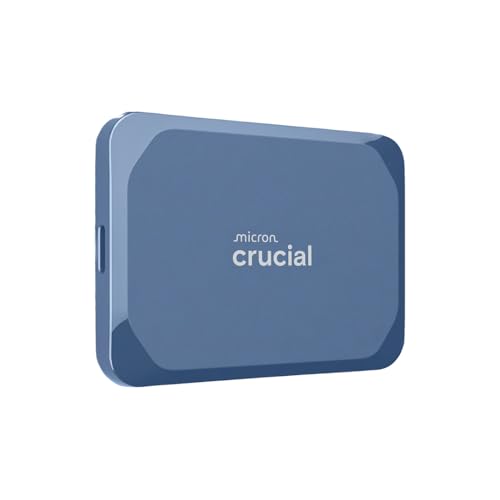
Crucial X10 1TB Portable SSD
Best for: rugged portable storage for creators
- Storage Capacity
- 1TB
- Interface
- USB 3.2
- Form Factor
- Portable SSD
- Max Read Speed
- Up to 2,100 MB/s
- Compatibility
- Mac
- Host Interface
- USB-C
View on Amazon: Crucial X10 1TB Portable SSD Affiliate link
The Crucial X10 1TB Portable SSD delivers up to 2,100 MB/s read speeds via USB 3.2. It features IP65 dust and water resistance and withstands drops up to 9.8 feet. This compact drive fits Mac, Windows, and gaming consoles. It suits creators and students needing fast, durable storage for photos and backups on the go.
Pros
- Up to 2,100 MB/s read speeds
- IP65 dust and water resistance rating
- Drop resistant up to 9.8 feet
- Broad compatibility with Mac, Windows, and consoles
Cons
- USB 3.2 interface limits max throughput compared to newer standards
- No included carrying case or cable details in specs
- Limited to 1TB capacity in this specific model variant
Good fit if
- You need a rugged drive for outdoor use
- You want fast transfers for large media files
- You store files across multiple device types
Skip if
- You require USB 4 or Thunderbolt speeds
- You need more than 1TB in one unit
- You prefer internal M.2 installation over portable
Verdict: The Crucial X10 1TB Portable SSD offers reliable speed and durability for mobile users. It fits photographers and gamers who prioritize build quality and cross-platform access.
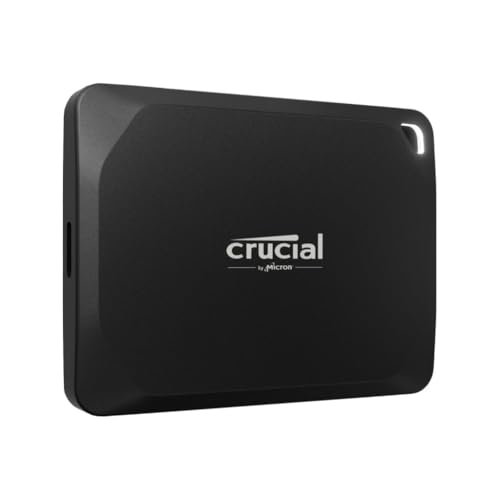
Crucial X10 Pro 1TB Portable SSD
Best for: fast portable storage with USB-C 3.2
- Storage Capacity
- 1TB
- Interface
- USB-C 3.2 Gen 2x2 (20Gbps)
- Form Factor
- 2.5 inches, external
- Max Read Speed
- 2100 MB/s
- Max Write Speed
- 2,000 MB/s
- Dimensions
- 1.97 × 0.39 × 2.56 inches
View on Amazon: Crucial X10 Pro 1TB Portable SSD Affiliate link
The Crucial X10 Pro 1TB Portable SSD uses a USB-C 3.2 Gen 2x2 interface for high-speed data transfers. It offers read speeds up to 2,100 MB/s and write speeds up to 2,000 MB/s. This external drive fits a standard 2.5-inch form factor and weighs just 1.48 ounces. You get reliable performance for large file management. It suits users who need fast portable storage without bulk.
Pros
- USB-C 3.2 Gen 2x2 interface supports 20 Gbps transfer rates
- Read speeds reach 2,100 MB/s
- Write speeds reach 2,000 MB/s
- Lightweight design at 1.48 ounces
Cons
- Write speed is slightly lower than the read speed
- Standard 2.5-inch external form factor is not ultra-compact
Good fit if
- You need fast transfer rates for large files
- You prefer a lightweight portable drive
- You require a USB-C connection with high bandwidth
Skip if
- You need write speeds higher than 2,000 MB/s
- You prefer a compact form factor smaller than 2.5 inches
- You require a drive with a different interface
Verdict: The Crucial X10 Pro 1TB Portable SSD delivers strong read speeds and a lightweight build. It fits users who prioritize fast data transfer rates in a portable format.
Specifications side by side
| Spec | Crucial X10 1TB Portable SSD | Crucial X10 Pro 1TB Portable SSD |
|---|---|---|
| Storage Capacity | 1TB | 1TB |
| Interface | USB 3.2 | USB-C 3.2 Gen 2x2 (20Gbps) |
| Form Factor | Portable SSD | 2.5 inches, external |
| Max Read Speed | Up to 2,100 MB/s | 2100 MB/s |
| Max Write Speed | not stated | 2,000 MB/s |
| Compatibility | Mac | not stated |
| Size | 1TB | Standard |
| Host Interface | USB-C | not stated |
| Dimensions | 1.96 × 2.55 × 0.39 inches | 1.97 × 0.39 × 2.56 inches |
| Weight | 1.13 ounces | 1.48 ounces |
| Color | Blue | Black |
| Model | CT1000X10SSD9-02 | CT1000X10PROSSD9 |
Frequently asked questions
Which drive is smaller and lighter?
The Crucial X10 is slightly more compact. It weighs 1.13 ounces and measures 1.96 by 1.96 by 0.39 inches. The Crucial X10 Pro is heavier at 1.48 ounces and slightly longer at 1.97 inches. Both fit easily in a pocket or camera bag. You should choose the X10 if minimizing weight is your top priority.
Is the Crucial X10 compatible with Mac?
Yes, the Crucial X10 is explicitly listed as compatible with Mac. This makes it a convenient choice for Apple users who need portable storage. The Crucial X10 Pro data does not specify Mac compatibility. You should verify Mac support for the Pro model before purchasing if you rely on macOS for your workflow.
What is the main color difference between the two?
The Crucial X10 comes in a blue color option. The Crucial X10 Pro is available in black. This is a cosmetic difference that does not affect performance. You can choose based on your personal style preference or to match your existing gear. Both drives maintain a professional appearance suitable for travel.
Do both drives use USB-C?
Yes, both the Crucial X10 and the Crucial X10 Pro use USB-C as their host interface. This ensures modern connectivity with laptops, tablets, and smartphones. You can use the same cable for both drives. USB-C offers reversible plug orientation and supports high-speed data transfer standards.
Which model is better for rugged use?
The Crucial X10 is built for rugged environments. It features IP65 dust and water resistance and is drop resistant up to 9.8 feet. This durability makes it ideal for photographers and travelers. The Crucial X10 Pro data does not highlight these specific rugged specs. You should pick the X10 for harsh conditions.
Is there a difference in maximum read speed?
No, both drives offer the same maximum read speed of 2,100 MB/s. This ensures fast file transfers for large media files. The Crucial X10 Pro lists a write speed of 2,000 MB/s. The Crucial X10 does not specify its write speed in the provided data. You can expect similar burst performance from both.