Crucial X10 1TB Portable SSD vs Crucial P310 1TB Heatsink NVMe SSD (2026): Key Differences
As an Amazon Associate we earn from qualifying purchases. Links on this page are affiliate links.
The crucial x10 1tb portable SSD vs p310 2280 1tb pcie comparison highlights two distinct storage solutions from Crucial. Both offer 1TB of capacity and target users needing fast data access. The main difference lies in their form and connection. The X10 is an external USB drive built for portability and durability. The P310 is an internal M.2 NVMe drive designed for high-speed performance in laptops, desktops, and consoles. You must choose based on your device interface.
Key differences
| Aspect | Crucial X10 1TB Portable SSD | Crucial P310 1TB Heatsink NVMe SSD |
|---|---|---|
| Interface | USB 3.2 | PCIe 4.0 |
| Form Factor | Portable SSD | 2280 M.2 |
| Max Read Speed | Up to 2,100 MB/s | Up to 7,100 MB/s |
| Cooling | Not listed | Heatsink |
| Durability | IP65 water and dust resistance | Not listed |
Which one should you choose?
Choose Crucial X10 1TB Portable SSD if
- You need a portable drive for travel or external use.
- You want a rugged drive with IP65 water resistance.
- You connect to devices via USB-C or USB-A ports.
Choose Crucial P310 1TB Heatsink NVMe SSD if
- You are installing storage in a laptop, desktop, or PS5.
- You require maximum read speeds up to 7,100 MB/s.
- You need PCIe Gen4 performance for gaming or heavy multitasking.
Verdict: The Crucial X10 is the better choice for users who need a durable, portable external drive for transfers across multiple devices. The Crucial P310 suits those installing internal storage in a compatible PC or console who prioritize raw speed and PCIe 4.0 performance.
X10 vs P310 Key Differences
Transfer Speed
The Crucial P310 delivers significantly higher sequential read speeds, reaching up to 7,100 MB/s, while the Crucial X10 tops out at 2,100 MB/s. This large gap matters for large file transfers and heavy workloads. The P310 also lists a max write speed of 6,000 MB/s, whereas the X10 data does not specify a write speed. If you move massive video files or game libraries frequently, the P310’s PCIe Gen4 interface provides a clear advantage in raw throughput over the X10’s USB 3.2 connection.
Form Factor
These drives serve different physical needs. The Crucial X10 is a portable external SSD with a compact design measuring 1.96 by 2.55 inches and weighing just 1.13 ounces. It connects via USB-C. The Crucial P310 is an internal M.2 2280 NVMe drive, measuring 3.15 by 0.92 inches. It requires installation into a motherboard slot or a compatible enclosure. You should choose the X10 for plug-and-play portability and the P310 for internal system upgrades where space is limited but speed is prioritized.
Cooling
Thermal management differs between the two options. The Crucial P310 includes a built-in heatsink to help dissipate heat during sustained high-speed operations, which is crucial for maintaining performance in laptops and desktops. The Crucial X10 does not list a heatsink, relying instead on its external casing for passive cooling. Since the X10 is designed for portable use and lower sustained loads, it may not need active thermal solutions. However, for intensive internal tasks, the P310’s heatsink offers better thermal control.
Durability
The Crucial X10 is built for rugged use, featuring IP65 dust and water resistance. It is also drop resistant up to 9.8 feet. These specs make it suitable for travel and outdoor environments. The Crucial P310 data does not mention any specific durability ratings, water resistance, or drop protection. As an internal drive, it is not designed to withstand physical abuse or environmental exposure. If you need a drive that survives drops and moisture, the X10 is the only viable choice here.
Compatibility
Both drives offer broad compatibility, but for different devices. The Crucial X10 connects to Windows, Mac, iPad Pro, Chromebooks, Android devices, and consoles like PS4, PS5, and Xbox via USB. The Crucial P310 works with desktops, laptops, and PS5, supporting backward compatibility with Gen3 systems. The P310 cannot connect directly to mobile devices or consoles without an adapter. The X10 is more versatile for external connections, while the P310 is optimized for internal PC and console upgrades.
Which Crucial SSD fits your workflow
Users needing portable external storage
The Crucial X10 is an external drive with USB 3.2 connectivity. It offers up to 2,100 MB/s read speeds for fast transfers. Its IP65 rating provides dust and water resistance, and it withstands drops from 9.8 feet. This makes it durable for travel and compatible with consoles and mobile devices.
PS5 owners or desktop builders
The Crucial P310 is an internal M.2 2280 NVMe drive with a heatsink. It delivers up to 7,100 MB/s read and 6,000 MB/s write speeds via PCIe 4.0. This interface is required for PS5 expansion and offers significantly higher throughput for desktops and laptops compared to external USB solutions.
Creators moving large video files
If you need maximum sequential throughput, the P310’s 7,100 MB/s read speed is superior. The 6,000 MB/s write speed helps when exporting large media files. The included heatsink manages thermal control for sustained performance. This internal drive is ideal for workstations where speed is the primary constraint.
Gamers on consoles or laptops
The X10 connects via USB-C and works with PS5, Xbox, and Android devices. It is compact and drop-resistant. While slower than the P310, its 2,100 MB/s speed is sufficient for game loading on consoles. The external form factor allows you to easily move games between different systems without installing internal hardware.
The products compared
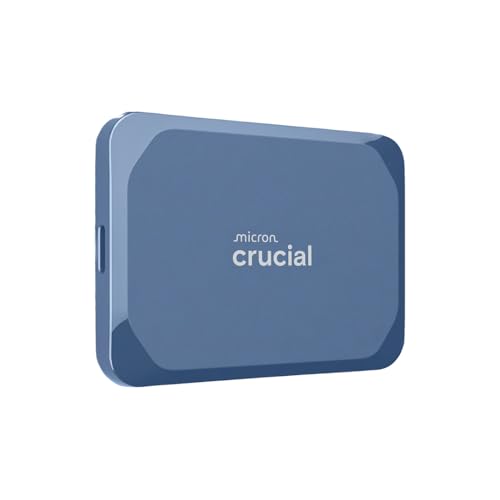
Crucial X10 1TB Portable SSD
Best for: portable, durable external storage
- Storage Capacity
- 1TB
- Interface
- USB 3.2
- Form Factor
- Portable SSD
- Max Read Speed
- Up to 2,100 MB/s
- Compatibility
- Mac
- Host Interface
- USB-C
View on Amazon: Crucial X10 1TB Portable SSD Affiliate link
The Crucial X10 1TB Portable SSD connects via USB 3.2 and delivers read speeds up to 2,100MB/s. It features a compact design measuring 2.55 by 1.96 inches and weighs just 1.13 ounces. The drive offers IP65 dust and water resistance and drop protection up to 9.8 feet. It works with Windows, Mac, and gaming consoles. This external drive suits users who need durable, high-speed storage for travel or daily file transfers.
Pros
- Read speeds up to 2,100MB/s
- IP65 dust and water resistance
- Drop resistant up to 9.8 feet
- Compact 1.13-ounce build
Cons
- USB 3.2 interface is slower than Gen4 NVMe
- No internal heatsink for sustained thermal management
- External form factor limits direct motherboard integration
Good fit if
- You need portable storage for travel
- You want water and dust resistance
- You transfer large files between devices
Skip if
- You require PCIe Gen4 internal speeds
- You need direct motherboard installation
- You want a passive cooling heatsink
Verdict: The Crucial X10 1TB Portable SSD fits users who prioritize durability and portability over internal PCIe speeds. It is a practical external drive for creators and students who move between devices.

Crucial P310 1TB Heatsink NVMe SSD
Best for: PS5 and desktop upgrades
- Storage Capacity
- 1TB
- Interface
- PCIe 4.0
- Form Factor
- 2280
- Max Read Speed
- Up to 7,100 MB/s
- Max Write Speed
- 6,000 MB/s
- Cooling
- Heatsink
View on Amazon: Crucial P310 1TB Heatsink NVMe SSD Affiliate link
The Crucial P310 is a 1TB M.2 2280 NVMe drive designed for high-speed internal storage. It features a PCIe 4.0 interface with read speeds up to 7,100 MB/s and write speeds of 6,000 MB/s. The included heatsink helps manage thermal control for sustained performance. It works with desktops, laptops, and PlayStation 5 systems. This drive suits users who need fast game loading and quick application startup times.
Pros
- Up to 7,100 MB/s read speed for fast data access
- 6,000 MB/s write speed for smooth multitasking
- Built-in heatsink for better thermal control
- Compatible with PS5, laptops, and desktops
Cons
- Requires a motherboard with M.2 slot and PCIe 4.0 support for full speed
- Not a portable external drive like the X10
- Limited to 1TB capacity in this specific listing
Good fit if
- You are upgrading a desktop or laptop with an M.2 slot
- You want fast load times for games on a PS5
- You need reliable internal storage for heavy multitasking
Skip if
- You need a portable external drive for travel
- Your system only has SATA ports or no M.2 slot
- You require more than 1TB of storage in a single unit
Verdict: Crucial P310 1TB PCIe 4.0 NVMe SSD delivers high internal performance for compatible systems. It fits users who prioritize speed for gaming and productivity over portable convenience.
Specifications side by side
| Spec | Crucial X10 1TB Portable SSD | Crucial P310 1TB Heatsink NVMe SSD |
|---|---|---|
| Storage Capacity | 1TB | 1TB |
| Interface | USB 3.2 | PCIe 4.0 |
| Form Factor | Portable SSD | 2280 |
| Max Read Speed | Up to 2,100 MB/s | Up to 7,100 MB/s |
| Max Write Speed | not stated | 6,000 MB/s |
| Cooling | not stated | Heatsink |
| Compatibility | Mac | Laptop, Desktop, PS5, Gaming |
| Size | 1TB | 1TB |
| Host Interface | USB-C | not stated |
| Dimensions | 1.96 × 2.55 × 0.39 inches | 3.15 × 0.92 × 0.38 inches |
| Weight | 1.13 ounces | 1.23 ounces |
| Color | Blue | Black |
| Model | CT1000X10SSD9-02 | CT1000P310SSD5-01 |
Frequently asked questions
Can I use the Crucial X10 as an internal drive?
No, the Crucial X10 is designed strictly as an external portable drive. It connects via USB-C and requires an external enclosure. You cannot install it inside a laptop or desktop motherboard. It is built for mobility and durability rather than internal system integration.
Is the Crucial P310 compatible with PlayStation 5?
Yes, the Crucial P310 is explicitly listed as compatible with PS5. Its PCIe 4.0 interface and M.2 2280 form factor meet the console requirements for internal storage expansion. This makes it a suitable upgrade for gamers looking to increase their library capacity on Sony hardware.
What is the main difference in connectivity between the two drives?
The Crucial X10 uses a USB-C host interface for external connections. The Crucial P310 uses a PCIe 4.0 interface for direct motherboard installation. This means the X10 plugs into a port, while the P310 slots directly into an M.2 slot on your computer's circuit board.
Does the Crucial X10 have a heatsink?
The provided specifications for the Crucial X10 do not mention a heatsink. It is a compact portable drive with dimensions of 1.96 by 2.55 inches. The Crucial P310, in contrast, is sold with a heatsink to manage thermal output during high-speed internal operations.
Which drive is better for moving between different computers?
The Crucial X10 is better for portability. It is a self-contained external drive that you can carry and plug into any compatible Mac or PC. The P310 is an internal component that must be installed inside a specific system, making it less convenient for frequent travel.
What form factor does the Crucial P310 use?
The Crucial P310 uses the M.2 2280 form factor. This is a standard size for internal NVMe SSDs, measuring 3.15 inches in length. It is designed to fit into the M.2 slots found on modern laptops, desktops, and gaming consoles like the PS5.