Crucial or Netac? Nvme SSDs Compared in 2026
As an Amazon Associate we earn from qualifying purchases. Links on this page are affiliate links.
This crucial vs netac nvme SSD comparison looks at two external drives with different strengths. Both units use USB-C connections for portable storage, but they target different needs. The Crucial X10 offers higher speeds and larger capacity options, while the Netac Z Slim focuses on a compact aluminum build and lower entry capacity. You need to decide if speed and durability matter more than size and budget.
Key differences
| Aspect | Crucial X10 1TB Portable SSD | Netac Z Slim 250GB Portable SSD |
|---|---|---|
| Max Read Speed | Up to 2,100 MB/s | 550 MB/s |
| Max Write Speed | not listed | 450 MB/s |
| Storage Capacity | 1TB (also 2TB, 4TB, 6TB, 8TB) | 250GB (also 500GB, 1TB) |
| Durability Rating | IP65 dust and water resistance; drop resistant up to 9.8 ft | Aluminum alloy enclosure; no listed IP or drop rating |
| Dimensions | 1.96 x 2.55 x 0.39 inches | 3.9 x 1.1 x 0.35 inches |
Which one should you choose?
Choose Crucial X10 1TB Portable SSD if
- You need fast file transfers for large video projects or game libraries.
- You require a drive that can withstand water exposure and drops.
- You want to store large amounts of data in one device.
Choose Netac Z Slim 250GB Portable SSD if
- You prefer a smaller, lighter drive that fits easily in a pocket.
- You only need basic storage for documents and small files.
- You want a metal enclosure that feels solid in hand.
Verdict: The Crucial X10 is the better choice for users who prioritize speed and rugged durability. The Netac Z Slim suits those who need a tiny, lightweight drive for basic everyday tasks. Your decision depends on whether you value performance or portability.
Crucial X10 vs Netac Z Slim
Transfer Speed
The Crucial X10 delivers significantly faster read speeds, reaching up to 2,100 MB/s. This high throughput benefits creators and gamers who move large files. The Netac Z Slim offers a maximum read speed of 550 MB/s and a write speed of 450 MB/s. While adequate for daily documents and photos, it is much slower than the Crucial option. The Crucial X10 uses a USB 3.2 interface, while the Netac Z Slim uses USB 3.2 Gen 2. The speed difference is substantial, making the Crucial choice for high-performance tasks. The Netac is sufficient for basic storage needs.
Storage Capacity
You can choose from multiple capacities for both drives, but the starting points differ. The Netac Z Slim starts at a modest 250 GB, which is practical for essential files without paying for unused space. The Crucial X10 starts at 1 TB, offering four times that space right away. Both brands offer larger options, with the Crucial X10 going up to 8 TB and the Netac Z Slim up to 1 TB. If you need high capacity from the start, the Crucial X10 is the better option. The Netac is better if you want a smaller, cheaper entry point.
Build Quality
Durability features vary between these two portable SSDs. The Crucial X10 is rated IP65 for dust and water resistance and can withstand drops from up to 9.8 feet. This makes it suitable for rough travel or outdoor use. The Netac Z Slim features an aluminum alloy enclosure, which provides a solid feel and basic protection. However, it lacks specific IP ratings or drop-test specifications in the provided data. The Crucial X10 offers more comprehensive physical protection standards. If you work in harsh environments, the Crucial build is superior.
Form Factor
Both drives are designed for portability, but their dimensions differ. The Netac Z Slim measures 3.9 inches in length, 1.1 inches in width, and 0.35 inches in height. It weighs approximately 1.06 ounces. The Crucial X10 is shorter at 1.96 inches long, slightly wider at 2.55 inches, and 0.39 inches thick. It weighs 1.13 ounces. The Netac Z Slim is longer and thinner, potentially fitting more easily into tight pockets. The Crucial X10 is more compact in length. Both are lightweight and easy to carry in a bag.
Compatibility
Both drives support a wide range of operating systems and devices. The Crucial X10 connects via USB-C and USB-A, working with Windows, Mac, iPad Pro, Chromebooks, Android, Linux, PS4, PS5, and Xbox. The Netac Z Slim also uses USB-C and includes a USB-C-to-A cable and adapter. It supports Windows, macOS, Linux, and Android. The Crucial X10 explicitly lists console compatibility, which is a unique advantage for gamers. Both are versatile for computers and mobile devices. The Crucial X10 has a slight edge due to broader device support.
Which portable SSD fits your needs
Creators needing fast large file transfers
The Crucial X10 offers up to 2,100 MB/s read speeds, which significantly reduces wait times for large video or photo projects. Its 1TB capacity provides ample space for extensive media libraries. The IP65 rating adds durability against dust and water, making it reliable for field work where speed and storage capacity are critical priorities.
Students carrying daily documents and notes
The Netac Z Slim provides 250GB of storage, which is sufficient for documents, study materials, and photos without paying for unused space. Its lightweight aluminum design and slim profile fit easily into pockets or bags. This makes it a practical, portable choice for students who need reliable access to essential files on the go.
Users prioritizing durability and weather resistance
The Crucial X10 features an IP65 dust and water resistance rating, along with drop resistance up to 9.8 feet. This robust construction ensures your data remains safe during travel or in harsh environments. If you frequently move drives in unpredictable conditions, this durability specification offers peace of mind that standard plastic enclosures cannot match.
Budget-conscious buyers needing basic storage
The Netac Z Slim delivers essential performance with 550 MB/s read speeds for everyday tasks. Its 250GB capacity covers basic file storage needs without excess cost. The included USB-C to USB-A cable ensures compatibility with older ports. This straightforward specification set makes it a sensible option for users who do not require high-speed throughput.
The products compared
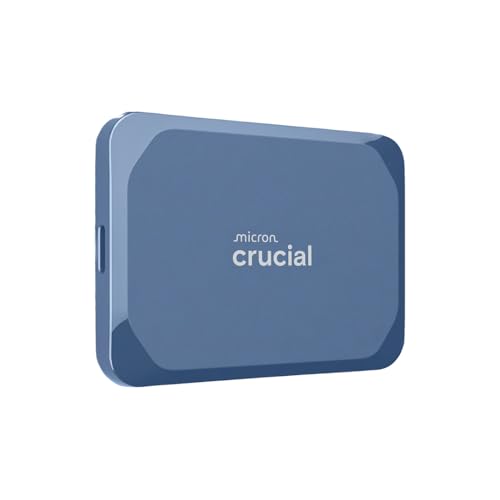
Crucial X10 1TB Portable SSD
Best for: fast external storage with rugged design
- Storage Capacity
- 1TB
- Interface
- USB 3.2
- Form Factor
- Portable SSD
- Max Read Speed
- Up to 2,100 MB/s
- Compatibility
- Mac
- Host Interface
- USB-C
View on Amazon: Crucial X10 1TB Portable SSD Affiliate link
The Crucial X10 1TB is a portable SSD with USB 3.2 connectivity. It delivers up to 2,100MB/s read speeds, making it fast for large file transfers. The drive features IP65 dust and water resistance and drop protection up to 9.8 feet. It connects via USB-C and works with Windows, Mac, and consoles. This compact drive suits creators and gamers who need reliable, high-speed external storage.
Pros
- Up to 2,100MB/s read speed
- IP65 dust and water resistance
- Drop resistant up to 9.8 ft
- USB-C interface for fast transfers
Cons
- Only 1TB capacity available in this listing
- No mention of included backup software beyond trial
- Heavier than typical flash drives at 1.13 ounces
Good fit if
- You need fast data access for large files
- You work in dusty or wet environments
- You use Windows, Mac, or gaming consoles
Skip if
- You require more than 1TB of storage
- You need a drive smaller than 2 inches
- You prefer wireless connectivity options
Verdict: The Crucial X10 1TB Portable SSD offers high speed and durability for users who need reliable external storage. It fits creators and gamers who value fast transfers and rugged design.
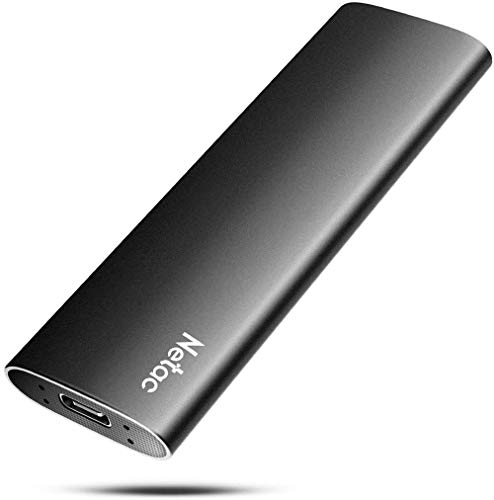
Netac Z Slim 250GB Portable SSD
Best for: portable daily file storage
- Storage Capacity
- 250GB
- Interface
- USB 3.2 Gen 2
- Form Factor
- Portable
- Max Read Speed
- 550MB/s
- Max Write Speed
- 450MB/s
- Compatibility
- Mac
View on Amazon: Netac Z Slim 250GB Portable SSD Affiliate link
The Netac Z Slim is a 250GB portable SSD designed for everyday file storage. It offers read speeds up to 550MB/s and write speeds up to 450MB/s via USB 3.2 Gen 2. The aluminum alloy enclosure is slim, lightweight, and compatible with Windows, macOS, Linux, and Android devices. It suits users needing a compact drive for documents and photos.
Pros
- Read speeds up to 550MB/s
- Slim aluminum alloy enclosure
- Compatible with multiple operating systems
- Includes USB-C to A cable
Cons
- Lower capacity than 1TB competitors
- Write speeds limited to 450MB/s
- No included USB-C to C cable
Good fit if
- You need a lightweight drive for travel
- You use devices with USB-A ports
- You store essential daily files
Skip if
- You require maximum transfer speeds
- You need large storage capacity
- You prefer USB-C to C connectivity
Verdict: Netac Z Slim 250GB Portable SSD fits users who prioritize portability and cross-platform compatibility over raw speed or large capacity.
Specifications side by side
| Spec | Crucial X10 1TB Portable SSD | Netac Z Slim 250GB Portable SSD |
|---|---|---|
| Storage Capacity | 1TB | 250GB |
| Interface | USB 3.2 | USB 3.2 Gen 2 |
| Form Factor | Portable SSD | Portable |
| Max Read Speed | Up to 2,100 MB/s | 550MB/s |
| Max Write Speed | not stated | 450MB/s |
| Compatibility | Mac | Mac |
| Size | 1TB | 250 GB |
| Material | not stated | Aluminum |
| Host Interface | USB-C | USB-C |
| Dimensions | 1.96 × 2.55 × 0.39 inches | 3.9 × 1.1 × 0.35 inches |
| Weight | 1.13 ounces | 1.06 ounces |
| Color | Blue | Zslim |
| Model | CT1000X10SSD9-02 | Z Slim |
Frequently asked questions
Which drive is better for Mac users?
Both the Crucial X10 and Netac Z Slim support Mac compatibility. You can use either drive with your Apple devices without additional drivers. The Crucial X10 offers larger capacity options, while the Netac Z Slim provides a lighter, aluminum build. Choose based on whether you prioritize speed or portability.
Do these SSDs use USB-C connections?
Yes, both the Crucial X10 and Netac Z Slim feature USB-C host interfaces. This modern connection ensures backward compatibility with USB-A ports using an adapter. USB-C allows for faster data transfer rates compared to older standards, making both drives suitable for efficient external storage workflows.
Which portable SSD has the rugged design?
The Crucial X10 is described as having a rugged design suitable for users who need durable external storage. It is built to withstand daily use while offering high speeds. The Netac Z Slim uses an aluminum material for durability but focuses more on slim portability than ruggedness.
Can I store large media libraries on these drives?
The Crucial X10 offers a 1TB size, providing ample space for extensive media libraries. This capacity is ideal for storing large video or photo projects. The Netac Z Slim comes in a 250GB size, which is better for smaller files or daily document storage rather than large media collections.
Which drive is lighter to carry?
The Netac Z Slim weighs 1.06 ounces, making it slightly lighter than the Crucial X10, which weighs 1.13 ounces. Both drives are compact and portable. The Netac Z Slim also has a slim profile, making it easy to slip into a pocket or bag for daily use.
Is the Crucial X10 suitable for gamers?
Yes, the Crucial X10 is recommended for gamers who value fast transfers. Its high read speeds of up to 2,100 MB/s reduce load times and file transfer waits. The rugged design also protects your game library from physical damage during travel or storage in gaming setups.