Compatibility Explained: What It Means for Nvme SSDs
As an Amazon Associate we earn from qualifying purchases. Links on this page are affiliate links.
Compatibility Explained for SSDs
When you shop for an internal drive, you need to ensure the hardware fits your specific device. This guide covers compatibility explained for the most common use cases. You will see these labels on product pages. They tell you if the drive works with your computer or console.
Laptop compatibility usually refers to the M.2 form factor. Most modern laptops use the 2280 size, which is 22mm wide and 80mm long. You must check your manual to confirm this size. Some ultrathin models use smaller 2230 or 2242 drives. The drive must also fit the M.2 slot on your motherboard. This slot connects directly to the PCIe lanes. If your laptop has an older SATA-only M.2 slot, a PCIe NVMe drive will not work. Always verify the slot type before buying.
Desktop compatibility is generally broader. Most desktop motherboards include multiple M.2 slots. These slots support both NVMe and SATA protocols. You need to check if the slot supports the PCIe generation of your new drive. A PCIe 4.0 drive will work in a PCIe 3.0 slot, but it will run at the slower speed. Ensure you have enough physical space in your case for the drive and any heatsink.
PlayStation 5 compatibility requires a drive that meets Sony’s strict speed requirements. The console needs an NVMe drive with a sequential read speed of at least 5,500 MB/s. The drive must also have a heatsink, either built-in or added separately. The M.2 slot in the PS5 is fixed at the 2280 size. Using a drive that does not meet these specs will result in the console not recognizing the storage expansion.
NAS compatibility depends on the drive’s endurance rating. Network Attached Storage systems run continuously. You need a drive designed for 24/7 operation. Look for drives with high terabytes written (TBW) ratings. Consumer drives may fail prematurely under constant heavy load. Check your NAS model’s supported drive sizes and protocols.
Compatibility Explained For Nvme SSDs
Laptop
Laptop compatibility ensures the drive fits your portable computer’s internal slot. You must check the form factor, such as 2.5-inch or M.2, to match the bay. The KingSpec 64GB PATA IDE SSD serves vintage laptops with older interfaces. Modern laptops typically use M.2 SATA or NVMe slots. Ensure the physical length, like 2280, fits the chassis. Power consumption matters for battery life. Lower power draws extend runtime. You benefit from faster boot times and application loading. Verify the interface matches your motherboard. M.2 drives offer a compact solution. They save space inside thin chassis. This compatibility label confirms the drive works in standard laptop configurations without adapters.
Desktop
Desktop compatibility means the drive works in your stationary PC. Desktops often have multiple slots for storage. The Addlink S20 1TB SATA SSD fits standard 2.5-inch bays. It uses the SATA III interface, which is widely supported. You can install it in older or newer towers. M.2 slots are also common in modern desktops. These drives connect directly to the motherboard. They save cable clutter. Desktops handle heat better than laptops. You can use drives with higher performance tiers. The trade-off is physical space. You need an available slot. Desktop users often prioritize capacity and speed. This label confirms the drive integrates easily into standard PC builds. You do not need special adapters for common interfaces.
PS5
PS5 compatibility indicates the drive works with Sony’s console. The PlayStation 5 requires specific M.2 NVMe drives. Speed is critical for loading game assets. The Mushkin Gamma 2TB PCIe 4.0 SSD meets these requirements. It provides the necessary bandwidth for next-gen games. You must ensure the drive has a heatsink. The PS5 slot is tight. Heat dissipation is vital for stability. Capacity matters for large game files. 1TB is the minimum recommended size. The BUFFALO 1TB USB-C stick offers external storage. It is slower than internal M.2 drives. Use it for storing games you play less often. Internal drives load games faster. This label confirms the drive meets Sony’s technical specifications for internal installation.
NAS
NAS compatibility means the drive is designed for network storage. The WD Red SA500 500GB M.2 SSD targets these systems. NAS devices run 24/7. They need high endurance. The drive must handle constant read and write cycles. Caching performance helps with small file access. The Western Digital drive uses 3D NAND for reliability. It suits home or business setups. NAS drives often prioritize stability over raw speed. You need consistent performance under load. Power efficiency is also important. Lower power draw reduces heat in enclosed cases. The M.2 2280 form factor fits many modern NAS units. This label confirms the drive is optimized for continuous operation. It ensures data integrity in a networked environment. You avoid premature wear from heavy usage patterns.
Who Needs This Compatibility Info
Who needs it
You need this information if you are upgrading a laptop, desktop, PlayStation 5, or NAS. Each device has specific physical and interface requirements. Laptops often use M.2 slots with limited space. You must verify the form factor to ensure the drive fits inside the chassis. Desktops offer more flexibility but still require the correct socket type. The PS5 demands drives that meet strict speed and size guidelines for its internal expansion slot. NAS units may require drives that handle continuous operation and specific power profiles. If you are buying for any of these systems, checking compatibility prevents returns and installation headaches. It ensures the hardware works seamlessly with your existing setup without needing adapters or modifications.
Who can skip it
You can skip this detail if you are buying a portable external drive or using a USB enclosure. External drives connect via USB and do not depend on internal motherboard slots or specific form factors. Similarly, if you are purchasing a SATA SSD for an older desktop or laptop, the compatibility is usually straightforward and less complex than NVMe options. In these cases, focus on capacity and sustained write speeds instead. You do not need to worry about M.2 keys or PCIe lanes. Prioritize storage size and reliability for general file storage or media libraries. These use cases are less sensitive to the specific interface constraints that matter for internal installations in consoles or compact devices.
SSD Compatibility Glossary
Form Factor
The physical size and shape of the drive. Common options include 2.5-inch for traditional bays and M.2 sticks for compact slots. You must match this to your device's available space.
Interface
The connection standard, such as SATA or NVMe. This determines how the drive talks to your motherboard. Using the wrong interface means the drive will not function or will run slowly.
Transfer Speed
How fast data moves between the drive and your system. Measured in MB/s or GB/s. Higher numbers allow quicker game loads and file transfers. Check both read and write speeds.
Cache Type
A buffer for managing data flow. DRAM cache improves performance during heavy loads. DRAM-less drives rely on the host memory. This impacts sustained write speeds and system responsiveness.
NAND Type
The storage technology used for bits. Types include TLC and QLC. These affect capacity and endurance. Different grades offer varying levels of reliability and cost efficiency for your specific needs.
Cooling
Heat management for the drive. High-performance NVMe drives generate significant heat. A heatsink helps maintain stable speeds. Without it, the drive may throttle performance to prevent overheating.
Security
Features like hardware encryption. This protects your data if the drive is lost or stolen. Look for AES-256 support. It ensures your files remain unreadable without proper authorization.
Quick picks
| # | Product | Best for | Price |
|---|---|---|---|
| 1 | KingSpec 64GB 2.5-Inch PATA IDE SSD | Vintage laptops and industrial control systems | Check price of KingSpec 64GB 2.5-Inch PATA IDE SSD on Amazon |
| 2 | Addlink S20 1TB 2.5-Inch SATA SSD | Standard 2.5-inch SATA bay PC upgrades | Check price of Addlink S20 1TB 2.5-Inch SATA SSD on Amazon |
| 3 | BUFFALO 1TB USB 3.2 Gen 2 Portable Stick SSD | Portable PS5 and laptop storage | Check price of BUFFALO 1TB USB 3.2 Gen 2 Portable Stick SSD on Amazon |
| 4 | Western Digital WD Red SA500 500GB M.2 SSD | NAS systems needing high endurance and caching | Check price of Western Digital WD Red SA500 500GB M.2 SSD on Amazon |
| 5 | TEAMGROUP MS30 256GB M.2 SATA SSD | basic storage upgrades for older laptops | Check price of TEAMGROUP MS30 256GB M.2 SATA SSD on Amazon |
| 6 | Mushkin Gamma 2TB PCIe 4.0 NVMe SSD | PS5 and high-speed desktop storage | Check price of Mushkin Gamma 2TB PCIe 4.0 NVMe SSD on Amazon |
Our 6 picks
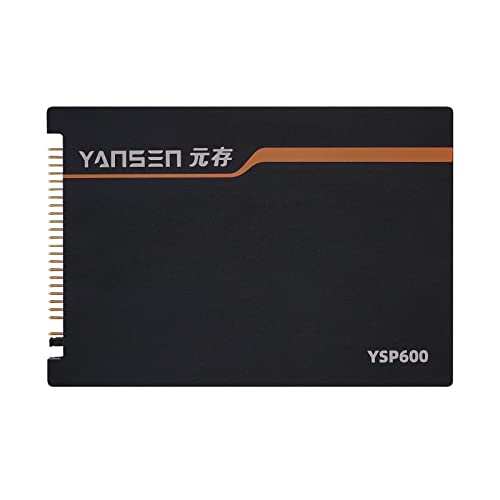
KingSpec 64GB 2.5-Inch PATA IDE SSD
Best for: Vintage laptops and industrial control systems
- Compatibility
- Laptop (what this guide is about)
- Storage Capacity
- 64GB
- Interface
- 44Pin PATA IDE
- Form Factor
- 2.5"
- Dimensions
- 5.91 × 4.49 × 0.79 inches
- Weight
- 4.64 ounces
View on Amazon: KingSpec 64GB 2.5-Inch PATA IDE SSD Affiliate link
This drive replaces aging hard drives in vintage laptops and industrial equipment using a 44-pin PATA IDE interface. It uses 64GB of flash storage in a slim 2.5-inch form factor. The lack of moving parts improves shock resistance for workshop environments. It offers a direct swap for legacy systems without needing extra drivers. This SSD suits users maintaining older ThinkPad notebooks or CNC machine tools.
Pros
- 44Pin PATA IDE interface for vintage compatibility
- Shock and vibration resistant design
- Slim 2.5-inch internal form factor
- Plug and play installation with no drivers
Cons
- Limited to 64GB storage capacity
- Only compatible with legacy PATA IDE ports
- No PCIe or SATA III support
Good fit if
- You need to revive an old laptop with a PATA IDE slot
- You are upgrading industrial CNC or medical diagnostic equipment
- You require shock-resistant storage for embedded systems
Skip if
- You need modern SATA III or NVMe speeds
- You require more than 64GB of space
- You are building a current desktop or gaming PC
Verdict: KingSpec 64GB 2.5" PATA IDE SSD is a niche solution for restoring vintage hardware. It fits users who must keep older laptops or industrial machines running with reliable flash storage.

Addlink S20 1TB 2.5-Inch SATA SSD
Best for: Standard 2.5-inch SATA bay PC upgrades
- Compatibility
- Laptop, Desktop (what this guide is about)
- Storage Capacity
- 1TB
- Interface
- SATA III 6Gb/s
- Form Factor
- 2.5-inch, 7mm
- Max Read Speed
- 500 MB/s
- Max Write Speed
- 450 MB/s
View on Amazon: Addlink S20 1TB 2.5-Inch SATA SSD Affiliate link
The Addlink S20 is a 2.5-inch internal SATA III solid-state drive with 1TB of 3D NAND storage. It operates across a 6Gb/s SATA interface, reaching read speeds up to 500 MB/s and write speeds up to 450 MB/s with SLC caching. This 7mm drive fits standard drive bays in laptops, desktop PCs, and older systems.
Pros
- Standard 7mm 2.5-inch form factor fits laptops and desktops with SATA bays
- Up to 500 MB/s read and 450 MB/s write sequential transfer speeds
- Built-in SLC write caching supports sustained data transfers
Cons
- SATA III speeds peak at 500 MB/s, well below PCIe NVMe transfer rates
- Lacks dedicated onboard DRAM cache, relying entirely on SLC caching
- Form factor is limited to 2.5-inch bays and incompatible with M.2 slots
Good fit if
- You need a standard 2.5-inch 7mm SATA drive for an older laptop or desktop PC.
- You want 1TB of solid-state storage to replace a mechanical hard drive.
Skip if
- You require an M.2 NVMe SSD for high-speed slots or PS5 console expansion.
- You need sustained write performance supported by dedicated DRAM.
Verdict: Addlink S20 1TB 2.5-Inch SATA SSD suits users upgrading older laptops, desktops, or PS4 systems with standard 2.5-inch SATA drive bays. Its SATA III speeds provide reliable basic throughput without requiring an M.2 slot.

BUFFALO 1TB USB 3.2 Gen 2 Portable Stick SSD
Best for: Portable PS5 and laptop storage
- Compatibility
- PS5, Mac (what this guide is about)
- Storage Capacity
- 1TB
- Interface
- USB 3.2 Gen 2
- Form Factor
- External Stick
- Host Interface
- USB-C
- Dimensions
- 2.7 × 0.9 × 0.4 inches
View on Amazon: BUFFALO 1TB USB 3.2 Gen 2 Portable Stick SSD Affiliate link
This external stick SSD offers 1TB of storage in a compact, shock-resistant design. It connects via USB 3.2 Gen 2, delivering speeds up to 600 MB/s. The drive is compatible with PS5, PS4, Macs, and PCs. Its retractable cable makes it easy to carry. This unit is ideal for users needing portable, durable storage for consoles or laptops.
Pros
- 1TB storage capacity
- USB 3.2 Gen 2 interface
- Up to 600 MB/s read speed
- Compatible with PS5 and PS4
- Shock-resistant rugged design
Cons
- Slower than internal PCIe Gen4 NVMe drives
- USB 3.2 Gen 2 limits sustained speeds
- Only 2-year warranty if unregistered
Good fit if
- You need portable storage for a PS5
- You want a compact drive for Macs
- You require shock-resistant external storage
Skip if
- You need maximum internal PCIe speeds
- You require a desktop NAS solution
- You need IDE compatibility for legacy devices
Verdict: BUFFALO 1TB External USB-C Stick SSD is a practical choice for console owners and mobile users who prioritize portability and durability over raw internal performance.

Western Digital WD Red SA500 500GB M.2 SSD
Best for: NAS systems needing high endurance and caching
- Compatibility
- NAS (what this guide is about)
- Storage Capacity
- 500GB
- Interface
- SATA III 6 Gb/s
- Max Read Speed
- Up to 560 MB/s
- Form Factor
- M.2 2280
- NAND Type
- 3D NAND
View on Amazon: Western Digital WD Red SA500 500GB M.2 SSD Affiliate link
This Western Digital drive uses 3D NAND and a SATA III 6 Gb/s interface to deliver up to 560 MB/s read speeds. It is purpose-built for NAS systems, handling heavy read and write loads in 24/7 environments. You get reduced latency for multi-user tasks like photo rendering and video editing. It fits M.2 2280 slots. It is ideal for home or business NAS setups needing reliable endurance.
Pros
- Optimized for NAS caching to access frequently used files rapidly
- Superior endurance for heavy read/write loads in 24/7 operation
- Up to 560 MB/s max read speed via SATA III
- Purpose-built 3D NAND for reliability in multi-user environments
Cons
- 500GB capacity is smaller than the 1TB and 2TB options available from competitors
- SATA III interface limits speed compared to PCIe Gen4 NVMe drives
- M.2 2280 form factor requires specific motherboard or adapter compatibility
Good fit if
- You need an SSD specifically optimized for NAS systems
- You require high endurance for 24/7 heavy read/write workloads
- You are building a home or business NAS with M.2 slots
Skip if
- You need maximum sequential read speeds exceeding 560 MB/s
- You are installing in a laptop with limited M.2 space
- You prefer PCIe Gen4 NVMe drives for gaming or desktops
Verdict: WD Red 500GB M.2 2280 NAS SSD is a reliable choice for NAS users who prioritize endurance and caching performance over raw speed. It suits home or business setups needing stable 24/7 operation.

TEAMGROUP MS30 256GB M.2 SATA SSD
Best for: basic storage upgrades for older laptops
- Compatibility
- Laptop, Desktop (what this guide is about)
- Storage Capacity
- 256GB
- Interface
- SATA III 6Gb/s
- Max Read Speed
- 500 MB/s
- Max Write Speed
- 400 MB/s
- Cache Type
- SLC Cache
View on Amazon: TEAMGROUP MS30 256GB M.2 SATA SSD Affiliate link
The TEAMGROUP MS30 is a 256GB M.2 2280 drive using the SATA III 6Gb/s interface. It delivers read speeds up to 500 MB/s and write speeds up to 400 MB/s. The drive uses 3D TLC NAND with SLC caching. It fits laptops and desktops. It supports Intel Smart Response Technology for caching. This unit is a basic internal storage option for older systems or budget builds.
Pros
- SATA III 6Gb/s interface for broad compatibility
- Read speeds up to 500 MB/s
- Supports Intel Smart Response Technology
- M.2 2280 form factor fits standard slots
- 3-year limited warranty
Cons
- 256GB capacity is small for modern games
- No PCIe Gen4 speeds for newer systems
- No included mounting bracket or thermal pad
Good fit if
- You need a cheap upgrade for an older laptop
- You want to add cache to an HDD setup
- You have a desktop with an M.2 SATA slot
Skip if
- You need high speed for large file transfers
- You are building a new gaming PC
- You require large storage for media libraries
Verdict: TEAMGROUP MS30 256GB M.2 SATA SSD is a reliable entry-level drive for basic computing tasks. It suits users with older hardware who need simple internal storage expansion.

Mushkin Gamma 2TB PCIe 4.0 NVMe SSD
Best for: PS5 and high-speed desktop storage
- Compatibility
- PS5, Gaming (what this guide is about)
- Storage Capacity
- 2TB
- Interface
- PCIe Gen4 x4, NVMe 1.3
- Form Factor
- M.2 2280
- Max Read Speed
- 7,175 MB/s
- Max Write Speed
- 6,800 MB/s
View on Amazon: Mushkin Gamma 2TB PCIe 4.0 NVMe SSD Affiliate link
This 2TB M.2 2280 drive uses PCIe Gen4 x4 and NVMe 1.3. It offers sequential reads up to 7,175 MB/s and writes up to 6,800 MB/s. The Phison E18 controller manages performance. It is compatible with PS5, desktops, and laptops. The QLC NAND type affects endurance. It includes hardware encryption for data security.
Pros
- High sequential read speed of 7,175 MB/s
- Compatible with PS5, desktops, and laptops
- Phison E18 controller for stable performance
- Includes hardware encryption
Cons
- Uses QLC NAND which has lower endurance than TLC
- No mention of DRAM cache in specifications
- Limited to M.2 2280 form factor only
Good fit if
- You need a PS5 compatible drive with high speed
- You want a 2TB capacity for gaming or work
- You use a desktop or laptop with PCIe Gen4 support
Skip if
- You require a 2.5-inch SATA drive for older systems
- You need maximum endurance for heavy write workloads
- You are looking for a portable external SSD solution
Verdict: Mushkin Gamma 2TB Gen4 NVMe delivers fast Gen4 speeds for PS5 and PC use. It suits gamers needing 2TB capacity, but QLC NAND limits heavy write endurance.
Specifications side by side
| Spec | KingSpec 64GB 2.5-Inch PATA IDE SSD | Addlink S20 1TB 2.5-Inch SATA SSD | BUFFALO 1TB USB 3.2 Gen 2 Portable Stick SSD | Western Digital WD Red SA500 500GB M.2 SSD | TEAMGROUP MS30 256GB M.2 SATA SSD | Mushkin Gamma 2TB PCIe 4.0 NVMe SSD |
|---|---|---|---|---|---|---|
| Storage Capacity | 64GB | 1TB | 1TB | 500GB | 256GB | 2TB |
| Interface | 44Pin PATA IDE | SATA III 6Gb/s | USB 3.2 Gen 2 | SATA III 6 Gb/s | SATA III 6Gb/s | PCIe Gen4 x4, NVMe 1.3 |
| Form Factor | 2.5" | 2.5-inch, 7mm | External Stick | not stated | not stated | M.2 2280 |
| Max Read Speed | not stated | 500 MB/s | not stated | Up to 560 MB/s | 500 MB/s | 7,175 MB/s |
| Max Write Speed | not stated | 450 MB/s | not stated | not stated | 400 MB/s | 6,800 MB/s |
| Cache Type | not stated | SLC write caching | not stated | not stated | SLC Cache | not stated |
| Compatibility | Laptop | Laptop, Desktop | PS5, Mac | NAS | Laptop, Desktop | PS5, Gaming |
| NAND Type | not stated | 3D NAND | not stated | 3D NAND | 3D NAND, TLC | QLC |
| Security | not stated | not stated | not stated | not stated | not stated | Hardware Encryption |
| Size | 64GB | 1TB | 1 TB | 500GB | 256GB | 2TB |
| Host Interface | not stated | not stated | USB-C | not stated | not stated | not stated |
| Dimensions | 5.91 × 4.49 × 0.79 inches | 3.94 × 2.75 × 0.28 inches | 2.7 × 0.9 × 0.4 inches | 3.15 × 0.87 × 0.94 inches | 0.87 × 3.15 × 0.14 inches | 3.15 × 0.87 × 0.15 inches |
| Weight | 4.64 ounces | not stated | 2.4 ounces | not stated | 0.35 ounces | not stated |
| Color | As per images | S20 | Black | Red | not stated | Gen.4 PCIe |
| Model | FBA_KSD-PA25.6-064MS | ad1TBS20S3S | SSD-PUT1.0U3B | WDS500G1R0B | TM8PS7256G0C101 | MKNSSDGA2TB-D8 |
Frequently asked questions
Can I use an M.2 NVMe SSD in my PS5?
Yes, if the drive meets Sony’s specifications. The Mushkin Gamma 2TB PCIe 4.0 NVMe SSD is compatible with PS5 systems. It uses the M.2 2280 form factor, which fits the console’s expansion slot. You must ensure the drive supports PCIe 4.0 speeds for optimal performance.
What SSD works for a NAS system?
Drives designed for network-attached storage offer high endurance. The WD Red SA500 500GB M.2 SSD is built for NAS use. It features 3D NAND and uses the SATA III interface. This makes it suitable for home or business setups requiring stable 24/7 operation.
Is a 2.5-inch SATA SSD good for laptops?
It is a practical choice for standard upgrades. The Addlink S20 1TB 2.5-inch SATA SSD fits many laptop bays. It uses SATA III and 3D NAND for reliable performance. This form factor is common in older and many current desktop and laptop models.
Can I use a portable USB SSD with my PS5?
Yes, for storing and playing PS4 games. The BUFFALO 1TB USB 3.2 Gen 2 Portable Stick SSD works with PS5 consoles. It connects via USB-C and is designed for portability. Note that it is not intended for installing PS5-specific games directly.
What is the best SSD for vintage laptops?
You need a drive matching the older interface. The KingSpec 64GB 2.5-inch PATA IDE SSD is designed for this. It fits vintage laptops and industrial control systems. This niche solution helps keep older hardware running with reliable flash storage instead of failing mechanical drives.
Does an M.2 SATA SSD work in a desktop?
Yes, if your motherboard has an M.2 SATA slot. The TEAMGROUP MS30 256GB M.2 SATA SSD is compatible with desktops. It uses the M.2 2280 form factor and SATA III interface. This provides a simple upgrade path for basic computing tasks.