What Is Cache Type? A Guide for Nvme SSDs Buyers (2026)
As an Amazon Associate we earn from qualifying purchases. Links on this page are affiliate links.
Understanding Cache Types For NVMe Buyers
Cache type explained reveals how your drive manages data flow between fast flash memory and your system. This spec matters because it directly impacts speed consistency under heavy loads. You will see two main categories in listings: DRAM cache and SLC cache.
A DRAM cache is a separate chip of volatile memory. It acts as a map. When your computer sends data, the drive checks this map first. It knows exactly where files live on the flash chips. This allows for faster random read and write speeds. The drive can handle multiple tasks simultaneously without confusion. If you edit large video files or run a database, this type of cache keeps performance steady.
SLC cache is different. It uses a portion of the main NAND flash memory itself. The drive reserves some blocks to act as a high-speed buffer. When you transfer large files, data moves quickly into this buffer first. It then writes to the slower main storage in the background. This method saves money and space on the circuit board. However, it has limits. Once the buffer fills up, speeds can drop significantly. You might notice stuttering during very large file transfers.
How is this labeled? Manufacturers usually list DRAM or SLC cache in the technical specifications. Some budget drives may not mention the cache type at all. In these cases, assume they rely solely on the main flash memory for caching. This is rare for modern NVMe drives but common in entry-level SATA models.
Why should you care? If you buy a drive for general office work, SLC cache is often sufficient. Your daily tasks are light. The drive will handle them well. If you are a gamer or content creator, look for DRAM. It ensures your system does not wait for the drive during intense sessions. Always check the spec sheet before purchasing. The cache type defines the drive's behavior under pressure.
SLC And DRAM Cache Options
SLC Cache
SLC cache uses a portion of the NAND flash to mimic faster storage. This buffer helps maintain high write speeds for short bursts. Once the buffer fills, performance often drops significantly. This type suits light users who do not transfer large files continuously. For example, the Transcend 120GB M.2 2242 SATA SSD uses this method. It is a solid choice for compact systems and light daily use. The drive prioritizes form factor over raw speed. You get reliable basic performance but should expect slower sustained writes. This trade-off keeps costs lower while providing adequate speed for everyday tasks like web browsing and document editing.
DRAM Cache
DRAM cache includes a separate memory chip to store the mapping table. This allows the drive to manage data more efficiently and sustain speeds longer. It reduces latency and improves consistency during heavy workloads. This option suits users needing reliable performance for upgrades or small form factor systems. The Transcend 256GB M.2 SATA SSD with DRAM offers steady performance for older systems. It is a practical upgrade for laptops needing fast storage within SATA limits. You gain better responsiveness and sustained write speeds. The trade-off is a slightly higher price and more complex controller design. This setup is ideal if you prioritize consistent speed over cost savings.
Who Needs DRAM Or SLC Cache
Who needs it
You should prioritize a drive with DRAM cache if you run demanding workloads. Video editors, 3D modelers, and database administrators need consistent write speeds. DRAM acts as a dedicated buffer, mapping data locations efficiently. This prevents the drive from slowing down during large file transfers. If you frequently copy hundreds of gigabytes of data, this spec ensures stability. SLC cache is also vital for users who perform sustained sequential writes. It mimics faster storage by using a portion of the NAND flash. This helps maintain peak speeds for short bursts. However, once the buffer fills, performance drops. If your workflow involves constant heavy writing, look for larger SLC buffers or DRAM. These features keep your system responsive under load. Without them, you may experience stuttering or long delays when moving large datasets. Consistency matters more than peak burst speed for these tasks.
Who can skip it
You can safely ignore cache type if you only browse the web and check email. Casual gamers and office workers rarely push the drive hard enough to fill buffers. For light use, the difference between DRAM and SLC cache is negligible. Your system will feel the same in day-to-day operations. Instead of focusing on cache, prioritize capacity and endurance. Look for a drive with higher terabytes written (TBW) ratings if you store lots of files. Also, consider the interface speed. A PCIe 4.0 drive with minimal cache often outperforms older PCIe 3.0 models with DRAM. Simple tasks like loading operating systems or installing a few games do not require complex data mapping. Save your money for larger storage space. The extra capacity lets you keep more projects and media files. This provides a better user experience than a small cache buffer. Focus on reliability and total storage rather than speed consistency for heavy loads.
SSD Cache Glossary
DRAM Cache
A dedicated memory chip that stores the drive’s mapping table. This allows for faster data access and consistent write speeds during heavy workloads, unlike flash-based alternatives.
SLC Cache
A portion of NAND flash memory treated as Single-Level Cell storage. It acts as a high-speed buffer for writes, but performance may drop once this buffer fills up.
Mapping Table
A list that tracks where data is physically stored on the NAND chips. DRAM cache holds this table in fast memory, while SLC cache stores it on the flash itself.
Write Speed
The rate at which data is saved to the drive. Cache type heavily influences this speed, especially during large file transfers or when the drive is nearly full.
NAND Flash
The non-volatile memory chips that store your files. It is slower than DRAM, so cache helps bridge the speed gap between your system and the storage media.
Performance Consistency
How steady the drive’s speed remains under load. DRAM cache provides better consistency than SLC cache, which often slows down after the initial buffer period ends.
Buffer Overflow
The state where the cache space is full. In SLC cache drives, this triggers a slowdown as the drive writes directly to slower NAND flash without the buffer’s help.
Quick picks
| # | Product | Best for | Price |
|---|---|---|---|
| 1 | Transcend 120GB M.2 2242 SATA SSD | compact systems and light daily use | Check price of Transcend 120GB M.2 2242 SATA SSD on Amazon |
| 2 | Transcend 256GB M.2 SATA SSD with DRAM | Upgrading laptops with M.2 slots | Check price of Transcend 256GB M.2 SATA SSD with DRAM on Amazon |
| 3 | Transcend 120GB M.2 SATA SSD | basic computing and legacy systems | Check price of Transcend 120GB M.2 SATA SSD on Amazon |
| 4 | Transcend 128GB M.2 2242 SATA SSD | small form factor systems needing DRAM cache | Check price of Transcend 128GB M.2 2242 SATA SSD on Amazon |
| 5 | Addlink S20 512GB 2.5-Inch SATA SSD | Laptop and console SATA upgrades | Check price of Addlink S20 512GB 2.5-Inch SATA SSD on Amazon |
| 6 | TEAMGROUP CARDEA A440 1TB PCIe 4.0 SSD | Users needing DRAM cache and heatsink cooling | Check price of TEAMGROUP CARDEA A440 1TB PCIe 4.0 SSD on Amazon |
Our 6 picks
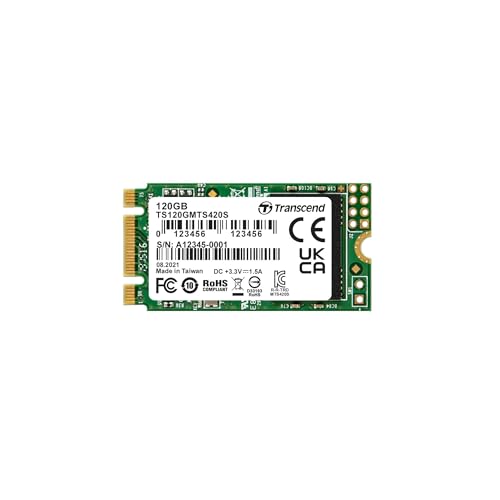
Transcend 120GB M.2 2242 SATA SSD
Best for: compact systems and light daily use
- Cache Type
- SLC Cache (what this guide is about)
- Storage Capacity
- 120GB
- Interface
- SATA III 6GB/s
- Max Read Speed
- 560MB/sec
- Max Write Speed
- 500MB/sec
- Form Factor
- M.2 2242
View on Amazon: Transcend 120GB M.2 2242 SATA SSD Affiliate link
This is a 120GB M.2 2242 SSD using a SATA III 6GB/s interface. It features an SLC cache to manage data flow, which helps maintain speed during bursts. You get sequential read speeds up to 560MB/sec and write speeds up to 500MB/sec. The drive uses 3D TLC NAND flash memory. Its small 2242 form factor makes it suitable for compact systems where space is limited.
Pros
- SLC cache improves sustained write performance
- Compact M.2 2242 form factor fits tight spaces
- SATA III 6GB/s interface offers reliable connectivity
- 3D TLC NAND flash memory provides good density
Cons
- Small 120GB capacity limits storage for large files
- SLC cache is less efficient than DRAM for heavy workloads
- No included heatsink for thermal management
Good fit if
- You need a small drive for a compact laptop or mini-PC
- You want a budget-friendly SATA SSD for basic tasks
- You are upgrading an older system with M.2 2242 support
Skip if
- You require high capacity for media libraries
- You need DRAM cache for professional video editing
- You want NVMe speeds for gaming
Verdict: Transcend 120GB M.2 2242 SATA SSD is a solid choice for users needing a compact, budget SATA drive. It suits light users who prioritize form factor over raw speed or capacity.

Transcend 256GB M.2 SATA SSD with DRAM
Best for: Upgrading laptops with M.2 slots
- Cache Type
- DRAM Cache (what this guide is about)
- Storage Capacity
- 256GB
- Interface
- SATA III
- Max Read Speed
- 560 MB/s
- Max Write Speed
- 520 MB/s
- Form Factor
- M.2 2280
View on Amazon: Transcend 256GB M.2 SATA SSD with DRAM Affiliate link
This Transcend drive uses a DDR3 DRAM cache to manage data mapping, which helps maintain consistent speeds during heavy loads. It offers sequential read speeds up to 560 MB/s and write speeds up to 520 MB/s over a SATA III interface. The M.2 2280 form factor fits standard slots. It suits users who need reliable performance for everyday computing tasks without the premium cost of NVMe drives.
Pros
- Includes DDR3 DRAM cache for stable performance
- Sequential read speeds up to 560 MB/s
- Sequential write speeds up to 520 MB/s
- Uses 3D NAND flash for better endurance
Cons
- SATA III interface limits maximum transfer speeds
- 256GB capacity is lower than modern standards
- No included heatsink for thermal management
Good fit if
- You need a DRAM cache for consistent performance
- You are upgrading a laptop with an M.2 slot
- You require a compact 2280 form factor
Skip if
- You need NVMe speeds for large file transfers
- You require more than 256GB of storage
- You are building a high-end gaming PC
Verdict: Transcend 256GB M.2 SATA III SSD provides steady performance thanks to its DRAM cache. It is a practical upgrade for older systems or laptops that need reliable, fast storage within the SATA speed limit.

Transcend 120GB M.2 SATA SSD
Best for: basic computing and legacy systems
- Cache Type
- SLC Cache (what this guide is about)
- Storage Capacity
- 120GB
- Interface
- SATA III 6GB/s
- Max Read Speed
- 560MB/sec
- Max Write Speed
- 510MB/sec
- Form Factor
- M.2 2280
View on Amazon: Transcend 120GB M.2 SATA SSD Affiliate link
This Transcend MTS820S is a 120GB M.2 2280 SATA III SSD using SLC caching. It offers read speeds up to 560MB/s and write speeds up to 510MB/s. The drive uses 3D TLC NAND flash. It fits standard M.2 slots with a B+M key. You should consider this if you need a compact, budget-friendly storage solution for older systems or basic computing tasks.
Pros
- SLC cache boosts performance
- Read speed up to 560MB/s
- Compact M.2 2280 form factor
- 3D TLC NAND flash memory
Cons
- Only 120GB storage capacity
- SATA III interface limits speed
- No DRAM cache included
Good fit if
- You need a small M.2 drive for legacy systems
- You want a budget SSD for light use
- You require SLC caching for better burst speeds
Skip if
- You need high capacity for large files
- You want maximum NVMe speeds
- You require DRAM cache for heavy workloads
Verdict: Transcend MTS820S 120GB M.2 SSD is a solid choice for users needing a compact, affordable SATA SSD. It suits basic computing needs but falls short for high-performance tasks.

Transcend 128GB M.2 2242 SATA SSD
Best for: small form factor systems needing DRAM cache
- Cache Type
- DRAM Cache (what this guide is about)
- Storage Capacity
- 128GB
- Interface
- SATA III 6Gb/s
- Max Read Speed
- 560MB/s
- Max Write Speed
- 350MB/s
- Form Factor
- M.2 2242
View on Amazon: Transcend 128GB M.2 2242 SATA SSD Affiliate link
The Transcend MTS430S is a 128GB M.2 2242 SATA III drive with a dedicated DDR3 DRAM cache. It offers sequential read speeds up to 560MB/s and write speeds up to 350MB/s. The compact 42mm length fits space-constrained devices like NUCs and thin laptops. You get reliable data integrity through 3D TLC NAND and LDPC error correction. This drive suits users needing small form factor storage with consistent performance.
Pros
- Dedicated DDR3 DRAM cache reduces latency
- Compact M.2 2242 form factor for tight spaces
- Sequential read speeds up to 560MB/s
- 3D TLC NAND with LDPC error correction
Cons
- Limited 128GB storage capacity
- SATA III interface caps speeds below NVMe
- Shorter 42mm length may not fit all M.2 slots
Good fit if
- You need a small SSD for a NUC or mini-PC
- You require DRAM cache for consistent performance
- You have an M.2 slot supporting SATA protocol
Skip if
- You need NVMe PCIe speeds
- You require large storage capacity over 128GB
- Your device only supports NVMe M.2 slots
Verdict: Transcend 128GB M.2 2242 DRAM SSD is a compact, reliable option for small form factor systems. It fits users who prioritize DRAM cache performance in tight spaces over raw speed or large capacity.

Addlink S20 512GB 2.5-Inch SATA SSD
Best for: Laptop and console SATA upgrades
- Cache Type
- SLC Cache (what this guide is about)
- Storage Capacity
- 512GB
- Interface
- SATA III
- Form Factor
- 2.5 inch
- Max Read Speed
- 500MB/s
- Max Write Speed
- 450MB/s
View on Amazon: Addlink S20 512GB 2.5-Inch SATA SSD Affiliate link
The Addlink S20 is a 2.5-inch SATA III drive using 3D NAND flash. It features SLC caching to help maintain speed during heavy workloads. You get up to 500MB/s read and 450MB/s write speeds. The slim 7mm profile fits standard laptop bays and PlayStation consoles. It is a practical upgrade for systems that still rely on SATA interfaces.
Pros
- 500MB/s sequential read speed
- SLC caching for sustained performance
- 2.5-inch 7mm form factor
- 3D NAND flash memory
Cons
- SLC caching is slower than DRAM cache
- SATA III interface limits max speed
- No included heatsink for thermal management
Good fit if
- You need a 2.5-inch drive for a laptop
- You are upgrading a PlayStation 4
- You want a budget SATA SSD
Skip if
- You require PCIe NVMe speeds
- You need a compact M.2 form factor
- You want a drive with DRAM cache
Verdict: Addlink S20 512GB SATA SSD fits users who need a standard 2.5-inch drive for laptops or consoles. It offers reliable SATA speeds but lacks the performance of modern NVMe drives.

TEAMGROUP CARDEA A440 1TB PCIe 4.0 SSD
Best for: Users needing DRAM cache and heatsink cooling
- Cache Type
- SLC Cache, DRAM Cache (what this guide is about)
- Storage Capacity
- 1TB
- Interface
- PCIe Gen4 x4, NVMe
- Form Factor
- M.2 2280
- Max Read Speed
- 7,000 MB/s
- Max Write Speed
- 5,500 MB/s
View on Amazon: TEAMGROUP CARDEA A440 1TB PCIe 4.0 SSD Affiliate link
This 1TB M.2 2280 NVMe drive uses a Phison E18 controller with PCIe Gen4 x4 support. It features both DRAM and SLC cache for consistent performance. Sequential speeds reach 7,000 MB/s read and 5,500 MB/s write. The included graphene and aluminum heatsinks help manage high temperatures. It is suitable for users needing high throughput and thermal management.
Pros
- DRAM and SLC cache for sustained writes
- 7,000 MB/s sequential read speed
- Includes graphene and aluminum heatsinks
- Phison E18 controller
Cons
- Only one capacity option listed at 1TB
- Heatsink height may not fit all PS5 slots
- No SATA interface option
Good fit if
- You need high sequential read speeds
- You want DRAM cache for stability
- You require a heatsink for thermal control
Skip if
- You need a SATA SSD
- You require a smaller 2242 form factor
- You prefer a drive without a heatsink
Verdict: TEAMGROUP T-Force CARDEA A440 1TB offers fast PCIe Gen4 speeds with DRAM cache and effective cooling. It fits users who prioritize thermal management and sustained write performance in an M.2 2280 form factor.
Specifications side by side
| Spec | Transcend 120GB M.2 2242 SATA SSD | Transcend 256GB M.2 SATA SSD with DRAM | Transcend 120GB M.2 SATA SSD | Transcend 128GB M.2 2242 SATA SSD | Addlink S20 512GB 2.5-Inch SATA SSD | TEAMGROUP CARDEA A440 1TB PCIe 4.0 SSD |
|---|---|---|---|---|---|---|
| Storage Capacity | 120GB | 256GB | 120GB | 128GB | 512GB | 1TB |
| Interface | SATA III 6GB/s | SATA III | SATA III 6GB/s | SATA III 6Gb/s | SATA III | PCIe Gen4 x4, NVMe |
| Form Factor | not stated | not stated | not stated | not stated | 2.5 inch | M.2 2280 |
| Max Read Speed | 560MB/sec | 560 MB/s | 560MB/sec | 560MB/s | 500MB/s | 7,000 MB/s |
| Max Write Speed | 500MB/sec | 520 MB/s | 510MB/sec | 350MB/s | 450MB/s | 5,500 MB/s |
| Cache Type | SLC Cache | DDR3 DRAM Cache | SLC Cache | DDR3 DRAM, SLC Cache | SLC Caching | DRAM, SLC Cache |
| Cooling | not stated | not stated | not stated | not stated | not stated | Graphene & Aluminum Heatsink |
| Compatibility | Laptop, Desktop | Laptop, Desktop | Laptop, Desktop | Laptop, Desktop | not stated | not stated |
| NAND Type | not stated | not stated | not stated | not stated | 3D NAND | 3D NAND, TLC |
| Size | 120GB | 256GB | 120GB | 128GB | 512GB | 1TB |
| Material | not stated | not stated | not stated | not stated | not stated | Aluminum |
| Dimensions | 0.87 × 0.15 × 3.15 inches | 3.15 × 0.87 × 0.14 inches | 0.87 × 0.15 × 3.15 inches | 1.65 × 0.87 × 0.14 inches | 3.94 × 2.75 × 0.28 inches | 19.7 × 19.7 × 11 inches |
| Weight | not stated | not stated | not stated | not stated | not stated | 1.62 ounces |
| Color | Multicoloured | Green | Black | Green | S20 | A440 |
| Model | TS120GMTS420S | TS256GMTS830S | TS120GMTS820S | TS128GMTS430S | ad512GBS20S3S | TM8FPZ001T0C327 |
Frequently asked questions
Does DRAM cache make an SSD faster?
Yes, DRAM cache improves consistency more than peak speed. It acts as a dedicated buffer for the drive’s mapping table. This allows the controller to locate data quickly during heavy workloads. You will notice smoother performance when editing video or running databases, as seen with the TEAMGROUP CARDEA A440.
What is SLC cache on an SSD?
SLC cache is a portion of NAND flash memory treated as Single-Level Cell storage. It mimics faster storage to maintain high write speeds for short bursts. Once this buffer fills, performance often drops. This method is common in budget drives like the Transcend 120GB M.2 2242 SATA SSD.
Can an SSD have both DRAM and SLC cache?
Yes, some drives include both types of caching. The TEAMGROUP CARDEA A440 features DRAM cache for mapping and SLC cache for write buffering. This combination helps manage data flow efficiently. You get consistent speeds under load while retaining burst performance for large file transfers in an M.2 2280 form factor.
Is DRAM cache necessary for gaming?
It is helpful but not always mandatory for basic gaming. DRAM cache ensures consistent write speeds, which reduces stuttering in large open-world games. The Addlink S20 512GB uses SLC cache instead. It offers reliable SATA speeds, though it may lack the sustained performance of modern NVMe drives with DRAM.
How does cache affect write speeds?
Cache type directly impacts how quickly you can write data. DRAM cache maps data locations efficiently, preventing slowdowns during heavy writes. SLC cache provides a temporary high-speed buffer. When the SLC buffer fills, write speeds often drop significantly. This is why drives like the Transcend 256GB M.2 SATA SSD with DRAM are preferred for steady performance.
Which cache type is better for laptops?
DRAM cache is generally better for laptops running demanding tasks. It provides consistent performance without relying on flash memory buffers. The Transcend 128GB M.2 2242 DRAM SSD fits small form factor systems. It offers reliable performance in tight spaces, making it a practical choice for upgrading older laptops or compact PCs.