BUFFALO vs Netac Nvme SSDs: Which Brand Fits You?
As an Amazon Associate we earn from qualifying purchases. Links on this page are affiliate links.
You are deciding between the BUFFALO vs netac nvme SSD options for portable storage. Both are external solid-state drives designed for easy transport. The BUFFALO model offers higher capacity and a mountable design for TV recording. The Netac drive provides faster transfer speeds and a more compact aluminum body. You need to choose based on your specific storage needs and connection preferences.
Key differences
| Aspect | Buffalo 960GB Mountable External SSD | Netac Z Slim 250GB Portable SSD |
|---|---|---|
| Storage Capacity | 960 GB | 250 GB |
| Interface | USB 3.2 (Gen1) | USB 3.2 Gen 2 |
| Max Read Speed | not listed | 550 MB/s |
| Max Write Speed | not listed | 450 MB/s |
| Form Factor | Mountable External | Slim Portable |
| Warranty | 1 year | 3 years |
Which one should you choose?
Choose Buffalo 960GB Mountable External SSD if
- You need large storage for TV recordings or media libraries.
- You want to mount the drive behind a TV or monitor.
- You primarily use USB 3.0 or older Type-A ports.
Choose Netac Z Slim 250GB Portable SSD if
- You prioritize faster file transfer speeds for daily use.
- You need a lightweight, pocket-sized drive for travel.
- You want a longer warranty period for peace of mind.
Verdict: The BUFFALO drive suits users who need high capacity and a fixed mounting solution for TVs. The Netac Z Slim is better for those who value speed, portability, and a longer warranty. Choose the BUFFALO for bulk storage and the Netac for mobile efficiency.
Buffalo vs Netac Portable SSDs
Transfer Speed
The Netac Z Slim lists max read speeds of 550MB/s and write speeds of 450MB/s. It uses a USB 3.2 Gen 2 interface to reach these rates. The BUFFALO drive uses a USB 3.2 Gen 1 interface. This standard caps theoretical throughput at 5Gbps. The BUFFALO listing does not state specific read or write speeds. For large file transfers, the Netac connection allows faster data movement. You will notice a difference when moving high-resolution video or large project files. The Netac interface supports higher bandwidth than the BUFFALO connection.
Storage Capacity
The BUFFALO model comes in a 960GB version. This provides ample space for TV recordings and media libraries. The Netac Z Slim is available in a 250GB option. This capacity suits daily documents and smaller photo collections. The BUFFALO drive holds nearly four times the data of the base Netac model. If you need to store extensive video archives or system backups, the BUFFALO capacity is superior. The Netac offers higher capacity variants, but the base comparison favors the BUFFALO size for bulk storage needs.
Build Material
The Netac Z Slim features an aluminum alloy enclosure. This material offers a solid feel and helps with heat dissipation during heavy use. The BUFFALO listing does not specify the enclosure material. It describes the product as an external portable SSD with a black finish. Aluminum typically provides better durability and thermal management than plastic housings. The Netac build feels more robust for frequent travel. The BUFFALO design prioritizes function over material specification in the provided data.
Mounting Options
The BUFFALO drive includes a TV back mounting kit. This allows you to attach the SSD directly behind a television for recording. The kit includes various screws for secure installation. The Netac Z Slim is a standard portable drive. It lacks any mounting accessories or brackets. If you plan to use the drive for continuous TV recording or fixed installation, the BUFFALO mounting capability is a distinct advantage. The Netac is designed for handheld portability rather than fixed placement.
Portability and Weight
The Netac Z Slim weighs approximately 1.06 ounces and measures 100 × 29.4 × 9mm. It fits easily into a pocket or small bag. The BUFFALO drive weighs around 4.3 ounces and is larger. The mounting kit adds further bulk if you use it. The Netac is significantly lighter and more compact. For users who carry the drive in a pocket or small pouch daily, the Netac form factor is more convenient. The BUFFALO is better suited for stationary use or larger bags.
Choose the Right Portable SSD for You
Users needing large capacity for TV recording
The Buffalo drive offers 960 GB of storage, which is significantly larger than the Netac 250 GB option. It includes a dedicated TV back mounting kit with hand crank screws for secure installation. This makes it ideal for users who need to record long TV shows or store large media libraries on a single external drive without managing multiple devices.
Users prioritizing fast transfer speeds
The Netac Z Slim supports USB 3.2 Gen 2, enabling read speeds up to 550MB/s and write speeds up to 450MB/s. This is faster than the Buffalo model, which uses the slower USB 3.2 Gen 1 interface. If you frequently move large files like videos or project data, the higher bandwidth of the Netac drive will reduce your wait times significantly.
Users wanting a lightweight aluminum design
The Netac Z Slim weighs only 1.06 ounces and measures 100 x 29.4 x 9mm. Its aluminum alloy enclosure provides a slim profile that fits easily into pockets or bags. In contrast, the Buffalo drive weighs 7.05 ounces and includes bulky mounting hardware. The Netac is better for travelers who prioritize portability and a compact, durable form factor for daily carry.
Users needing versatile device compatibility
The Netac drive supports Windows, macOS, Linux, and Android systems, with included USB-C to A cables and adapters. It works with phones, tablets, and computers. The Buffalo drive is compatible with Windows and Mac computers via USB Type-A terminals. If you plan to use your SSD with Android devices or need flexible connection options across different operating systems, the Netac offers broader utility.
The products compared

Buffalo 960GB Mountable External SSD
Best for: TV recording and mounting
- Storage Capacity
- 960 GB
- Interface
- USB 3.2 (Gen1)
- Form Factor
- External Portable
- Dimensions
- 4.61 × 2.95 × 0.47 inches
- Weight
- 7.05 ounces
View on Amazon: Buffalo 960GB Mountable External SSD Affiliate link
This is a 960 GB external portable SSD from BUFFALO. It connects via USB 3.2 Gen1. The drive body measures 3.0 x 4.5 x 4.6 inches. It includes a TV back mounting kit. This unit suits users who need a compact drive for Windows or Mac computers. It also works well for TV recording tasks.
Pros
- 960 GB storage capacity
- Includes TV back mounting kit
- USB 3.2 Gen1 interface
- Compact body dimensions
Cons
- No sequential read/write speeds listed
- Short 1 year warranty period
Good fit if
- You need a mountable drive for a TV
- You use Windows or Mac computers
- You require 960 GB of portable storage
Skip if
- You need high-speed data transfers
- You want a longer warranty period
- You prefer a larger capacity option
Verdict: BUFFALO 960GB Portable SSD is a practical option for mounting behind a TV. It offers reliable storage for Windows and Mac users who need a compact form factor.
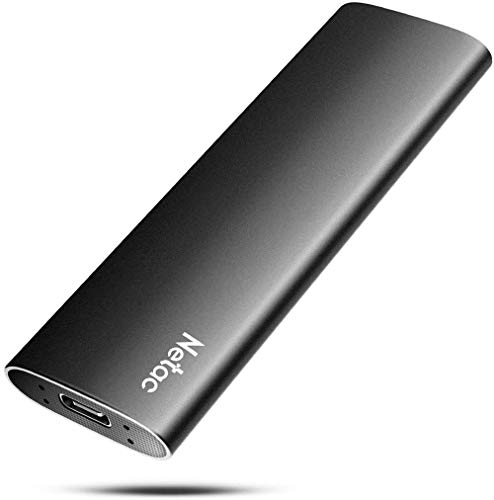
Netac Z Slim 250GB Portable SSD
Best for: Lightweight daily file storage
- Storage Capacity
- 250GB
- Interface
- USB 3.2 Gen 2
- Form Factor
- Portable
- Max Read Speed
- 550MB/s
- Max Write Speed
- 450MB/s
- Compatibility
- Mac
View on Amazon: Netac Z Slim 250GB Portable SSD Affiliate link
The Netac Z Slim is a compact external SSD with 250GB of storage. It offers read speeds up to 550MB/s and write speeds up to 450MB/s via USB 3.2 Gen 2. The aluminum alloy enclosure is slim and lightweight, measuring 100 x 29.4 x 9mm and weighing 30g. It supports Windows, macOS, Linux, and Android systems. This drive suits users needing portable space for daily files.
Pros
- 250GB capacity for documents and photos
- Up to 550MB/s read speed
- Slim aluminum alloy enclosure
- Cross-platform compatibility
Cons
- 250GB is a smaller capacity option
- No included USB-C to C cable
- No dedicated software management
Good fit if
- You need a lightweight drive for travel
- You use multiple operating systems
- You want simple plug-and-play storage
Skip if
- You require large capacity for video editing
- You need high-speed USB-C to C connection
- You prefer a larger storage option
Verdict: Netac Z Slim 250GB Portable SSD is a practical choice for users who prioritize portability and cross-platform use over high capacity. It fits those carrying daily files between devices.
Specifications side by side
| Spec | Buffalo 960GB Mountable External SSD | Netac Z Slim 250GB Portable SSD |
|---|---|---|
| Storage Capacity | 960 GB | 250GB |
| Interface | USB 3.2 (Gen1) | USB 3.2 Gen 2 |
| Form Factor | External Portable | Portable |
| Max Read Speed | not stated | 550MB/s |
| Max Write Speed | not stated | 450MB/s |
| Compatibility | not stated | Mac |
| Material | not stated | Aluminum |
| Host Interface | not stated | USB-C |
| Dimensions | 4.61 × 2.95 × 0.47 inches | 3.9 × 1.1 × 0.35 inches |
| Weight | 7.05 ounces | 1.06 ounces |
| Size | 960GB | 250 GB |
| Color | Black | Zslim |
| Model | SSD-PGT960U3-BA | Z Slim |
Frequently asked questions
Which drive is better for mounting behind a television?
The BUFFALO 960GB Mountable External SSD is the better choice for this specific use case. Its design is explicitly noted as practical for mounting behind a TV. It offers a compact form factor that fits Windows and Mac users who need reliable storage in a space-saving configuration.
How much storage space does the BUFFALO drive provide?
The BUFFALO model provides 960GB of storage capacity. This is significantly more than the Netac option, which offers only 250GB. If you need to store large amounts of data, such as TV recordings, the BUFFALO drive gives you more room for your files.
Is the Netac SSD made of metal or plastic?
The Netac Z Slim 250GB Portable SSD features an aluminum material construction. This metal build contributes to its lightweight design, weighing just 1.06 ounces. It is a practical choice for users who prioritize portability and cross-platform use over high capacity for daily file storage.
What interface does the Netac drive use for connections?
The Netac Z Slim uses a USB-C host interface. This connection type allows it to reach max read speeds of 550MB/s and write speeds of 450MB/s via USB 3.2 Gen 2. It is designed for users who need fast transfer rates for daily files between devices.
Which SSD is lighter and easier to carry?
The Netac Z Slim is the lighter option, weighing only 1.06 ounces. In comparison, the BUFFALO drive weighs 7.05 ounces. The Netac drive is ideal for those carrying daily files between devices, as it prioritizes portability and fits easily into bags or pockets.
Can I use the BUFFALO drive with Mac computers?
Yes, the BUFFALO 960GB Portable SSD is compatible with Mac users. It is also designed for Windows users. The drive offers reliable storage in a compact form factor, making it a practical option for cross-platform use without requiring special adapters or drivers for basic functionality.