Xiaobi SSD Enclosures: 3 Picks Ranked by Specs
As an Amazon Associate we earn from qualifying purchases. Links on this page are affiliate links.
You need the best Xiaobi SSD enclosures to connect your internal drive externally without hassle. Xiaobi offers tool-free M.2 NVMe enclosures in aluminum or plastic, with options for passive or active fan cooling. We compared 3 models based strictly on published specifications. The Xiaobi M.2 NVMe SSD Enclosure leads because it supports tool-free installation and passive cooling for standard NVMe drives. This approach ensures you get reliable performance without unnecessary complexity. Our selection focuses on practical specs like interface type and thermal management. We ignore marketing claims and look only at what the listings state. This method helps you choose the right enclosure for your specific drive size and cooling needs.
Quick picks
| # | Product | Best for | Price |
|---|---|---|---|
| 1 | Xiaobi M.2 NVMe SSD Enclosure Best overall | Tool-free NVMe drive connections with passive cooling | Check price of Xiaobi M.2 NVMe SSD Enclosure on Amazon |
| 2 | Xiaobi 10Gbps Fan-Cooled M.2 SSD Enclosure Best premium | Users needing active cooling and tool-free setup | Check price of Xiaobi 10Gbps Fan-Cooled M.2 SSD Enclosure on Amazon |
| 3 | Xiaobi Tool-Free NVMe Enclosure Best budget | users needing multi-size M.2 support | Check price of Xiaobi Tool-Free NVMe Enclosure on Amazon |
Our 3 picks
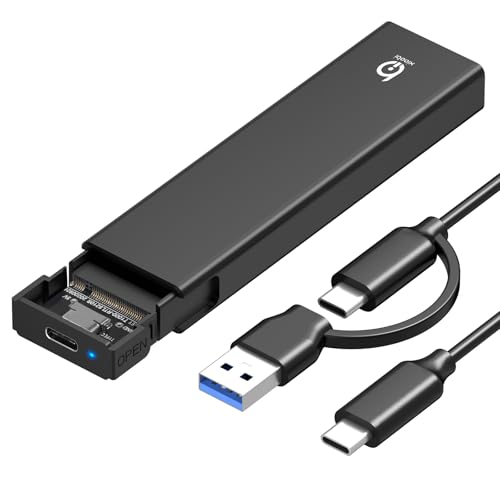
Xiaobi M.2 NVMe SSD Enclosure
Best for: Tool-free NVMe drive connections with passive cooling
- Max Transfer Speed
- 10Gbps
- Host Interface
- USB 3.2 Gen 2
- Drive Interface
- PCIe NVMe (M-Key, B+M Key)
- Supported Form Factors
- 2230, 2242, 2260, 2280
- Cooling System
- Aluminum alloy with thermal pad
- Installation Style
- Tool-free
View on Amazon: Xiaobi M.2 NVMe SSD Enclosure Affiliate link
The Xiaobi Bi-M217 is a tool-free NVMe enclosure featuring a USB-C 3.2 Gen 2 interface for 10Gbps transfer speeds. Its aluminum alloy housing and silicone thermal pad provide passive cooling without a fan. It supports M-Key and B+M Key drives in 2230, 2242, 2260, and 2280 sizes. This model suits users who want stable performance and easy installation without additional hardware.
Pros
- USB-C 3.2 Gen 2 interface supports up to 10Gbps transfer speeds
- Tool-free installation with a secure buckle mechanism
- Aluminum alloy housing with silicone thermal pad for heat dissipation
- Supports M-Key and B+M Key NVMe drives in multiple sizes
Cons
- Does not support SATA or mSATA SSDs
- Incompatible with M.2 SSDs that have built-in heatsinks
- Lacks an included cooling fan compared to other options
Good fit if
- You need a tool-free way to connect NVMe drives
- You use M-Key or B+M Key SSDs in standard sizes
- You prefer passive cooling via aluminum alloy construction
Skip if
- You require support for SATA or mSATA drives
- Your NVMe SSD includes a large built-in heatsink
- You need active cooling with an included fan
Verdict: The Xiaobi Bi-M217 NVMe Enclosure is a practical choice for users who prioritize tool-free installation and passive cooling for standard NVMe drives. It fits buyers who do not need active fans or support for non-NVMe formats.

Xiaobi 10Gbps Fan-Cooled M.2 SSD Enclosure
Best for: Users needing active cooling and tool-free setup
- Max Transfer Speed
- 10Gbps
- Host Interface
- USB 3.2 Gen 2
- Drive Interface
- M-Key/B+M Key NVMe, B+M Key SATA
- Supported Form Factors
- 2230, 2242, 2260, 2280
- Cooling System
- Built-in silent fan, aluminum shell
- Installation Style
- Tool-free
View on Amazon: Xiaobi 10Gbps Fan-Cooled M.2 SSD Enclosure Affiliate link
This Xiaobi enclosure uses the RTL9210C chip and USB 3.2 Gen 2 to reach 10Gbps transfer speeds. It includes a silent cooling fan and aluminum shell to manage heat. The tool-free sandwich design supports 2230, 2242, 2260, and 2280 M.2 NVMe and SATA drives. It works with Windows, macOS, and Linux without drivers.
Pros
- USB 3.2 Gen 2 interface for 10Gbps speeds
- Built-in silent cooling fan for thermal management
- Tool-free sandwich-style installation
- Supports 2230, 2242, 2260, and 2280 form factors
Cons
- Requires a cooling fan, adding moving parts
- Does not support M.2 SSDs with existing heatsinks
- Excludes B-Key SATA and AHCI SSDs
Good fit if
- You need active cooling for sustained transfers
- You use multiple M.2 form factors
- You want tool-free installation
Skip if
- You prefer a completely passive design
- Your SSD has a built-in heatsink
- You need B-Key SATA support
Verdict: Xiaobi NVMe Enclosure with Cooling Fan offers active thermal control and broad format support for users who prioritize speed and stability. It fits those who need to manage heat without tools.

Xiaobi Tool-Free NVMe Enclosure
Best for: users needing multi-size M.2 support
- Max Transfer Speed
- 10Gbps
- Host Interface
- USB 3.2 Gen 2
- Drive Interface
- M.2 NVMe (M-Key, B+M Key)
- Supported Form Factors
- 2230, 2242, 2260, 2280
- Cooling System
- Aluminum alloy shell, thermal pad
- Installation Style
- Tool-free
View on Amazon: Xiaobi Tool-Free NVMe Enclosure Affiliate link
This Xiaobi enclosure uses a USB 3.2 Gen 2 interface to reach 10Gbps transfer speeds. It features a sandwich-style aluminum alloy shell with a thermal pad for heat dissipation. You can install M.2 NVMe drives in 2230, 2242, 2260, or 2280 sizes without tools. It works with Windows, macOS, and Linux. This model is a solid option if you need wide form factor support and passive cooling.
Pros
- USB 3.2 Gen 2 interface for 10Gbps speeds
- Aluminum alloy shell with thermal pad for cooling
- Supports 2230, 2242, 2260, and 2280 form factors
- Tool-free installation with secure buckle design
Cons
- Passive cooling only, no active fan
- Does not support M.2 SSDs with existing heatsinks
- Not compatible with SATA or mSATA drives
Good fit if
- You need an enclosure for multiple M.2 sizes
- You want tool-free installation for quick swaps
- You prefer passive aluminum cooling over fans
Skip if
- You require active fan cooling for heavy loads
- You need to use SATA or mSATA SSDs
- Your NVMe drive has a built-in heatsink
Verdict: Xiaobi Bi-M212 Tool-Free NVMe Enclosure is a versatile choice for users who need to support various M.2 sizes. It offers reliable 10Gbps speeds and easy installation for those who value flexibility over active cooling.
Specifications side by side
| Spec | Xiaobi M.2 NVMe SSD Enclosure | Xiaobi 10Gbps Fan-Cooled M.2 SSD Enclosure | Xiaobi Tool-Free NVMe Enclosure |
|---|---|---|---|
| Max Transfer Speed | 10Gbps | 10Gbps | 10Gbps |
| Host Interface | USB 3.2 Gen 2 | USB 3.2 Gen 2 | USB 3.2 Gen 2 |
| Drive Interface | PCIe NVMe (M-Key, B+M Key) | M-Key/B+M Key NVMe, B+M Key SATA | M.2 NVMe (M-Key, B+M Key) |
| Supported Form Factors | 2230, 2242, 2260, 2280 | 2230, 2242, 2260, 2280 | 2230, 2242, 2260, 2280 |
| Cooling System | Aluminum alloy with thermal pad | Built-in silent fan, aluminum shell | Aluminum alloy shell, thermal pad |
| Installation Style | Tool-free | Tool-free | Tool-free |
| Interface | NVMe | SATA III | NVMe |
| Form Factor | M.2 2280 | M.2 2280 | M.2 2280 |
| Cooling | not stated | Cooling Fan | not stated |
| Transfer Speed | 10Gbps | not stated | 10Gbps |
| Features | Tool-Free, UASP, TRIM | not stated | Tool-Free, UASP, TRIM |
| Material | not stated | Aluminum | not stated |
| Color | Black | Gery | Black |
| Model | Bi-M217 | Bi-M211F | Bi-M212 |
| Size | not stated | 10 Gbps | not stated |
Xiaobi Enclosure Lineup Overview
The Xiaobi Bi-M217 stands out for tool-free NVMe connections and passive cooling. It suits users who prefer simplicity without active fans. The Bi-M211F adds an aluminum body and a cooling fan for active thermal management. This model targets those needing sustained stability under load. Both use standard M.2 NVMe interfaces.
The Bi-M212 offers versatile multi-size M.2 support while remaining tool-free. It provides reliable 10Gbps speeds without active cooling components. Shoppers prioritizing flexibility over heat dissipation will find this option practical. You can choose between passive or active thermal solutions based on your drive's needs. Each enclosure supports NVMe drives, ensuring broad compatibility for your external storage projects.
Where Xiaobi Fits Your Needs
Xiaobi targets users who value tool-free NVMe installation and straightforward thermal management. The range includes passive cooling options like the Bi-M217 and active fan solutions such as the Bi-M211F. You will find aluminum and plastic materials, along with black and grey colors. All listed models support standard M.2 NVMe drives. There is no SATA support or USB-C PD charging mentioned. The brand does not offer RGB lighting or complex software utilities. You should choose based on your cooling preference and drive size compatibility rather than advanced features.
How to Choose the Right Xiaobi Enclosure
-
Check the Interface Standard
You must ensure your M.2 drive uses the NVMe protocol. Xiaobi enclosures in this guide support only NVMe interfaces, not the older SATA protocol. Verify your drive’s label or specifications before purchasing. If you own a SATA M.2 SSD, these enclosures will not function. This compatibility check prevents you from buying hardware that cannot communicate with your storage device. All listed models adhere to this single interface requirement for reliable data transfer.
-
Decide on Cooling Method
Thermal management affects sustained performance during heavy workloads. You can choose between passive and active cooling solutions. The Bi-M217 relies on passive heat dissipation, which is silent but less effective under extreme load. The Bi-M211F includes a cooling fan for active thermal control. If you prioritize quiet operation, select the passive option. If you need to manage heat for long transfers, the fan-cooled model is the better choice for your specific usage pattern.
-
Verify M.2 Size Support
M.2 drives come in various physical lengths, commonly 2280, 2260, or 2242. You need an enclosure that fits your specific drive dimensions. The Bi-M212 is designed to support multiple M.2 sizes, offering versatility if you have drives of different lengths. Other models may support only the standard 2280 form factor. Check the product specifications to confirm compatibility with your drive’s physical size to avoid installation issues or loose connections inside the casing.
-
Evaluate Setup Convenience
Installation ease varies by design. Some Xiaobi enclosures feature tool-free mechanisms, allowing you to insert the drive without screws. The Bi-M217 and Bi-M212 both offer this tool-free setup for quick connections. This feature is useful if you frequently swap drives or lack screwdrivers. If you prefer a more traditional secured fit, you might look elsewhere, but for speed and simplicity, the tool-free models provide a hassle-free experience for connecting your NVMe drive externally.
-
Assess Transfer Speed Needs
Connection speed determines how fast you can move data. The Bi-M211F supports 10 Gbps transfer rates, which is suitable for high-speed external storage needs. Ensure your computer’s USB port also supports this speed to realize the benefit. Slower ports will bottleneck the performance regardless of the enclosure’s capability. Match the enclosure’s rated speed with your system’s output to ensure efficient data transfers. This spec is critical for users who frequently move large files between devices.
Frequently asked questions
Which Xiaobi enclosure is best for passive cooling?
The Xiaobi Bi-M217 is the top choice for passive cooling. It uses an aluminum body to dissipate heat without a fan. This model is ideal if you want quiet operation. It supports tool-free installation for standard M.2 NVMe drives. You get a reliable connection without moving parts.
Does Xiaobi support SATA M.2 drives?
No, the enclosures in this list do not support SATA. All three models are designed strictly for the NVMe interface. You must verify that your M.2 drive uses the NVMe protocol before buying. These enclosures will not work with older SATA-based M.2 SSDs.
Which model includes a cooling fan?
The Xiaobi Bi-M211F is the only model with an active cooling fan. It features an aluminum body to help with heat management. This setup is best for users who need sustained performance under load. The fan helps keep the drive cool during intensive tasks.
Are these enclosures tool-free?
Yes, all three Xiaobi models feature tool-free designs. You can install your M.2 drive without screws or extra hardware. The Bi-M217, Bi-M211F, and Bi-M212 all support this convenient feature. This makes setup quick and easy for any user.
What is the maximum transfer speed?
The listed models support up to 10 Gbps speeds. This applies to the Bi-M211F and Bi-M212 enclosures. This speed allows for fast data transfers between your drive and computer. Ensure your host port also supports this rate for optimal performance.
Which enclosure supports multiple M.2 sizes?
The Xiaobi Bi-M212 is designed for multi-size M.2 support. It offers versatility for different drive lengths. This makes it a flexible choice if you use various M.2 SSDs. It maintains 10Gbps speeds while providing easy tool-free installation.
What colors are available for these enclosures?
Xiaobi offers black and grey color options. The Bi-M217 and Bi-M212 come in black. The Bi-M211F is available in grey. These colors provide a standard look that fits most setups. You can choose based on your aesthetic preference.