Best SSD Enclosures Under $50 in 2026: 15 Picks Ranked by Specs
As an Amazon Associate we earn from qualifying purchases. Links on this page are affiliate links.
Finding the best SSD enclosures under $50 requires matching drive sizes, interface bandwidth, and bay configurations to your hardware. The ICY DOCK M.2 NVMe USB-C Enclosure with Power Switch leads the rankings because its 10Gbps chassis supports drive lengths from 2230 up to 22110 alongside a dedicated physical power switch.
This guide ranks 15 options strictly using specifications published on their listings, comparing interfaces, transfer speeds, and thermal designs. You can quickly decide which enclosure matches your drive form factor, host speeds, and daily storage setup.
Quick picks
The best fit for you
- You need to house extra-long 22110 M.2 NVMe drives ICY DOCK M.2 NVMe USB-C Enclosure with Power Switch It accommodates M.2 cards up to size 22110 and features an integrated physical power switch with 10Gbps transfer speed.
- You use compact M.2 2242 form factor drives DOCKCASE Magnetic 2242 NVMe Enclosure It is designed specifically for M.2 2242 drives with 100W power delivery and a 10Gbps transfer speed.
- You require standalone offline cloning for two NVMe drives WAVLINK Dual-Bay 20Gbps NVMe Cloner This dual-bay unit supports PC-free offline cloning and delivers up to 20Gbps transfer speeds.
- You want maximum 40Gbps transfer speeds on Mac systems MOKiN 40Gbps M.2 NVMe SSD Enclosure It provides 40Gbps transfer speeds with dedicated Mac compatibility over USB4 and Thunderbolt connections.
Our 15 picks

ICY DOCK M.2 NVMe USB-C Enclosure with Power Switch
Best for: Long 22110 NVMe drives with power control
- Max Transfer Speed
- 10Gbps
- Host Interface
- USB 3.2 Gen 2, Thunderbolt 3/4
- Drive Interface
- PCIe NVMe
- Supported Form Factors
- 2230, 2242, 2260, 2280, 22110
- Drive Bay Count
- 1 bay
- Dimensions
- 5.91 × 2.48 × 0.47 inches
View on Amazon: ICY DOCK M.2 NVMe USB-C Enclosure with Power Switch
This ICY DOCK enclosure converts a single M.2 PCIe NVMe solid-state drive into a portable external drive via a 10Gbps USB 3.2 Gen 2 USB-C interface. It accommodates drives from 30mm up to 110mm lengths, including 22110 cards. It includes a physical power switch and backward compatibility with Thunderbolt 3 and 4 ports. You will find it suits your setup if you need broad drive-size flexibility and dedicated power control on your desk.
Pros
- Supports M.2 cards from 30mm (2230) up to 110mm (22110) in length
- Up to 10Gbps transfer speed via USB 3.2 Gen 2 Type-C
- Dedicated physical drive power switch
- Compatible with Thunderbolt 3 and Thunderbolt 4 host ports
Cons
- Supports PCIe NVMe drives only, with no SATA M.2 support listed
- Single-bay design cannot house multiple drives simultaneously
Good fit if
- You use longer 110mm (22110) or shorter non-standard M.2 NVMe drives.
- You want a physical on/off switch to cut drive power without disconnecting cables.
- You connect to USB-C, USB 3.2 Gen 2, or Thunderbolt 3 and 4 ports.
Skip if
- You need an enclosure that supports legacy SATA-based M.2 drives.
- You require dual bays for hardware cloning or multi-drive setups.
Verdict: ICY DOCK 10Gbps M.2 NVMe SSD Enclosure delivers versatile M.2 card compatibility spanning from 2230 up to 22110 sizes. Its physical power switch and 10Gbps interface give you practical, dependable access to single NVMe drives.

Vantec M.2 NVMe RGB USB-C Enclosure
Best for: portable NVMe storage with controllable RGB lighting
- Host Interface
- USB 3.1 Gen 2x1 Type-C
- Drive Interface
- NVMe
- Supported Form Factors
- 2242, 2260, 2280
- Cooling System
- Anodized aluminum
- Features
- RGB Lighting
- Dimensions
- 4.2 × 1.76 × 0.66 inches
This Vantec enclosure houses an M.2 NVMe solid-state drive inside an anodized aluminum casing. You get a USB 3.1 Gen 2x1 Type-C connection with UASP support, alongside compatibility with 2242, 2260, and 2280 form factors. It includes syncable RGB lighting paired with a physical on/off switch and separate data activity LED. This build suits you if you need portable NVMe storage with system-matched external lighting.
Pros
- Dedicated physical on/off switch for RGB lighting
- Anodized aluminum body for passive heat dissipation
- Supports M.2 NVMe form factors 2242, 2260, and 2280
- Includes a 300mm shielded USB Type-C to Type-C cable
Cons
- Motherboard RGB synchronization requires compatible system hardware
- Lacks support for compact 2230 form factor drives
Good fit if
- You want an external NVMe enclosure with controllable RGB lighting.
- You use an M.2 NVMe drive in the 2242, 2260, or 2280 size.
- You connect directly to host devices with USB Type-C ports.
Skip if
- You need an enclosure compatible with compact 2230 M.2 drives.
- You require an included USB Type-A connection cable.
- You use an M.2 SATA SSD instead of an NVMe drive.
Verdict: Vantec RGB M.2 NVMe Enclosure delivers USB 3.1 Gen 2x1 connectivity inside an anodized aluminum shell with customizable lighting. It is a solid choice when you need portable drive housing with an integrated RGB power switch.

ORICO Dual-Bay M.2 NVMe SSD Enclosure
Best for: dual NVMe drive swapping without tools
- Max Transfer Speed
- 10Gbps
- Host Interface
- USB 3.2 Gen 2 Type-C
- Drive Interface
- PCIe NVMe M-Key, B&M Key
- Supported Form Factors
- 2230, 2242, 2260, 2280
- Drive Bay Count
- 2 bays
- Cooling System
- Aluminum fin, heat sinks, thermal pads
This ORICO dual-bay enclosure lets you run two M.2 PCIe NVMe drives at USB 3.2 Gen 2 speeds up to 10Gbps. It features an aluminum finned body with two internal heatsinks, tool-free rubber plug installation, and support for drives up to 4TB per bay across 2230 to 2280 sizes. If you need simultaneous dual-drive access or want to manage multiple NVMe sticks without carrying tools, this enclosure fits your desk.
Pros
- Dual M.2 NVMe bays supporting up to 8TB total capacity
- Tool-free drive mounting using rubber retention plugs
- USB 3.2 Gen 2 interface with UASP and TRIM up to 10Gbps
- Aluminum finned housing with two heatsinks and thermal pads
- Compatible with 2230, 2242, 2260, and 2280 form factors
Cons
- Supplied with only one cable despite requiring two for simultaneous dual-bay operation
- Maximum transfer rate tops out at 10Gbps rather than 20Gbps or 40Gbps
- Incompatible with M.2 SATA SSDs
Good fit if
- You need to access or swap two NVMe SSDs without using screwdrivers.
- You require large external storage capacity up to 8TB across two drives.
- You work with multiple M.2 card lengths between 2230 and 2280.
Skip if
- You want 20Gbps or 40Gbps transfer speeds for demanding workloads.
- You need cables included in the box to mount both drives immediately.
Verdict: ORICO Dual-Bay M.2 NVMe Enclosure gives you flexible dual-slot access and tool-free mounting at standard 10Gbps speeds. It is a solid pick if you manage two NVMe drives and supply an extra cable for concurrent operation.

Sokiwi Dual-Bay M.2 NVMe Clone Enclosure
Best for: offline NVMe cloning and dual-drive maintenance
- Max Transfer Speed
- 10Gbps
- Host Interface
- USB 3.2 Gen 2
- Drive Interface
- NVMe M.2
- Supported Form Factors
- 2230, 2242, 2260, 2280
- Drive Bay Count
- 2 bays
- Cooling System
- Built-in cooling fan
This dual-bay M.2 NVMe enclosure functions as both an external drive dock and a standalone duplicator. It operates over a 10Gbps USB 3.2 Gen 2 connection and features a built-in cooling fan to manage thermal levels across both drive slots. You can clone drives offline without connecting a computer by using the dedicated button. It suits you if you need drive duplication alongside multi-OS compatibility across standard M.2 NVMe cards.
Pros
- Standalone offline cloning without a host computer
- Built-in active cooling fan for thermal control
- Tool-free drive installation using retention clips
- Accommodates 2230, 2242, 2260, and 2280 M.2 form factors
- Includes both USB-C to USB-C and USB-C to USB-A cables
Cons
- Does not support M.2 SATA SSDs
- Incompatible with drives equipped with heatsinks
- Requires external power adapter connection to operate offline cloning
Good fit if
- You need to duplicate NVMe drives without powering on a computer.
- You frequently swap bare M.2 NVMe drives and want tool-free mounting.
- You want active fan cooling to manage temperatures on dual drives.
Skip if
- You need to read or clone M.2 SATA drives.
- You use M.2 SSDs that have pre-installed heatsinks.
- You require host transfer rates faster than 10Gbps.
Verdict: Sokiwi Dual-Bay NVMe Cloner Enclosure provides dual-drive access and standalone PC-free duplication over a 10Gbps USB connection. Its built-in cooling fan and tool-free design make drive servicing straightforward as long as you use bare NVMe drives.

VCOM 40Gbps USB4 M.2 NVMe SSD Enclosure
Best for: high-speed USB4 and Thunderbolt transfers
- Max Transfer Speed
- Up to 40Gbps
- Host Interface
- USB4, Thunderbolt 3/4, USB 3.2/3.1/3.0
- Drive Interface
- NVMe M&B+M-Key
- Supported Form Factors
- 2280
- Cooling System
- Thermal pad, aluminum alloy shell
- Dimensions
- 3.94 × 2.08 × 0.53 inches
This aluminum housing connects an M.2 NVMe SSD to your system over USB4 or Thunderbolt at speeds up to 40Gbps. Powered by an Intel JHL7440 controller, it transfers data at rates up to 2,800MB/s read and 2,500MB/s write when paired with compatible host hardware. It relies on a thermal pad and an aluminum shell for passive cooling, making it a fast external storage option if you use a standard 2280 drive.
Pros
- Up to 40Gbps bandwidth via USB4 and Thunderbolt 3/4 interfaces
- Intel JHL7440 controller chip with dual-chip master control
- Aluminum alloy housing with an included thermal pad for cooling
- Transfer rates up to 2800MB/s read and 2500MB/s write
Cons
- Supports only 2280 form factor drives
- Incompatible with USB 2.0 and older legacy ports
- Requires screws for installation rather than a tool-free latch
Good fit if
- You have a 2280 NVMe SSD and a USB4 or Thunderbolt port.
- You want up to 40Gbps bandwidth driven by an Intel JHL7440 controller.
- You prefer passive heat dissipation via a thermal pad and aluminum shell.
Skip if
- You need to install shorter M.2 drive sizes such as 2230, 2242, or 2260.
- You must connect to older host devices that only support USB 2.0.
- You want tool-free drive swapping without dealing with screws.
Verdict: VCOM 40Gbps Aluminum NVMe Enclosure delivers high-bandwidth USB4 and Thunderbolt speeds using an Intel JHL7440 controller. It is a solid pick if your workflow demands fast transfers with a standard 2280 drive.

DOCKCASE Explorer NVMe Enclosure with Display
Best for: on-screen drive diagnostics and write protection
- Max Transfer Speed
- 10Gbps
- Host Interface
- USB 3.2 Gen 2 Type-C
- Drive Interface
- PCIe NVMe (M-Key, B+M Key)
- Supported Form Factors
- 2230, 2242, 2260, 2280
- Cooling System
- Graphite thermal pad
- Weight
- 5.29 ounces
View on Amazon: DOCKCASE Explorer NVMe Enclosure with Display
This enclosure houses an M.2 NVMe drive using a USB 3.2 Gen 2 Type-C connection capped at 10Gbps. It integrates an onboard display showing drive health, power cycles, and remaining capacity directly on the unit. You also get 10 seconds of power loss protection to prevent data corruption during sudden disconnects. It suits you if you need detailed hardware monitoring and hardware-based write safety for 2230 through 2280 NVMe SSDs.
Pros
- Integrated display monitors drive health, life, and power-on cycles
- Hardware-level 10-second power loss protection prevents data loss
- Supports M.2 NVMe form factors 2230, 2242, 2260, and 2280
- Auxiliary USB-C power prompt warns when power drops below 15W
Cons
- Max transfer rate limited to 10Gbps USB 3.2 Gen 2
- Does not support SATA-based M.2 SSDs
Good fit if
- You need real-time readouts of SSD health, usage, and status
- You want power loss protection against unexpected drive disconnection
- You use standard M-Key or B+M Key PCIe NVMe drives up to 2280
Skip if
- You require transfer speeds exceeding 10Gbps via USB4 or Thunderbolt
- You plan to install an M.2 SATA drive
Verdict: DOCKCASE M.2 NVMe Enclosure with Display stands out with its real-time diagnostic screen and 10-second power loss protection. It delivers reliable 10Gbps NVMe connectivity with dedicated hardware monitoring.

SABRENT Rocket 20Gbps RGB M.2 SSD Enclosure
Best for: flexible dual-protocol 20Gbps external storage
- Max Transfer Speed
- 20Gbps
- Host Interface
- USB 3.2 Gen 2x2, USB-C
- Drive Interface
- M.2 NVMe, M.2 SATA
- Supported Form Factors
- M.2 2230, 2242, 2260, 2280
- Cooling System
- Aluminum, thermal padding
- Features
- RGB Lighting
The SABRENT Rocket RGB is an external drive enclosure featuring a USB 3.2 Gen 2x2 Type-C interface capable of transfer speeds up to 20Gbps. It accepts both M.2 NVMe and M.2 SATA SSDs across four standard lengths from 2230 to 2280. Its aluminum body integrates thermal padding for heat dissipation alongside RGB status LEDs. This makes it a capable pick if you need versatile dual-protocol support and high-speed data transfers.
Pros
- Supports both M.2 NVMe and M.2 SATA drives
- USB 3.2 Gen 2x2 interface provides up to 20Gbps bandwidth
- Compatible with 2230, 2242, 2260, and 2280 form factors
- Aluminum construction with built-in thermal padding
- Includes TRIM and UASP protocol support
Cons
- Requires a dedicated USB 3.2 Gen 2x2 port to reach maximum 20Gbps speeds
- Relies entirely on passive aluminum cooling without an integrated fan
Good fit if
- You have a host system with a 20Gbps USB 3.2 Gen 2x2 port.
- You switch between M.2 SATA and M.2 NVMe solid-state drives.
- You want status-informing RGB LED lighting on your external storage.
Skip if
- You need 40Gbps USB4 or Thunderbolt data throughput.
- You prefer an enclosure without RGB LED lighting.
Verdict: SABRENT Rocket RGB 20Gbps M.2 Enclosure provides flexible dual-protocol drive support and up to 20Gbps bandwidth over USB 3.2 Gen 2x2. It is a solid choice for moving files quickly across M.2 NVMe or SATA drives.
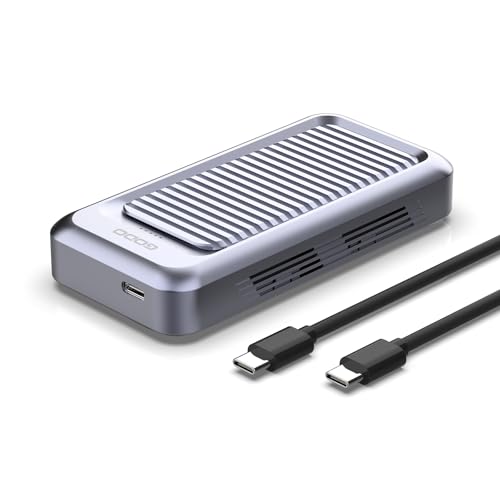
GODO Tool-Free 40Gbps M.2 NVMe Enclosure
Best for: 40Gbps USB4 performance with active cooling
- Max Transfer Speed
- 40Gbps
- Host Interface
- USB4.0 Type-C, Thunderbolt 4/3
- Drive Interface
- PCIe NVMe (M Key, B+M Key)
- Supported Form Factors
- M.2 2230, 2242, 2260, 2280
- Cooling System
- Aluminum alloy body with fan
- Maximum Capacity
- 4TB
This GODO external enclosure delivers up to 40Gbps transfer speeds over a USB4 and Thunderbolt interface. It houses an M.2 NVMe drive up to 4TB across 2230, 2242, 2260, and 2280 form factors. You get tool-free drive installation alongside active cooling from an internal fan and an aluminum alloy body. It suits you if you need maximum bus bandwidth for high-capacity NVMe drives on modern laptop or desktop connections.
Pros
- Up to 40Gbps transfer speed via USB4 and Thunderbolt 3/4
- Built-in active cooling fan paired with aluminum alloy chassis
- Tool-free drive installation with plug-and-play operation
- Supports M.2 2230, 2242, 2260, and 2280 NVMe SSDs up to 4TB
Cons
- Only supports PCIe NVMe drives, not SATA M.2 SSDs
- Built-in cooling fan introduces an active moving component
Good fit if
- You need 40Gbps bandwidth for Thunderbolt or USB4 hosts.
- You want tool-free drive swapping across various M.2 card lengths.
- You require active fan cooling to manage sustained NVMe heat.
Skip if
- You need compatibility with SATA-based M.2 drives.
- You prefer a completely silent enclosure with passive cooling only.
Verdict: GODO 40Gbps Tool-Free M.2 NVMe Enclosure brings 40Gbps connectivity and active fan cooling to portable storage drives. It provides broad M.2 NVMe size compatibility and quick installation for high-bandwidth host systems.

MAIWO 40Gbps NVMe SSD Enclosure with Fan
Best for: Active cooling with 40Gbps USB4 connectivity
- Max Transfer Speed
- 40Gbps
- Host Interface
- USB4, Thunderbolt 4/3
- Drive Interface
- PCIe NVMe (M Key)
- Supported Form Factors
- 2280
- Cooling System
- Aluminium alloy shell, built-in fan
- Maximum Capacity
- 8TB
This MAIWO enclosure adapts an M.2 NVMe SSD to USB4 and Thunderbolt 4/3 connections with transfer speeds reaching up to 40Gbps. It features an aluminum shell with an integrated cooling fan and uses an ASM2464PD chipset that supports up to 8TB drives. If you need tool-free installation and active cooling for high-bandwidth file transfers on compatible PC, Mac, or iPad hardware, this unit handles 2280 drives cleanly.
Pros
- Up to 40Gbps transfer speed via USB4 and Thunderbolt 4
- Active cooling with built-in fan and aluminum alloy housing
- Tool-free drive installation
- Supports storage capacities up to 8TB
Cons
- Supports only 2280 form factor M.2 drives
- Thunderbolt 3 connections capped at 20Gbps
- Incompatible with SATA M.2 SSDs
Good fit if
- You need 40Gbps interface bandwidth for an M-Key 2280 NVMe drive.
- You want built-in active fan cooling inside an aluminum body.
- You swap drives frequently and require tool-free installation.
Skip if
- You use shorter M.2 drive sizes such as 2230, 2242, or 2260.
- You need an enclosure compatible with SATA M.2 drives.
- You require full 40Gbps throughput over a Thunderbolt 3 connection.
Verdict: MAIWO 40Gbps Tool-Free NVMe Enclosure delivers high-bandwidth USB4 throughput and active fan cooling in a screwless aluminum chassis. It provides a straightforward way to run up to an 8TB 2280 drive without tools.

WAVLINK Dual-Bay 20Gbps NVMe Cloner
Best for: standalone offline M.2 NVMe drive cloning
- Max Transfer Speed
- 20Gbps
- Host Interface
- USB-C
- Drive Interface
- PCIe NVMe (M and B+M keys)
- Supported Form Factors
- 2280/2260/2242/2230
- Drive Bay Count
- 2 bays
- Cooling System
- Silicone thermal pads
This WAVLINK dual-bay enclosure functions as both an external storage dock and a standalone offline duplicator. It connects to your host system via a 20Gbps USB-C interface and supports two M.2 NVMe drives up to 8TB each for a total 16TB capacity. You get one-button drive cloning without needing a computer, tool-free drive installation, and compatibility with 2230 to 2280 form factors. It suits you if you frequently duplicate or swap NVMe drives.
Pros
- Standalone one-click offline cloning with four LED progress indicators
- High-speed 20Gbps USB-C host interface
- Tool-free drive installation supporting 2230, 2242, 2260, and 2280 form factors
- Supports up to 16TB total capacity across two 8TB NVMe bays
Cons
- Incompatible with M.2 SATA SSDs
- Requires an external DC 5V/4A power adapter to run
Good fit if
- You need to clone M.2 NVMe drives directly without using a computer.
- You want dual-drive desktop access with transfer speeds up to 20Gbps.
Skip if
- You need compatibility with M.2 SATA drives.
- You want a pocketable, bus-powered enclosure that does not require an AC wall plug.
Verdict: WAVLINK Dual-Bay 20Gbps NVMe Cloner delivers standalone drive copying and dual-drive expansion over a high-speed 20Gbps connection. It is an effective desktop solution if you need offline NVMe replication and large multi-terabyte capacity.

Kingwin Dual-Bay 2.5-Inch Trayless Mobile Rack
Best for: dual 2.5-inch drive hot-swapping with keylock security
- Max Transfer Speed
- 12Gbps
- Drive Interface
- 2.5" SATA/SAS
- Supported Form Factors
- 2.5-inch
- Drive Bay Count
- 2 bays
- Cooling System
- Aluminum frame
- Installation Style
- Trayless, tool-free
View on Amazon: Kingwin Dual-Bay 2.5-Inch Trayless Mobile Rack
This Kingwin unit is an internal dual-bay mobile rack designed for 2.5-inch SATA or SAS drives. It features an aluminum frame for passive heat dissipation and a trayless, tool-free mechanism for rapid drive swaps. The hardware interface supports speeds up to 12Gbps alongside integrated keylocks for drive physical security. It suits you if you need hot-swappable 2.5-inch storage bays inside a desktop or server chassis.
Pros
- Dual-bay capacity for 2.5-inch SATA and SAS drives
- Trayless, tool-free installation mechanism
- Transfer rate support up to 12Gbps
- Integrated keylock system for physical drive security
- Aluminum frame construction for passive heat dissipation
Cons
- Does not support M.2 form-factor SSDs
- Requires a desktop or server chassis bay for mounting
Good fit if
- You need to mount and swap two 2.5-inch SATA or SAS drives
- You want physical keylock security for installed storage
- You prefer tool-free, trayless drive installation
Skip if
- You need an enclosure for M.2 NVMe or M.2 SATA SSDs
- You require a portable external USB storage drive adapter
Verdict: Kingwin Dual-Bay 2.5-Inch SATA/SAS Mobile Rack provides trayless, dual-drive mounting with built-in keylock security for desktop and server chassis. It is a solid choice if you need rapid access to 2.5-inch SATA or SAS storage without dealing with drive trays.
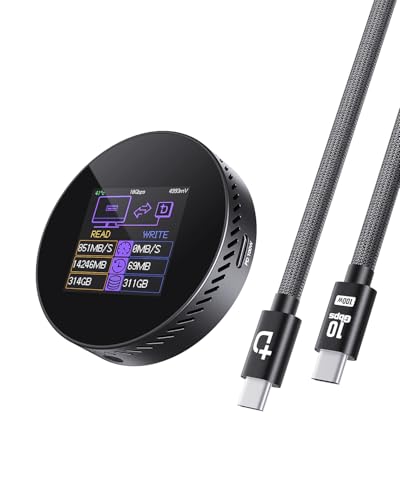
DOCKCASE Magnetic 2242 NVMe Enclosure
Best for: M.2 2242 drives and mobile recording
- Max Transfer Speed
- 10Gbps
- Host Interface
- USB 3.2 Type-C
- Drive Interface
- M.2 NVMe PCIe
- Supported Form Factors
- 2242, 2230
- Maximum Capacity
- 2TB
- Dimensions
- 2.33 × 0.57 × 2.33 inches
DOCKCASE enclosure fits M.2 2242 and 2230 NVMe drives up to 2TB. You get 10Gbps USB 3.2 Type-C transfer speeds, three-second hardware power loss protection, and a built-in status screen tracking drive health. It features pass-through 100W Power Delivery across dual USB-C ports alongside MagSafe-compatible magnetic mounting. This fits your workflow if you record phone video directly to external storage or need compact pocket backups.
Pros
- Integrated HD display tracks drive health, cycles, and capacity
- 3-second hardware power loss protection prevents corruption
- 100W PD pass-through charging via secondary USB-C port
- MagSafe-compatible magnetic attachment for mobile recording
Cons
- Limited to 2230 and 2242 sizes, excluding standard 2280 SSDs
- Maximum storage capacity capped at 2TB
- Maximum throughput capped at 10Gbps USB 3.2 Gen 2
Good fit if
- You use an M.2 2230 or 2242 NVMe drive up to 2TB.
- You need 100W charging pass-through while transferring files.
- You want magnetic phone mounting for direct video capture.
Skip if
- You need to mount a standard 2280 form-factor SSD.
- You require 20Gbps or 40Gbps transfer bandwidth.
- You plan to install an SSD larger than 2TB.
Verdict: DOCKCASE Magnetic 2242 NVMe Enclosure delivers compact 10Gbps storage with integrated health monitoring and 100W power delivery. It protects small-format drives with onboard power-loss protection and attaches cleanly to phones.

FREEGENE 40Gbps Dual-Bay NVMe Dock with Fan
Best for: dual-drive 40Gbps workstation docking setups
- Max Transfer Speed
- 40Gbps
- Host Interface
- USB 4.0, USB-C
- Drive Interface
- M.2 NVMe
- Supported Form Factors
- 2230, 2242, 2260, 2280
- Drive Bay Count
- 2 bays
- Cooling System
- Built-in fan, aluminum alloy
You get a dual-bay M.2 NVMe enclosure combined with a 6-in-1 desktop dock. It delivers 40Gbps host bandwidth across USB 4.0 connections and holds up to 8TB of storage across M.2 sizes from 2230 to 2280. Integrated fans and an aluminum alloy body handle thermal loads during sustained transfers. This setup suits you if you need multi-drive storage alongside HDMI display output and 100W Power Delivery over a single 40Gbps port.
Pros
- Dual M.2 NVMe bays supporting RAID 0 speeds up to 2800 MB/s
- 40Gbps USB 4.0 interface powered by an Intel JHL7440 controller
- 6-in-1 hub includes HDMI video output and 100W Power Delivery
- Active cooling system with built-in fan and aluminum alloy housing
Cons
- Incompatible with host devices that lack 40Gbps ports
- Heavier 1.5-pound weight limits portable travel use
Good fit if
- You have a 40Gbps USB 4.0 host port and need multi-drive storage.
- You want integrated HDMI video output and 100W charging at your desk.
- You run dual NVMe drives in RAID 0 for accelerated read and write speeds.
Skip if
- You connect to computers that lack native 40Gbps USB 4.0 ports.
- You need a lightweight, pocket-sized enclosure for travel.
Verdict: ACASIS Dual-Bay 40Gbps NVMe Enclosure Dock pairs dual-drive NVMe storage with video output and 100W charging for desktop setups. Its strict requirement for 40Gbps host ports makes it unusable on standard legacy USB connections.

Rosewill Dual-Bay NVMe Cloner Dock
Best for: standalone offline cloning and dual NVMe workflows
- Max Transfer Speed
- 20Gbps
- Host Interface
- USB 3.2 Gen 2x2
- Drive Interface
- PCIe NVMe (M-Key, B+M Key)
- Drive Bay Count
- 2 bays
- Installation Style
- Tool-free
- Form Factor
- M.2
The Rosewill Dual-Bay 20Gbps NVMe Cloner Dock provides two M.2 NVMe slots with a 20Gbps USB 3.2 Gen 2x2 connection. You can clone drives offline using a single button without a host computer. It accepts M-Key and B+M Key PCIe drives via a tool-free docking design. An included 12V/2A power supply ensures stable operation. This dock suits you if you frequently duplicate drives or manage dual NVMe storage.
Pros
- USB 3.2 Gen 2x2 interface supports up to 20Gbps transfer speeds
- Standalone one-click offline drive duplication without a PC
- Tool-free dual bays fit M-Key and B+M Key NVMe SSDs
- Includes 12V/2A power adapter, USB-C cable, and USB-A cable
Cons
- Requires external 12V/2A power adapter for operation
- No SATA M.2 SSD support listed
Good fit if
- You need standalone, one-button drive cloning without connecting to a computer.
- You have a USB 3.2 Gen 2x2 port to utilize full 20Gbps bandwidth.
- You want quick tool-free drive swapping for two M.2 NVMe drives.
Skip if
- You need a compact, bus-powered enclosure to carry in a pocket.
- You plan to use SATA-based M.2 SSDs.
Verdict: Rosewill Dual-Bay 20Gbps NVMe Cloner Dock delivers high-bandwidth 20Gbps connectivity and push-button drive cloning across two tool-free slots. It is a capable choice for fast off-computer backups and desktop drive management.

MOKiN 40Gbps M.2 NVMe SSD Enclosure
Best for: Mac users needing 40Gbps Thunderbolt transfer speeds
- Max Transfer Speed
- 40Gbps
- Host Interface
- Thunderbolt 3/4, USB4/3.2/3.1/3.0/2.0
- Drive Interface
- NVMe (M-Key, B+M Key)
- Supported Form Factors
- 2242, 2260, 2280
- Cooling System
- Aluminum
- Compatibility
- Mac
The MOKiN 40Gbps M.2 NVMe SSD Enclosure connects via USB4 and Thunderbolt 3 or 4 protocols using an ASMedia ASM2464PD controller. You get data throughput up to 40Gbps with support for M-Key and B+M Key NVMe drives in 2242, 2260, and 2280 form factors. It features an aluminum shell for passive cooling, includes both USB-C and USB-A cables, and suits you if you need high-bandwidth external storage on macOS or Windows systems.
Pros
- Up to 40Gbps transfer speed via ASM2464PD controller
- Compatible with Thunderbolt 3, Thunderbolt 4, and USB4
- Supports 2242, 2260, and 2280 NVMe SSD form factors
- Includes both USB-C and USB-A connection cables
Cons
- Does not support M.2 SATA SSDs
- Lacks support for compact 2230 M.2 drives
Good fit if
- You need 40Gbps Thunderbolt or USB4 throughput for a Mac or PC.
- You use a standard 2242, 2260, or 2280 NVMe M.2 drive.
Skip if
- You want to install an older M.2 SATA SSD.
- You need to house a miniature 2230 form factor drive.
Verdict: MOKiN 40Gbps M.2 NVMe SSD Enclosure provides 40Gbps speeds across Thunderbolt and USB4 interfaces using an ASM2464PD chip. It is a capable aluminum solution for full-size NVMe drives on modern systems.
Specifications side by side
| Spec | ICY DOCK M.2 NVMe USB-C Enclosure with Power Switch | Vantec M.2 NVMe RGB USB-C Enclosure | ORICO Dual-Bay M.2 NVMe SSD Enclosure | Sokiwi Dual-Bay M.2 NVMe Clone Enclosure | VCOM 40Gbps USB4 M.2 NVMe SSD Enclosure | DOCKCASE Explorer NVMe Enclosure with Display | SABRENT Rocket 20Gbps RGB M.2 SSD Enclosure | GODO Tool-Free 40Gbps M.2 NVMe Enclosure | MAIWO 40Gbps NVMe SSD Enclosure with Fan | WAVLINK Dual-Bay 20Gbps NVMe Cloner | Kingwin Dual-Bay 2.5-Inch Trayless Mobile Rack | DOCKCASE Magnetic 2242 NVMe Enclosure | FREEGENE 40Gbps Dual-Bay NVMe Dock with Fan | Rosewill Dual-Bay NVMe Cloner Dock | MOKiN 40Gbps M.2 NVMe SSD Enclosure |
|---|---|---|---|---|---|---|---|---|---|---|---|---|---|---|---|
| Max Transfer Speed | 10Gbps | not specified | 10Gbps | 10Gbps | Up to 40Gbps | 10Gbps | 20Gbps | 40Gbps | 40Gbps | 20Gbps | 12Gbps | 10Gbps | 40Gbps | 20Gbps | 40Gbps |
| Host Interface | USB 3.2 Gen 2, Thunderbolt 3/4 | USB 3.1 Gen 2x1 Type-C | USB 3.2 Gen 2 Type-C | USB 3.2 Gen 2 | USB4, Thunderbolt 3/4, USB 3.2/3.1/3.0 | USB 3.2 Gen 2 Type-C | USB 3.2 Gen 2x2, USB-C | USB4.0 Type-C, Thunderbolt 4/3 | USB4, Thunderbolt 4/3 | USB-C | not specified | USB 3.2 Type-C | USB 4.0, USB-C | USB 3.2 Gen 2x2 | Thunderbolt 3/4, USB4/3.2/3.1/3.0/2.0 |
| Drive Interface | PCIe NVMe | NVMe | PCIe NVMe M-Key, B&M Key | NVMe M.2 | NVMe M&B+M-Key | PCIe NVMe (M-Key, B+M Key) | M.2 NVMe, M.2 SATA | PCIe NVMe (M Key, B+M Key) | PCIe NVMe (M Key) | PCIe NVMe (M and B+M keys) | 2.5" SATA/SAS | M.2 NVMe PCIe | M.2 NVMe | PCIe NVMe (M-Key, B+M Key) | NVMe (M-Key, B+M Key) |
| Supported Form Factors | 2230, 2242, 2260, 2280, 22110 | 2242, 2260, 2280 | 2230, 2242, 2260, 2280 | 2230, 2242, 2260, 2280 | 2280 | 2230, 2242, 2260, 2280 | M.2 2230, 2242, 2260, 2280 | M.2 2230, 2242, 2260, 2280 | 2280 | 2280/2260/2242/2230 | 2.5-inch | 2242, 2230 | 2230, 2242, 2260, 2280 | not specified | 2242, 2260, 2280 |
| Drive Bay Count | 1 bay | not specified | 2 bays | 2 bays | not specified | not specified | not specified | not specified | not specified | 2 bays | 2 bays | not specified | 2 bays | 2 bays | not specified |
| Cooling System | not specified | Anodized aluminum | Aluminum fin, heat sinks, thermal pads | Built-in cooling fan | Thermal pad, aluminum alloy shell | Graphite thermal pad | Aluminum, thermal padding | Aluminum alloy body with fan | Aluminium alloy shell, built-in fan | Silicone thermal pads | Aluminum frame | not specified | Built-in fan, aluminum alloy | not specified | Aluminum |
| Maximum Capacity | not specified | not specified | 2 x 4TB | not specified | not specified | not specified | not specified | 4TB | 8TB | 16TB (8TB per drive) | not specified | 2TB | 8TB | not specified | not specified |
| Installation Style | not specified | not specified | Tool-free | Tool-Free | not specified | not specified | not specified | Tool-Free | Tool Free | Tool-Free | Trayless, tool-free | not specified | Tool-free | Tool-free | not specified |
| Interface | NVMe | NVMe | NVMe | NVMe | NVMe | NVMe | SATA III | NVMe | NVMe | NVMe | SATA III | NVMe | NVMe | not specified | NVMe |
| Form Factor | M.2 2280 | M.2 | M.2 2280 | M.2 | M.2 2280 | M.2 2280 | M.2 | M.2 2280 | M.2 | M.2 2280 | not specified | M.2 2242 | M.2 | M.2 | M.2 |
| Cooling | not specified | not specified | not specified | not specified | not specified | not specified | not specified | not specified | Cooling Fan | not specified | not specified | not specified | Cooling Fan | not specified | not specified |
| Compatibility | not specified | not specified | not specified | not specified | not specified | not specified | not specified | not specified | not specified | not specified | not specified | not specified | not specified | not specified | Mac |
| Transfer Speed | 10Gbps | not specified | 10Gbps | 10Gbps | 40Gbps | 10Gbps | 20Gbps | 40Gbps | 40Gbps | 20Gbps | not specified | 10Gbps | 40Gbps | 20Gbps | 40Gbps |
| Features | not specified | RGB Lighting | Tool-Free | Offline Clone | not specified | not specified | RGB Lighting | Tool-Free | Tool-Free | Tool-Free, Offline Clone | Tool-Free | not specified | Tool-Free | Tool-Free, Offline Clone | not specified |
| Bay Count | not specified | not specified | Dual-Bay | not specified | not specified | not specified | not specified | not specified | not specified | Dual-Bay | Dual-Bay | not specified | not specified | Dual-Bay | not specified |
| Material | not specified | not specified | Aluminum | not specified | Aluminum | not specified | not specified | Aluminum | not specified | not specified | Aluminum | not specified | Aluminum | not specified | not specified |
| Dimensions | 5.91 × 2.48 × 0.47 inches | 4.2 × 1.76 × 0.66 inches | 4.41 × 2.95 × 0.67 inches | not specified | 3.94 × 2.08 × 0.53 inches | not specified | 4.3 × 1.8 × 0.58 inches | not specified | 4.72 × 1.97 × 0.59 inches | 5.91 × 3.94 × 2.36 inches | not specified | 2.33 × 0.57 × 2.33 inches | not specified | 6 × 5 × 2.75 inches | not specified |
| Weight | 7.2 ounces | 3.25 ounces | 3.53 ounces | 13.8 ounces | not specified | 5.29 ounces | 3.4 ounces | not specified | 9.59 ounces | 1.01 pounds | 10.4 ounces | 1.9 ounces | 1.5 pounds | 13.6 ounces | not specified |
| Color | Black | Black | Grey | Star Black | Black | Black | not specified | Black or White or Gray | not specified | Silver | Black | black | not specified | black | Gray |
| Model | MB861U31-1M2B | NST-210C3-RGB | Dual M.2 NVMe+NVMe | SKUD1001 | 40Gbps M.2 NVMe | 10SPLP-Black | EC-RGBC | USB401-NVMe | 40Gbps NVMe Enclosure Built-in Fan | NVMe + NVMe | K-22SS | Black-100W PD | TBU405 Pro Max | RS-N2-CL | UD1102-1 |
| Size | not specified | not specified | Dual M.2 NVMe+NVMe | 2230/2242/2260/2280 | not specified | not specified | not specified | not specified | not specified | not specified | SATA Dual Bay | not specified | not specified | 20 Gbps Dual Bay Cloner | not specified |
When you evaluate kitchen hardware alongside computer gear, you can compare specifications for the best juicers under 50 by motor wattage.
Key Specs for Choosing an SSD Enclosure
-
Check Physical Drive Length
Verify your SSD physical dimensions before selecting an enclosure. M.2 drives come in several standard lengths, including 2230, 2242, 2260, 2280, and 22110. Most standard enclosures accommodate only common 2280 cards. If you repurpose an enterprise drive or compact card, confirm the enclosure supports that exact length. The ICY DOCK MB861U31-1M2B supports card sizes from 2230 up to extra-long 22110 modules. Matching physical length prevents mounting clearance issues and guarantees that mounting standoffs line up correctly with your drive notch.
-
Match Drive Bus Protocol
Inspect whether your internal drive uses the NVMe or SATA protocol. NVMe M.2 drives use M-key or B+M key pinouts, while SATA M.2 drives rely on B+M keys running over standard SATA signalling. Standard NVMe enclosures cannot communicate with older M.2 SATA cards. If your storage inventory mixes both drive types, check for explicit dual-protocol specifications. The SABRENT EC-RGBC provides SATA III interface compatibility alongside high-speed data pathways. Confirming protocol compatibility before purchase prevents drive detection failures and unusable hardware configurations.
-
Evaluate Enclosure Cooling Methods
Check the thermal design of the chassis to match your sustained transfer workloads. Solid-state drives generate substantial heat during continuous writes. Passive enclosures use aluminum shells to absorb heat directly through thermal pads. For heavy continuous transfers, enclosures with integrated active cooling fans circulate air across the drive surface to combat thermal throttling. The MAIWO 40Gbps NVMe Enclosure includes a built-in cooling fan inside its aluminum body. Choose active cooling if your tasks involve transferring large files continuously, or pick fanless aluminum bodies for quiet everyday operations.
-
Select Bay Count Carefully
Determine how many drives you need connected at once. Single-slot enclosures maintain low weight and a compact profile for mobile carry. Dual-bay enclosures allow simultaneous access to two storage drives through a single desktop connection point. The ORICO Dual-Bay M.2 NVMe SSD Enclosure provides two internal M.2 bays within an aluminum casing. If you frequently transfer files between separate SSDs or want to expand workstation storage without occupying multiple host ports, pick a dual-bay unit. For portable single-drive use, stick with lighter single-bay models.
-
Review Offline Cloning Features
Assess whether your workflow requires standalone drive duplication without a host computer. Enclosures with hardware cloning copy data directly from a source NVMe drive to a target drive at the press of a physical button. The WAVLINK Dual-Bay 20Gbps NVMe Cloner features offline clone support across its two drive slots. This capability eliminates the need to install disk imaging software or tie up your operating system during backups. If you only read and write files through standard operating system file browsers, a standard non-cloning enclosure avoids extra bulk.
-
Consider Tool-Free Assembly Needs
Check the drive mounting mechanism if you intend to switch drives regularly. Enclosures with tool-free designs use latches, sliding lids, or silicone retention pins instead of tiny mounting screws. The GODO USB401-NVMe utilizes a tool-free aluminum design for quick drive installations. Tool-free designs let you swap drives quickly in the field without carrying specialized screwdrivers. If your drive remains permanently inside the enclosure for portable backup duty, traditional screw-fastened models provide secure internal retention and prevent accidental disassembly inside travel bags.
Frequently asked questions
Can an NVMe SSD enclosure also read SATA M.2 drives?
Most NVMe enclosures only accept PCIe-based NVMe storage, but dual-protocol enclosures accept both formats. For instance, the SABRENT Rocket EC-RGBC supports both SATA III and NVMe M.2 drives over a 20Gbps USB-C connection. Single-protocol models like the VCOM 40Gbps or ORICO dual-bay chassis accept NVMe SSDs exclusively. You must check the interface specifications of your bare drive and enclosure before installing storage.
How does standalone offline drive cloning operate without a computer?
Standalone cloning duplicates data directly between two bays using hardware onboard the enclosure. Models such as the Sokiwi SKUD1001, WAVLINK Dual-Bay, and Rosewill RS-N2-CL feature dedicated offline clone buttons. You insert the source drive and target drive into the tool-free slots without connecting a host PC. The controller replicates the data autonomously, while built-in fans or open dock designs dissipate heat during the cloning process.
Why do some high-speed M.2 enclosures include integrated cooling fans?
High-bandwidth controllers generate substantial heat during sustained 40Gbps data transfers. Enclosures like the GODO USB401-NVMe, MAIWO 40Gbps, and FREEGENE dual-bay dock use active fan cooling alongside aluminum housing. Active airflow removes excess thermal buildup from high-speed NVMe controllers, such as Intel JHL7440 or ASM2464PD chips, preventing thermal throttling during intensive transfers. In contrast, slower 10Gbps single-drive enclosures typically rely on passive heat dissipation.
What does onboard power loss protection do in an SSD enclosure?
Hardware power loss protection provides emergency backup power to allow write operations to complete safely if the cable disconnects unexpectedly. The DOCKCASE Explorer 10SPLP-Black and DOCKCASE Magnetic 2242 integrate 10-second power loss protection circuits alongside real-time diagnostic screens. This secondary power buffer prevents filesystem corruption and firmware damage on your NVMe SSD. Standard portable enclosures lack onboard capacitors and stop operating instantly upon disconnection.
Can you install traditional 2.5-inch SATA or SAS SSDs in these enclosures?
Most units in this category house M.2 form-factor drives, but select multi-bay hardware supports standard 2.5-inch drives. For example, the Kingwin K-22SS is an aluminum trayless mobile rack designed for dual 2.5-inch SATA III and SAS drives with keylock security. It accommodates full-height 2.5-inch drives in desktop or server chassis instead of M.2 gumstick drives, providing hot-swap access through SATA host connections.
What are the advantages of a physical power switch on an SSD enclosure?
A physical power switch lets you shut down an external drive without unplugging cables from your computer. The ICY DOCK MB861U31-1M2B includes a dedicated hardware power switch that cuts power directly to the installed NVMe drive. This reduces electrical wear, keeps the enclosure cool when idle, and avoids repeated wear on host USB-C ports. Other units, like the Vantec RGB enclosure, provide switches specifically to manage lighting.
Do tool-free SSD enclosures require mounting screws or thermal pads?
Tool-free enclosures use sliding latches or rubber retention pegs to secure drives instead of traditional screws. Models like the ORICO Dual-Bay, GODO USB401-NVMe, and MAIWO 40Gbps allow rapid SSD swapping by eliminating screwdriver requirements. You open the aluminum chassis, press the drive into the M.2 slot, and lock it in place. While you avoid tiny chassis screws, you still place a thermal pad against the drive to bridge heat into the enclosure.