15 Best SSD Enclosures Under $30, Compared
As an Amazon Associate we earn from qualifying purchases. Links on this page are affiliate links.
External storage expansion starts with choosing the right drive caddy, and finding the best SSD enclosures under $30 comes down to protocol compatibility and transfer bandwidth. The ORICO Transparent 10Gbps M.2 NVMe Enclosure takes the top spot by pairing 10Gbps transfer speeds with a tool-free sliding assembly for M.2 2280 NVMe drives.
This comparison evaluates 15 products based on the specifications published on the listings. You can use this guide to decide which interface standard, enclosure material, and physical form factor fit your specific drive and transfer requirements.
Quick picks
The best fit for you
- You need tool-free mounting for an NVMe SSD ORICO Transparent 10Gbps M.2 NVMe Enclosure It features a tool-free sliding assembly and 10Gbps transfer speed for M.2 2280 NVMe SSDs.
- You require maximum bandwidth for high-speed USB4 transfers AMZPILOT 40Gbps USB4 NVMe Enclosure This aluminum model delivers 40Gbps transfer speeds and built-in active fan cooling for NVMe drives.
- You want to repurpose a small 2230 SSD ORICO 2230 NVMe SSD Enclosure Its aluminum chassis is built specifically for the compact M.2 2230 form factor at 10Gbps speeds.
- You need offline cloning between NVMe and SATA FIDECO 2-Bay NVMe & SATA Dock with Fan It provides an offline clone feature with active cooling fan support for M.2 and 2.5-inch drives.
Our 15 picks

ORICO Transparent 10Gbps M.2 NVMe Enclosure
Best for: tool-free M.2 NVMe drive connectivity
- Max Transfer Speed
- 10 Gbps
- Host Interface
- USB Type-C
- Drive Interface
- PCIe NVMe M-Key
- Supported Form Factors
- 2230, 2242, 2260, 2280
- Cooling System
- Aluminum alloy lines, thermal pad
- Installation Style
- Tool-free
This external enclosure adapts an M.2 NVMe SSD to a USB Type-C host port. It delivers transfer speeds up to 10 Gbps over USB 3.2 Gen 2 and includes both USB-C and USB-A connection cables. The slide-on design enables tool-free drive installation for 2230, 2242, 2260, and 2280 form factors. It suits you if you need a portable drive carrier with integrated thermal pads and support for UASP and TRIM.
Pros
- Up to 10 Gbps transfer speeds via USB 3.2 Gen 2
- Tool-free sliding installation
- Supports 2230, 2242, 2260, and 2280 M.2 form factors
- Includes both USB-C to USB-C and USB-C to USB-A cables
- Supports UASP and TRIM protocols
Cons
- Supports PCIe NVMe M-Key drives only and lacks M.2 SATA support
- Bundled USB-A cable limits connection speeds to 5 Gbps
Good fit if
- You need tool-free installation for an M.2 NVMe PCIe drive.
- You connect across both USB-C and standard USB-A host devices.
- You want hardware support for TRIM and UASP protocols.
Skip if
- You use an M.2 SATA or B-Key solid-state drive.
- You require transfer bandwidth beyond 10 Gbps.
Verdict: ORICO Transparent M.2 NVMe SSD Enclosure provides standard 10 Gbps speeds and dual-cable connectivity for NVMe drives in four form factors. Its tool-free sliding assembly and thermal pad offer straightforward setup for everyday external storage.

Sokiwi Tool-Free M.2 NVMe & SATA SSD Enclosure
Best for: dual-protocol NVMe and SATA drive swapping
- Max Transfer Speed
- 10Gbps
- Host Interface
- USB 3.2 Gen 2
- Drive Interface
- NVMe/SATA PCIe M-Key, PCIe B&M Key
- Supported Form Factors
- 2230, 2242, 2260, 2280
- Cooling System
- Aluminum alloy shell
- Maximum Capacity
- 2TB
View on Amazon: Sokiwi Tool-Free M.2 NVMe & SATA SSD Enclosure
This Sokiwi external drive enclosure accepts M.2 NVMe and SATA drives in 2230, 2242, 2260, and 2280 form factors. It connects via USB 3.2 Gen 2 for data transfers up to 10Gbps on NVMe and 6Gbps on SATA. The aluminum body uses a tool-free latch mechanism, and the box includes both USB-C and USB-A cables. It suits you if you need a flexible drive reader for storage up to 2TB.
Pros
- Supports both NVMe and SATA M.2 drives
- Tool-free latch installation
- Includes both USB-C and USB-A cables
- Compatible with 2230, 2242, 2260, and 2280 form factors
Cons
- Storage capacity limited to 2TB
- Does not support M.2 PCIe AHCI or mSATA drives
Good fit if
- You swap frequently between M.2 NVMe and M.2 SATA drives.
- You need tool-free installation for fast drive swaps.
- You connect across both USB-C and USB-A host devices.
Skip if
- You need drive capacities exceeding 2TB.
- You use M.2 PCIe AHCI or mSATA SSDs.
Verdict: Sokiwi Tool-Free NVMe & SATA SSD Enclosure provides 10Gbps dual-protocol connectivity inside an aluminum housing. It gives you an easy, screw-free option for drives up to 2TB.

ORICO Transparent NVMe M.2 SSD Enclosure
Best for: converting spare NVMe drives to portable storage
- Max Transfer Speed
- 10Gbps
- Host Interface
- USB 3.2 Gen 2 Type-C
- Drive Interface
- PCIe NVMe M-Key
- Supported Form Factors
- 2230, 2242, 2260, 2280
- Cooling System
- Aluminum alloy, silicone thermal pad
- Installation Style
- Tool-free
This external drive housing connects an M-key NVMe solid-state drive to your computer through a 10Gbps USB 3.2 Gen 2 Type-C interface. It accommodates 2230, 2242, 2260, and 2280 form factors with a tool-free sliding enclosure. With bundled USB-C and USB-A cables, an aluminum thermal plate, and TRIM support, it suits you if you need a quick way to convert a spare PCIe drive into high-speed portable storage.
Pros
- Tool-free sliding design requires no mounting hardware
- Includes both USB-C to USB-C (10Gbps) and USB-C to USB-A (5Gbps) cables
- Supports 2230, 2242, 2260, and 2280 NVMe form factors
- Supports UASP acceleration and TRIM command protocols
Cons
- Does not support SATA-based M.2 SSDs
- Bundled USB-A cable limits transfers to 5Gbps
Good fit if
- You use an M-key PCIe NVMe drive between lengths 2230 and 2280
- You want tool-free drive swaps without using tools
- You need cables for both USB-C and USB-A host ports
Skip if
- You need to mount a SATA-protocol M.2 drive
- You require 10Gbps speeds over a USB-A connection
Verdict: ORICO Transparent NVMe SSD Enclosure delivers 10Gbps speeds and tool-free mounting for PCIe M.2 drives across four lengths. It gives you flexible host connectivity with dual cables while staying focused strictly on NVMe media.

SABRENT Tool-Free NVMe and SATA M.2 Enclosure
Best for: quick tool-free swaps between NVMe and SATA
- Max Transfer Speed
- 10Gbps
- Host Interface
- USB 3.2 Type-C
- Drive Interface
- PCIe NVMe, SATA
- Supported Form Factors
- 2242, 2260, 2280
- Cooling System
- Aluminum case, thermal pad
- Installation Style
- Tool-free
View on Amazon: SABRENT Tool-Free NVMe and SATA M.2 Enclosure
This enclosure houses a bare M.2 NVMe or SATA SSD and connects via a 10Gbps USB 3.2 Type-C interface. It accepts 2242, 2260, and 2280 drive sizes and features a tool-free aluminum chassis with an included thermal pad. If you swap between different M.2 drive types or need portable external storage without carrying screwdrivers, this bus-powered case gives you plug-and-play operation for your spare solid-state drives.
Pros
- Supports both M.2 PCIe NVMe and M.2 SATA SSDs
- 10Gbps USB 3.2 Type-C interface
- Tool-free installation requires no screwdrivers
- Aluminum casing with included thermal pad
Cons
- Does not accommodate drives with pre-installed heatsinks
- Does not support 2230 form factor drives
- Includes only an 8-inch Type-C cable without a Type-A adapter
Good fit if
- You need to access both M.2 NVMe and SATA SSDs.
- You want screwdriver-free installation for quick drive swaps.
- You have host hardware with USB Type-C ports.
Skip if
- You use an SSD fitted with a pre-installed heatsink.
- You need to install a 2230 form factor drive.
- You require a connection to USB Type-A ports out of the box.
Verdict: SABRENT Tool-Free NVMe & SATA Enclosure provides dual-protocol drive support and 10Gbps transfer capability inside a tool-free aluminum chassis. It handles standard bare M.2 drives without requiring extra tools or external power.

ORICO Tool-Free Aluminum M.2 NVMe Enclosure
Best for: tool-free NVMe swaps across USB-A and USB-C
- Max Transfer Speed
- 10Gbps
- Host Interface
- USB 3.2 Gen 2 Type-C
- Drive Interface
- PCIe NVMe M-Key
- Supported Form Factors
- 2230, 2242, 2260, 2280
- Cooling System
- Aluminum shell, heatsink, thermal pad
- Maximum Capacity
- 4TB
This ORICO enclosure houses an M.2 NVMe drive inside an aluminum shell and connects via a 10Gbps USB 3.2 Gen 2 Type-C interface. It supports PCIe M-Key drives up to 4TB across 2230, 2242, 2260, and 2280 sizes. You get a tool-free latch mechanism, an internal heatsink vest, and an included 2-in-1 USB-C and USB-A cable for fast connections to computers and phones.
Pros
- Tool-free latch design allows quick drive installation
- Dual-interface cable supports both USB-C and USB-A host ports
- Includes aluminum cooling vest and silicone thermal pad
- Supports 2230, 2242, 2260, and 2280 form factors up to 4TB
Cons
- Incompatible with SATA-based M.2 SSDs
- Limited to 10Gbps USB 3.2 Gen 2 interface speeds
Good fit if
- You need to connect an M.2 NVMe drive to both USB-A and USB-C computers.
- You swap PCIe M-Key drives often and want toolless access.
- You run high-capacity NVMe storage up to 4TB.
Skip if
- You need an enclosure that supports M.2 SATA drives.
- You require transfer bandwidth beyond 10Gbps.
Verdict: ORICO Tool-Free Aluminum M.2 NVMe Enclosure provides 10Gbps transfer rates and rapid drive swaps for PCIe M-Key storage. The included dual-connector cable and dedicated cooling vest make it a dependable pick for everyday data transfers.

YINNCEEN M.2 and 2.5-Inch SATA Enclosure
Best for: reading mixed M.2 and 2.5-inch drives
- Max Transfer Speed
- Up to 10Gbps
- Host Interface
- USB 3.2 Gen 2
- Drive Interface
- M.2 NVMe, M.2 SATA, 2.5" SATA
- Supported Form Factors
- 2230, 2242, 2260, 2280, 22110, 2.5-inch
- Installation Style
- Tool-Free
This YINNCEEN docking station accepts M.2 NVMe drives, M.2 SATA drives, and standard 2.5-inch SATA hard drives or solid-state drives. It uses a USB 3.2 Gen 2 interface delivering up to 10Gbps for NVMe and 6Gbps for SATA media. The open vertical design fits M.2 form factors from 2230 to 22110. It is built for you if you need a flexible, tool-free reader for both M.2 cards and 2.5-inch drives.
Pros
- Supports M.2 NVMe, M.2 SATA, and 2.5-inch SATA drives
- Accepts M.2 form factors from 2230 up to 22110
- USB 3.2 Gen 2 interface delivers up to 10Gbps transfer speed
- Includes a 2-in-1 cable with USB-A and USB-C connectors
Cons
- Reads only one drive at a time and defaults to SATA if two are inserted
- Does not support hot-plugging drives while connected
- Incompatible with 3.5-inch hard drives
Good fit if
- You handle both 2.5-inch SATA disks and M.2 solid-state drives.
- You use extra-long 22110 M.2 cards that do not fit standard enclosures.
- You want a tool-free vertical dock with both USB-C and USB-A connections.
Skip if
- You need to read or transfer files between two connected drives at once.
- You plan to mount 3.5-inch desktop hard drives.
- You need to hot-swap drives without disconnecting the host cable.
Verdict: YINNCEEN M.2 and 2.5-Inch SSD Dock delivers flexible 10Gbps connectivity across M.2 cards up to 22110 and standard 2.5-inch SATA drives. It cannot read multiple drives at once or swap disks while plugged in, but serves well as a dedicated tool-free bench reader.

ORICO Transparent Tool-Free NVMe and SATA Enclosure
Best for: swapping between NVMe and SATA M.2 drives
- Max Transfer Speed
- 10Gbps
- Host Interface
- USB 3.2 Gen 2 Type-C
- Drive Interface
- SATA/NVMe M.2 (M-Key/B+M-Key)
- Supported Form Factors
- 2230/2242/2260/2280
- Maximum Capacity
- 4TB
- Installation Style
- Tool-free
View on Amazon: ORICO Transparent Tool-Free NVMe and SATA Enclosure
This external enclosure converts an internal M.2 drive into a portable USB-C drive using a clear shell. You get USB 3.2 Gen 2 connectivity, reaching transfer speeds up to 10Gbps for NVMe drives and 6Gbps for SATA drives. It accepts 2230, 2242, 2260, and 2280 form factors with capacities up to 4TB. It suits you if you frequently swap between different M.2 drive types without carrying extra tools.
Pros
- Dual protocol support for both NVMe (M-Key) and SATA (B+M Key) drives
- Up to 10Gbps transfer speed on NVMe and 6Gbps on SATA via USB 3.2 Gen 2
- Tool-free drive installation requires no additional hardware or screwdrivers
- Accepts four common M.2 drive lengths: 2230, 2242, 2260, and 2280
- Features 10-minute auto-sleep mode, LED indicator, and UASP and TRIM support
Cons
- SATA protocol transfer speeds max out at 6Gbps
- Maximum drive capacity is limited to 4TB
Good fit if
- You need to read both NVMe and SATA M.2 drives using one enclosure.
- You swap drives frequently and require tool-free installation.
- You use M.2 SSDs in sizes ranging from 2230 to 2280.
Skip if
- You require offline drive cloning or simultaneous dual-bay access.
- You need transfer speeds beyond 10Gbps, such as USB4.
Verdict: ORICO Transparent Dual-Protocol M.2 SSD Enclosure delivers flexible 10Gbps NVMe and 6Gbps SATA drive support in a tool-free design. It provides a practical, portable solution for working with multiple M.2 form factors up to 4TB.
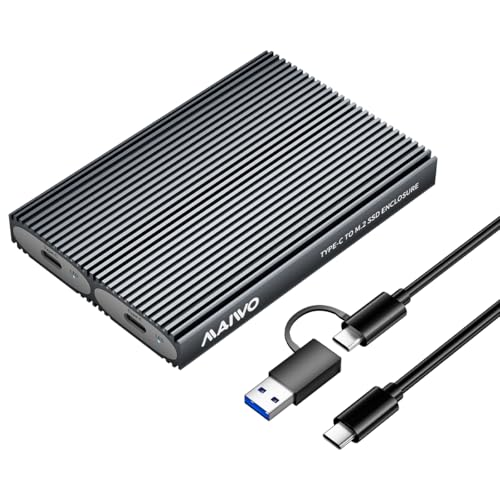
MAIWO Dual-Bay 10Gbps NVMe SSD Enclosure
Best for: dual NVMe drive setups needing high capacity
- Max Transfer Speed
- 10Gbps
- Host Interface
- USB 3.1 Gen 2 Type-C
- Drive Interface
- PCIe NVMe (M Key, B+M Key)
- Supported Form Factors
- M.2 2230, 2242, 2260, 2280
- Drive Bay Count
- 2 bays
- Cooling System
- Aluminum alloy shell, thermal pad
This dual-bay enclosure accommodates two M.2 NVMe SSDs up to 8TB each, delivering up to 16TB of total external storage. It operates over a 10Gbps USB 3.1 Gen 2 Type-C interface with UASP support. The aluminum shell uses tool-free installation and supports 2230 through 2280 drive sizes. You will need a second cable to run both drives simultaneously, making it suitable if you need multi-drive capacity in one compact housing.
Pros
- Holds two M.2 NVMe drives up to 16TB total capacity
- 10Gbps USB 3.1 Gen 2 transfer rates with UASP support
- Tool-free installation for 2230, 2242, 2260, and 2280 form factors
- Aluminum alloy shell with included thermal pads
Cons
- Requires a second USB-C cable to access both SSDs simultaneously
- Does not support offline cloning
- Incompatible with M.2 SATA SSDs
Good fit if
- You want to mount two M.2 NVMe drives inside a single enclosure.
- You need up to 16TB of total external storage across two slots.
- You prefer tool-free drive installation without screws.
Skip if
- You need standalone offline drive cloning without a computer.
- You plan to use SATA-based M.2 drives.
- You expect to access two drives at once using only the included cable.
Verdict: MAIWO Dual-Bay M.2 NVMe SSD Enclosure provides 10Gbps speeds and dual-slot capacity up to 16TB inside a durable aluminum housing. It gives you flexible multi-drive NVMe storage, though simultaneous two-drive access requires supplying a second USB cable.

ORICO Aluminum Tool-Free 10Gbps NVMe Enclosure
Best for: portable, tool-free M.2 NVMe drive use
- Max Transfer Speed
- 10Gbps
- Host Interface
- USB 3.2 Gen 2
- Drive Interface
- PCIe NVMe (M/B&M Keys)
- Supported Form Factors
- 2230/2242/2260/2280
- Cooling System
- Aluminum alloy shell, metal heatsink
- Installation Style
- Tool-Free
View on Amazon: ORICO Aluminum Tool-Free 10Gbps NVMe Enclosure
This external enclosure converts an M.2 NVMe drive into a portable USB drive. It runs over a USB 3.2 Gen 2 interface with transfer speeds up to 10 Gbps and accommodates 2230, 2242, 2260, and 2280 drive sizes. Built with an aluminum shell, metal heatsink, and silicone case, it protects your storage on the move. It suits you if you need tool-free drive swaps and wide OS compatibility across computers and mobile devices.
Pros
- Tool-free buckle design allows drive installation without screws
- Supports 2230, 2242, 2260, and 2280 M.2 NVMe form factors
- USB 3.2 Gen 2 interface delivers up to 10 Gbps transfer rates
- Includes aluminum alloy shell, metal heatsink vest, and thermal pad
Cons
- Supports PCIe NVMe drives only, lacking SATA M.2 compatibility
- Carries extra weight at 5.29 ounces compared to bare enclosures
Good fit if
- You need quick, tool-free installation for standard NVMe M.2 drives.
- You carry your drive often and want an outer silicone cover.
- You work across multiple operating systems including Windows, macOS, Linux, Android, and iOS.
Skip if
- You need compatibility with M.2 SATA solid-state drives.
- You require transfer speeds faster than 10 Gbps.
Verdict: ORICO Aluminum Tool-Free NVMe SSD Enclosure pairs 10 Gbps USB 3.2 Gen 2 transfer rates with screwless NVMe drive swaps. It provides multi-layer cooling and broad operating system support for portable PCIe storage.

ORICO 2230 NVMe SSD Enclosure
Best for: repurposing spare 2230 handheld gaming SSDs
- Max Transfer Speed
- 10Gbps
- Host Interface
- USB-C 3.2 Gen 2
- Drive Interface
- PCIe NVMe (M-Key)
- Supported Form Factors
- M.2 2230
- Cooling System
- Aluminum case and thermal pad
- Maximum Capacity
- 2TB
This compact external drive enclosure houses short M.2 2230 NVMe drives up to 2TB. It connects through a 10Gbps USB-C 3.2 Gen 2 port to deliver quick transfers, and it features an aluminum body with a shockproof silicone cover. It suits you well if you have a spare 2230 SSD from a gaming handheld or laptop and need a pocket-sized drive for general backups or direct 4K video recording.
Pros
- Supports transfer rates up to 10Gbps over USB-C 3.2 Gen 2
- Compact form factor tailored specifically to 2230 M.2 drives
- Aluminum shell paired with a silicone case and thermal pad for heat dissipation
- Includes a screwdriver for secure internal fastening
Cons
- Does not accommodate larger M.2 sizes like 2280, 2260, or 2242
- Requires screwdriver assembly rather than a tool-free latch
- Incompatible with SATA-based M.2 solid-state drives
Good fit if
- You have an extra M.2 2230 NVMe drive from a handheld console or laptop upgrade.
- You want a pocket-sized aluminum enclosure that includes a protective silicone bumper.
- You intend to record 4K ProRes footage straight to an external drive from a USB-C phone.
Skip if
- You need an enclosure that fits standard 2280 length M.2 drives.
- You want tool-free drive swaps without using a screwdriver.
- You plan to install an M.2 SATA drive rather than an NVMe drive.
Verdict: ORICO 2230 NVMe SSD Enclosure delivers 10Gbps transfer speeds in a miniature form factor made specifically for 2230 NVMe drives. Its aluminum housing and protective silicone bumper make it a sturdy pick for repurposing small handheld SSDs.

ASUS Cobble Tool-Free M.2 Enclosure
Best for: rugged external PS5 and console storage
- Max Transfer Speed
- 10Gbps
- Host Interface
- USB-C 3.2 Gen 2x1
- Drive Interface
- NVMe, SATA
- Supported Form Factors
- M.2 2230–2280
- Cooling System
- Aluminum Cooling
- Installation Style
- Tool-Free
The ASUS Cobble is an external M.2 drive enclosure made with an aluminum cooling body and an IP55 dust and water resistance rating. It connects via a USB-C 3.2 Gen 2x1 interface that tops out at 10Gbps for both NVMe and SATA M.2 drives from sizes 2230 to 2280. It suits you if you need durable, tool-free storage expansion for consoles like the PS5, PC, or Mac.
Pros
- Dual-protocol support for both NVMe and SATA M.2 SSDs
- IP55 water and dust resistance rating
- Tool-free Q-Latch design accepts 2230 through 2280 drive sizes
- Aluminum construction for heat dissipation
Cons
- Maximum throughput limited to 10Gbps USB 3.2 Gen 2x1
- Weighs 6.53 ounces, making it heavier than standard portable enclosures
Good fit if
- You need a dust- and water-resistant enclosure to use with a PS5 or PC.
- You want to swap M.2 NVMe or SATA drives quickly without screws.
- You require broad compatibility across consoles, macOS, and Windows.
Skip if
- You need 20Gbps or 40Gbps USB4 transfer speeds.
- You require a multi-bay dock for standalone drive cloning.
Verdict: ASUS Cobble Tool-Free NVMe and SATA SSD Enclosure provides 10Gbps transfers alongside IP55 environmental protection. Its tool-free latch handles SATA and NVMe drives across PCs and gaming consoles.
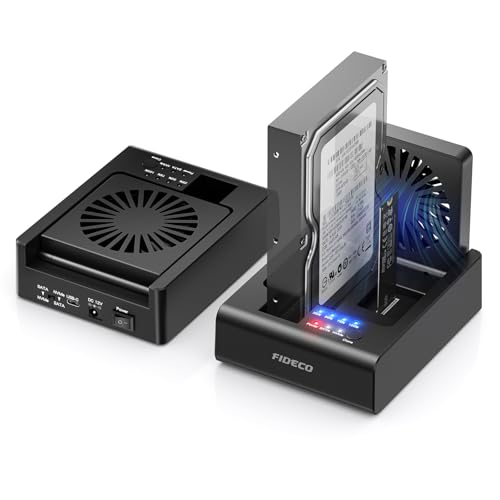
FIDECO 2-Bay NVMe & SATA Dock with Fan
Best for: cloning between NVMe SSDs and SATA drives
- Max Transfer Speed
- 10Gbps
- Host Interface
- USB 3.2 Gen 2
- Drive Interface
- PCIe NVMe (M-Key, M+B Key), SATA
- Supported Form Factors
- 2.5-inch, 3.5-inch
- Drive Bay Count
- 2-Bay
- Cooling System
- Foldable cooling fan
The FIDECO Dual-Bay NVMe and SATA Dock with Fan is an external desktop docking station that holds one M.2 PCIe NVMe drive and one 2.5-inch or 3.5-inch SATA drive simultaneously. It connects over USB 3.2 Gen 2 at up to 10Gbps and features an integrated foldable cooling fan. This station suits you if you need standalone bidirectional offline cloning between NVMe and SATA media without booting up host software.
Pros
- Supports bidirectional offline cloning between NVMe and SATA drives without a computer
- Foldable active cooling fan provides dedicated airflow to drives
- USB 3.2 Gen 2 host interface supporting 10Gbps NVMe transfers
- Dual bays accommodate one M.2 NVMe SSD and one 2.5-inch or 3.5-inch SATA drive at the same time
Cons
- SATA drive transfer speeds reach a maximum of 5Gbps
- Weighs 1.28 pounds, making it bulkier than compact single-drive enclosures
Good fit if
- You need to clone data directly between an M.2 NVMe SSD and a SATA drive without using a PC.
- You want active cooling via a built-in fan during prolonged file transfers.
- You need simultaneous desktop access to both an M.2 NVMe SSD and a 2.5-inch or 3.5-inch drive.
Skip if
- You need an ultra-compact, bus-powered enclosure for pocket travel.
- You need to clone directly between two M.2 NVMe drives.
Verdict: FIDECO Dual-Bay NVMe and SATA Dock with Fan provides versatile cross-format drive access and standalone offline cloning backed by active fan cooling. It is a solid desktop workstation dock when you routinely migrate files between M.2 PCIe SSDs and SATA drives.

AMZPILOT 40Gbps USB4 NVMe Enclosure
Best for: high-speed USB4 and Thunderbolt NVMe transfers
- Max Transfer Speed
- 40Gbps
- Host Interface
- USB4, Thunderbolt 4/3
- Drive Interface
- NVMe
- Supported Form Factors
- M.2 2230, 2242, 2280
- Cooling System
- Built-in silent blower fan
- Maximum Capacity
- 8TB
The AMZPILOT 40Gbps USB4 NVMe Enclosure turns your M.2 NVMe solid-state drive into high-speed external storage. It operates across USB4 and Thunderbolt 4 or 3 ports at bandwidths up to 40Gbps. You get an active cooling system with a built-in silent blower fan, aluminum fins, and support for drives up to 8TB. It suits you if you need sustained transfer performance for large files.
Pros
- Up to 40Gbps transfer speed via USB4 and Thunderbolt 4/3
- Active cooling with a built-in silent blower fan and 12 fins
- Supports M.2 NVMe capacities up to 8TB
- Compatible with 2230, 2242, and 2280 form factors
Cons
- Does not support SATA-based M.2 SSDs
- Requires a screwdriver despite snap-fit designation
- Omits support for M.2 2260 length drives
Good fit if
- You need 40Gbps transfer rates using a USB4 or Thunderbolt connection.
- You handle sustained transfers that require active blower fan cooling.
- You want to house an M.2 NVMe drive up to 8TB.
Skip if
- You need to read an M.2 SATA SSD.
- You plan to use an M.2 2260 size module.
Verdict: AMZPILOT 40Gbps USB4 NVMe Enclosure delivers high-bandwidth transfers with built-in active fan cooling for drives up to 8TB. It provides desktop-grade throughput over USB4 and Thunderbolt ports during sustained data workloads.
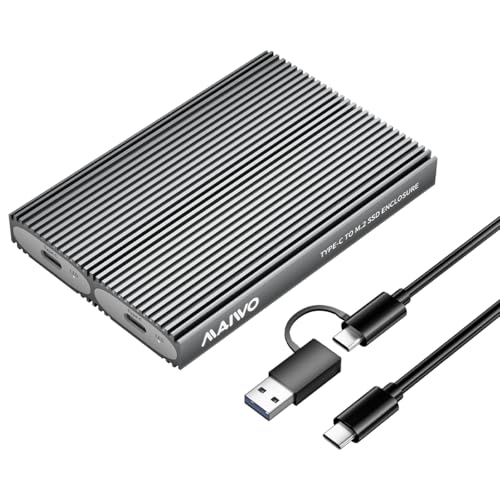
MAIWO Dual-Bay M.2 NVMe SSD Enclosure
Best for: tool-free dual NVMe drive storage expansion
- Max Transfer Speed
- 10Gbps
- Host Interface
- USB 3.1 Gen 2 Type-C
- Drive Interface
- PCIe NVMe M-Key & B+M Key
- Supported Form Factors
- 2230, 2242, 2260, 2280
- Drive Bay Count
- 2 bays
- Cooling System
- Aluminum alloy body, thermal pads
This dual-bay enclosure from MAIWO houses two PCIe NVMe drives up to 8TB each, delivering 10Gbps throughput over USB 3.1 Gen 2 Type-C. It supports 2230, 2242, 2260, and 2280 form factors with tool-free access and an aluminum body. You get support for UASP and Trim commands without needing an external power supply. It suits you if you handle multiple NVMe drives and need compact external storage for high-capacity transfers.
Pros
- Dual independent M.2 NVMe bays supporting up to 16TB total capacity
- 10Gbps USB 3.1 Gen 2 interface with UASP and Trim support
- Tool-free installation for 2230, 2242, 2260, and 2280 form factors
- Aluminum alloy body with thermal pads and ventilation grooves
Cons
- Requires two cables to access both drives simultaneously, but includes only one
- Supports PCIe NVMe drives only, lacking SATA M.2 SSD support
Good fit if
- You need to access up to two NVMe drives across standard M.2 lengths without tools.
- You want 10Gbps transfer rates with Trim and UASP support over bus power.
Skip if
- You need support for M.2 SATA SSDs.
- You want to run both drives simultaneously out of the box without buying an extra cable.
Verdict: MAIWO Dual-Bay M.2 NVMe SSD Enclosure delivers practical two-slot NVMe expansion at 10Gbps speeds inside a compact, tool-free aluminum chassis. Note that you must provide a second cable to access both installed drives simultaneously.

SEINIKAY Dual-Bay M.2 NVMe Cloner
Best for: offline NVMe duplication and quick drive swapping
- Max Transfer Speed
- Up to 16Gbps
- Host Interface
- USB-C 3.2 Gen 2
- Drive Interface
- M-Key M.2 NVMe PCIe
- Supported Form Factors
- 2230, 2242, 2260, 2280, 22110
- Drive Bay Count
- Dual bay
- Cooling System
- Open-air chassis
The SEINIKAY Dual-Bay NVMe Cloner Dock is an open-air external drive station supporting two M-Key M.2 NVMe PCIe SSDs. It functions as a dual-slot reader over USB-C 3.2 Gen 2 and duplicates drives offline without a computer. Supporting sizes up to the 22110 format with tool-free insertion, it suits you if you regularly clone drives or swap bare NVMe media without tools.
Pros
- Supports standalone offline drive cloning without a host computer
- Compatible with M.2 NVMe sizes from 2230 up to 22110
- Tool-free dual-bay setup with open-air chassis cooling
- Includes 15W power adapter plus USB-C and USB-A cables
Cons
- Incompatible with M.2 SATA SSDs
- Open-air design leaves drives physically exposed
Good fit if
- You need to duplicate one NVMe drive to another without a computer
- You use longer 22110 format M.2 NVMe SSDs alongside standard sizes
- You want tool-free drive swapping across two slots
Skip if
- You need compatibility with M.2 SATA drives
- You require a fully enclosed case to protect drives during transport
Verdict: SEINIKAY Dual-Bay NVMe Cloner Dock delivers PC-free drive duplication and dual-slot reading for M-Key NVMe drives up to size 22110. Its open docking design enables rapid swapping, provided you do not need SATA support or enclosed impact protection.
Specifications side by side
| Spec | ORICO Transparent 10Gbps M.2 NVMe Enclosure | Sokiwi Tool-Free M.2 NVMe & SATA SSD Enclosure | ORICO Transparent NVMe M.2 SSD Enclosure | SABRENT Tool-Free NVMe and SATA M.2 Enclosure | ORICO Tool-Free Aluminum M.2 NVMe Enclosure | YINNCEEN M.2 and 2.5-Inch SATA Enclosure | ORICO Transparent Tool-Free NVMe and SATA Enclosure | MAIWO Dual-Bay 10Gbps NVMe SSD Enclosure | ORICO Aluminum Tool-Free 10Gbps NVMe Enclosure | ORICO 2230 NVMe SSD Enclosure | ASUS Cobble Tool-Free M.2 Enclosure | FIDECO 2-Bay NVMe & SATA Dock with Fan | AMZPILOT 40Gbps USB4 NVMe Enclosure | MAIWO Dual-Bay M.2 NVMe SSD Enclosure | SEINIKAY Dual-Bay M.2 NVMe Cloner |
|---|---|---|---|---|---|---|---|---|---|---|---|---|---|---|---|
| Max Transfer Speed | 10 Gbps | 10Gbps | 10Gbps | 10Gbps | 10Gbps | Up to 10Gbps | 10Gbps | 10Gbps | 10Gbps | 10Gbps | 10Gbps | 10Gbps | 40Gbps | 10Gbps | Up to 16Gbps |
| Host Interface | USB Type-C | USB 3.2 Gen 2 | USB 3.2 Gen 2 Type-C | USB 3.2 Type-C | USB 3.2 Gen 2 Type-C | USB 3.2 Gen 2 | USB 3.2 Gen 2 Type-C | USB 3.1 Gen 2 Type-C | USB 3.2 Gen 2 | USB-C 3.2 Gen 2 | USB-C 3.2 Gen 2x1 | USB 3.2 Gen 2 | USB4, Thunderbolt 4/3 | USB 3.1 Gen 2 Type-C | USB-C 3.2 Gen 2 |
| Drive Interface | PCIe NVMe M-Key | NVMe/SATA PCIe M-Key, PCIe B&M Key | PCIe NVMe M-Key | PCIe NVMe, SATA | PCIe NVMe M-Key | M.2 NVMe, M.2 SATA, 2.5" SATA | SATA/NVMe M.2 (M-Key/B+M-Key) | PCIe NVMe (M Key, B+M Key) | PCIe NVMe (M/B&M Keys) | PCIe NVMe (M-Key) | NVMe, SATA | PCIe NVMe (M-Key, M+B Key), SATA | NVMe | PCIe NVMe M-Key & B+M Key | M-Key M.2 NVMe PCIe |
| Supported Form Factors | 2230, 2242, 2260, 2280 | 2230, 2242, 2260, 2280 | 2230, 2242, 2260, 2280 | 2242, 2260, 2280 | 2230, 2242, 2260, 2280 | 2230, 2242, 2260, 2280, 22110, 2.5-inch | 2230/2242/2260/2280 | M.2 2230, 2242, 2260, 2280 | 2230/2242/2260/2280 | M.2 2230 | M.2 2230–2280 | 2.5-inch, 3.5-inch | M.2 2230, 2242, 2280 | 2230, 2242, 2260, 2280 | 2230, 2242, 2260, 2280, 22110 |
| Drive Bay Count | not specified | not specified | not specified | not specified | not specified | not specified | not specified | 2 bays | not specified | not specified | not specified | 2-Bay | not specified | 2 bays | Dual bay |
| Cooling System | Aluminum alloy lines, thermal pad | Aluminum alloy shell | Aluminum alloy, silicone thermal pad | Aluminum case, thermal pad | Aluminum shell, heatsink, thermal pad | not specified | not specified | Aluminum alloy shell, thermal pad | Aluminum alloy shell, metal heatsink | Aluminum case and thermal pad | Aluminum Cooling | Foldable cooling fan | Built-in silent blower fan | Aluminum alloy body, thermal pads | Open-air chassis |
| Maximum Capacity | not specified | 2TB | not specified | not specified | 4TB | not specified | 4TB | 16TB | not specified | 2TB | not specified | not specified | 8TB | 16TB | not specified |
| Installation Style | Tool-free | Tool-Free | Tool-free | Tool-free | Tool-Free | Tool-Free | Tool-free | Tool Free | Tool-Free | Screwdriver | Tool-Free | not specified | Tool-free snap-fit | Tool-Free | Tool-free |
| Interface | NVMe | SATA III | NVMe | SATA III | NVMe | SATA III | SATA III | NVMe | NVMe | NVMe | SATA III | SATA III | NVMe | NVMe | NVMe |
| Form Factor | M.2 2280 | M.2 | M.2 2280 | M.2 | M.2 2280 | 2.5 Inch | M.2 2280 | M.2 2242 | M.2 2280 | M.2 2230 | M.2 2230 | 2.5 Inch | not specified | M.2 2280 | M.2 2230 |
| Cooling | not specified | not specified | not specified | not specified | not specified | not specified | not specified | not specified | not specified | not specified | not specified | Cooling Fan | not specified | not specified | not specified |
| Compatibility | not specified | not specified | not specified | not specified | not specified | not specified | not specified | not specified | not specified | not specified | PS5, Mac | not specified | not specified | not specified | not specified |
| Transfer Speed | 10Gbps | 10Gbps | 10Gbps | not specified | 10Gbps | 10Gbps | 10Gbps | 10Gbps | 10Gbps | 10Gbps | 10Gbps | not specified | 40Gbps | 10Gbps | not specified |
| Features | not specified | Tool-Free | not specified | Tool-Free | Tool-Free | not specified | Tool-Free | Tool-Free | Tool-Free | not specified | Tool-Free | Offline Clone | not specified | Tool-Free | Tool-Free, Offline Clone |
| Bay Count | not specified | not specified | not specified | not specified | not specified | not specified | not specified | Dual-Bay | not specified | not specified | not specified | not specified | not specified | Dual-Bay | Dual-Bay |
| Material | not specified | not specified | not specified | not specified | Aluminum | not specified | not specified | not specified | Aluminum | Aluminum | Aluminum | not specified | Aluminum | not specified | not specified |
| Dimensions | 4.25 × 1.34 × 0.47 inches | 3.7 × 1.5 × 0.4 inches | 4.25 × 1.34 × 0.45 inches | 4.59 × 1.24 × 0.5 inches | 4.43 × 39 × 0.67 inches | not specified | 4.21 × 1.38 × 0.47 inches | 4.65 × 1.97 × 0.51 inches | 1.8 × 0.7 × 5.39 inches | 2.28 × 2.09 × 0.63 inches | 5.1 × 1.7 × 0.7 inches | not specified | 4.35 × 2 × 0.74 inches | 4.65 × 1.97 × 0.51 inches | 2.72 × 2.72 × 0.51 inches |
| Weight | 3.17 ounces | 3.84 ounces | 3.21 ounces | 3.99 ounces | 5.29 ounces | not specified | 0.35 ounces | 3.53 ounces | 5.29 ounces | 2.82 ounces | 6.53 ounces | 1.28 pounds | 5.66 ounces | not specified | 3.7 ounces |
| Color | Red | Gray | Blue | BLACK | Grey | Black | Transparent | Grey | Gray | Silver or Gray | Black | Black | Space Grey | not specified | Black |
| Model | TCM2-Red | SKUD0501-US | TCM2-Blue | EC-SNVE | M.2 NVMe-10Gbps | SATA C-III | NVMe & SATA | 2 Bay - M.2 NVMe | AXM2-G2-V1 | ORICO-IP30-G2-WH-BP | ASUS COBBLE/BLK/G/AS//ESD-A1A | MS01 | 40Gbps Pilot C40 | not specified | S3027AN |
| Size | not specified | 2230/2242/2260/2280 | not specified | 10Gbps NVMe + SATA | M.2 NVMe-10Gbps | Carbon fiber textured shell | not specified | not specified | not specified | not specified | Black|Urban Design | 2-Bay | not specified | not specified | not specified |
If you also need kitchen appliances alongside desktop storage, you can compare specifications across the best toasters under 30.
How to Choose the Right SSD Enclosure
-
Match Drive Interface Protocols
You must match the enclosure controller to your drive protocol. M.2 drives use either PCIe NVMe or SATA interfaces. Standard NVMe caddies cannot read SATA M.2 drives. If you frequently handle spare drives from retired laptops, pick a dual-protocol model. The Sokiwi Tool-Free M.2 NVMe & SATA SSD Enclosure supports both NVMe and SATA M.2 drives. If you exclusively use modern PCIe storage, a dedicated NVMe enclosure keeps setup focused. Always verify the supported protocol on your bare SSD.
-
Evaluate Target Transfer Speeds
Enclosures offer different maximum transfer speeds that determine real-world read and write limits. Most options cap data transfer at 10Gbps, which provides standard throughput for regular backups. This rate handles general file transfers reliably. If your daily workflow requires maximum pipeline performance, look for higher bandwidth. The AMZPILOT 40Gbps USB4 NVMe Enclosure delivers 40Gbps transfer speed for intensive workloads. Make sure your host port supports the matching transfer standard to avoid speed drops.
-
Review Thermal Dissipation Features
High-speed NVMe drives generate heat during heavy file operations. Thermal throttling reduces your transfer rates if the enclosure cannot dissipate heat quickly. Look at the chassis material and cooling accessories. Aluminum bodies act as passive heatsinks to draw thermal buildup away from the drive controller. The ORICO Tool-Free Aluminum M.2 NVMe Enclosure uses an aluminum housing paired with a cooling vest. Transparent cases show internal components but offer different heat behavior. Choose metal enclosures for sustained workloads.
-
Check Drive Swapping Mechanisms
Consider how often you intend to change the internal drive. If you plan to swap multiple SSDs frequently, look for tool-free latches, sliding trays, or rubber retention grommets. These mechanisms eliminate the need for screwdrivers during installation. The ASUS Cobble Tool-Free M.2 Enclosure utilizes a tool-free latch system to secure drives quickly. If you build a permanent drive for travel, confirm the mechanism stays tight during transit so the drive remains fully seated.
-
Assess Standalone Cloning Needs
If you need to migrate operating systems or duplicate drives without a computer, look for standalone cloning features. Standard single-bay enclosures require an active computer and software to copy data. Dual-bay docks offer hardware-level sector cloning directly. The SEINIKAY Dual-Bay M.2 NVMe Cloner provides offline cloning without connecting to a PC. Keep in mind that target drives must equal or exceed source capacity. For ordinary single-drive storage, compact caddies remain much easier to carry.
-
Verify Dual-Bay Cable Requirements
Multi-bay enclosures let you mount multiple storage drives in a single footprint, but host connectivity varies. Some dual-slot units require a dedicated connection for each installed drive rather than routing both through one port. The MAIWO Dual-Bay 10Gbps NVMe SSD Enclosure requires a second cable to access both installed drives simultaneously. Always check port requirements and cable needs in advance, particularly when connecting multi-drive hardware to laptops with limited available ports.
Frequently asked questions
Can you clone an SSD without connecting the enclosure to a computer?
Yes, certain dual-bay docks support standalone offline cloning without a host computer. For example, the SEINIKAY Dual-Bay M.2 NVMe Cloner and the FIDECO 2-Bay NVMe and SATA Dock feature built-in offline duplication functions. These docks copy data directly between installed drives at the hardware level, which lets you duplicate drives without needing an operating system or cloning software.
Can an external SSD enclosure connect directly to a gaming console like the PS5?
Yes, you can use compatible enclosures with gaming consoles. The ASUS Cobble Tool-Free M.2 Enclosure specifically lists PS5 compatibility alongside PC and Mac support. It connects through a USB-C host interface at 10Gbps and features IP55 environmental protection. Make sure your console supports external USB mass storage before formatting the internal M.2 drive for console use.
How do dual-bay SSD enclosures handle reading two drives at the same time?
Some dual-bay enclosures require independent host connections for each drive slot. For instance, the MAIWO Dual-Bay M.2 NVMe SSD Enclosure supports two drives up to 16TB total, but you must supply a second USB cable to access both drives simultaneously. Multi-drive enclosures handle data routing differently, so you should check connection requirements before configuring your storage array.
Do SSD enclosures require active cooling fans to manage heat?
Most 10Gbps enclosures rely on passive cooling using aluminum shells, thermal pads, or cooling vests, which handle moderate transfer workloads silently. However, higher-bandwidth or high-workload models like the AMZPILOT 40Gbps USB4 NVMe Enclosure and FIDECO 2-Bay Dock integrate active cooling fans. Active fans help dissipate heat continuously during demanding sustained transfers or hardware drive cloning sessions.
Can one enclosure dock accommodate both 2.5-inch SATA drives and M.2 modules?
Yes, specific hybrid docks accept both drive types. The YINNCEEN M.2 and 2.5-Inch SATA Enclosure and the FIDECO 2-Bay Dock support standard 2.5-inch SATA drives alongside M.2 cards. With the YINNCEEN dock, you cannot read multiple drives at once or swap disks while plugged in, making it a bench reader for mixed drive types.
What is the maximum storage capacity supported by portable M.2 enclosures?
Maximum capacity depends on the enclosure controller and bay design. Compact single-drive models like the Sokiwi Tool-Free Enclosure support capacities up to 2TB, while the ORICO Transparent Dual-Protocol model accommodates up to 4TB. High-capacity options like the AMZPILOT 40Gbps support up to 8TB, and the MAIWO Dual-Bay NVMe Enclosure handles dual drives up to 16TB.
Do you need tools to install an SSD into an external enclosure?
Many modern enclosures feature tool-free designs that eliminate the need for screws or screwdrivers. Models like the SABRENT EC-SNVE and ORICO Tool-Free Aluminum Enclosure use sliding trays, latches, or push-pins to lock drives in place quickly. This screwless approach lets you install or swap bare M.2 drives in seconds without keeping extra tools nearby.