15 Best M.2 2280 SSD Enclosures, Compared
As an Amazon Associate we earn from qualifying purchases. Links on this page are affiliate links.
Finding the right m2 2280 SSD enclosure turns an internal drive into portable storage for backups and file transfers. This comparison covers 15 models based strictly on the specifications published on their listings. The ORICO Transparent 10Gbps M.2 NVMe Enclosure takes the top spot because its 10Gbps transfer speed and dual included cables provide reliable everyday performance for standard NVMe drives.
This guide helps you decide which transfer speed, connection interface, and chassis material match your storage needs and hardware setup.
Quick picks
The best fit for you
- You need simple everyday portable NVMe storage ORICO Transparent 10Gbps M.2 NVMe Enclosure It delivers 10Gbps transfer speeds and tool-free installation for M.2 2280 NVMe drives.
- You need maximum 40Gbps transfer bandwidth ACASIS 40Gbps M.2 NVMe Enclosure It supports 40Gbps transfer rates using a certified JHL7440 controller chip.
- You require high-speed 20Gbps data transfers ORICO 20Gbps M.2 NVMe SSD Enclosure It delivers 20Gbps bandwidth up to 2000MB/s across USB 3.2 Gen 2x2 connections.
- You need to run two drives simultaneously ORICO Dual-Bay NVMe and SATA M.2 Enclosure It provides a dual-bay aluminum chassis with dedicated slots for NVMe and SATA drives.
Our 15 picks

ORICO Transparent 10Gbps M.2 NVMe Enclosure
Best for: everyday portable M.2 2280 NVMe storage
- Form Factor
- M.2 2280 (what this guide is about)
- Max Transfer Speed
- 10 Gbps
- Host Interface
- USB Type-C
- Drive Interface
- PCIe NVMe M-Key
- Supported Form Factors
- 2230, 2242, 2260, 2280
- Cooling System
- Aluminum alloy lines, thermal pad
The ORICO Transparent 10Gbps M.2 NVMe Enclosure connects an M-key NVMe drive to your system via USB 3.2 Gen 2. It accepts 2280, 2260, 2242, and 2230 form factors. You get 10 Gbps bandwidth via the included USB-C cable and 5 Gbps via USB-A. Tool-free sliding access and a thermal pad manage drive installation and heat. You will find it suits high-speed mobile storage needs.
Pros
- 10 Gbps USB 3.2 Gen 2 transfer rate with UASP and TRIM support
- Tool-free sliding enclosure mechanism
- Includes both USB-C to USB-C and USB-C to USB-A cables
- Compatible with 2230, 2242, 2260, and 2280 M.2 form factors
Cons
- Supports NVMe M-Key drives only; incompatible with SATA M.2 SSDs
- Included USB-C to USB-A cable limits transfers to 5 Gbps
Good fit if
- You need tool-free installation for an M.2 2280 NVMe SSD.
- You use both USB-C and standard USB-A host devices.
- You want TRIM and UASP protocol support on Windows, Mac, or Linux.
Skip if
- You need to read or write to SATA-based M.2 solid-state drives.
- You require transfer interfaces faster than 10 Gbps.
Verdict: ORICO Transparent 10Gbps M.2 NVMe Enclosure provides reliable 10 Gbps connectivity and simple tool-free installation for M.2 2280 NVMe drives. It handles everyday data transfers across multiple operating systems with dual included cables.

ASUS ROG Strix Arion 10Gbps NVMe Enclosure
Best for: premium aluminum NVMe setups with RGB lighting
- Form Factor
- M.2 2280 (what this guide is about)
- Max Transfer Speed
- Up to 10 Gbps
- Host Interface
- USB Type-C 3.2 Gen 2
- Drive Interface
- PCIe NVMe (M Key, B+M Key)
- Supported Form Factors
- 2230, 2242, 2260, 2280
- Cooling System
- Aluminum alloy case with thermal pads
The ASUS ROG Strix Arion is an aluminum external enclosure designed for M.2 PCIe NVMe solid-state drives, including form factors from 2230 to 2280. You get a USB 3.2 Gen 2 Type-C connection delivering speeds up to 10 Gbps, thermal pads for heat transfer, and integrated Aura Sync RGB lighting. It suits you if you want a sturdy metal build with both USB-C and USB-A cables included out of the box.
Pros
- USB 3.2 Gen 2 interface supports transfer rates up to 10 Gbps
- Aluminum alloy housing includes internal thermal pads for heat dissipation
- Comes with both USB Type-C and USB Type-A connection cables
- Compatible with M.2 NVMe sizes 2230, 2242, 2260, and 2280
- Integrated ASUS Aura Sync RGB lighting
Cons
- Transfer speed tops out at 10 Gbps rather than 20 Gbps or 40 Gbps
- No support listed for M.2 SATA SSDs
- Larger footprint measuring 7.1 inches in length
Good fit if
- You need an aluminum M.2 2280 enclosure that includes both USB-C and USB-A cables.
- You want integrated RGB lighting compatible with Aura Sync ecosystems.
- You work with standard PCIe NVMe SSDs between 2230 and 2280 form factors.
Skip if
- You require speeds exceeding 10 Gbps for high-throughput workflows.
- You need an enclosure that supports M.2 SATA drives.
Verdict: ASUS ROG Strix Arion NVMe Enclosure delivers durable aluminum construction, dual cables, and 10 Gbps transfer rates for PCIe NVMe drives. It provides solid thermal management and integrated lighting for your desktop or portable setup.

ORICO 20Gbps M.2 NVMe SSD Enclosure
Best for: 20Gbps USB 3.2 Gen 2x2 workflows
- Form Factor
- M.2 2280 (what this guide is about)
- Max Transfer Speed
- 20Gbps
- Host Interface
- USB 3.2 Gen 2x2 Type-C
- Drive Interface
- NVMe PCIe (M-Key & B+M Key)
- Supported Form Factors
- 2230, 2242, 2260, 2280
- Cooling System
- Aluminum shell heat sink
This enclosure houses an M.2 NVMe SSD inside an aluminum shell and connects via a 20Gbps USB 3.2 Gen 2x2 interface. It supports M.2 2280 drives along with 2230, 2242, and 2260 sizes up to 8TB capacity. If you need transfer rates over 2000MB/s for large video files and have a compatible USB 3.2 Gen 2x2 or USB4 port, this setup fits your external storage workflow.
Pros
- USB 3.2 Gen 2x2 interface provides up to 20Gbps transfer speeds
- Supports NVMe drive capacities up to 8TB
- Full aluminum housing acts as a heat sink
- Accommodates M.2 form factors 2230, 2242, 2260, and 2280
Cons
- Incompatible with ports that only support Thunderbolt 3
- Does not support M.2 SATA or mSATA drives
- Requires a screw to secure the drive rather than a tool-free latch
Good fit if
- You have a computer with a USB 3.2 Gen 2x2 or USB4 port capable of 20Gbps transfers.
- You need an external enclosure that handles M.2 NVMe drives up to 8TB.
- You want an aluminum body that helps dissipate drive heat during heavy transfers.
Skip if
- You rely exclusively on host ports that only support Thunderbolt 3.
- You plan to install an M.2 SATA or mSATA solid state drive.
- You prefer a tool-free design that swaps drives without a screwdriver.
Verdict: ORICO 20Gbps M.2 NVMe SSD Enclosure delivers USB 3.2 Gen 2x2 bandwidth up to 2000MB/s for NVMe drives up to 8TB. It provides solid passive cooling through an all-aluminum shell, provided your host machine supports the Gen 2x2 standard.

ICY DOCK M.2 NVMe USB-C Enclosure with Power Switch
Best for: extended drive lengths and manual power control
- Form Factor
- M.2 2280 (what this guide is about)
- Max Transfer Speed
- 10Gbps
- Host Interface
- USB 3.2 Gen 2, Thunderbolt 3/4
- Drive Interface
- PCIe NVMe
- Supported Form Factors
- 2230, 2242, 2260, 2280, 22110
- Drive Bay Count
- 1 bay
View on Amazon: ICY DOCK M.2 NVMe USB-C Enclosure with Power Switch
This ICY DOCK M.2 NVMe USB-C enclosure supports drives from 2230 up to 22110 lengths, including standard 2280 cards. You get a USB-C host interface with up to 10Gbps transfer speed, backward compatibility with USB 2.0, a dedicated power switch, and a blue activity LED. It suits you if you need an external enclosure to swap various NVMe drive lengths while maintaining manual power control directly on the hardware.
Pros
- Fits 2230, 2242, 2260, 2280, and 22110 M.2 NVMe drives
- Dedicated on/off drive power switch
- USB-C connection supporting up to 10Gbps transfer speed
- Integrated drive activity LED indicator light
Cons
- No support listed for M.2 SATA SSDs
- Enclosure weight is relatively high at roughly 0.45 pounds
Good fit if
- You use longer 22110 cards alongside standard 2280 NVMe SSDs.
- You want a physical power switch to shut down the drive without disconnecting the cable.
Skip if
- You need compatibility with M.2 SATA solid-state drives.
- You require speeds exceeding 10Gbps over USB 3.2 Gen 2x2 or 40Gbps protocols.
Verdict: ICY DOCK M.2 NVMe USB-C Enclosure with Power Switch provides wide M.2 length compatibility up to 22110 alongside a physical power button. It is a solid 10Gbps USB-C option if you want direct hardware control over your drive.

ORICO Transparent NVMe M.2 SSD Enclosure
Best for: tool-free portable 10 Gbps NVMe storage
- Form Factor
- M.2 2280 (what this guide is about)
- Max Transfer Speed
- 10Gbps
- Host Interface
- USB 3.2 Gen 2 Type-C
- Drive Interface
- PCIe NVMe M-Key
- Supported Form Factors
- 2230, 2242, 2260, 2280
- Cooling System
- Aluminum alloy, silicone thermal pad
This ORICO enclosure houses an M.2 2280 NVMe SSD and connects via USB 3.2 Gen 2 at speeds up to 10 Gbps. It features tool-free sliding installation, an aluminum plate with a silicone thermal pad for cooling, and a 10-minute sleep mode. It includes both USB-C and USB-A cables, making it a solid choice if you want quick, screwless external access to an M-key NVMe drive.
Pros
- Up to 10 Gbps transfer speeds over USB 3.2 Gen 2
- Tool-free sliding cover installation
- Includes both USB-C to USB-C and USB-C to USB-A cables
- Supports UASP and TRIM commands
Cons
- Supports NVMe M-key drives only, with no SATA M.2 compatibility
- Included USB-C to USB-A cable is capped at 5 Gbps
Good fit if
- You use an M-key NVMe drive in sizes from 2230 to 2280
- You want tool-free sliding installation without using screws
- You need both USB-C and USB-A host connection cables included
Skip if
- You need an enclosure that supports M.2 SATA drives
- You require transfer speeds higher than 10 Gbps
Verdict: ORICO Transparent 10Gbps M.2 NVMe Enclosure delivers dependable 10 Gbps USB 3.2 Gen 2 connectivity with simple, tool-free sliding access for your 2280 NVMe drive. It handles cooling with an aluminum heat sink and thermal pad while supplying both USB-C and USB-A cables out of the box.

MAIWO Dual-Interface M.2 NVMe and SATA Enclosure
Best for: cable-free use across USB-A and USB-C devices
- Form Factor
- M.2 2280 (what this guide is about)
- Max Transfer Speed
- 10Gbps
- Host Interface
- USB-A, USB-C
- Drive Interface
- NVMe & SATA (M-Key, B+M Key)
- Supported Form Factors
- 2230, 2242, 2260, 2280
- Cooling System
- Aluminum alloy
View on Amazon: MAIWO Dual-Interface M.2 NVMe and SATA Enclosure
This external enclosure accommodates M.2 2280 NVMe and SATA drives using a cable-free design with integrated USB-A and USB-C connectors. You get transfer rates up to 10Gbps on NVMe and 6Gbps on SATA across USB 3.1 connections. The aluminum alloy body aids passive heat dissipation while keeping total weight around 0.13 pounds. It suits you if you need a pocketable drive adapter that plugs directly into computers or OTG-enabled phones without carrying extra cables.
Pros
- Dual integrated USB-A and USB-C connectors eliminate the need for loose cables
- Dual-protocol compatibility supports both NVMe (up to 10Gbps) and SATA (up to 6Gbps)
- Accommodates M.2 sizes 2230, 2242, 2260, and 2280 in M Key or B+M Key configurations
- Aluminum alloy casing aids heat dissipation and weighs approximately 0.13 pounds
- Built-in LED indicator provides drive status monitoring
Cons
- Peak data transfer rate is capped at 10Gbps over USB 3.1
- Direct-plug stick form factor lacks an extension cable for recessed ports
Good fit if
- You switch frequently between USB-A and USB-C host devices without carrying cables
- You want a single enclosure that works with both M.2 NVMe and M.2 SATA drives
- You use M.2 2280 drives or smaller sizes such as 2230, 2242, or 2260
Skip if
- You require speeds exceeding 10Gbps, such as 20Gbps or 40Gbps connections
- You need a flexible cable tether to avoid blocking adjacent ports on compact devices
Verdict: MAIWO Dual USB M.2 NVMe and SATA SSD Enclosure delivers versatile dual-protocol support and direct USB-A and USB-C connectivity without extra cables. It offers a straightforward 10Gbps mobile solution for M.2 2280 and smaller drives.

ORICO Dual-Bay NVMe and SATA M.2 Enclosure
Best for: running mixed NVMe and SATA M.2 drives
- Form Factor
- M.2 2280 (what this guide is about)
- Max Transfer Speed
- 10Gbps (NVMe), 6Gbps (SATA)
- Host Interface
- USB 3.2 Gen 2 Type-C
- Drive Interface
- PCIe NVMe M-Key, SATA B-Key, B+M Key
- Supported Form Factors
- 2230, 2242, 2260, 2280
- Drive Bay Count
- 2 bays
This dual-bay enclosure from ORICO houses one M.2 NVMe SSD and one M.2 SATA drive simultaneously. You get a 10 Gbps USB 3.2 Gen 2 interface on the NVMe slot and a dedicated 6 Gbps link for the SATA bay. The aluminum chassis includes heat sinks and silicone pads for passive cooling. It fits your setup if you manage both drive protocols and need tool-free drive swaps.
Pros
- Dual bays support one NVMe SSD and one SATA SSD simultaneously
- Tool-free drive installation using rubber retention caps
- Aluminum alloy shell with included heatsinks and thermal silicone pads
- Supports drive capacities up to 2 x 4TB
Cons
- Cannot fit two NVMe SSDs or two SATA SSDs at once
- Requires two separate USB cables to access both drives simultaneously
- SATA bay bandwidth tops out at 6 Gbps
Good fit if
- You need to access both an M.2 NVMe drive and an M.2 SATA drive.
- You swap M.2 drives frequently and want a tool-free mounting design.
- You have available USB ports to run dual data cables at once.
Skip if
- You want to mount two NVMe SSDs together in one enclosure.
- You prefer a single cable connection to read both drives.
Verdict: ORICO Dual-Bay NVMe and SATA M.2 Enclosure gives you dedicated NVMe and SATA slots in a sturdy aluminum build. It is practical when you maintain drives across both interfaces and have the ports for dual-cable operation.

ORICO Dual-Bay NVMe and SATA M.2 SSD Enclosure
Best for: mixed NVMe and SATA dual-drive setups
- Form Factor
- M.2 2280 (what this guide is about)
- Max Transfer Speed
- 10Gbps (NVMe), 6Gbps (SATA)
- Host Interface
- USB 3.2 Gen 2 Type-C
- Drive Interface
- PCIe NVMe M-Key, SATA B-Key, B+M Key
- Supported Form Factors
- 2230, 2242, 2260, 2280
- Drive Bay Count
- 2 bays
View on Amazon: ORICO Dual-Bay NVMe and SATA M.2 SSD Enclosure
This ORICO dual-bay enclosure houses one M.2 NVMe drive and one M.2 SATA drive simultaneously using independent slots. It accommodates sizes from 2230 to 2280 with capacities up to 4TB per bay. You get a 10Gbps USB 3.2 Gen 2 Type-C connection for NVMe and 6Gbps for SATA. The aluminum body uses tool-free rubber plugs for drive mounting. It suits you if you handle mixed SSD types across separate drives.
Pros
- Dual independent bays support one NVMe SSD and one SATA SSD
- Tool-free drive installation using rubber plugs
- Aluminum alloy housing with thermal pads and heat sinks
- Supports capacities up to 2x4TB across 2230, 2242, 2260, and 2280 sizes
- Runs two drives simultaneously with two connected data cables and no power adapter
Cons
- Bays are protocol-locked: one supports only NVMe and the other supports only SATA
- Requires connecting two separate cables to access both SSDs simultaneously
Good fit if
- You need to access both an M.2 NVMe SSD and an M.2 SATA SSD from one enclosure
- You want tool-free drive installation without needing screws or screwdrivers
- You work with drives up to 4TB in sizes from 2230 through 2280
Skip if
- You want to mount two NVMe SSDs or two SATA SSDs at the same time
- You prefer a single cable connection to run both installed drives
Verdict: ORICO Dual-Bay NVMe and SATA M.2 Enclosure provides a dedicated bay for an NVMe drive and another for a SATA drive inside an aluminum, tool-free chassis. It gives you flexible multi-drive handling as long as you do not need two drives of the same protocol.

ACASIS 40Gbps M.2 NVMe Enclosure
Best for: high-speed USB4 NVMe data transfers
- Form Factor
- M.2 2280 (what this guide is about)
- Max Transfer Speed
- 40Gbps
- Host Interface
- USB4, USB 3.2/3.1/3.0/2.0
- Drive Interface
- M.2 NVMe
- Supported Form Factors
- 2230, 2242, 2260, 2280
- Dimensions
- 3.96 × 1.92 × 0.6 inches
This external drive enclosure houses an M.2 2280 NVMe solid-state drive and connects through a 40Gbps interface. Equipped with a JHL7440 chip, it works with USB4, USB 3.2, 3.1, 3.0, and 2.0 connections. The housing measures 3.96 by 1.92 by 0.6 inches and weighs roughly 0.35 pounds. It suits you if you require high-speed external data access on Windows, macOS, or Linux systems.
Pros
- Up to 40Gbps transfer speed over USB4
- Certified JHL7440 dual-chip controller
- Backward compatibility with USB 3.2, 3.1, 3.0, and 2.0
- Wide operating system support across Windows, macOS, and Linux
Cons
- Supports NVMe protocol only, excluding M.2 SATA drives
- Does not include an SSD
Good fit if
- You need 40Gbps transfer speeds for an M.2 2280 NVMe drive.
- You connect external storage across USB4, USB 3.2, or older ports.
- You work with macOS, Windows, or Linux hardware.
Skip if
- You want to use an M.2 SATA SSD.
- You need an enclosure that includes internal storage out of the box.
Verdict: ACASIS 40Gbps M.2 NVMe SSD Enclosure delivers 40Gbps transfer rates using a certified JHL7440 controller chip. It provides reliable cross-platform compatibility for single M.2 2280 NVMe drives.

ORICO Tool-Free Aluminum M.2 NVMe Enclosure
Best for: quick tool-free M.2 NVMe drive swaps
- Form Factor
- M.2 2280 (what this guide is about)
- Max Transfer Speed
- 10Gbps
- Host Interface
- USB 3.2, Thunderbolt 3 Compatible
- Drive Interface
- PCIe M-Key, PCIe B&M key
- Supported Form Factors
- 2230, 2242, 2260, 2280
- Cooling System
- Silicone pad, heatsink, aluminum body
This aluminum M.2 enclosure connects NVMe drives to your host devices via a 10Gbps USB-C interface. It accommodates sizes 2230, 2242, 2260, and 2280. A tool-free push-cover tray lets you swap drives without screws, while a silicone pad and internal heatsink assist heat transfer. This unit suits you if you need fast, pocketable external storage for an M.2 NVMe drive across computers, consoles, or phones.
Pros
- Tool-free push-cover design requires no mounting hardware
- Delivers up to 10Gbps transfer speeds over USB-C
- Includes thermal pad and internal heatsink cooling vest
- Integrated 10-minute idle sleep mode to reduce wear
Cons
- Does not support M.2 SATA or PCIe AHCI drives
- Supplied cable is USB-C to USB-C without an included USB-A adapter
Good fit if
- You want toolless drive swapping for M.2 NVMe PCIe SSDs.
- You connect to USB-C ports on laptops, PCs, or mobile devices.
Skip if
- You need compatibility with legacy M.2 SATA SSDs.
- You require speeds exceeding the 10Gbps USB 3.2 Gen 2 ceiling.
Verdict: ORICO Tool-Free Aluminum M.2 NVMe Enclosure provides straightforward, screwless drive installation and 10Gbps transfer rates in a portable aluminum body. It is an efficient choice for standard NVMe drives if you do not need SATA support.

ORICO Dual-Protocol Tool-Free M.2 Enclosure
Best for: Swapping between NVMe and SATA SSDs
- Form Factor
- M.2 2280 (what this guide is about)
- Max Transfer Speed
- 10Gbps NVMe, 5Gbps SATA
- Host Interface
- USB-C 3.2 Gen 2
- Drive Interface
- M.2 NVMe M/B+M Key, NGFF SATA B+M Key
- Supported Form Factors
- 2230, 2242, 2260, 2280
- Cooling System
- Heatsink, thermal silicone, aluminum
This external enclosure accommodates M.2 2280 drives using either NVMe or SATA protocols. It delivers transfer rates up to 10Gbps for NVMe drives and up to 5Gbps for SATA drives over a USB-C connection. The aluminum chassis includes a cooling vest and allows tool-free drive installation. It suits you if you need a flexible drive adapter that supports both protocols up to 4TB across multiple operating systems.
Pros
- Supports both M.2 NVMe (10Gbps) and M.2 SATA (5Gbps) drives
- Tool-free installation with a one-click locking mechanism
- Aluminum shell equipped with a heatsink cooling vest
- Accommodates drive capacities up to 4TB
Cons
- Maximum NVMe transfer rate is limited to 10Gbps
- M.2 SATA drives max out at 5Gbps throughput
Good fit if
- You work with both M.2 NVMe and M.2 SATA solid-state drives
- You need tool-free drive swapping for capacities up to 4TB
- You connect drives across Windows, Mac OS, Linux, and Android devices
Skip if
- You require speeds exceeding 10Gbps for high-end NVMe storage
- You need an enclosure that supports capacities larger than 4TB
Verdict: ORICO Dual-Protocol Tool-Free M.2 Enclosure provides flexible 10Gbps NVMe and 5Gbps SATA connectivity inside a toolless aluminum body. It delivers dependable multi-OS support for M.2 drives up to 4TB.

VCOM 40Gbps USB4 M.2 NVMe SSD Enclosure
Best for: high-speed USB4 and Thunderbolt 3 data transfers
- Form Factor
- M.2 2280 (what this guide is about)
- Max Transfer Speed
- Up to 40Gbps
- Host Interface
- USB4, Thunderbolt 3/4, USB 3.2/3.1/3.0
- Drive Interface
- NVMe M&B+M-Key
- Supported Form Factors
- 2280
- Cooling System
- Thermal pad, aluminum alloy shell
This VCOM enclosure houses single M.2 2280 NVMe SSDs. Aluminum build uses Intel JHL7440 controller for 40Gbps USB4 and Thunderbolt 3 bandwidth. Included thermal pad draws heat to metal shell. LED tracks status. Needs screwdriver for drive access. Suits you if you transfer large files across USB4, Thunderbolt 3, or USB 3.2 ports on Windows, Mac, or Linux systems.
Pros
- Intel JHL7440 controller delivers 40Gbps USB4 and Thunderbolt 3 bandwidth
- Aluminum alloy housing with thermal pad handles passive cooling
- Integrated LED displays device connection status
- Broad OS support covering Windows, Mac OS, and Linux
Cons
- Not compatible with USB 2.0 or older interfaces
- Requires screw fastening rather than tool-free installation
- Restricted strictly to M.2 2280 length drives
Good fit if
- You need 40Gbps throughput over USB4 or Thunderbolt 3 ports.
- You use standard M.2 2280 NVMe drives.
Skip if
- You must connect to legacy USB 2.0 host ports.
- You need tool-free drive swaps or shorter M.2 drive lengths.
Verdict: VCOM 40Gbps Aluminum M.2 2280 Enclosure provides high-bandwidth data transfers using Intel JHL7440 silicon. Aluminum casing maintains cooling on modern USB4 and Thunderbolt setups.
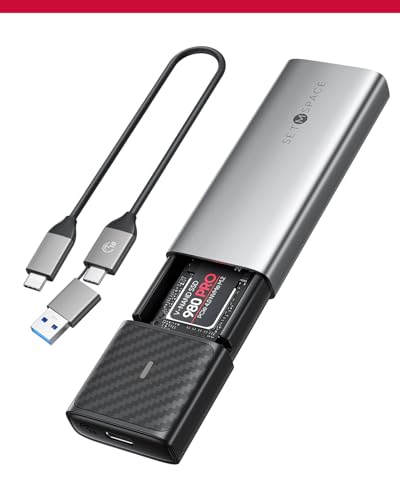
SETMSPACE Tool-Free M.2 Heatsink Enclosure
Best for: tool-free multi-format M.2 SSD backups
- Form Factor
- M.2 2280 (what this guide is about)
- Max Transfer Speed
- Exceeding 1000Mb/s
- Drive Interface
- NVMe, SATA (M Key, B+M Key)
- Supported Form Factors
- 2230, 2242, 2260, 2280
- Cooling System
- Heatsink, aluminum alloy case
- Installation Style
- Tool-Free
The SETMSPACE Tool-Free M.2 Heatsink Enclosure holds M.2 2280 drives along with 2260, 2242, and 2230 sizes. It supports both NVMe and SATA protocols through a USB-C connection, reaching transfer rates over 1000Mb/s. The enclosure uses a tool-free push design for quick drive swaps and includes a dedicated heatsink for thermal control. It suits you if you need toolless access and multi-length compatibility.
Pros
- Supports both NVMe and SATA protocols in M key and B+M key
- Included heatsink provides passive thermal dissipation
- Tool-free enclosure opens with a single press
- Accepts four drive sizes: 2280, 2260, 2242, and 2230
- Automatic sleep mode engages after 10 minutes of inactivity
Cons
- Data transfer rate maxes out around 1000Mb/s
- Lacks active cooling fan hardware
Good fit if
- You want tool-free drive installation using a push-to-open latch.
- You alternate between NVMe and SATA M.2 drives.
- You require an enclosure with an included passive heatsink.
Skip if
- You require data transfer speeds higher than 1000Mb/s.
- You need active fan cooling for sustained read and write tasks.
Verdict: SETMSPACE Tool-Free M.2 Heatsink Enclosure delivers dual NVMe and SATA drive compatibility with easy tool-free installation. The included heatsink and automatic sleep mode make it a dependable choice for daily data backups.

VCOM 10Gbps M.2 NVMe SSD Enclosure
Best for: tool-free 10Gbps portable NVMe storage
- Form Factor
- M.2 2280 (what this guide is about)
- Max Transfer Speed
- 10Gbps
- Host Interface
- USB 3.2 Gen 2 Type-C
- Drive Interface
- PCIe NVMe (M-Key, B+M Key)
- Supported Form Factors
- 2230, 2242, 2260, 2280
- Cooling System
- Aluminum alloy shell, cooling vest
The VCOM 10Gbps M.2 NVMe SSD Enclosure houses PCIe NVMe drives up to size 2280 in a ribbed aluminum body. It connects via a 10Gbps USB-C interface and supports UASP, TRIM, and S.M.A.R.T. commands. Tool-free assembly lets you swap drives without screws, and VCOM includes both USB-C and USB-A cables. It suits you if you need a compact, portable external drive for high-speed file transfers across PC, Mac, or Linux systems.
Pros
- Up to 10Gbps transfer speed via USB 3.2 Gen 2
- Tool-free drive installation requires no extra tools
- Includes both USB-C to USB-C and USB-A to USB-C cables
- Supports UASP, TRIM, and S.M.A.R.T. protocols
- Aluminum alloy shell with internal heatsink vest
Cons
- Does not support M.2 SATA or NGFF SSDs
- Limits data throughput to 10Gbps rather than faster 20Gbps or 40Gbps standards
Good fit if
- You need tool-free installation for an M.2 NVMe drive up to size 2280.
- You want both USB-C and USB-A cables included in the box.
- You use Windows, Mac OS, or Linux host machines.
Skip if
- You use an M.2 SATA or NGFF drive.
- You require transfer speeds above 10Gbps.
Verdict: VCOM 10Gbps M.2 NVMe SSD Enclosure provides a straightforward, tool-free aluminum housing for 10Gbps NVMe drives. It delivers reliable cooling and dual-cable connectivity for multi-platform workloads.

DOCKCASE Explorer NVMe Enclosure with Display
Best for: critical data transfers requiring power loss protection
- Form Factor
- M.2 2280 (what this guide is about)
- Max Transfer Speed
- 10Gbps
- Host Interface
- USB 3.2 Gen 2 Type-C
- Drive Interface
- PCIe NVMe (M-Key, B+M Key)
- Supported Form Factors
- 2230, 2242, 2260, 2280
- Cooling System
- Graphite thermal pad
View on Amazon: DOCKCASE Explorer NVMe Enclosure with Display
The DOCKCASE Explorer Edition M.2 NVMe Enclosure houses an M.2 2280 NVMe drive with a 10Gbps USB 3.2 Gen 2 interface. It stands out with a built-in display screen showing drive health, power cycles, and remaining life, alongside hardware power loss protection providing roughly 10 seconds of backup writing time. This enclosure suits you if you handle critical data transfers and need real-time monitoring combined with defense against abrupt disconnections.
Pros
- Hardware power loss protection provides roughly 10 seconds of emergency write time
- Integrated display screen monitors SSD health, remaining life, and power cycles
- Realtek RTL9210 controller supports transfer speeds up to 10Gbps
- Graphite thermal pad and chip-level temperature management assist heat dissipation
Cons
- Caps transfer speeds at 10Gbps rather than 20Gbps or 40Gbps standards
- Only includes a USB-C to USB-C cable without a bundled USB-A adapter
Good fit if
- You need hardware-level power loss protection to prevent data corruption during disconnects.
- You want an integrated screen to track SSD health status and drive metrics directly.
- You connect primarily to USB-C host devices capable of 10Gbps transfer speeds.
Skip if
- You need transfer speeds faster than 10Gbps, such as 20Gbps or 40Gbps.
- You rely on USB-A ports out of the box without purchasing a separate adapter.
Verdict: DOCKCASE Explorer Edition M.2 NVMe Enclosure delivers reliable 10Gbps throughput paired with distinct telemetry and data safety features. Its integrated status screen and 10-second power loss protection make it an outstanding choice for safeguarding critical writes on the go.
Specifications side by side
| Spec | ORICO Transparent 10Gbps M.2 NVMe Enclosure | ASUS ROG Strix Arion 10Gbps NVMe Enclosure | ORICO 20Gbps M.2 NVMe SSD Enclosure | ICY DOCK M.2 NVMe USB-C Enclosure with Power Switch | ORICO Transparent NVMe M.2 SSD Enclosure | MAIWO Dual-Interface M.2 NVMe and SATA Enclosure | ORICO Dual-Bay NVMe and SATA M.2 Enclosure | ORICO Dual-Bay NVMe and SATA M.2 SSD Enclosure | ACASIS 40Gbps M.2 NVMe Enclosure | ORICO Tool-Free Aluminum M.2 NVMe Enclosure | ORICO Dual-Protocol Tool-Free M.2 Enclosure | VCOM 40Gbps USB4 M.2 NVMe SSD Enclosure | SETMSPACE Tool-Free M.2 Heatsink Enclosure | VCOM 10Gbps M.2 NVMe SSD Enclosure | DOCKCASE Explorer NVMe Enclosure with Display |
|---|---|---|---|---|---|---|---|---|---|---|---|---|---|---|---|
| Max Transfer Speed | 10 Gbps | Up to 10 Gbps | 20Gbps | 10Gbps | 10Gbps | 10Gbps | 10Gbps (NVMe), 6Gbps (SATA) | 10Gbps (NVMe), 6Gbps (SATA) | 40Gbps | 10Gbps | 10Gbps NVMe, 5Gbps SATA | Up to 40Gbps | Exceeding 1000Mb/s | 10Gbps | 10Gbps |
| Host Interface | USB Type-C | USB Type-C 3.2 Gen 2 | USB 3.2 Gen 2x2 Type-C | USB 3.2 Gen 2, Thunderbolt 3/4 | USB 3.2 Gen 2 Type-C | USB-A, USB-C | USB 3.2 Gen 2 Type-C | USB 3.2 Gen 2 Type-C | USB4, USB 3.2/3.1/3.0/2.0 | USB 3.2, Thunderbolt 3 Compatible | USB-C 3.2 Gen 2 | USB4, Thunderbolt 3/4, USB 3.2/3.1/3.0 | not specified | USB 3.2 Gen 2 Type-C | USB 3.2 Gen 2 Type-C |
| Drive Interface | PCIe NVMe M-Key | PCIe NVMe (M Key, B+M Key) | NVMe PCIe (M-Key & B+M Key) | PCIe NVMe | PCIe NVMe M-Key | NVMe & SATA (M-Key, B+M Key) | PCIe NVMe M-Key, SATA B-Key, B+M Key | PCIe NVMe M-Key, SATA B-Key, B+M Key | M.2 NVMe | PCIe M-Key, PCIe B&M key | M.2 NVMe M/B+M Key, NGFF SATA B+M Key | NVMe M&B+M-Key | NVMe, SATA (M Key, B+M Key) | PCIe NVMe (M-Key, B+M Key) | PCIe NVMe (M-Key, B+M Key) |
| Supported Form Factors | 2230, 2242, 2260, 2280 | 2230, 2242, 2260, 2280 | 2230, 2242, 2260, 2280 | 2230, 2242, 2260, 2280, 22110 | 2230, 2242, 2260, 2280 | 2230, 2242, 2260, 2280 | 2230, 2242, 2260, 2280 | 2230, 2242, 2260, 2280 | 2230, 2242, 2260, 2280 | 2230, 2242, 2260, 2280 | 2230, 2242, 2260, 2280 | 2280 | 2230, 2242, 2260, 2280 | 2230, 2242, 2260, 2280 | 2230, 2242, 2260, 2280 |
| Drive Bay Count | not specified | not specified | not specified | 1 bay | not specified | not specified | 2 bays | 2 bays | not specified | not specified | not specified | not specified | not specified | not specified | not specified |
| Cooling System | Aluminum alloy lines, thermal pad | Aluminum alloy case with thermal pads | Aluminum shell heat sink | not specified | Aluminum alloy, silicone thermal pad | Aluminum alloy | Aluminum fin, heat sinks, thermal pads | Aluminum rib, heat sinks, thermal pads | not specified | Silicone pad, heatsink, aluminum body | Heatsink, thermal silicone, aluminum | Thermal pad, aluminum alloy shell | Heatsink, aluminum alloy case | Aluminum alloy shell, cooling vest | Graphite thermal pad |
| Maximum Capacity | not specified | not specified | 8TB | not specified | not specified | 8TB | 2 x 4TB | 2 x 4TB | not specified | 4TB | 4TB | not specified | not specified | not specified | not specified |
| Installation Style | Tool-free | not specified | not specified | not specified | Tool-free | not specified | Tool-free | Tool Free | not specified | Tool-Free | Tool-Free | not specified | Tool-Free | Tool-free | not specified |
| Interface | NVMe | NVMe | NVMe | NVMe | NVMe | SATA III | SATA III | SATA III | NVMe | NVMe | SATA III | NVMe | SATA III | NVMe | NVMe |
| Form Factor | M.2 2280 | M.2 2280 | M.2 2280 | M.2 2280 | M.2 2280 | M.2 2280 | M.2 2280 | M.2 2280 | M.2 2280 | M.2 2280 | M.2 2280 | M.2 2280 | M.2 2280 | M.2 2280 | M.2 2280 |
| Cooling | not specified | not specified | not specified | not specified | not specified | not specified | not specified | not specified | not specified | not specified | not specified | not specified | Heatsink | not specified | not specified |
| Transfer Speed | 10Gbps | 10Gbps | 20Gbps | 10Gbps | 10Gbps | 10Gbps | not specified | not specified | 40Gbps | 10Gbps | 10Gbps | 40Gbps | not specified | 10Gbps | 10Gbps |
| Features | not specified | not specified | not specified | not specified | not specified | not specified | Tool-Free | Tool-Free | not specified | Tool-Free | Tool-Free | not specified | Tool-Free | not specified | not specified |
| Bay Count | not specified | not specified | not specified | not specified | not specified | not specified | Dual-Bay | Dual-Bay | not specified | not specified | not specified | not specified | not specified | not specified | not specified |
| Material | not specified | Aluminum | Aluminum | not specified | not specified | Aluminum | Aluminum | Aluminum | not specified | Aluminum | Aluminum | Aluminum | not specified | not specified | not specified |
| Dimensions | 4.25 × 1.34 × 0.47 inches | 7.1 × 3.8 × 1.6 inches | 4.25 × 1.16 × 0.53 inches | 5.91 × 2.48 × 0.47 inches | 4.25 × 1.34 × 0.45 inches | 5.55 × 1.22 × 0.35 inches | not specified | not specified | 3.96 × 1.92 × 0.6 inches | 4.88 × 1.38 × 0.55 inches | 4.88 × 1.38 × 0.55 inches | 3.94 × 2.08 × 0.53 inches | 0.55 × 1.97 × 3.94 inches | 4.02 × 1.1 × 0.47 inches | not specified |
| Weight | 3.17 ounces | 3.46 ounces | not specified | 7.2 ounces | 3.21 ounces | 2.12 ounces | 6.35 ounces | 8.47 ounces | 5.61 ounces | 3.53 ounces | 3.21 ounces | not specified | not specified | 2.82 ounces | 5.29 ounces |
| Color | Red | Black | gray or silver | Black | Blue | Grey | Grey | Silver | not specified | Blue | Blue | Black | Gray | not specified | Black |
| Model | TCM2-Red | ROG Strix Arion ESD-S1C | ORICO M2PV-C3-BK-EP | MB861U31-1M2B | TCM2-Blue | MAIWO K1683P2 | M.2 SATA+NVMe-Dual | Dual M.2 SATA+NVMe | TBU405 | Black | Blue-C to C cable | 40Gbps M.2 NVMe | NVME/SATA SSD Enclosure | 10 M.2 NVMe | 10SPLP-Black |
| Size | not specified | Black|up to 10Gbps | M.2 NVMe-20Gbps | not specified | not specified | not specified | Dual M.2 SATA+NVMe | not specified | TBU405 | not specified | not specified | not specified | not specified | not specified | not specified |
How to Choose an M.2 SSD Enclosure
-
Assess Chassis Material for Cooling
Internal NVMe drives generate heat during continuous transfers. You should inspect the enclosure shell material to ensure your drive maintains stable operating temperatures. Aluminum bodies absorb heat from the SSD and dissipate it through external surface contact. Some models pair metal shells with internal thermal pads and heatsinks for steady heat transfer. Transparent plastic designs prioritize visual styling, but full-metal housings like the ASUS ROG Strix Arion 10Gbps NVMe Enclosure provide durable thermal dissipation for demanding workloads. Check the published exterior material before matching it with a high-performance SSD.
-
Check Physical Length Support
Most portable enclosures accommodate standard 80mm drives. However, you should confirm physical length specifications if you plan to install longer enterprise solid-state drives. Standard M.2 2280 enclosures only accept cards up to 80 millimeters in length. If your spare hardware includes extended form factors, choose an enclosure engineered with extra clearance. The ICY DOCK M.2 NVMe USB-C Enclosure with Power Switch supports drives up to the 22110 form factor alongside standard 2280 sizes. Matching your exact drive dimensions prevents clearance issues inside the tray before you attempt installation.
-
Select Single or Dual Bays
Single-drive enclosures suit quick portable storage, but multi-drive workflows require specialized multi-bay housings. If you manage separate storage pools or need simultaneous access to multiple cards, evaluate the internal slot count. Dual-bay units allow you to mount two M.2 drives inside a single chassis. You should verify whether each bay supports identical protocols or splits them between separate technologies. The ORICO Dual-Bay NVMe and SATA M.2 Enclosure features dedicated bays for one NVMe drive and one SATA drive. Reviewing slot specifications ensures your specific drive pairing fits without hardware conflicts.
-
Evaluate Installation Mechanism
Enclosure designs differ in how you secure the M.2 SSD. Tool-free enclosures use sliding latches, push-pins, or silicone plugs to lock drives in place quickly. This mechanism suits you if you frequently swap bare drives between different test benches or backup systems. Models such as the ORICO Tool-Free Aluminum M.2 NVMe Enclosure allow fast, screwless drive swaps anywhere without carrying a screwdriver. If you plan to leave a single drive installed permanently, screw-secured enclosures offer a locked internal assembly. Choose the fastening style that matches how often you swap internal hardware.
-
Check Data Safety Hardware
Unexpected disconnections during active writes can cause file corruption. You should check whether an enclosure includes dedicated hardware protection or monitoring features if you handle sensitive files. Certain enclosures incorporate onboard capacitors that provide power loss protection, giving the SSD enough time to flush cached data safely. Others include integrated telemetry displays to track real-time drive health and operational status. The DOCKCASE Explorer NVMe Enclosure with Display provides an integrated screen and ten-second power loss protection for critical writes. Prioritize these hardware safeguards if you frequently transfer valuable data on the move.
-
Consider Port and Cable Styles
You should verify how an enclosure physically attaches to your host devices. Standard enclosures feature a female USB-C port and supply detachable cables. Units that include both USB-C to USB-C and USB-C to USB-A cables let you connect to older desktops and modern laptops alike. Alternatively, some ultra-compact enclosures build USB plugs directly into the body to eliminate cables entirely. The MAIWO Dual-Interface M.2 NVMe and SATA Enclosure features integrated USB-A and USB-C connectors for direct plug-in operation. Consider whether carrying separate cables or having direct onboard plugs fits your mobile setup better.
Frequently asked questions
Can an M.2 2280 enclosure fit physically longer or shorter drives?
Most standard enclosures are built for 80mm drives, but specific models accommodate alternate lengths. For example, the ICY DOCK MB861U31-1M2B supports drives up to the extended 22110 form factor. Other options, including the MAIWO K1683P2, accept 2280 and smaller drives. You should verify internal standoff locations before attempting to mount any drive outside the standard 2280 specification.
How do tool-free M.2 SSD enclosures secure the drive?
Tool-free enclosures secure your drive using sliding trays, latches, or rubber fasteners instead of screws. Models such as the ORICO TCM2-Red, TCM2-Blue, and SETMSPACE allow fast drive insertion without screwdrivers. You simply place the M.2 2280 card inside the tray and lock it in place. Make sure the drive remains flush against the internal heatsink or thermal pad for consistent heat transfer.
Can you run two M.2 SSDs in a single enclosure at the same time?
You can run two drives simultaneously if you select a multi-bay enclosure with independent controller support. Units like the ORICO Dual-Bay NVMe and SATA M.2 Enclosure provide two dedicated slots. However, this model requires one NVMe drive and one SATA drive rather than two identical interfaces. You must verify host port bandwidth and protocol requirements to ensure both installed drives mount properly.
What hardware is required to reach 40Gbps transfer rates?
Reaching 40Gbps requires a host computer with a compatible USB4 or Thunderbolt port alongside a matching high-speed enclosure. Enclosures such as the ACASIS TBU405 and VCOM 40Gbps incorporate Intel JHL7440 controller hardware to manage these data rates. Connecting a 40Gbps enclosure to a standard USB 3.0 or 10Gbps USB-C port still works, but your transfer speeds will throttle down to that port's limit.
Why do certain M.2 enclosures feature power switches or displays?
These specialized additions provide manual control and status visibility over your connected drive. The ICY DOCK enclosure includes an integrated physical power switch, letting you cut power without physically removing the cable. Meanwhile, the DOCKCASE Explorer Edition provides a diagnostic display and 10-second power loss protection. These features give you direct feedback and safeguard write operations against abrupt disconnects during file transfers.
Do M.2 2280 SSD enclosures require an external power supply?
No external power brick is needed because single M.2 2280 enclosures draw operating power through the host USB connection. Enclosures such as the ASUS ROG Strix Arion and ORICO TCM2-Red operate purely via bus power over USB-C or USB-A cables. As long as your computer or tablet supplies standard bus power through its port, the enclosure powers both the controller chip and the SSD.
Will an M.2 SATA SSD work inside a dedicated NVMe enclosure?
An M.2 SATA drive will not work in a dedicated NVMe enclosure. NVMe models like the ORICO 20Gbps or VCOM 10Gbps communicate exclusively via PCIe pathways and cannot interface with SATA protocols. If you intend to use a SATA M.2 SSD, you must choose a dual-protocol enclosure, such as the MAIWO K1683P2 or SETMSPACE, which contains bridge controllers capable of routing both signal types.