Best M.2 2242 SSD Enclosures: 3 Spec-Based Picks
As an Amazon Associate we earn from qualifying purchases. Links on this page are affiliate links.
Finding the best M.2 2242 SSD enclosures often requires sifting through many options. We compared 3 models based strictly on the specifications published on their listings. The MAIWO Dual-Bay 10Gbps NVMe SSD Enclosure takes the top spot because it supports dual drives with 10Gbps transfer speeds. This dual-bay capacity makes it ideal for users needing portable storage for two M.2 2242 drives. Other picks focus on magnetic attachment or SATA III support. This guide helps you decide which enclosure matches your specific interface and size requirements.
Quick picks
| # | Product | Best for | Price |
|---|---|---|---|
| 1 | MAIWO Dual-Bay 10Gbps NVMe SSD Enclosure Best overall | dual-slot high-capacity M.2 NVMe storage setups | Check price of MAIWO Dual-Bay 10Gbps NVMe SSD Enclosure on Amazon |
| 2 | DOCKCASE Magnetic 2242 NVMe Enclosure Also great | Magnetic mobile storage with health monitoring | Check price of DOCKCASE Magnetic 2242 NVMe Enclosure on Amazon |
| 3 | MAIWO 10Gbps Dual-Protocol M.2 Enclosure Best budget | Portable storage for M.2 2242 SATA drives | Check price of MAIWO 10Gbps Dual-Protocol M.2 Enclosure on Amazon |
The best fit for you
- You need dual drive storage in a portable unit MAIWO Dual-Bay 10Gbps NVMe SSD Enclosure Its dual-bay design houses two M.2 2242 drives with 10Gbps transfer speeds.
- You want magnetic mobile storage for your phone DOCKCASE Magnetic 2242 NVMe Enclosure It features a magnetic design for phone attachment and 10Gbps NVMe speeds.
- You have SATA-based M.2 2242 drives MAIWO 10Gbps Dual-Protocol M.2 Enclosure It supports SATA III interfaces with 10Gbps transfer speeds and tool-free access.
Our 3 picks
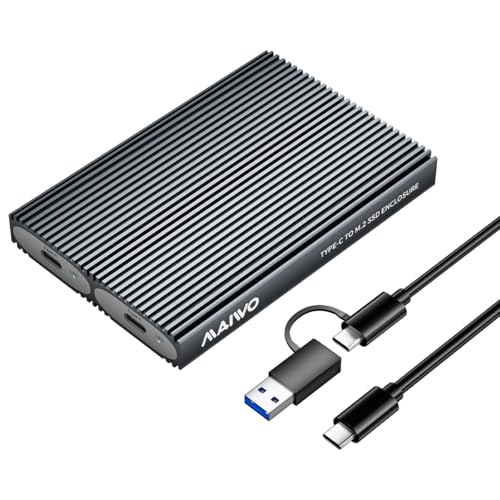
MAIWO Dual-Bay 10Gbps NVMe SSD Enclosure
Best for: dual-slot high-capacity M.2 NVMe storage setups
- Form Factor
- M.2 2242 (what this guide is about)
- Max Transfer Speed
- 10Gbps
- Host Interface
- USB 3.1 Gen 2 Type-C
- Drive Interface
- PCIe NVMe (M Key, B+M Key)
- Supported Form Factors
- M.2 2230, 2242, 2260, 2280
- Drive Bay Count
- 2 bays
View on Amazon: MAIWO Dual-Bay 10Gbps NVMe SSD Enclosure Affiliate link
This dual-bay enclosure houses two M.2 NVMe SSDs, including the 2242 size, with tool-free installation. You get USB 3.1 Gen 2 transfer rates up to 10Gbps per drive, paired with an aluminum alloy body for heat dissipation. It supports up to 16TB total capacity, making it a functional desktop solution when you manage multiple bare drives.
Pros
- Dual M.2 bays supporting up to 16TB total capacity
- Tool-free installation for 2230, 2242, 2260, and 2280 drives
- 10Gbps USB 3.1 Gen 2 interface with UASP support
- Aluminum alloy casing with included thermal pads
Cons
- Requires two separate cables to access both bays at once
- Does not support hardware drive cloning
- Incompatible with M.2 SATA solid-state drives
Good fit if
- You need to connect two M.2 NVMe drives in a single enclosure.
- You frequently swap 2242 or other size drives without tools.
Skip if
- You want standalone offline cloning without a host computer.
- You need to read legacy SATA-protocol M.2 drives.
Verdict: MAIWO Dual-Bay M.2 NVMe Enclosure fits technical users who require dual-slot NVMe access up to 10Gbps and swap 2242 drives without extra tools.
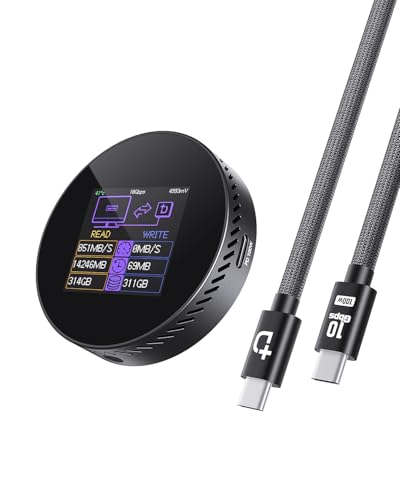
DOCKCASE Magnetic 2242 NVMe Enclosure
Best for: Magnetic mobile storage with health monitoring
- Form Factor
- M.2 2242 (what this guide is about)
- Max Transfer Speed
- 10Gbps
- Host Interface
- USB 3.2 Type-C
- Drive Interface
- M.2 NVMe PCIe
- Supported Form Factors
- 2242, 2230
- Maximum Capacity
- 2TB
View on Amazon: DOCKCASE Magnetic 2242 NVMe Enclosure Affiliate link
This enclosure supports M.2 2242 and 2230 NVMe drives with a 10Gbps USB 3.2 interface. It features a magnetic design for phone attachment and a built-in display for drive health. The unit includes 100W PD pass-through charging and 3-second power loss protection. It suits users needing portable, high-speed storage with real-time monitoring for their mobile devices.
Pros
- 10Gbps USB 3.2 transfer speeds
- Magnetic design with MagSafe compatibility
- Built-in HD display for health monitoring
- 100W PD pass-through charging
- 3-second power loss protection
Cons
- Supports only NVMe, not SATA
- Maximum capacity limited to 2TB
- Heavier at 1.9 ounces
Good fit if
- You need magnetic attachment for your phone
- You want real-time drive health monitoring
- You require 100W pass-through charging
Skip if
- You use SATA M.2 drives
- You need storage larger than 2TB
- You prefer a lighter, non-magnetic case
Verdict: DOCKCASE Magnetic M.2 2242 NVMe Enclosure fits users who need magnetic phone attachment and drive health monitoring. It is a practical solution for high-speed mobile storage with pass-through charging.

MAIWO 10Gbps Dual-Protocol M.2 Enclosure
Best for: Portable storage for M.2 2242 SATA drives
- Form Factor
- M.2 2242 (what this guide is about)
- Max Transfer Speed
- 10Gbps
- Host Interface
- USB 3.1 Gen2 Type-C
- Drive Interface
- PCIe NVMe NGFF SATA (M Key, B+M Key)
- Supported Form Factors
- 2230, 2242, 2260, 2280mm
- Cooling System
- Aluminum alloy shell, thermal pads
View on Amazon: MAIWO 10Gbps Dual-Protocol M.2 Enclosure Affiliate link
This enclosure supports M.2 2242 SATA drives alongside other form factors. It uses a USB 3.1 Gen2 Type-C interface to deliver transfer speeds up to 10Gbps. The tool-free design allows for quick drive installation without hardware. An aluminum alloy shell with thermal pads helps manage heat during use. It is a practical solution for users needing portable storage for SATA-based NVMe modules.
Pros
- USB 3.1 Gen2 Type-C interface
- Tool-free installation design
- Aluminum alloy cooling shell
- Supports up to 8TB capacity
Cons
- Limited to SATA III interface speeds
- Bulky dimensions compared to 2242-only enclosures
- No included power adapter for bus power
Good fit if
- You need to use M.2 2242 SATA drives
- You want a tool-free installation process
- You require high transfer bandwidth for large files
Skip if
- You only have M.2 2242 NVMe drives
- You need a compact enclosure for tight spaces
- You want the fastest possible NVMe speeds
Verdict: MAIWO M.2 2242 SATA Enclosure is a versatile option for users with SATA-based M.2 2242 drives who need a robust, tool-free enclosure. It suits those who prioritize cooling and high-speed USB connectivity over minimal size.
Specifications side by side
| Spec | MAIWO Dual-Bay 10Gbps NVMe SSD Enclosure | DOCKCASE Magnetic 2242 NVMe Enclosure | MAIWO 10Gbps Dual-Protocol M.2 Enclosure |
|---|---|---|---|
| Max Transfer Speed | 10Gbps | 10Gbps | 10Gbps |
| Host Interface | USB 3.1 Gen 2 Type-C | USB 3.2 Type-C | USB 3.1 Gen2 Type-C |
| Drive Interface | PCIe NVMe (M Key, B+M Key) | M.2 NVMe PCIe | PCIe NVMe NGFF SATA (M Key, B+M Key) |
| Supported Form Factors | M.2 2230, 2242, 2260, 2280 | 2242, 2230 | 2230, 2242, 2260, 2280mm |
| Drive Bay Count | 2 bays | not stated | not stated |
| Cooling System | Aluminum alloy shell, thermal pad | not stated | Aluminum alloy shell, thermal pads |
| Maximum Capacity | 16TB | 2TB | 8TB |
| Installation Style | Tool Free | not stated | Tool Free |
| Interface | NVMe | NVMe | SATA III |
| Form Factor | M.2 2242 | M.2 2242 | M.2 2242 |
| Transfer Speed | 10Gbps | 10Gbps | 10Gbps |
| Features | Tool-Free, UASP, TRIM | not stated | Tool-Free, UASP, TRIM |
| Bay Count | Dual-Bay | not stated | not stated |
| Dimensions | 4.65 × 1.97 × 0.51 inches | 2.33 × 0.57 × 2.33 inches | 4.33 × 1.5 × 0.53 inches |
| Weight | 3.53 ounces | 1.9 ounces | 2.47 ounces |
| Color | Grey | black | Silver |
| Model | 2 Bay - M.2 NVMe | Black-100W PD | K1691 |
If your drive runs hot inside a desktop rather than an external enclosure, our peirushg m 2 SSD water block review covers a cooling option for that setup.
How to Choose the Right 2242 Enclosure
-
Check Transfer Speed
Look at the transfer speed specification to ensure your connection matches your needs. Most modern enclosures offer 10Gbps speeds. This limit determines how fast data moves between your drive and computer. The MAIWO Dual-Bay and DOCKCASE Magnetic models both support 10Gbps. This speed is sufficient for most external storage tasks. If you need faster speeds, check if your host port supports higher standards. The listed speed is the maximum the enclosure can handle, not a guarantee of performance.
-
Verify Interface Compatibility
Match the enclosure interface to your specific M.2 2242 drive type. You must choose between NVMe and SATA III. The MAIWO Dual-Bay supports NVMe drives. The MAIWO 10Gbps Dual-Protocol handles SATA III drives. Using the wrong interface will prevent the drive from working. Check your drive’s protocol before purchasing. NVMe drives are generally faster than SATA III. Ensure the enclosure label clearly states the supported interface type to avoid compatibility issues.
-
Assess Physical Dimensions
Consider the enclosure dimensions for portability and fit. The DOCKCASE Magnetic model measures 2.33 inches by 2.33 inches. It is thin and designed for mobile use. The MAIWO Dual-Bay is larger at 4.65 inches long. It houses two drives, so it takes more space. Measure your intended storage location before buying. Smaller enclosures are easier to carry but may have less cooling. Larger units offer more capacity but are less portable. Check width, height, and length specifications carefully.
-
Evaluate Weight and Build
Check the weight if you plan to carry the enclosure often. The DOCKCASE Magnetic enclosure weighs 1.9 ounces. It is light and easy to transport. The MAIWO Dual-Bay weighs 3.53 ounces. It is heavier due to the dual-bay design. Heavier enclosures may feel more durable. Lighter ones are better for backpacks or pockets. Consider how you will use the device. Frequent travelers should prioritize lower weight. Desktop users might not mind the extra mass. Compare the weight specifications to find the right balance for your lifestyle.
-
Consider Tool-Free Access
Look for tool-free features if you need easy drive swaps. The MAIWO Dual-Bay and MAIWO 10Gbps Dual-Protocol both offer tool-free access. This feature allows you to install or remove drives without screws. It saves time and reduces the risk of losing small parts. If you change drives frequently, this is a key feature. The DOCKCASE Magnetic model does not list this feature. Check the attributes section for tool-free design. It adds convenience for users who manage multiple storage devices regularly.
Frequently asked questions
Can I use this enclosure with both NVMe and SATA drives?
It depends on the specific model you choose. The MAIWO Dual-Bay 10Gbps NVMe SSD Enclosure is designed strictly for NVMe interfaces. In contrast, the MAIWO 10Gbps Dual-Protocol M.2 Enclosure supports SATA III drives. You must match the interface specification to your drive type to ensure compatibility and proper function.
Do I need tools to install my M.2 2242 drive?
Many modern enclosures feature tool-free designs for easier installation. The MAIWO Dual-Bay 10Gbps NVMe SSD Enclosure and the MAIWO 10Gbps Dual-Protocol M.2 Enclosure both offer tool-free access. This feature allows you to insert and secure your drive without needing a screwdriver or other hardware tools during setup.
Is there an enclosure suitable for attaching to a smartphone?
Yes, the DOCKCASE Magnetic 2242 NVMe Enclosure is designed for this purpose. It features a magnetic design that allows for easy attachment to compatible phones. This makes it a practical solution for high-speed mobile storage with 10Gbps NVMe speeds and pass-through charging capabilities for on-the-go use.
What is the maximum transfer speed for these enclosures?
All three listed models support 10Gbps transfer speeds. This specification determines how fast data moves between your drive and computer. The MAIWO Dual-Bay, DOCKCASE Magnetic, and MAIWO Dual-Protocol enclosures all share this speed limit, ensuring robust connectivity for high-performance storage needs in a portable format.
Which enclosure is best for storing two drives?
The MAIWO Dual-Bay 10Gbps NVMe SSD Enclosure is the top choice for dual-drive storage. It houses two M.2 2242 or larger drives in a single portable unit. This design is ideal for users who value dual-drive capacity and tool-free access over the simplicity of a single-cable connection.
Does the magnetic enclosure support pass-through charging?
Yes, the DOCKCASE Magnetic 2242 NVMe Enclosure supports pass-through charging. This feature allows you to charge your device while using the enclosure for data transfer. It is a practical addition for users who need high-speed mobile storage with magnetic phone attachment and continuous power supply.
What color options are available for these enclosures?
The available colors vary by model. The MAIWO Dual-Bay 10Gbps NVMe SSD Enclosure comes in grey. The DOCKCASE Magnetic 2242 NVMe Enclosure is black. The MAIWO 10Gbps Dual-Protocol M.2 Enclosure is silver. You can choose based on your aesthetic preference while ensuring the form factor fits your needs.