Best KIOXIA Nvme SSDs Under $200 in 2026: 3 Picks
As an Amazon Associate we earn from qualifying purchases. Links on this page are affiliate links.
Finding the best KIOXIA nvme SSDs under $200 requires checking the published specifications carefully. We compared 3 models to help you choose. The KIOXIA EXCERIA 500GB M.2 NVMe SSD leads because it offers dependable Gen3 speeds in a standard M.2 2280 form factor. This makes it ideal for systems where space is tight and high-end thermal solutions are unnecessary. The other picks include a budget SATA option and a model with a heatsink for PS5 upgrades. This guide helps you decide which drive fits your specific hardware needs and interface requirements.
Quick picks
| # | Product | Best for | Price |
|---|---|---|---|
| 1 | KIOXIA EXCERIA 500GB M.2 NVMe SSD Best overall | Standard M.2 2280 systems needing Gen3 speed | Check price of KIOXIA EXCERIA 500GB M.2 NVMe SSD on Amazon |
| 2 | KIOXIA EXCERIA 480GB 2.5-Inch SATA SSD Best budget | legacy laptop and desktop upgrades | Check price of KIOXIA EXCERIA 480GB 2.5-Inch SATA SSD on Amazon |
| 3 | KIOXIA EXCERIA 1TB Heatsink NVMe SSD Best premium | PS5 upgrades and gaming PCs needing cooling | Check price of KIOXIA EXCERIA 1TB Heatsink NVMe SSD on Amazon |
The best fit for you
- You need a standard Gen3 M.2 drive for tight spaces KIOXIA EXCERIA 500GB M.2 NVMe SSD It offers dependable Gen3 NVMe speeds in a standard M.2 2280 form factor.
- You want the best budget option for legacy systems KIOXIA EXCERIA 480GB 2.5-Inch SATA SSD It provides solid SATA III performance for older laptops and desktops.
- You require a PS5 upgrade with built-in cooling KIOXIA EXCERIA 1TB Heatsink NVMe SSD It includes a heatsink and DRAM cache for thermal management and PCIe 4.0 speed.
Our 3 picks
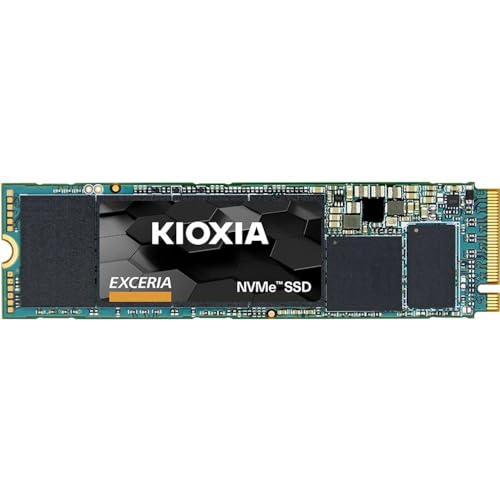
KIOXIA EXCERIA 500GB M.2 NVMe SSD
Best for: Standard M.2 2280 systems needing Gen3 speed
- Storage Capacity
- 500 GB
- Interface
- PCIe Gen3 x4
- Form Factor
- M.2 2280
- Dimensions
- 3.94 × 2.76 × 0.28 inches
View on Amazon: KIOXIA EXCERIA 500GB M.2 NVMe SSD Affiliate link
This KIOXIA EXCERIA drive uses PCIe Gen3 x4 NVMe 1.3c technology to deliver 350,000 read and 400,000 write IOPS. It fits in the standard M.2 2280 slot, measuring 3.94 by 2.76 inches. You get 500 GB of storage for everyday tasks. It suits users who need reliable performance without the bulk of larger capacities or the heat of high-end models.
Pros
- PCIe Gen3 x4 interface for fast data transfer
- 350,000 read and 400,000 write IOPS
- Standard M.2 2280 form factor fits most systems
- Uses BiCS FLASH technology for consistent performance
Cons
- 500 GB capacity is smaller than the 1TB option
- No heatsink included for thermal management
- Limited to PCIe Gen3 speeds
Good fit if
- You need a compact M.2 2280 drive for a laptop or desktop
- You want reliable NVMe speeds for general computing
- You prefer a smaller 500 GB capacity to save space
Skip if
- You require more than 500 GB of storage
- You need PCIe Gen4 or faster speeds
- You want a pre-installed heatsink for passive cooling
Verdict: KIOXIA EXCERIA 500GB NVMe SSD is a solid choice for users needing standard M.2 2280 storage with dependable Gen3 speeds. It fits well in systems where space is tight and high-end thermal solutions are unnecessary.

KIOXIA EXCERIA 480GB 2.5-Inch SATA SSD
Best for: legacy laptop and desktop upgrades
- Storage Capacity
- 480GB
- Interface
- SATA 6 Gbit/s
- Form Factor
- 2.5 Inch
- Max Read Speed
- 555 MB/s
- Max Write Speed
- 540 MB/s
- Compatibility
- Laptop, Desktop
View on Amazon: KIOXIA EXCERIA 480GB 2.5-Inch SATA SSD Affiliate link
This Kioxia Exceria is a 2.5-inch SATA SSD with 480GB of storage. It offers sequential read speeds up to 555 MB/s and write speeds up to 540 MB/s. The drive uses BiCS FLASH technology and fits standard laptop or desktop bays. It is a practical option for users who need reliable internal storage without the premium cost of NVMe drives.
Pros
- Sequential read speeds reach 555 MB/s
- Sequential write speeds reach 540 MB/s
- Standard 2.5-inch form factor fits most systems
- Uses Kioxia BiCS FLASH memory
Cons
- SATA interface limits speed compared to NVMe options
- 480GB capacity is smaller than 1TB alternatives
- Lacks the compact M.2 form factor of modern drives
Good fit if
- You are upgrading an older laptop or desktop
- You need a cost-effective storage solution
- You prefer standard 2.5-inch drive bays
Skip if
- You require the fastest possible NVMe speeds
- You need high capacity for large media libraries
- You are building a modern compact PC
Verdict: Kioxia Exceria 480GB SATA SSD is a sensible upgrade for legacy systems. It provides solid SATA performance for users who do not need NVMe speeds.

KIOXIA EXCERIA 1TB Heatsink NVMe SSD
Best for: PS5 upgrades and gaming PCs needing cooling
- Storage Capacity
- 1TB
- Interface
- PCIe 4.0 NVMe
- Form Factor
- M.2 2280
- Max Read Speed
- up to 7000MB/s
- Cache Type
- DRAM
- Cooling
- Heatsink
View on Amazon: KIOXIA EXCERIA 1TB Heatsink NVMe SSD Affiliate link
This KIOXIA EXCERIA drive offers 1TB of storage in an M.2 2280 form factor. It uses a PCIe 4.0 NVMe interface to reach read speeds of up to 7000MB/s. The unit includes a built-in heatsink for thermal management and features DRAM cache for consistent performance. It is designed for PS5 upgrades and gaming PCs that require high throughput and reliable cooling.
Pros
- Includes a built-in heatsink for improved thermal performance
- Sequential read speeds up to 7000MB/s
- Equipped with DRAM cache for data handling
- Compatible with PCIe 4.0 and backward compatible with PCIe 3.0
Cons
- Limited to 1TB storage capacity
- Heatsink adds physical bulk to the M.2 2280 form factor
- No warranty duration specified in the data
Good fit if
- You need a PS5-compatible SSD with integrated cooling
- You require high sequential read speeds for gaming
- You want a drive with DRAM cache for stability
Skip if
- You need more than 1TB of storage
- You are building a compact system with no room for a heatsink
- You require PCIe 5.0 speeds
Verdict: KIOXIA EXCERIA 1TB NVMe SSD with Heatsink provides fast PCIe 4.0 performance and built-in cooling for PS5 and gaming PC users who prioritize thermal management and DRAM cache.
Specifications side by side
| Spec | KIOXIA EXCERIA 500GB M.2 NVMe SSD | KIOXIA EXCERIA 480GB 2.5-Inch SATA SSD | KIOXIA EXCERIA 1TB Heatsink NVMe SSD |
|---|---|---|---|
| Storage Capacity | 500 GB | 480GB | 1TB |
| Interface | PCIe Gen3 x4 | SATA 6 Gbit/s | PCIe 4.0 NVMe |
| Form Factor | M.2 2280 | 2.5 Inch | M.2 2280 |
| Max Read Speed | not stated | 555 MB/s | up to 7000MB/s |
| Max Write Speed | not stated | 540 MB/s | not stated |
| Cache Type | not stated | not stated | DRAM |
| Cooling | not stated | not stated | Heatsink |
| Compatibility | not stated | Laptop, Desktop | not stated |
| Size | 500 GB | 480 gb | 1TB |
| Dimensions | 3.94 × 2.76 × 0.28 inches | 4.69 × 3.58 × 0.79 inches | 23.9 × 9.72 × 4.41 inches |
| Weight | not stated | 1.61 ounces | 1.59 ounces |
| Color | Black | Black | Yellow |
| Model | LRC10Z500GG8 | LTC10Z480GG8 | LSC11K1T02G8 |
Choosing the right KIOXIA SSD for you
-
Check interface compatibility
You must match the drive interface to your motherboard slots. The top pick uses NVMe for modern systems. The budget option relies on SATA III for older hardware. NVMe offers faster data transfer through the PCIe bus. SATA connects via a separate cable. Verify your system supports the specific interface before buying. Using the wrong interface will prevent the drive from working. Check your manual or BIOS settings to confirm available ports and supported protocols for your specific computer model.
-
Verify form factor size
Physical dimensions determine if the drive fits your device. The best overall pick is a standard M.2 2280 size. It measures roughly 2.76 inches wide and 3.94 inches long. This fits most laptops and desktops with M.2 slots. The budget SATA drive is larger at 2.5 inches. It requires a 2.5-inch bay or an adapter. The heatsink model is significantly larger due to the cooling module. Measure your available space carefully. Ensure your case or console has the correct physical slot for the chosen form factor.
-
Assess cooling needs
Thermal management affects sustained performance and drive longevity. The third pick includes a built-in heatsink for better heat dissipation. This is ideal for gaming PCs or PS5 upgrades where temperatures rise quickly. The standard M.2 and SATA drives lack integrated cooling. They rely on case airflow or separate heatsinks. If your system has poor ventilation, choose the model with the heatsink. Proper cooling prevents thermal throttling. This ensures consistent speeds during large file transfers or heavy workloads without performance drops.
-
Match storage capacity
Capacity determines how much data you can store. The options range from 480GB to 1TB. The budget SATA drive offers 480GB for basic needs. The top NVMe pick provides 500GB for standard use. The heatsink model offers 1TB for larger libraries or games. Choose based on your current and future storage requirements. A 500GB drive fills up quickly with modern games. Ensure the selected capacity meets your minimum threshold. Upgrading later may require migrating data or buying a second drive.
-
Confirm device compatibility
Not all drives work with every device. The budget SATA drive is explicitly compatible with legacy laptops and desktops. The NVMe drives suit modern systems with M.2 slots. The heatsink model is optimized for PS5 and gaming PCs. Verify your specific device model supports the drive type. PS5s require specific NVMe drives with certain speed and size limits. Older desktops may only accept SATA drives. Check the manufacturer’s compatibility list. Incorrect compatibility can lead to installation failures or lack of functionality in your target device.
Frequently asked questions
Which KIOXIA SSD is best for PS5 upgrades?
The KIOXIA EXCERIA 1TB Heatsink NVMe SSD is the top choice for PlayStation 5 users. It delivers fast PCIe 4.0 performance and includes a built-in heatsink for effective thermal management. This model features DRAM cache, which helps maintain consistent speeds during heavy gaming loads. It is designed specifically for systems that require robust cooling solutions.
Does the top pick include a heatsink?
No, the KIOXIA EXCERIA 500GB M.2 NVMe SSD does not include a heatsink. It is designed as a standard M.2 2280 drive for systems where space is tight or high-end thermal solutions are unnecessary. If you require active cooling, you should consider the 1TB model, which comes with a dedicated yellow heatsink attached for better temperature control.
Can I use these drives in older laptops?
Yes, but you must select the correct interface. The KIOXIA EXCERIA 480GB SATA SSD is compatible with legacy laptops and desktops that use SATA III ports. It provides solid performance for older systems that do not support NVMe speeds. The NVMe models require an M.2 slot with PCIe support, which is typically found in newer hardware.
What is the difference between NVMe and SATA interfaces?
NVMe drives connect via the M.2 slot and use the PCIe bus for faster data transfer rates. SATA drives connect via a 2.5-inch form factor and use the older SATA III interface. NVMe is ideal for modern systems needing high speed, while SATA is a sensible upgrade for legacy systems that lack M.2 slots or PCIe support.
Is the 1TB model suitable for gaming PCs?
Yes, the KIOXIA EXCERIA 1TB Heatsink NVMe SSD is well-suited for gaming PCs. It offers PCIe 4.0 performance for quick load times and includes a heatsink to manage heat during intensive sessions. The inclusion of DRAM cache further supports sustained performance, making it a reliable option for users who prioritize thermal management and speed in their gaming builds.
What form factors are available in this list?
This selection includes two distinct form factors. The NVMe models use the M.2 2280 size, which is standard for modern motherboards. The budget option is a 2.5-inch SATA SSD, which is the traditional size for older laptops and desktops. You must check your system's available slots to ensure the physical dimensions and interface match your hardware requirements.