10Gtek Nvme SSDs: 4 Picks Ranked by Specs
As an Amazon Associate we earn from qualifying purchases. Links on this page are affiliate links.
This guide ranks the best 10Gtek NVMe SSD adapters by their published specifications. 10Gtek offers expansion cards and adapters for M.2 and U.2 drives, supporting both PCIe 3.0 and 4.0 interfaces. We compared 4 models to help you find the right hardware for your system. The top pick is the 10Gtek Quad Port U.2 NVMe PCIe 3.0 Switch Adapter. It leads because it supports four U.2 drives in a single slot, making it ideal for servers needing high-density storage without complex configuration.
Quick picks
| # | Product | Best for | Price |
|---|---|---|---|
| 1 | 10Gtek Quad Port U.2 NVMe PCIe 3.0 Switch Adapter Best overall | Servers needing four U.2 drives | Check price of 10Gtek Quad Port U.2 NVMe PCIe 3.0 Switch Adapter on Amazon |
| 2 | 10Gtek 4-Slot M.2 PCIe 3.0 Expansion Card Best premium | Adding four NVMe drives to non-bifurcation systems | Check price of 10Gtek 4-Slot M.2 PCIe 3.0 Expansion Card on Amazon |
| 3 | 10Gtek Dual U.2 PCIe 3.0 x8 Adapter Card Best desktop | Dual U.2 NVMe SSD expansion in desktops | Check price of 10Gtek Dual U.2 PCIe 3.0 x8 Adapter Card on Amazon |
| 4 | 10Gtek Dual SFF-8654 PCIe 4.0 x8 Adapter Card Best budget | Dual U.2 NVMe expansion on PCIe 4.0 | Check price of 10Gtek Dual SFF-8654 PCIe 4.0 x8 Adapter Card on Amazon |
Our 4 picks

10Gtek Quad Port U.2 NVMe PCIe 3.0 Switch Adapter
Best for: Servers needing four U.2 drives
- Interface
- PCIe 3.0 x8
- Weight
- 7.05 ounces
View on Amazon: 10Gtek Quad Port U.2 NVMe PCIe 3.0 Switch Adapter Affiliate link
This 10Gtek adapter lets you connect four U.2 NVMe SSDs to a single PCIe slot. It uses the Broadcom PEX8724 switch to manage lanes without needing motherboard bifurcation. The card supports PCIe 3.0 x8 connections and works with Windows, Linux, and VMware ESXi. It is built for high-density storage in servers or workstations that need multiple fast drives without complex BIOS settings.
Pros
- Built-in Broadcom PEX8724 PCIe switch chipset
- Supports four U.2 SSDs simultaneously
- No motherboard bifurcation required
- Compatible with Windows, Linux, and VMware ESXi
Cons
- Does not support hot swapping
- SFF-8643 to U.2 cables are not included
- Only includes full-height bracket
Good fit if
- You need to add four U.2 drives to a server
- You want to avoid complex BIOS bifurcation settings
- You use Windows, Linux, or VMware ESXi
Skip if
- You need hot swap capability for your drives
- You only have a PCIe x4 slot available
- You want a low-profile bracket included
Verdict: 10Gtek 4-Port U.2 NVMe Adapter provides a stable way to expand storage with four drives. It fits servers or workstations that need high-density NVMe support without complex motherboard configuration.

10Gtek 4-Slot M.2 PCIe 3.0 Expansion Card
Best for: Adding four NVMe drives to non-bifurcation systems
- Interface
- PCIe 3.0 x8
- Cooling
- Aluminum Heatsink & Fan
- Form Factor
- M.2 2280
View on Amazon: 10Gtek 4-Slot M.2 PCIe 3.0 Expansion Card Affiliate link
This expansion card adds four M.2 NVMe slots to your system via a PCIe 3.0 x8 interface. It uses a Broadcom PEX-8724 controller to manage lanes independently, ensuring stability for all drives. The aluminum heatsink and fan keep components cool. It supports various SSD lengths, including 22110mm. You get universal compatibility without needing complex motherboard bifurcation settings.
Pros
- Broadcom PEX-8724 controller for stable multi-drive management
- Supports four M.2 NVMe SSDs simultaneously
- Aluminum heatsink and fan for active cooling
- Works with non-bifurcation motherboards
- Accepts SSDs up to 22110mm length
Cons
- Limited to PCIe 3.0 speeds
- Does not support hot-swapping
- Includes only full-height bracket
Good fit if
- You need to connect four NVMe drives
- Your motherboard lacks PCIe bifurcation support
- You run data-intensive workloads like video editing
Skip if
- You require PCIe 4.0 bandwidth
- You need hot-swap drive access
- You have a low-profile PC case
Verdict: 10Gtek 4-Port PCIe 3.0 NVMe Expansion is a practical solution for workstations needing four drives without complex BIOS adjustments. It fits users who prioritize drive count over maximum theoretical transfer speeds.
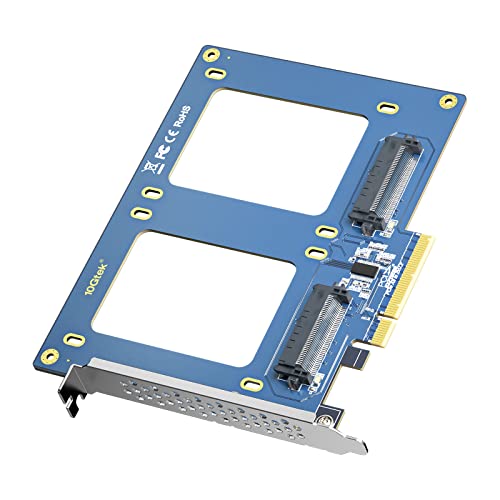
10Gtek Dual U.2 PCIe 3.0 x8 Adapter Card
Best for: Dual U.2 NVMe SSD expansion in desktops
- Interface
- PCIe 3.0 x8, SFF-8639
- Compatibility
- NAS
- Weight
- 5.61 ounces
View on Amazon: 10Gtek Dual U.2 PCIe 3.0 x8 Adapter Card Affiliate link
This adapter lets you mount two 2.5-inch U.2 NVMe SSDs using a PCIe 3.0 x8 interface. You need motherboard BIOS support for bifurcation to recognize both drives. The card includes a full-height bracket and weighs 5.61 ounces. It supports desktop and NAS use. NVMe drives offer faster speeds than SATA. This setup works well for high-performance storage needs.
Pros
- Supports two 2.5-inch U.2 NVMe SSDs
- Uses PCIe 3.0 x8 interface
- Includes full-height bracket
- Enables NVMe boot from PCIe
Cons
- Does not support hot swapping
- Requires motherboard BIOS bifurcation support
- Only full-height bracket included
Good fit if
- You need to add two U.2 drives to a desktop
- You want to use NVMe SSDs for faster storage
- Your motherboard supports PCIe bifurcation
Skip if
- You require hot-swappable drive bays
- Your motherboard does not support PCIe bifurcation
- You need a low-profile bracket
Verdict: 10Gtek Dual U.2 PCIe 3.0 Adapter is a solid choice for desktop users who need to install two U.2 NVMe SSDs and have a motherboard that supports PCIe bifurcation. It delivers high-speed storage expansion without the need for hot swapping.

10Gtek Dual SFF-8654 PCIe 4.0 x8 Adapter Card
Best for: Dual U.2 NVMe expansion on PCIe 4.0
- Interface
- PCIe 4.0 x8
- Dimensions
- 0.1 × 0.1 × 0.1 inches
View on Amazon: 10Gtek Dual SFF-8654 PCIe 4.0 x8 Adapter Card Affiliate link
This 10Gtek adapter lets you connect two U.2 NVMe SSDs via a PCIe 4.0 x8 interface. It uses the SFF-8654 4i standard and requires motherboard bifurcation support to recognize both drives. The card includes full-height and low-profile brackets for flexible installation. It does not support SAS or SATA drives. This solution suits users who need dual NVMe connectivity in a compact PCIe slot.
Pros
- Supports two U.2 NVMe SSDs simultaneously
- PCIe 4.0 x8 interface for high bandwidth
- Includes full-height and low-profile brackets
Cons
- Requires motherboard BIOS to support bifurcation
- Does not support SAS or SATA SSDs
- No hot-swapping capability
Good fit if
- You need to connect two U.2 NVMe drives
- Your motherboard supports PCIe bifurcation
- You require a PCIe 4.0 x8 connection
Skip if
- You need to use SAS or SATA drives
- Your motherboard does not support bifurcation
- You require hot-swapping capability
Verdict: 10Gtek PCIe 4.0 Dual U.2 Adapter is a practical choice for users who need dual NVMe connectivity via a single PCIe slot. It fits those with bifurcation support who want to expand their storage without sacrificing PCIe lanes.
Specifications side by side
| Spec | 10Gtek Quad Port U.2 NVMe PCIe 3.0 Switch Adapter | 10Gtek 4-Slot M.2 PCIe 3.0 Expansion Card | 10Gtek Dual U.2 PCIe 3.0 x8 Adapter Card | 10Gtek Dual SFF-8654 PCIe 4.0 x8 Adapter Card |
|---|---|---|---|---|
| Interface | PCIe 3.0 x8 | PCIe 3.0 x8 | PCIe 3.0 x8, SFF-8639 | PCIe 4.0 x8 |
| Cooling | not stated | Aluminum Heatsink & Fan | not stated | not stated |
| Form Factor | not stated | M.2 2280 | not stated | not stated |
| Compatibility | not stated | not stated | NAS | not stated |
| Material | not stated | Aluminum | not stated | not stated |
| Weight | 7.05 ounces | not stated | 5.61 ounces | not stated |
| Dimensions | not stated | not stated | not stated | 0.1 × 0.1 × 0.1 inches |
| Size | (4x) SFF-8643 (PEX) | 1pc | 1pc | (2x) SFF-8654, 4i |
| Color | (4x) SFF-8643, PCIe X8 (PEX8724) | 4x M.2 (M Key), PEX-8724 | (2x) U.2, PCIe 3.0 | 2) 2x 4i, PCIe x8 |
| Model | NV9324-4I | 10Gtek-LRNV9524-4I | PCIX88639-2 | S54N2X8 |
10Gtek NVMe Adapter Lineup Overview
The collection splits into PCIe 3.0 and 4.0 options. The Quad Port U.2 Adapter and 4-Slot M.2 Expansion Card both use PCIe 3.0. The M.2 card includes an aluminum heatsink for thermal management. These models suit users prioritizing drive count or budget constraints over maximum theoretical bandwidth. The Dual U.2 Adapter also operates on PCIe 3.0 but targets desktop and NAS compatibility with two drives.
The Dual SFF-8654 Adapter stands out as the sole PCIe 4.0 option. It supports two drives via a single slot, ideal for systems with bifurcation support. You should choose the PCIe 3.0 cards if your motherboard limits lane speeds. Select the PCIe 4.0 model if you need higher throughput for dual U.2 NVMe expansion.
Who 10Gtek Adapters Suit
10Gtek targets users needing multi-drive expansion in desktops and servers. The range spans from dual U.2 adapters to quad M.2 or U.2 cards. You get PCIe 3.0 or 4.0 connectivity. The lineup focuses on high-density storage solutions rather than single-drive simplicity. None of these models support SATA protocols or wireless features. They are strictly for PCIe-based NVMe expansion. If you need to add four drives to a non-bifurcation system, the M.2 card fits. For dual U.2 setups, both 3.0 and 4.0 options exist. This brand suits builders prioritizing drive count over single-slot speed.
How to choose the right one
-
Check PCIe generation
You must match the adapter’s PCIe generation to your motherboard’s capabilities. The 10Gtek Dual SFF-8654 supports PCIe 4.0, offering higher bandwidth than the PCIe 3.0 models. If your system only supports PCIe 3.0, the PCIe 4.0 card will still work but may not reach its full potential. Conversely, using a PCIe 3.0 adapter in a PCIe 4.0 slot limits your speed. Always verify your motherboard’s slot specifications before purchasing to ensure you get the performance you expect from your NVMe drives.
-
Match drive form factor
Select an adapter that physically accepts your SSD type. The 10Gtek 4-Slot M.2 card is designed for M.2 2280 drives, while the Quad Port U.2 Adapter handles SFF-8643 connectors. The Dual U.2 PCIe 3.0 x8 Adapter uses SFF-8639 ports. You cannot install an M.2 drive into a U.2 slot without an incompatible converter, which often lacks proper support. Check the connector type listed in the specs. Choosing the wrong form factor means the hardware will not fit your existing storage devices, rendering the purchase useless for your current setup.
-
Verify BIOS bifurcation
Multi-drive adapters require your motherboard’s BIOS to support PCIe bifurcation. This feature splits a single PCIe slot into multiple lanes for each drive. The 10Gtek Dual U.2 PCIe 3.0 x8 Adapter explicitly notes this requirement for desktop use. Without bifurcation, all drives may share a single lane, drastically reducing speeds. Some systems disable this by default. You need to check your motherboard manual to confirm support. If your system lacks this feature, the Quad Port U.2 Adapter or 4-Slot M.2 card might still function via the internal switch, but performance will vary significantly.
-
Consider thermal management
High-speed NVMe drives generate significant heat during sustained transfers. The 10Gtek 4-Slot M.2 PCIe 3.0 Expansion Card includes an aluminum heatsink to dissipate this heat. Other models in the lineup do not list integrated cooling solutions. If you plan to run multiple drives simultaneously, passive cooling becomes critical to prevent thermal throttling. You should ensure your case has adequate airflow around the expansion slot. Adding aftermarket cooling to cards without heatsinks is possible but adds complexity. Prioritize models with built-in thermal management for stability in dense storage configurations.
-
Assess physical dimensions
Expansion cards vary in height and width, affecting fitment in your chassis. The 10Gtek Dual SFF-8654 PCIe 4.0 x8 Adapter has specific dimensions listed as 0.1 inches in height and width. These compact profiles help fit into tight server racks or small form factor cases. Larger cards may interfere with adjacent slots or GPU clearance. Measure the available space in your computer case before ordering. Ensure the card does not block other essential components like RAM sticks or drive bays. Proper physical planning prevents installation issues and ensures a clean, functional build.
Frequently asked questions
Which 10Gtek adapter is best for servers with four U.2 drives?
The 10Gtek Quad Port U.2 NVMe PCIe 3.0 Switch Adapter is the top choice for this setup. It supports four SFF-8643 drives and uses the PEX8724 switch chip. This model provides a stable expansion path for servers needing high-density NVMe storage without complex motherboard configuration.
Can I use a 10Gtek M.2 expansion card without PCIe bifurcation?
Yes, the 10Gtek 4-Slot M.2 PCIe 3.0 Expansion Card is designed for systems without bifurcation support. It allows you to install four M.2 2280 drives using a single PCIe slot. This makes it a practical solution for workstations that prioritize drive count over maximum theoretical speeds.
Does the 10Gtek Dual U.2 adapter support hot swapping?
No, the 10Gtek Dual U.2 PCIe 3.0 x8 Adapter Card does not support hot swapping. It is designed for desktops and NAS systems where you need to install two U.2 NVMe SSDs. You must power down the system to change drives, ensuring stable connectivity via PCIe bifurcation.
What is the best 10Gtek option for PCIe 4.0 systems?
The 10Gtek Dual SFF-8654 PCIe 4.0 x8 Adapter Card is the best option for PCIe 4.0 environments. It supports two SFF-8654 drives and utilizes a PCIe x8 interface. This adapter allows you to expand storage with dual NVMe drives while maintaining full bandwidth on compatible motherboards.
Do 10Gtek M.2 adapters include cooling solutions?
Yes, the 10Gtek 4-Slot M.2 PCIe 3.0 Expansion Card includes an aluminum heatsink. This cooling component helps manage thermal output for the four installed M.2 drives. Proper thermal management is essential for maintaining performance and longevity in high-density storage configurations within workstations.
Which 10Gtek adapter is suitable for desktop expansion?
The 10Gtek Dual U.2 PCIe 3.0 x8 Adapter Card is ideal for desktop users. It supports two U.2 NVMe SSDs and is compatible with desktops and NAS units. This adapter requires motherboard PCIe bifurcation support to function correctly, offering a reliable way to add high-speed storage.