Addlink S70 Lite 1TB Gen3 NVMe SSD vs Addlink S85 1TB NVMe SSD: Spec Comparison
As an Amazon Associate we earn from qualifying purchases. Links on this page are affiliate links.
This comparison looks at the addlink s70 lite 1tb nvme SSD vs s85 1tb nvme SSD. Both drives offer 1TB of storage in a standard M.2 2280 form factor. They share a 3D NAND construction and a five-year limited warranty. The main difference lies in their interface generation and resulting speeds. The S70 Lite uses PCIe Gen3, while the S85 utilizes the faster PCIe Gen4 standard. You need to decide which performance tier fits your system.
Key differences
| Aspect | Addlink S70 Lite 1TB Gen3 NVMe SSD | Addlink S85 1TB PCIe 4.0 SSD |
|---|---|---|
| Interface | PCIe Gen3x4 | PCIe 4.0 |
| Max Read Speed | Up to 3200MB/s | Up to 6000MB/s |
| Max Write Speed | 2600MB/s | 5400MB/s |
| Cache Type | SLC caching | Host Memory Buffer (HMB) |
| NAND Type | 3D NAND | 3D TLC NAND |
Which one should you choose?
Choose Addlink S70 Lite 1TB Gen3 NVMe SSD if
- You have a motherboard with only PCIe Gen3 slots
- You want a drive that runs cool without a heatsink
- You prioritize lower power consumption for laptop battery life
Choose Addlink S85 1TB PCIe 4.0 SSD if
- You have a PCIe Gen4 compatible system
- You need maximum sequential transfer speeds for large files
- You want HMB technology for improved DRAM-less efficiency
Verdict: The S70 Lite is the practical choice for older systems or users prioritizing thermal efficiency. The S85 delivers significantly higher throughput for modern Gen4 platforms. Select the S85 if your hardware supports it and you need faster data movement.
Specs and Performance Comparison
Interface Speed
The Addlink S85 uses a PCIe Gen4x4 interface, allowing it to reach sequential read speeds of up to 6000MB/s and write speeds of 5400MB/s. This offers roughly double the bandwidth of the S70 Lite. The Addlink S70 Lite relies on a PCIe Gen3x4 interface, capping its sequential read speed at 3200MB/s and write speed at 2600MB/s. While both are fast compared to SATA drives, the S85 delivers significantly higher raw throughput for large file transfers and heavy workloads. The S70 Lite is sufficient for standard gaming and office tasks, but the S85 provides superior performance for data-intensive applications.
Cache Technology
Cache management differs between the two drives. The Addlink S70 Lite employs SLC caching to boost performance during sustained writes. This method uses a portion of the TLC NAND as a high-speed buffer. The Addlink S85 utilizes Host Memory Buffer (HMB) technology instead. HMB allows the SSD to use a small amount of system RAM to maintain its mapping table, improving efficiency without requiring a dedicated DRAM chip. Both approaches help manage data flow effectively, but they operate differently. SLC caching focuses on write acceleration, while HMB optimizes overall controller efficiency by leveraging host resources.
Physical Dimensions
Both drives share the standard M.2 2280 form factor, meaning they fit in the same slots on most desktop motherboards and laptops. However, their heights differ. The Addlink S70 Lite is available in a 0.4-inch height variant, which is the standard thickness for many Gen3 drives. The Addlink S85 is notably thinner, measuring just 2.25mm (approximately 0.09 inches) in its primary configuration. This ultra-slim profile makes the S85 easier to fit into thin laptops and compact mini PCs where clearance is limited. If you are upgrading a slim device, the S85 may offer better physical compatibility.
Power Efficiency
Both drives are designed with efficiency in mind, but they achieve it through different means. The Addlink S70 Lite is described as a low-power design that runs cool without a heatsink, which helps extend laptop battery life. The Addlink S85 also emphasizes low power draw, attributing this to its efficient HMB design. This efficiency allows it to maintain high Gen4 speeds while remaining friendly to gaming laptop batteries. Since both products prioritize thermal and power management to avoid throttling and preserve battery life, neither holds a clear advantage in this category based on the provided specifications.
NAND Type
The NAND flash construction varies slightly between the models. The Addlink S70 Lite uses 3D NAND flash. This technology stacks memory cells vertically to increase density and improve endurance. The Addlink S85 specifies 3D TLC NAND. TLC stands for Triple-Level Cell, meaning each cell stores three bits of data. This is a common type of 3D NAND that balances capacity, speed, and cost. While both use 3D technology, the S85 explicitly identifies its TLC structure. This detail helps you understand the underlying memory architecture, though both are suitable for everyday computing and gaming tasks.
Which Addlink SSD fits your needs
Users with older motherboards or laptops
The S70 Lite uses PCIe Gen3x4, which matches older systems perfectly. Its 3200MB/s read speed is fast enough for daily tasks. It runs cool and efficient without needing extra cooling. This drive ensures full compatibility with legacy M.2 slots while still offering a significant upgrade over traditional SATA drives for your specific hardware setup.
Gamers seeking maximum load times
The S85 delivers Gen4 speeds up to 6000MB/s, which is roughly double the bandwidth of the S70 Lite. This higher throughput helps with rapid large-file transfers and quick game loading. Its HMB technology supports strong performance without a dedicated DRAM cache. You get the fastest possible sequential speeds for modern gaming rigs that support PCIe 4.0.
Owners of thin ultrabooks
The S85 is ultra-slim at just 2.25mm high, making it ideal for tight spaces in thin laptops. Its efficient HMB design keeps power draw low, which helps extend battery life during heavy use. While it runs at Gen3 speeds in older slots, its low profile and efficiency make it a versatile choice for space-constrained mobile computing devices.
Budget-conscious buyers with Gen3 systems
If your system is Gen3 limited, the S85 cannot exceed Gen3 speeds anyway. The S70 Lite is optimized for this interface, offering reliable 2600MB/s writes. It provides the same 1TB capacity and 3D NAND durability. You get a proven, compatible drive that fits your hardware constraints without paying for unused Gen4 bandwidth potential.
The products compared
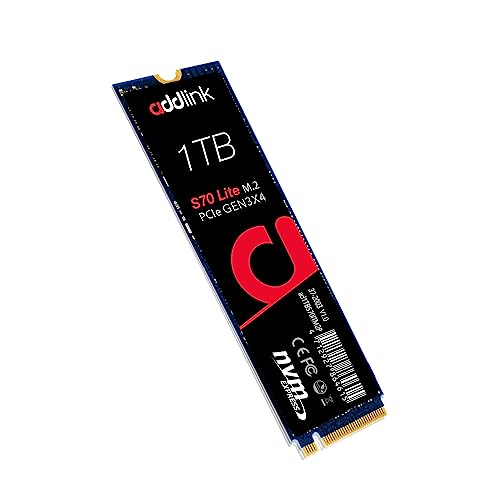
Addlink S70 Lite 1TB Gen3 NVMe SSD
Best for: PCIe Gen3 laptop and desktop upgrades
- Storage Capacity
- 1TB
- Interface
- PCIe Gen3x4
- Form Factor
- M.2 2280
- Max Read Speed
- Up to 3200MB/s
- Max Write Speed
- 2600MB/s
- Cache Type
- SLC caching
View on Amazon: Addlink S70 Lite 1TB Gen3 NVMe SSD Affiliate link
The Addlink S70 Lite 1TB is an internal M.2 2280 solid-state drive operating on the PCIe Gen3x4 interface. It delivers sequential read speeds up to 3,200 MB/s and write speeds up to 2,600 MB/s using 3D NAND flash and SLC caching. This drive suits you if you need storage for a Gen3 laptop or desktop system.
Pros
- Sequential read speeds up to 3,200 MB/s and write speeds up to 2,600 MB/s
- Standard M.2 2280 form factor fits laptops and desktop motherboards
- Includes a 5-year limited warranty
- Utilizes 3D NAND flash with SLC caching
Cons
- PCIe Gen3x4 interface delivers lower peak bandwidth than Gen4 drives
- Sequential write speed tops out at 2,600 MB/s
Good fit if
- You have a PC or laptop equipped with a PCIe Gen3 M.2 slot.
- You want 1TB of storage supported by a 5-year warranty.
Skip if
- You require the higher bandwidth of a PCIe Gen4 drive.
- You need sequential write performance exceeding 2,600 MB/s.
Verdict: Addlink S70 Lite 1TB Gen3 NVMe SSD provides reliable Gen3 throughput for PC users upgrading systems that do not support Gen4 speeds.

Addlink S85 1TB PCIe 4.0 SSD
Best for: Gen4 desktop and laptop upgrades
- Storage Capacity
- 1TB
- Interface
- PCIe 4.0
- Form Factor
- M.2 2280
- Max Read Speed
- 6000MB/s
- Max Write Speed
- 5400MB/s
- Cache Type
- Host Memory Buffer (HMB)
View on Amazon: Addlink S85 1TB PCIe 4.0 SSD Affiliate link
The Addlink S85 1TB is a Gen4 M.2 2280 NVMe SSD built for modern systems. It delivers sequential read speeds up to 6000MB/s and sequential write speeds up to 5400MB/s across a PCIe 4.0 interface. Using 3D TLC NAND and Host Memory Buffer technology, it suits you if you need faster transfer rates for gaming or everyday file tasks.
Pros
- Sequential read speeds reach up to 6000MB/s
- Sequential write speeds reach up to 5400MB/s
- Slim 2.25mm profile fits compact laptops and mini PCs
- Backing includes a 5-year limited warranty
Cons
- Uses Host Memory Buffer instead of dedicated onboard DRAM cache
- Drops to Gen3 speeds when installed in older PCIe 3.0 slots
Good fit if
- You have a PCIe 4.0 slot and want sequential reads up to 6000MB/s.
- You need a slim 2.25mm M.2 2280 drive for a compact laptop build.
Skip if
- You require an SSD with onboard DRAM rather than HMB architecture.
- You only have a PCIe 3.0 motherboard and cannot use Gen4 bandwidth.
Verdict: Addlink S85 1TB Gen4 NVMe SSD fits desktop and laptop owners who need PCIe 4.0 read speeds up to 6000MB/s on a 3D TLC drive.
Specifications side by side
| Spec | Addlink S70 Lite 1TB Gen3 NVMe SSD | Addlink S85 1TB PCIe 4.0 SSD |
|---|---|---|
| Storage Capacity | 1TB | 1TB |
| Interface | PCIe Gen3x4 | PCIe 4.0 |
| Form Factor | M.2 2280 | M.2 2280 |
| Max Read Speed | Up to 3200MB/s | 6000MB/s |
| Max Write Speed | 2600MB/s | 5400MB/s |
| Cache Type | SLC caching | Host Memory Buffer (HMB) |
| Compatibility | Laptop, Desktop, Gaming | Laptop, Desktop, Gaming |
| NAND Type | 3D NAND | TLC |
| Size | 1TB | 1TB |
| Dimensions | 3.2 × 0.8 × 0.4 inches | not stated |
| Weight | 0.7 ounces | not stated |
| Color | S70 Lite | [w/o Heatsink] up to 6000MB/s |
| Model | ad1TBS70M2P | 4712927866428 |
Frequently asked questions
Is the Addlink S85 compatible with older motherboards?
No, the S85 requires a PCIe 4.0 slot to function at full speed. While it may fall back to Gen3 speeds on older hardware, it will not reach its stated 6000MB/s read performance. You should choose the S70 Lite if your system only supports PCIe 3.0 interfaces for reliable compatibility.
Does the Addlink S85 include a heatsink?
The product data indicates the S85 is available without a heatsink. The listing specifically notes the speed rating for the version without a heatsink. If your motherboard lacks built-in M.2 cooling, you may need to add a separate thermal solution to maintain optimal operating temperatures during heavy workloads.
What type of NAND does the S85 use?
The S85 uses TLC NAND. This type of memory offers a good balance between speed, endurance, and cost. The S70 Lite uses 3D NAND, which generally provides higher density and improved performance per dollar. Both types are suitable for standard desktop and laptop storage needs.
Which drive is better for gaming?
Both drives support gaming compatibility, but the S85 offers faster load times due to its higher sequential read speeds. The S70 Lite is sufficient for standard gaming if you do not need the extra bandwidth. Choose the S85 for modern systems and the S70 Lite for older or budget builds.
Are both drives the same physical size?
Yes, both drives use the M.2 2280 form factor. This means they share the same standard dimensions of 22mm by 80mm. You can install either drive in any slot designed for this size. The S70 Lite has a specific thickness of 0.8 inches, which fits most standard chassis.
Can the S85 run on a laptop?
Yes, the S85 is compatible with laptops that support PCIe 4.0 NVMe drives. It is particularly suitable for thin laptops that benefit from its high speeds. Ensure your laptop model supports the M.2 2280 form factor and has a PCIe 4.0 slot to utilize the drive's full potential.