Addlink S70 Lite 1TB Gen3 NVMe SSD or Addlink P21 1TB Portable External? Which Addlink Model to Buy
As an Amazon Associate we earn from qualifying purchases. Links on this page are affiliate links.
This addlink s70 lite 1tb nvme SSD vs p21 1tb portable external comparison helps you decide between internal speed and external convenience. Both offer 1TB of storage. The main difference lies in connectivity. The S70 Lite is an internal M.2 drive for direct motherboard installation. The P21 is a portable external unit connected via USB. Your choice depends on whether you need to upgrade an existing system or carry data on the go.
Key differences
| Aspect | Addlink S70 Lite 1TB Gen3 NVMe SSD | Addlink P21 1TB Portable External SSD |
|---|---|---|
| Interface | PCIe Gen3x4 | USB 3.2 Gen 2x2 |
| Form Factor | M.2 2280 Internal | Portable External |
| Max Read Speed | Up to 3,200 MB/s | Up to 2,000 MB/s |
| Cache Type | SLC caching | not listed |
| Cooling | Low-power design (no heatsink) | Metal casing with cooling fins |
| Warranty | 5-year limited | 3-year limited |
Which one should you choose?
Choose Addlink S70 Lite 1TB Gen3 NVMe SSD if
- You need to install the drive directly into a desktop or laptop M.2 slot
- You want the highest possible sequential read speeds for gaming or large file transfers
- You prefer a longer warranty period for long-term internal use
Choose Addlink P21 1TB Portable External SSD if
- You need a plug-and-play drive for external backup or media transport
- You want universal compatibility with devices like PS5, Xbox, or smartphones
- You need a rugged, shock-resistant design for travel
Verdict: Choose the S70 Lite if you are upgrading the internal storage of a computer and want maximum PCIe speed. Choose the P21 if you need a portable, external drive for transferring files between different devices like consoles or phones.
Internal Speed Versus Portable Design
Interface and Connectivity
The Addlink S70 Lite uses a PCIe Gen3x4 interface, connecting directly to your motherboard via an M.2 slot. This internal connection offers low latency and high bandwidth for system operations. The Addlink P21 relies on USB 3.2 Gen 2x2, requiring a USB-C port on your device. While the P21 is plug-and-play and works with consoles like PS5 and Xbox, the S70 Lite is strictly for desktops and laptops with available M.2 slots. You choose the S70 for internal integration and the P21 for external flexibility.
Sequential Read Speed
Internal drives typically outperform external enclosures due to direct bus access. The S70 Lite boasts sequential read speeds up to 3,200 MB/s. This is significantly faster than the P21, which lists a maximum read speed of 2,000 MB/s. The P21 does mention speeds up to 2,050 MB/s in its features, but the key specs cap it at 2,000 MB/s. For large file transfers, the S70 Lite provides a clear performance advantage, moving data nearly 1,000 MB/s faster than the portable option.
Form Factor and Portability
These drives serve different physical needs. The S70 Lite is a standard M.2 2280 module, measuring 3.2 inches long, 0.8 inches wide, and 0.4 inches high. It weighs just 0.7 ounces. It is designed to be installed inside a chassis. The P21 is a portable external drive. It weighs 4.16 ounces and features a sleek aluminum design. It is built to slip into a pocket or bag. If you need to carry your storage, the P21 is the only viable choice. For fixed installation, the S70 Lite is compact and lightweight.
Thermal Management
Heat affects sustained performance. The S70 Lite features a low-power design that runs cool without requiring a heatsink. This helps extend laptop battery life and reduces throttling during heavy workloads. The P21 includes a shock-resistant metal casing with cooling fins to keep data safe under pressure. Both drives address thermal concerns, but through different methods. The S70 Lite relies on efficient power consumption, while the P21 uses passive metal dissipation. Neither requires active fans.
Cache and NAND Type
The S70 Lite utilizes 3D NAND flash with SLC caching. This configuration helps maintain sustained performance during large file transfers and heavy daily workloads, which is beneficial for gaming and boot times. The P21 data does not specify the NAND type or caching mechanism. Without this information, we cannot compare the internal architecture of the P21. The S70 Lite offers transparency here, providing a known solution for sustained write speeds, whereas the P21 leaves these details unspecified.
Warranty Coverage
Protection for your investment differs between the two models. The S70 Lite comes with a 5-year limited warranty. This is a substantial period for an internal component. The P21 is backed by a 3-year warranty. While both provide peace of mind, the S70 Lite offers two additional years of coverage. This makes the internal drive a more secure long-term option from a manufacturer support perspective, assuming you keep your receipt and registration details.
Which Addlink SSD suits your needs
Desktop builders needing fast internal storage
The S70 Lite installs directly into your motherboard via an M.2 2280 slot. It delivers sequential read speeds up to 3200 MB/s and write speeds up to 2600 MB/s. This PCIe Gen3x4 interface offers low latency for quick boot times and rapid file transfers. Its low-power design runs cool without a heatsink, making it ideal for compact desktop cases or laptops.
Creators moving large media files externally
The P21 Portable External SSD connects via USB 3.2 Gen 2x2 for high-speed data transfers. It reaches read speeds up to 2000 MB/s, allowing you to move 4K videos or game libraries quickly. The lightweight aluminum casing weighs just 4.16 ounces and includes cooling fins. This portable form factor slips into your pocket for easy transport between devices.
Users needing broad device compatibility
The P21 supports plug-and-play connectivity across multiple platforms. It works with laptops, PS5, Xbox, Windows, macOS, and Android devices. The USB-C interface ensures universal compatibility for backups or expanded storage on the go. Its shock-resistant metal casing protects your data during travel. This versatility makes it a practical choice for users with mixed device ecosystems.
The products compared
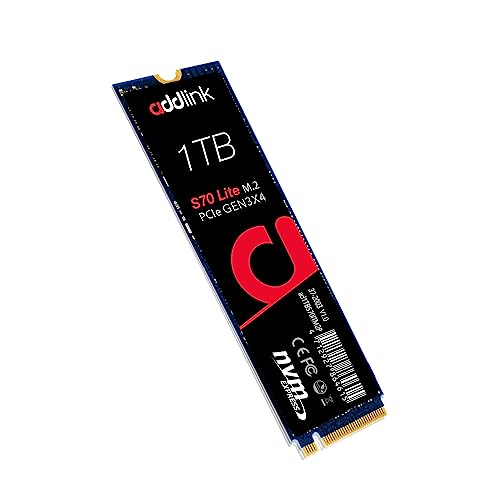
Addlink S70 Lite 1TB Gen3 NVMe SSD
Best for: internal desktop and laptop upgrades
- Storage Capacity
- 1TB
- Interface
- PCIe Gen3x4
- Form Factor
- M.2 2280
- Max Read Speed
- Up to 3200MB/s
- Max Write Speed
- 2600MB/s
- Cache Type
- SLC caching
View on Amazon: Addlink S70 Lite 1TB Gen3 NVMe SSD Affiliate link
The Addlink S70 Lite 1TB is an internal M.2 2280 NVMe drive using a PCIe Gen3x4 interface. It delivers sequential read speeds up to 3,200 MB/s and write speeds up to 2,600 MB/s. This model uses 3D NAND flash with SLC caching to handle heavy workloads. It fits standard desktop and laptop slots. You should choose this if you need fast internal storage for gaming or daily tasks, rather than a portable external solution.
Pros
- Sequential read speeds up to 3,200 MB/s
- Sequential write speeds up to 2,600 MB/s
- Standard M.2 2280 form factor for broad compatibility
- Low-power design runs cool without a heatsink
Cons
- Limited to PCIe Gen3x4 interface speeds
- Internal drive requires installation into a host device
- Includes only a 5-year limited warranty
Good fit if
- You are upgrading a desktop or laptop with an M.2 slot
- You need fast load times for games and large files
- You prefer a low-power internal drive that runs cool
Skip if
- You need a portable external drive for USB connection
- You require PCIe Gen4 or higher interface speeds
- You want a drive with an included heatsink
Verdict: Addlink S70 Lite 1TB Gen3 NVMe offers high sequential read speeds for internal storage upgrades. It suits users building or upgrading desktops and laptops who need fast, cool-running performance within an M.2 slot.

Addlink P21 1TB Portable External SSD
Best for: portable storage for creators and gamers
- Storage Capacity
- 1TB
- Interface
- USB 3.2 Gen 2x2
- Form Factor
- Portable
- Max Read Speed
- 2,000MB/s
- Cooling
- Metal casing with cooling fins
- Compatibility
- Laptop, PS5, Gaming, Mac
View on Amazon: Addlink P21 1TB Portable External SSD Affiliate link
The Addlink P21 is a portable external SSD designed for on-the-go storage. It uses a USB 3.2 Gen 2x2 interface to deliver read speeds up to 2,000MB/s. The 1TB drive weighs just 60 grams and features an aluminum casing with cooling fins. It works with laptops, consoles, and mobile devices. This model suits creators and gamers who need fast, compact storage for large files like 4K video.
Pros
- USB 3.2 Gen 2x2 interface for high-speed transfers
- Read speeds up to 2,000MB/s
- Lightweight aluminum design at 60 grams
- Built-in cooling fins for thermal management
Cons
- Slower max read speed than internal Gen3 NVMe drives
- Requires USB-C port and compatible host device
- External form factor takes up more space than M.2
Good fit if
- You need portable storage for laptops or consoles
- You transfer large 4K video files frequently
- You want a lightweight drive for travel
Skip if
- You need an internal M.2 drive for a desktop
- Your device only supports USB 3.2 Gen 1
- You require the absolute fastest sequential speeds available
Verdict: Addlink P21 1TB Portable SSD offers high-speed external storage in a compact, durable package. It fits users who prioritize portability and fast file transfers for media or gaming libraries.
Specifications side by side
| Spec | Addlink S70 Lite 1TB Gen3 NVMe SSD | Addlink P21 1TB Portable External SSD |
|---|---|---|
| Storage Capacity | 1TB | 1TB |
| Interface | PCIe Gen3x4 | USB 3.2 Gen 2x2 |
| Form Factor | M.2 2280 | Portable |
| Max Read Speed | Up to 3200MB/s | 2,000MB/s |
| Max Write Speed | 2600MB/s | not stated |
| Cache Type | SLC caching | not stated |
| Cooling | not stated | Metal casing with cooling fins |
| Compatibility | Laptop, Desktop, Gaming | Laptop, PS5, Gaming, Mac |
| NAND Type | 3D NAND | not stated |
| Size | 1TB | 1TB |
| Dimensions | 3.2 × 0.8 × 0.4 inches | not stated |
| Weight | 0.7 ounces | 6.35 ounces |
| Color | S70 Lite | not stated |
| Model | ad1TBS70M2P | 3311eb64-2d02-410e-8c3e-9f364cdf9f2f |
Frequently asked questions
Is the Addlink S70 Lite compatible with my laptop?
Yes, the Addlink S70 Lite is compatible with laptops. It uses an M.2 2280 form factor and connects via a PCIe 3.0 interface. This makes it suitable for internal upgrades in compatible desktops and laptops. Ensure your device has an available M.2 slot before purchasing.
Can I use the Addlink P21 with a PlayStation 5?
Yes, the Addlink P21 1TB Portable External SSD is compatible with the PlayStation 5. It is designed for portable storage for creators and gamers. You can use it to expand your game library on the console, provided it meets the USB connectivity requirements for external storage.
What is the difference in form factor between the two drives?
The Addlink S70 Lite is an internal M.2 2280 drive. It measures 3.2 inches in length and 0.8 inches in width. The Addlink P21 is a portable external SSD. It is a self-contained unit with no specific M.2 dimensions listed, designed for USB connection rather than internal slot installation.
Which drive is lighter and easier to carry?
The Addlink P21 Portable SSD is designed for portability. It weighs 4.16 ounces. The S70 Lite weighs only 0.7 ounces, but it is an internal component. For carrying data between locations, the P21 is the practical choice due to its external enclosure and USB connectivity.
Does the S70 Lite use 3D NAND memory?
Yes, the Addlink S70 Lite uses 3D NAND type memory. This is listed in its attributes. The P21 does not have this specific attribute listed in the provided data. The S70 Lite is intended for internal desktop and laptop upgrades where this memory type supports its performance goals.
Is the P21 suitable for Mac computers?
Yes, the Addlink P21 is compatible with Mac computers. Its listed compatibility includes laptops, PS5, gaming devices, and Mac. You can connect it via USB to store files, transfer media, or back up data on your Mac without needing internal installation.
What is the maximum storage capacity for these models?
Both the Addlink S70 Lite and the Addlink P21 offer 1TB of storage capacity. The S70 Lite is a 1TB Gen3 NVMe SSD. The P21 is a 1TB Portable External SSD. Both provide the same amount of space for your files and games.