2.5 Inch or M.2 Nvme SSDs? Compared by Specs
As an Amazon Associate we earn from qualifying purchases. Links on this page are affiliate links.
When you choose between a 25 inch vs m2 nvme SSD, you are selecting two very different storage solutions. Both drive options offer faster performance than traditional hard disks. They both use NAND flash memory to store your data. The main difference lies in their physical shape and connection method. One uses a standard cable interface, while the other plugs directly into the motherboard. This affects how they fit in your computer case and how fast they can transfer data.
Key differences
| Aspect | SanDisk SSD Plus 2TB SATA III SSD | Samsung 970 EVO Plus 500GB NVMe M.2 SSD |
|---|---|---|
| Form Factor | 2.5 inch/7mm | M.2 |
| Interface | SATA III 6 Gb/s | PCIe Gen 3.0 x4 NVMe 1.3 |
| Max Read Speed | Up to 545MB/s | Up to 3,500MB/s |
| Max Write Speed | Up to 515MB/s | Up to 3,300MB/s |
| Cache Type | SLC Caching | not listed |
| Warranty | 3 year limited | 5-year limited |
Which one should you choose?
Choose SanDisk SSD Plus 2TB SATA III SSD if
- You need a drive that fits in older desktop cases or laptops with standard SATA bays.
- You want a lower cost per gigabyte for large storage capacities like 2TB.
- You are replacing a traditional hard drive in a system that only supports SATA connections.
Choose Samsung 970 EVO Plus 500GB NVMe M.2 SSD if
- You require maximum transfer speeds for gaming or large file editing.
- You have a modern motherboard with an available M.2 slot for a compact build.
- You want a drive with a longer manufacturer warranty period.
Verdict: The SanDisk SSD Plus is the practical choice for users with standard SATA ports who need reliable, high-capacity storage. The Samsung 970 EVO Plus is the better option if you need blazing-fast speeds and have an M.2 slot available. Your decision depends on whether you prioritize raw speed or physical compatibility with your existing hardware.
2.5 Inch vs M.2 NVMe Specs
Interface Speed
The Samsung 970 EVO Plus uses a PCIe Gen 3.0 x4 NVMe 1.3 interface, which provides significantly higher bandwidth than the SanDisk SSD Plus. The SanDisk relies on a SATA III 6 Gb/s connection. This older interface limits data transfer rates compared to the modern NVMe standard. For users moving large files or running demanding applications, the NVMe connection offers a clear advantage in throughput. The SATA interface is sufficient for general tasks but cannot match the raw speed potential of the PCIe pathway used by the Samsung drive.
Transfer Speeds
Sequential read and write speeds differ greatly between these two drives. The Samsung 970 EVO Plus reaches up to 3,500MB/s for reads and 3,300MB/s for writes. In contrast, the SanDisk SSD Plus maxes out at 545MB/s for reads and 515MB/s for writes. The Samsung drive is roughly six times faster in sequential operations. This speed difference matters most when copying large video files or loading heavy games. The SanDisk speeds are typical for SATA drives and will feel noticeably slower during large data transfers compared to the NVMe option.
Form Factor
Physical dimensions dictate where you can install these drives. The SanDisk SSD Plus is a 2.5-inch drive with a 7mm height, requiring a specific bay and SATA power cable. The Samsung 970 EVO Plus is an M.2 stick measuring 0.87 inches by 3.15 inches. The M.2 form factor is much smaller and plugs directly into the motherboard. This makes the Samsung drive ideal for modern laptops and compact desktops where space is tight. The SanDisk requires more room and additional cabling, which can clutter cases.
NAND Technology
The Samsung 970 EVO Plus utilizes Samsung V-NAND technology. This 3D stacking method allows for higher density and better performance characteristics compared to traditional planar NAND. The SanDisk SSD Plus does not specify its NAND architecture in the provided data. V-NAND typically offers improved endurance and power efficiency. For tech enthusiasts and content creators, the advanced NAND structure in the Samsung drive supports higher random read/write operations. This technology helps maintain consistent performance under heavy workloads compared to standard NAND solutions.
Thermal Management
High-speed NVMe drives generate more heat than SATA drives. The Samsung 970 EVO Plus includes Dynamic Thermal Guard to monitor temperatures and prevent performance drops during sustained use. The SanDisk SSD Plus does not list specific thermal management features, likely because SATA drives operate at lower power and generate less heat. If you plan to use the Samsung drive for long rendering sessions or intense gaming, the active thermal control helps maintain top speeds. The SanDisk drive runs cooler naturally but lacks these specific protection mechanisms.
Data Security
The Samsung 970 EVO Plus supports AES 256-bit Full Disk Encryption and TCG/Opal V2.0 standards. These features provide hardware-level security for your data. The SanDisk SSD Plus does not mention specific encryption standards in its specifications. If you handle sensitive information or require compliance with security protocols, the Samsung drive offers built-in protection. The lack of mentioned encryption on the SanDisk drive means you may need to rely on software solutions for data security. For users prioritizing hardware security, the Samsung features are a distinct advantage.
Which SSD fits your storage needs
Users needing large affordable storage capacity
The SanDisk SSD Plus offers 2TB of space. It uses a SATA III interface with read speeds up to 545MB/s. This form factor fits standard 2.5-inch drive bays. It is ideal if you need to store many high-resolution photos and videos. The SLC caching helps with burst writes for everyday tasks like web browsing and gaming.
Gamers and content creators seeking speed
The Samsung 970 EVO Plus delivers sequential read speeds up to 3,500MB/s. It uses a PCIe Gen 3.0 x4 NVMe interface for low latency. This M.2 drive is better for high-end gaming and 4K content design. The V-NAND technology provides enhanced bandwidth. Dynamic Thermal Guard helps maintain optimal performance during intensive workloads.
People upgrading older desktop or laptop PCs
This drive replaces aging hard disks in systems with 2.5-inch bays. The 545MB/s read speed offers faster boots and application launches. It includes Acronis True Image software for easy migration. The 3-year warranty provides peace of mind. It is a practical choice for integrating new solid-state storage into existing hardware without changing form factors.
Quick picks
| # | Product | Best for | Price |
|---|---|---|---|
| 1 | SanDisk SSD Plus 2TB SATA III SSD | upgrading older PCs with SATA ports | Check price of SanDisk SSD Plus 2TB SATA III SSD on Amazon |
| 2 | Samsung 970 EVO Plus 500GB NVMe M.2 SSD | fast load times and data security | Check price of Samsung 970 EVO Plus 500GB NVMe M.2 SSD on Amazon |
The products compared

SanDisk SSD Plus 2TB SATA III SSD
Best for: upgrading older PCs with SATA ports
- Form Factor
- 2.5 Inch (what this guide is about)
- Storage Capacity
- 2TB
- Interface
- SATA III 6 Gb/s
- Max Read Speed
- Up to 545MB/s
- Max Write Speed
- Up to 515MB/s
- Cache Type
- SLC Caching
View on Amazon: SanDisk SSD Plus 2TB SATA III SSD Affiliate link
This SanDisk drive uses a 2.5-inch SATA III interface with 6 Gb/s bandwidth. It offers 2TB of storage and reaches read speeds up to 545MB/s and write speeds up to 515MB/s. The unit includes SLC caching to help with burst writes. It is built for everyday tasks like web browsing and photo editing. You get a reliable upgrade for older PCs or laptops that require a standard SATA connection.
Pros
- 2TB storage capacity for large files
- Sequential read speeds up to 545MB/s
- Sequential write speeds up to 515MB/s
- SLC caching for improved burst performance
Cons
- SATA III interface is slower than PCIe options
- 2.5-inch form factor is bulkier than M.2
- No PCIe NVMe speeds available
Good fit if
- You need a 2TB drive for a laptop or desktop
- Your system only supports SATA III connections
- You want high capacity for photos and videos
Skip if
- You require the fastest possible transfer speeds
- Your motherboard only has M.2 slots
- You are building a compact Mini-ITX PC
Verdict: SanDisk SSD Plus 2TB 2.5 Inch SATA is a solid choice for users upgrading older systems with SATA ports. It provides ample space and decent speeds for general computing tasks.
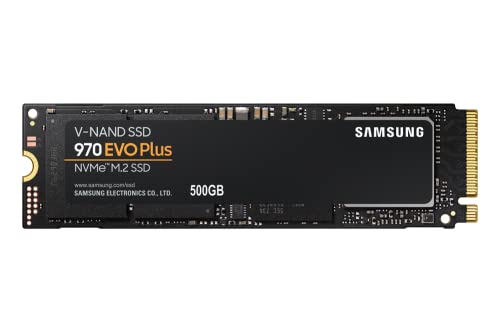
Samsung 970 EVO Plus 500GB NVMe M.2 SSD
Best for: fast load times and data security
- Form Factor
- M.2 (what this guide is about)
- Storage Capacity
- 500GB
- Interface
- PCIe Gen 3.0 x4 NVMe 1.3
- Max Read Speed
- Up to 3,500MB s
- Max Write Speed
- Up to 3,300MB s
- Dimensions
- 0.87 × 0.09 × 3.15 inches
View on Amazon: Samsung 970 EVO Plus 500GB NVMe M.2 SSD Affiliate link
This M.2 NVMe drive uses PCIe Gen 3.0 x4 and NVMe 1.3 to deliver sequential read speeds up to 3,500MB/s and write speeds up to 3,300MB/s. It includes Samsung V-NAND technology and Dynamic Thermal Guard for consistent performance. You get 500GB of storage in a compact form factor. This drive suits users who need fast load times and reliable data security through AES 256-bit encryption.
Pros
- Sequential read speeds up to 3,500MB/s
- Sequential write speeds up to 3,300MB/s
- NVMe 1.3 interface on PCIe Gen 3.0 x4
- Dynamic Thermal Guard for heat management
- AES 256-bit full disk encryption
Cons
- 500GB capacity is smaller than the 2TB option on this list
- Only includes a 5-year limited warranty
- Does not list a physical heatsink in the specifications
Good fit if
- You need fast sequential read and write speeds for large files
- You want NVMe performance in a standard M.2 slot
- You require built-in hardware encryption for data security
Skip if
- You need more than 500GB of storage space
- You are looking for a 2.5-inch SATA drive
- You require a drive with a pre-installed heatsink
Verdict: Samsung 970 EVO Plus 500GB NVMe SSD offers high-speed data transfer and robust thermal management for users prioritizing performance and security. It is an ideal fit for those who value fast load times and reliable encryption in a compact M.2 package.
Specifications side by side
| Spec | SanDisk SSD Plus 2TB SATA III SSD | Samsung 970 EVO Plus 500GB NVMe M.2 SSD |
|---|---|---|
| Storage Capacity | 2TB | 500GB |
| Interface | SATA III 6 Gb/s | PCIe Gen 3.0 x4 NVMe 1.3 |
| Form Factor | 2.5"/7mm | M.2 |
| Max Read Speed | Up to 545MB/s | Up to 3,500MB s |
| Max Write Speed | Up to 515MB/s | Up to 3,300MB s |
| Cache Type | SLC Caching | not stated |
| Size | 2TB | 500GB |
| Dimensions | 3.95 × 2.75 × 0.27 inches | 0.87 × 0.09 × 3.15 inches |
| Weight | 1.15 ounces | 1.76 ounces |
| Color | Black | Black |
| Model | SDSSDA-2T00 | MZ-V7S500B/AM |
Frequently asked questions
Can I use an M.2 NVMe drive in a desktop with SATA ports?
No. The Samsung 970 EVO Plus uses an M.2 form factor with an NVMe interface. It requires a motherboard slot that supports PCIe connections. Your desktop must have a compatible M.2 slot to install this drive. You cannot plug it into a standard SATA port. The SanDisk SSD Plus uses a SATA III interface, which fits traditional 2.5-inch bays.
Which SSD is better for older computers?
The SanDisk SSD Plus is the better choice for older systems. It features a 2.5-inch form factor and a SATA III interface. This design matches the drive bays and connection standards found in many legacy PCs. The Samsung 970 EVO Plus uses an M.2 NVMe interface, which many older motherboards do not support. Check your system's available ports before buying.
Do these drives require external power cables?
No. Both the SanDisk SSD Plus and Samsung 970 EVO Plus draw power directly from the motherboard or data cable. The SanDisk connects via SATA, which includes a power connector on the cable. The Samsung connects via the M.2 slot, which provides power through the board. You do not need separate power adapters for either drive.
Is the M.2 drive faster than the 2.5-inch drive?
Yes. The Samsung 970 EVO Plus uses a PCIe Gen 3.0 x4 NVMe interface. This provides significantly higher bandwidth than the SATA III connection used by the SanDisk SSD Plus. The NVMe protocol allows for faster data transfer rates. If speed is your priority, the M.2 NVMe drive offers superior performance for loading applications and files.
What is the physical size difference between these drives?
The SanDisk SSD Plus is a 2.5-inch drive measuring 3.95 inches in length. It is thicker and heavier, weighing 1.15 ounces. The Samsung 970 EVO Plus is a compact M.2 drive measuring 3.15 inches in length. It is much thinner and weighs 1.76 ounces. The M.2 form factor saves space inside your computer case.
Which SSD offers more storage capacity?
The SanDisk SSD Plus offers 2TB of storage. This provides ample space for large files and general computing tasks. The Samsung 970 EVO Plus in this comparison offers 500GB. While NVMe drives can come in larger capacities, this specific model has less space. You should choose the SanDisk if you need more room for your data.
Do I need a special cable to install these drives?
The SanDisk SSD Plus requires a SATA data cable and a SATA power cable. These are standard components included with most desktop motherboards. The Samsung 970 EVO Plus plugs directly into an M.2 slot on the motherboard. You do not need any additional cables for the NVMe drive. Installation is simpler for the M.2 option if your board has the slot.