15 Best 1TB Nvme SSDs, Compared
As an Amazon Associate we earn from qualifying purchases. Links on this page are affiliate links.
Choosing the right 1TB NVMe SSD requires matching interface speeds, form factors, and durability to your specific setup. We evaluated 15 models based on the specifications published on their official product listings. The Crucial X10 1TB Portable SSD earns the top spot by pairing data transfer speeds up to 2,100MB/s with a compact, weather-resistant USB-C shell.
Reviewing these specifications helps you decide whether you need high-speed external throughput, dedicated hardware encryption, or internal drive upgrades for your daily workflow.
Quick picks
The best fit for you
- You need rugged, fast portable storage for travel Crucial X10 1TB Portable SSD It provides USB-C connectivity with speeds up to 2,100MB/s in a compact, weather-resistant build.
- You need the fastest external NVMe transfer speeds available Glyph Atom EX40 1TB USB4 Portable SSD Its USB4 NVMe interface delivers data throughput rates up to 4,000 MB/s.
- You require physical PIN authentication for sensitive data iStorage diskAshur2 1TB Encrypted Portable SSD It features dedicated PIN keypad hardware encryption alongside an IP56 rugged exterior rating.
- You want an internal M.2 SSD for everyday computing Addlink S70 Lite 1TB Gen3 NVMe SSD The M.2 2280 form factor uses PCIe 3.0 to deliver read speeds up to 3,200 MB/s.
Our 15 picks

Crucial X10 1TB Portable SSD
Best for: durable high-speed portable storage for travel
- Size
- 1TB
- Storage Capacity
- 1TB
- Interface
- USB 3.2
- Form Factor
- Portable SSD
- Max Read Speed
- Up to 2,100 MB/s
- Compatibility
- Mac
View on Amazon: Crucial X10 1TB Portable SSD (paid link)
The Crucial X10 is an external solid state drive offering 1TB of storage over a USB-C interface. It delivers read speeds up to 2,100MB/s, making it suitable if you transfer files across Windows, Mac, Android, and gaming consoles. You get IP65 dust and water resistance plus 9.8-foot drop protection within a compact, lightweight 0.07-pound shell.
Pros
- Read speeds reaching up to 2,100MB/s
- IP65 dust and water resistance rating
- Drop resistance tested up to 9.8 feet
- Compact enclosure weighing roughly 0.07 pounds
Cons
- No official sequential write speed published in specifications
- External USB drive rather than an internal M.2 form factor
- Bundled Acronis and Mylio software licenses are limited to three-month trials
Good fit if
- You need portable storage with IP65 weather resistance and 9.8-foot drop protection.
- You want fast read speeds up to 2,100MB/s across PCs, Macs, and consoles.
Skip if
- You need an internal M.2 SSD installed directly into a motherboard.
- You require verified sequential write speed specifications prior to buying.
Verdict: Crucial X10 1TB Portable SSD delivers high-speed external data access up to 2,100MB/s inside a rugged, weather-resistant shell. It is a practical choice if you need fast, durable 1TB storage for mobile setups.

Glyph Atom EX40 1TB USB4 Portable SSD
Best for: rugged high-speed USB4 external storage workflows
- Size
- 1TB
- Storage Capacity
- 1TB
- Interface
- USB4
- Max Read Speed
- Up to 4,000 MB/s
- Max Write Speed
- Up to 4,000 MB/s
- Cooling
- Solid aluminum core and outer shell
View on Amazon: Glyph Atom EX40 1TB USB4 Portable SSD (paid link)
The Glyph Atom EX40 is a portable 1TB NVMe drive built for high-throughput tasks. It connects through a 40Gb USB4 Type-C port, reaching transfer rates up to 4,000 MB/s for read and write operations. The aluminum shell and bumper provide MIL-Standard 810F shock resistance, while backward compatibility covers Thunderbolt 3, 4, 5, and older USB ports. This drive suits you if you handle heavy 8K or RAW video files on external storage.
Pros
- Read and write transfer rates reach up to 4,000 MB/s via 40Gb USB4
- Backward compatible with Thunderbolt 3, 4, 5, and USB 3.0/3.1 ports
- MIL-Standard 810F rated for shock, vibration, and dust resistance
- Solid aluminum core and shell manage operating heat passively
- Includes three-year hardware warranty with two years of data recovery
Cons
- Requires a 40Gb USB4 or Thunderbolt host to achieve full rated speeds
- External enclosure format cannot be installed inside an internal M.2 slot
Good fit if
- You need external transfer rates up to 4,000 MB/s for high-resolution video workflows.
- You travel frequently and need MIL-Standard 810F shock and dust protection.
- You want bundled hardware warranty coverage combined with data recovery support.
Skip if
- You need an internal M.2 PCIe drive to mount directly onto your motherboard.
- Your host system only features older USB connections that bottleneck speed.
Verdict: Glyph Atom EX40 1TB USB4 NVMe SSD delivers up to 4,000 MB/s throughput alongside rugged hardware protection for demanding field work. It serves as an optimal portable drive if your system supports USB4 or Thunderbolt interfaces.
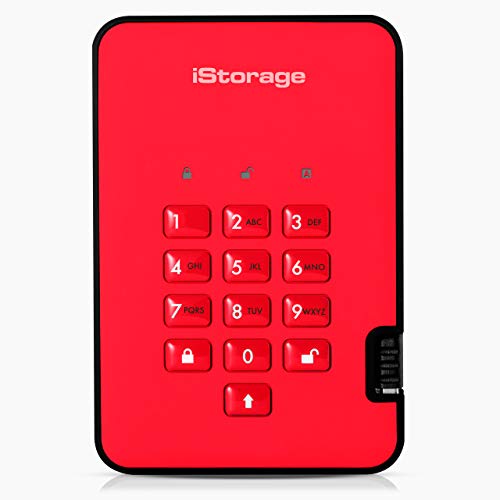
iStorage diskAshur2 1TB Encrypted Portable SSD
Best for: hardware PIN security and regulatory compliance
- Size
- 1TB
- Storage Capacity
- 1TB
- Interface
- USB 3.2
- Form Factor
- Portable
- Max Read Speed
- Up to 361MB/s
- Max Write Speed
- Up to 358MB/s
View on Amazon: iStorage diskAshur2 1TB Encrypted Portable SSD (paid link)
The iStorage diskAshur2 1TB Encrypted Portable SSD provides hardware-authenticated storage for your sensitive data. You unlock the drive using a 7-15 digit PIN keypad, bypassing software installation entirely. It offers USB 3.2 connectivity, reaching read speeds up to 361MB/s and write speeds up to 358MB/s. Built with IP56 dust and water resistance and AES-XTS 256-bit encryption, it suits you if you prioritize physical and digital data protection across any host system.
Pros
- AES-XTS 256-bit hardware encryption with 7-15 digit PIN authentication
- Common Criteria EAL 5+ certified secure microprocessor
- IP56 certified dust and splash water protection
- Hardware-level security operates without software on Windows, macOS, and Linux
Cons
- Read speeds capped at 361MB/s and write speeds capped at 358MB/s
- Weighs 0.48 pounds with a 0.59-inch thickness
Good fit if
- You need PIN-based AES-XTS 256-bit hardware encryption without installing host software.
- You require an IP56-rated enclosure to guard your files against water and dust.
Skip if
- You require high-speed NVMe transfer rates exceeding 361MB/s.
- You prefer an ultra-compact portable drive lighter than 0.48 pounds.
Verdict: iStorage diskAshur2 1TB Encrypted Portable SSD delivers dedicated PIN-protected hardware security and an IP56 rugged exterior for sensitive environments. Its 361MB/s read and 358MB/s write limits prioritize compliance and physical protection over raw throughput.

Samsung 860 EVO 1TB 2.5-Inch SATA SSD
Best for: 2.5-inch SATA drive bay upgrades
- Size
- 1TB
- Storage Capacity
- 1TB
- Interface
- SATA III
- Form Factor
- 2.5 Inch
- Dimensions
- 3.94 × 2.76 × 0.27 inches
- Weight
- 1.8 ounces
View on Amazon: Samsung 860 EVO 1TB 2.5-Inch SATA SSD (paid link)
The Samsung 860 EVO is an internal 2.5-inch solid-state drive with a 1TB capacity and a SATA III 6 Gb/s interface. It features Samsung V-NAND technology, a 7 mm drive height, and AES 256-bit hardware encryption compliant with TCG Opal and IEEE 1667 standards. If you need to upgrade an older desktop or laptop with standard SATA drive bays, this drive provides broad operating system compatibility and a 1.5 million hour MTBF reliability rating.
Pros
- AES 256-bit hardware encryption compliant with TCG Opal and IEEE 1667
- 1.5 million hours MTBF reliability rating
- 5-year limited warranty
- Standard 7 mm 2.5-inch casing fits internal drive bays
Cons
- SATA III interface limits bandwidth to 6 Gb/s
- Cables, mounting screws, and brackets are not included
Good fit if
- You need a 2.5-inch SATA III drive for an internal laptop or desktop bay.
- You require hardware-based AES 256-bit data encryption.
- You want a 1TB drive backed by a 5-year limited warranty.
Skip if
- You need an M.2 form factor or high-speed NVMe PCIe interface.
- You require installation hardware such as SATA cables or mounting brackets in the box.
Verdict: Samsung 860 EVO 1TB 2.5-Inch SATA SSD delivers solid SATA III storage with integrated AES 256-bit hardware encryption and a 1.5 million hour MTBF rating. It is a practical internal upgrade for systems using traditional 2.5-inch bays.
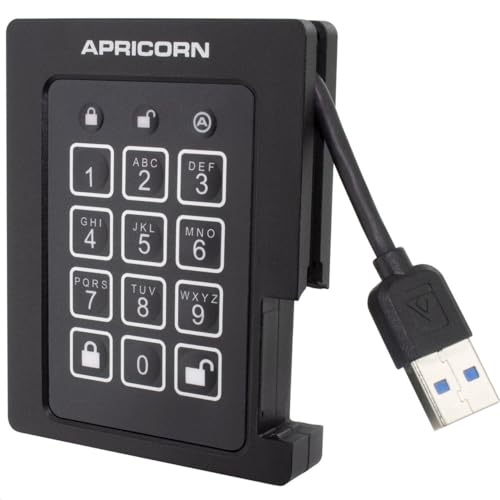
Apricorn Aegis Padlock 1TB Encrypted SSD
Best for: FIPS-validated hardware-encrypted portable data security
- Size
- 1TB
- Storage Capacity
- 1TB
- Interface
- USB 3.0
- Form Factor
- External Portable
- Security
- FIPS Validated
- Dimensions
- 3.25 × 2.5 × 0.5 inches
View on Amazon: Apricorn Aegis Padlock 1TB Encrypted SSD (paid link)
The Apricorn Aegis Padlock 1TB Encrypted SSD is an external portable drive built for secure data storage. It provides 1TB of capacity over a USB 3.0 interface and features FIPS validation alongside 256-bit encryption. The unit weighs 0.5 pounds with dimensions of 3.25 by 2.5 by 0.5 inches. You will find it suitable if you require hardware-level authentication with programmable PIN lengths and separate admin and user modes.
Pros
- FIPS validated security with 256-bit encryption
- Dedicated brute-force defense and optional self-destruct PIN
- Supports separate admin and user modes plus two read-only modes
- Compact footprint measuring 3.25 by 2.5 by 0.5 inches
Cons
- Relies on USB 3.0 connection rather than faster modern interfaces
- Weighs 0.5 pounds, heavier than bare internal SSD formats
Good fit if
- You need FIPS-validated hardware encryption with PIN authentication.
- You require separate admin and user access profiles.
- You want built-in brute-force defense and a self-destruct PIN option.
Skip if
- You need an internal M.2 SSD to install inside a PC motherboard.
- You require high-speed USB-C or USB4 transfer protocols.
Verdict: Apricorn Aegis Padlock 1TB Encrypted SSD delivers dedicated physical access control with FIPS validation and 256-bit encryption. It is a reliable choice when your portable storage setup prioritizes keypad-based security over raw interface speed.

Silicon Power A55 1TB 2.5-Inch SATA SSD
Best for: budget-friendly 2.5-inch SATA system upgrades
- Size
- 1TB
- Storage Capacity
- 1TB
- Interface
- SATA III
- Form Factor
- 2.5"
- Cache Type
- SLC Cache
- NAND Type
- 3D NAND
View on Amazon: Silicon Power A55 1TB 2.5-Inch SATA SSD (paid link)
The Silicon Power A55 is an internal 1TB drive built on 3D NAND flash and a SATA III interface. Its 2.5-inch enclosure measures 7mm thick, making it suitable for ultrabooks, laptops, and desktop drive bays. It uses SLC cache technology to assist transfer speeds and system responsiveness. If you need standard 2.5-inch SATA storage rather than an M.2 drive, this unit offers basic, functional capacity.
Pros
- Slim 7mm 2.5-inch form factor fits ultrabooks and thin notebooks
- Uses 3D NAND flash and SLC cache technology
- Includes a 3-year limited warranty
Cons
- Operates over SATA III rather than faster NVMe protocols
- Requires website registration to access complete warranty services
- Uses a 2.5-inch enclosure rather than a compact M.2 card
Good fit if
- You need a 1TB drive that fits a 7mm 2.5-inch SATA bay.
- You want 3D NAND storage with SLC caching for everyday computing.
Skip if
- You require high-speed PCIe NVMe transfer rates.
- You need an M.2 form factor drive for your motherboard.
Verdict: Silicon Power A55 1TB 2.5-Inch SATA SSD provides 1TB of 3D NAND storage in a 7mm enclosure for SATA-equipped computers. It delivers standard SATA III connectivity paired with SLC cache technology and a 3-year warranty.

SanDisk SSD Plus 1TB 2.5-Inch SATA SSD
Best for: desktop PC SATA III storage upgrades
- Size
- 1TB
- Storage Capacity
- 1TB
- Interface
- SATA III 6 Gb/s
- Form Factor
- 2.5"/7mm
- Max Read Speed
- 535 MB/s
- Max Write Speed
- 450 MB/s
View on Amazon: SanDisk SSD Plus 1TB 2.5-Inch SATA SSD (paid link)
The SanDisk SSD Plus 1TB is an internal 2.5-inch solid-state drive built with a SATA III interface. It delivers sequential read speeds up to 535 MB/s and write speeds up to 450 MB/s, fitting standard 7mm desktop drive bays. If you need a direct replacement for an older mechanical hard drive, this unit offers basic storage capacity, 1500G shock resistance, and a 3-year limited manufacturer warranty for daily desktop computing.
Pros
- Up to 535 MB/s sequential read speed
- Up to 450 MB/s sequential write speed
- 1500G shock resistance rating
- Standard 2.5-inch 7mm form factor
- 3-year limited manufacturer warranty
Cons
- SATA III speeds capped well below NVMe transfer rates
- Requires a 2.5-inch drive bay and SATA data cabling
Good fit if
- You need a 2.5-inch 7mm SATA III internal drive for a desktop PC.
- You want 1TB of solid-state storage with speeds up to 535 MB/s.
- You require 1500G shock resistance and a 3-year warranty.
Skip if
- You need fast PCIe NVMe throughput exceeding 535 MB/s.
- You require an M.2 form factor drive for your motherboard.
Verdict: SanDisk SSD Plus 1TB 2.5-Inch SATA SSD delivers reliable SATA III speeds up to 535 MB/s for desktop systems. It provides a simple 2.5-inch storage swap backed by a 3-year limited warranty.

Addlink S20 1TB 2.5-Inch SATA SSD
Best for: upgrading 2.5-inch laptop and console drive bays
- Size
- 1TB
- Storage Capacity
- 1TB
- Interface
- SATA III 6Gb/s
- Form Factor
- 2.5-inch, 7mm
- Max Read Speed
- 500 MB/s
- Max Write Speed
- 450 MB/s
View on Amazon: Addlink S20 1TB 2.5-Inch SATA SSD (paid link)
The Addlink S20 is a 1TB internal solid-state drive built on a 2.5-inch 7mm form factor. Utilizing a SATA III interface, it provides sequential read speeds up to 500MB/s and sequential write speeds up to 450MB/s. It features 3D NAND flash paired with SLC caching rather than dedicated DRAM. This drive suits you if you need a standard drive bay replacement for a compatible laptop, desktop PC, or PlayStation 4 system.
Pros
- Sequential read speeds up to 500MB/s and write speeds up to 450MB/s
- Standard 2.5-inch 7mm profile fits desktop and laptop drive bays
- Compatible with PlayStation 4, PS4 Slim, and PS4 Pro consoles
- Built-in SLC caching aids sustained write workloads
Cons
- SATA III interface limits maximum throughput compared to NVMe
- Lacks onboard dedicated DRAM cache
- Requires a 2.5-inch bay rather than an M.2 slot
Good fit if
- You need a 2.5-inch SATA drive to replace a traditional mechanical hard drive.
- You want a direct internal storage replacement for a laptop, desktop, or PS4.
Skip if
- You require high-speed NVMe PCIe transfer rates.
- Your system only accommodates M.2 format expansion cards.
Verdict: Addlink S20 1TB 2.5-Inch SATA III SSD provides standard SATA III speeds and SLC caching in a 7mm form factor. It delivers a direct 2.5-inch replacement for older laptop, desktop, or console hard drives.
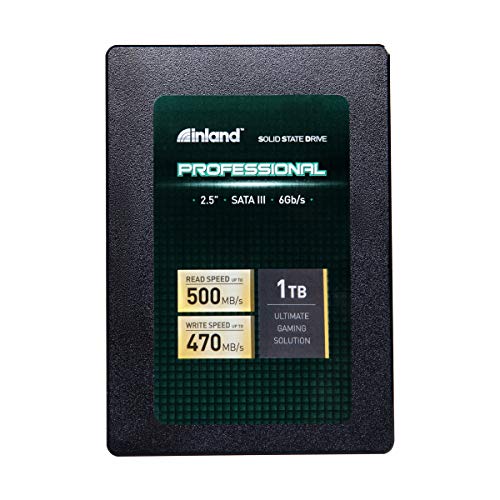
INLAND Pro 1TB SATA III 2.5-Inch SSD
Best for: upgrading 2.5-inch SATA laptop and desktop bays
- Size
- 1TB
- Storage Capacity
- 1TB
- Interface
- SATA III 6Gb/s
- Form Factor
- 2.5" 7mm
- Max Read Speed
- 500 MB/s
- Max Write Speed
- 470 MB/s
View on Amazon: INLAND Pro 1TB SATA III 2.5-Inch SSD (paid link)
The INLAND Pro 1TB is an internal 2.5-inch solid-state drive built with 3D TLC NAND flash and a SATA III interface. It delivers sequential read speeds up to 500 MB/s, sequential write speeds up to 470 MB/s, and a 660TBW endurance rating. With a standard 7mm height, this drive suits you if you need reliable storage replacement or an upgrade for older laptops, ultrabooks, and desktop PCs limited to SATA drive bays.
Pros
- Endurance rating up to 660TBW
- Sequential speeds up to 500 MB/s read and 470 MB/s write
- Random 4K read and write up to 70,000 IOPS
- Three-year limited parts and labor warranty
Cons
- SATA III interface tops out well below NVMe speeds
- 2.5-inch form factor requires a drive bay rather than an M.2 slot
Good fit if
- You need a 2.5-inch 7mm drive for a desktop PC, laptop, or ultrabook.
- You prioritize high endurance with a 660TBW rating.
- You are replacing a drive in a system limited to SATA III connections.
Skip if
- You have an M.2 slot and want faster NVMe PCIe bandwidth.
- You need an external portable drive with a USB interface.
Verdict: INLAND Pro 1TB 2.5-Inch SATA SSD delivers solid SATA III speeds and high 660TBW endurance using 3D TLC NAND. It is a practical replacement drive for laptops and desktops with standard 2.5-inch drive bays.
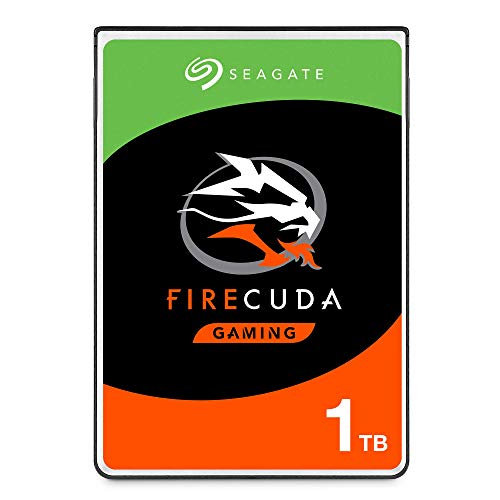
Seagate FireCuda 1TB 2.5-Inch SATA SSHD
Best for: 2.5-inch SATA laptop and gaming upgrades
- Size
- 1TB
- Storage Capacity
- 1TB
- Interface
- SATA 6GB/s
- Form Factor
- 2.5 Inch
- Compatibility
- Laptop, Gaming
- Dimensions
- 3.95 × 2.75 × 0.28 inches
View on Amazon: Seagate FireCuda 1TB 2.5-Inch SATA SSHD (paid link)
The Seagate FireCuda 1TB is an internal solid-state hybrid drive built for laptops and gaming setups. It combines flash acceleration with standard drive capacity over a SATA III 6Gb/s interface in a compact 2.5-inch form factor measuring 0.28 inches thick. If you need 1TB of storage backed by a five-year limited warranty and low power draw, this drive fits standard 2.5-inch bays while using flash caching to support everyday gaming needs.
Pros
- Five-year limited warranty
- 2.5-inch form factor measuring 0.28 inches thick
- Flash-accelerated hybrid design
- Low power consumption
Cons
- Uses SATA III interface instead of faster NVMe PCIe
- Hybrid drive design rather than purely solid-state storage
Good fit if
- You need a 1TB drive for a 2.5-inch laptop or PC drive bay.
- You want internal gaming storage backed by a five-year limited warranty.
- You want flash-accelerated performance from a low-power SATA drive.
Skip if
- You need high-speed PCIe NVMe transfer rates.
- You want an all-flash drive with no mechanical hybrid components.
Verdict: Seagate FireCuda 1TB 2.5-Inch SATA SSHD delivers flash-accelerated hybrid storage for systems with standard 2.5-inch SATA bays. It suits users who prioritize low power consumption and a five-year warranty over pure NVMe speeds.
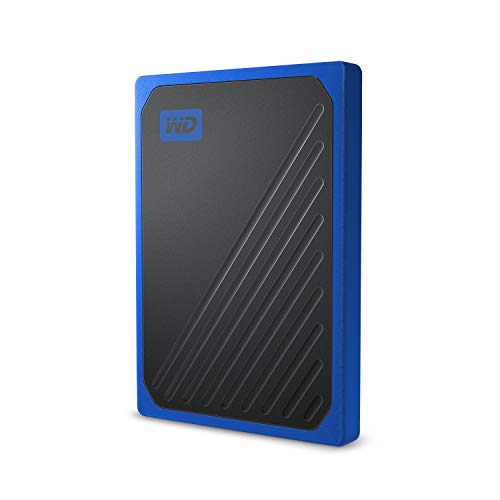
WD My Passport Go 1TB Portable SSD
Best for: rugged, pocketable console and travel backups
- Size
- 1TB
- Storage Capacity
- 1TB
- Form Factor
- Portable External
- Dimensions
- 3.7 × 2.6 × 0.39 inches
- Weight
- 1.92 ounces
View on Amazon: WD My Passport Go 1TB Portable SSD (paid link)
The Western Digital 1TB My Passport Go is a rugged external drive built for mobile use. It delivers speeds up to 300MB/s and features an integrated cable and protective rubber edges. It withstands drops up to 2 meters and weighs 0.12 pounds. Compatible with PC, Mac, PS4, and Xbox One, it gives you pocketable capacity for durable backups.
Pros
- Drop-resistant up to 2 meters with rubber edges
- Pocket-sized 0.12-pound design with integrated cable
- Compatible with PC, Mac, PS4, and Xbox One
- Includes a 3-year manufacturer limited warranty
Cons
- Transfer speed capped at 300MB/s
- Requires reformatting before use with Apple Time Machine
Good fit if
- You need drop-resistant storage with a built-in cable for travel.
- You want external plug-and-play storage for PC, PS4, or Xbox One.
Skip if
- You need data transfer rates faster than 300MB/s.
- You want an internal M.2 or SATA drive for your computer build.
Verdict: Western Digital 1TB My Passport Go Portable SSD delivers drop-tested exterior protection and an attached cable for easy travel. Its 300MB/s speed ceiling makes it better suited for console or backup storage than high-throughput workloads.
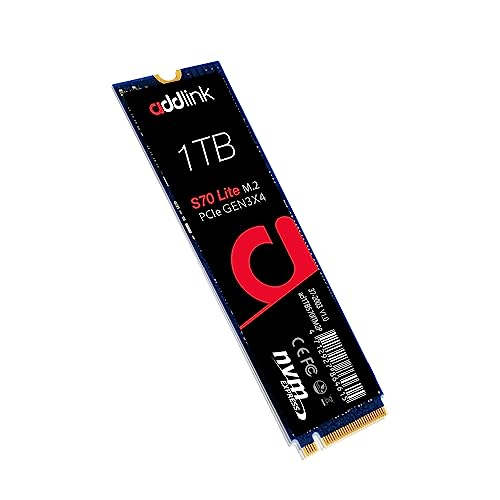
Addlink S70 Lite 1TB Gen3 NVMe SSD
Best for: everyday desktop and laptop PCIe Gen3 upgrades
- Size
- 1TB
- Storage Capacity
- 1TB
- Interface
- PCIe Gen3x4
- Form Factor
- M.2 2280
- Max Read Speed
- Up to 3200MB/s
- Max Write Speed
- 2600MB/s
View on Amazon: Addlink S70 Lite 1TB Gen3 NVMe SSD (paid link)
The Addlink S70 Lite is a 1TB internal solid-state drive built on the PCIe Gen3x4 NVMe interface and the standard M.2 2280 form factor. It delivers sequential read speeds up to 3,200 MB/s and write speeds up to 2,600 MB/s using 3D NAND flash with SLC caching. It suits you if you need a responsive storage upgrade for desktop motherboards or laptops with an open M.2 PCIe slot.
Pros
- Sequential read speeds up to 3,200 MB/s and write speeds up to 2,600 MB/s
- Standard M.2 2280 form factor compatible with laptops and desktops
- 3D NAND flash with SLC caching architecture
- 5-year limited warranty coverage
Cons
- PCIe Gen3 speeds fall below newer PCIe Gen4 drives
- No integrated heatsink included
Good fit if
- You need a 1TB M.2 2280 drive for a desktop or laptop PCIe slot.
- You want up to 3,200 MB/s read performance without requiring an external heatsink.
- You prefer an internal drive backed by a 5-year warranty.
Skip if
- You need the higher sequential speeds of a PCIe 4.0 drive.
- You require an SSD with a pre-installed factory heatsink.
Verdict: Addlink S70 Lite 1TB PCIe Gen3 M.2 SSD delivers balanced PCIe 3.0 speeds up to 3,200 MB/s for standard M.2 slots. It provides solid everyday storage performance backed by 3D NAND and a 5-year warranty.

Transcend 1TB PCIe 3.0 M.2 SSD
Best for: entry-level PCIe Gen3 desktop and laptop upgrades
- Size
- 1TB
- Storage Capacity
- 1TB
- Interface
- PCIe Gen3 x4
- Max Read Speed
- Up to 1,700 MB/s
- Max Write Speed
- 1,400 MB/s
- Cache Type
- SLC caching technology
View on Amazon: Transcend 1TB PCIe 3.0 M.2 SSD (paid link)
The Transcend 1TB NVMe PCIe M.2 SSD is an internal drive built on the M.2 2280 form factor. It uses a PCIe Gen3 x4 interface and NVMe 1.3 protocol, delivering sequential read speeds up to 1,700 MB/s and write speeds up to 1,400 MB/s. With built-in 3D NAND flash, SLC caching, and dynamic thermal throttling, you get stable basic storage suitable for routine computing tasks and moderate system upgrades.
Pros
- PCIe Gen3 x4 interface with NVMe 1.3 support
- Dynamic thermal throttling mechanism for heat management
- Built-in SLC caching technology
- LDPC coding engineered for data integrity
Cons
- Maximum read speed reaches 1,700 MB/s
- Maximum write speed tops out at 1,400 MB/s
Good fit if
- You need a standard M.2 2280 drive operating on PCIe Gen3 x4.
- You want built-in dynamic thermal throttling to regulate operating temperature.
- You require 1TB of 3D NAND storage with integrated SLC caching.
Skip if
- You require sequential read throughput higher than 1,700 MB/s.
- You need sequential write speeds exceeding 1,400 MB/s.
Verdict: Transcend 1TB NVMe PCIe M.2 SSD provides entry-level PCIe Gen3 speeds up to 1,700 MB/s read and 1,400 MB/s write. It offers reliable 3D NAND storage with dynamic thermal throttling for day-to-day computing builds.
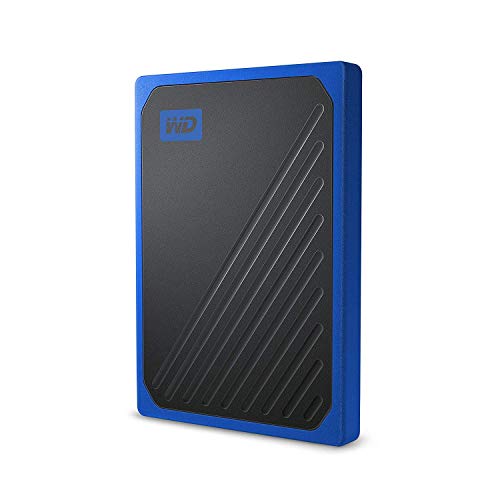
Western Digital 1TB My Passport Go Portable SSD
Best for: durable, portable everyday file backups
- Size
- 1TB
- Storage Capacity
- 1TB
- Interface
- USB 3.0
- Dimensions
- 3.7 × 2.6 × 0.39 inches
- Weight
- 1.94 ounces
View on Amazon: Western Digital 1TB My Passport Go Portable SSD (paid link)
The Western Digital My Passport Go is an external solid-state drive offering 1TB of portable storage. It connects via an integrated USB 3.0 cable and provides transfer speeds reaching up to 400MB/s. Built with a protective rubber bumper, the unit handles drops from up to 2 meters. This compact drive suits you if you need durable, pocket-sized storage for on-the-go file transfers without carrying separate connection cords.
Pros
- Drop-resistant up to 2 meters with protective rubber bumper
- Integrated built-in cable for portability
- Speeds up to 400MB/s via USB 3.0
- Lightweight build at approximately 0.12 pounds
Cons
- Maximum transfer speed capped at 400MB/s
- Limited to USB 3.0 interface
Good fit if
- You need a portable 1TB drive with built-in drop protection up to 2 meters.
- You prefer an integrated cable so you do not have to pack loose cords.
- You want a lightweight, pocket-sized external drive under 0.13 pounds.
Skip if
- You require transfer speeds faster than 400MB/s.
- You need an internal M.2 NVMe SSD for direct motherboard installation.
Verdict: Western Digital My Passport Go 1TB Portable SSD delivers dependable 1TB external storage with drop resistance and an attached cable. It provides up to 400MB/s performance for users who value portability over high-speed NVMe transfers.

Transcend 1TB M.2 SATA SSD with DRAM Cache
Best for: M.2 slots requiring SATA bus compatibility
- Size
- 1TB
- Storage Capacity
- 1TB
- Interface
- SATA III
- Max Read Speed
- 560 MB/s
- Max Write Speed
- 520 MB/s
- Cache Type
- DDR3 DRAM
View on Amazon: Transcend 1TB M.2 SATA SSD with DRAM Cache (paid link)
The Transcend 1TB M.2 SATA SSD with DRAM Cache gives you internal storage using the M.2 2280 form factor and a SATA III interface. It pairs 3D NAND flash memory with a dedicated DDR3 DRAM cache to manage active data. You get sequential read speeds up to 560 MB/s and write speeds up to 520 MB/s. This suits you if your system requires a compact M.2 card but relies strictly on SATA bus connections.
Pros
- Dedicated DDR3 DRAM cache for active data handling
- Sequential read speeds up to 560 MB/s and write speeds up to 520 MB/s
- Built with 3D NAND flash memory
- Low-Density Parity Check error correction coding
Cons
- SATA III interface limits sequential reads to 560 MB/s
- Does not support faster NVMe PCIe transfer protocols
Good fit if
- You need an M.2 2280 drive that operates over a SATA III bus.
- You want an onboard DDR3 DRAM cache to handle active data.
- You require built-in LDPC error correction for data transfers.
Skip if
- You require high-bandwidth NVMe PCIe transfer speeds.
- You need a standard 2.5-inch drive bay housing.
Verdict: Transcend 1TB M.2 SATA SSD with DRAM Cache delivers stable SATA III performance with dedicated DDR3 memory in a slim M.2 2280 format. It provides dependable solid-state storage for systems limited to M.2 SATA slots.
Specifications side by side
| Spec | Crucial X10 1TB Portable SSD | Glyph Atom EX40 1TB USB4 Portable SSD | iStorage diskAshur2 1TB Encrypted Portable SSD | Samsung 860 EVO 1TB 2.5-Inch SATA SSD | Apricorn Aegis Padlock 1TB Encrypted SSD | Silicon Power A55 1TB 2.5-Inch SATA SSD | SanDisk SSD Plus 1TB 2.5-Inch SATA SSD | Addlink S20 1TB 2.5-Inch SATA SSD | INLAND Pro 1TB SATA III 2.5-Inch SSD | Seagate FireCuda 1TB 2.5-Inch SATA SSHD | WD My Passport Go 1TB Portable SSD | Addlink S70 Lite 1TB Gen3 NVMe SSD | Transcend 1TB PCIe 3.0 M.2 SSD | Western Digital 1TB My Passport Go Portable SSD | Transcend 1TB M.2 SATA SSD with DRAM Cache |
|---|---|---|---|---|---|---|---|---|---|---|---|---|---|---|---|
| Storage Capacity | 1TB | 1TB | 1TB | 1TB | 1TB | 1TB | 1TB | 1TB | 1TB | 1TB | 1TB | 1TB | 1TB | 1TB | 1TB |
| Interface | USB 3.2 | USB4 | USB 3.2 | SATA III | USB 3.0 | SATA III | SATA III 6 Gb/s | SATA III 6Gb/s | SATA III 6Gb/s | SATA 6GB/s | not specified | PCIe Gen3x4 | PCIe Gen3 x4 | USB 3.0 | SATA III |
| Form Factor | Portable SSD | not specified | Portable | 2.5 Inch | External Portable | 2.5" | 2.5"/7mm | 2.5-inch, 7mm | 2.5" 7mm | 2.5 Inch | Portable External | M.2 2280 | not specified | not specified | not specified |
| Max Read Speed | Up to 2,100 MB/s | Up to 4,000 MB/s | Up to 361MB/s | not specified | not specified | not specified | 535 MB/s | 500 MB/s | 500 MB/s | not specified | not specified | Up to 3200MB/s | Up to 1,700 MB/s | not specified | 560 MB/s |
| Max Write Speed | not specified | Up to 4,000 MB/s | Up to 358MB/s | not specified | not specified | not specified | 450 MB/s | 450 MB/s | 470 MB/s | not specified | not specified | 2600MB/s | 1,400 MB/s | not specified | 520 MB/s |
| Cache Type | not specified | not specified | not specified | not specified | not specified | SLC Cache | not specified | SLC write caching | not specified | not specified | not specified | SLC caching | SLC caching technology | not specified | DDR3 DRAM |
| Cooling | not specified | Solid aluminum core and outer shell | not specified | not specified | not specified | not specified | not specified | not specified | not specified | not specified | not specified | not specified | not specified | not specified | not specified |
| Compatibility | Mac | not specified | not specified | not specified | not specified | not specified | not specified | Laptop, Desktop | not specified | Laptop, Gaming | not specified | Laptop, Desktop, Gaming | not specified | not specified | not specified |
| NAND Type | not specified | not specified | not specified | not specified | not specified | 3D NAND | not specified | 3D NAND | 3D NAND | not specified | not specified | 3D NAND | not specified | not specified | not specified |
| Security | not specified | not specified | Hardware Encryption, Password Protection | not specified | FIPS Validated | not specified | not specified | not specified | not specified | not specified | not specified | not specified | not specified | not specified | not specified |
| Size | 1TB | 1TB | 1TB | 1TB | 1TB | 1TB | 1TB | 1TB | 1TB | 1TB | 1TB | 1TB | 1TB | 1TB | 1TB |
| Host Interface | USB-C | not specified | not specified | not specified | not specified | not specified | not specified | not specified | not specified | not specified | not specified | not specified | not specified | not specified | not specified |
| Dimensions | 1.96 × 2.55 × 0.39 inches | not specified | 4.72 × 3.15 × 0.59 inches | 3.94 × 2.76 × 0.27 inches | 3.25 × 2.5 × 0.5 inches | 3.94 × 2.75 × 0.28 inches | 0.28 × 3.96 × 2.75 inches | 3.94 × 2.75 × 0.28 inches | 3.94 × 2.75 × 0.28 inches | 3.95 × 2.75 × 0.28 inches | 3.7 × 2.6 × 0.39 inches | 3.2 × 0.8 × 0.4 inches | 3.15 × 0.87 × 0.14 inches | 3.7 × 2.6 × 0.39 inches | 3.15 × 0.87 × 0.14 inches |
| Weight | 1.13 ounces | not specified | 7.62 ounces | 1.8 ounces | 8 ounces | 1.76 ounces | 1.12 ounces | not specified | not specified | 3.39 ounces | 1.92 ounces | 0.7 ounces | not specified | 1.94 ounces | not specified |
| Color | Blue | not specified | Fiery Red | Black | Multicolor | 1TB | Black | S20 | 1TB | Black | Cobalt | S70 Lite | Black | Cobalt | Green |
| Model | CT1000X10SSD9-02 | A40EX1000 | IS-DA2-256-SSD-1000-R | 896RC | ASSD-3PL256-1TBF | SP001TBSS3A55S25 | SDSSDA-1T00-G26 | ad1TBS20S3S | 618996726509 | ST1000LX015 | WDBY9Y0010BBT-WESN | ad1TBS70M2P | TS1TMTE110S | WDBMCG0010BBT-WESN | TS1TMTS830S |
Is a 1TB SSD capacity right for you?
A 1TB drive delivers sufficient capacity to host your operating system, primary applications, and working files on a single volume. Choosing 1TB allows direct replacement of older internal drives in standard 2.5-inch SATA bays or M.2 2280 slots without splitting data across multiple devices. For external use, 1TB provides dedicated space for portable backups, console storage, or encrypted archives in one hardware unit. You avoid carrying multiple smaller disks while keeping setups compact.
Worth it if
- You need a single internal drive to hold your operating system and active software in an M.2 or 2.5-inch SATA bay.
- You want to store complete system backups, console games, or media projects on one portable drive.
Skip it if
- You manage multi-terabyte media archives that exceed single-terabyte drive limits.
- You only store lightweight documents and require minimal local solid-state capacity.
If you build a compact mobile workstation around your drive, pair your setup with a 100Hz portable monitor for smoother display output.
How We Chose 1TB SSDs
To choose the 15 SSDs for this guide, you see products selected directly from listings that explicitly state a 1TB storage size in the title or specifications list. Only one capacity or design variant from each product family appears on the page. Every detail comes entirely from published manufacturer specifications, and products are never physically handled.
The selections are ordered with available products in stock first, followed by Amazon sales rank so better-selling drives appear earlier. Stock levels refresh at least daily on the page itself, which keeps your comparison focused directly on published hardware specs like form factor, connection interface, and transfer throughput.
How to Choose the Right 1TB SSD
-
Evaluate Cache Type and Architecture
When comparing solid-state storage, check whether a drive uses dedicated DRAM or dynamic SLC caching. A dedicated volatile memory buffer helps sustain consistent transfer rates during sustained multi-gigabyte write tasks. In contrast, SLC caching allocates a portion of standard flash memory to accelerate initial burst writes. If your daily workflow involves continuous transfers, look for drives featuring onboard memory buffers. For example, the Transcend 1TB M.2 SATA SSD with DRAM Cache incorporates dedicated DDR3 memory, providing sustained bus stability that basic DRAM-less solid-state designs cannot match.
-
Review Hardware Encryption Standards
If you store sensitive or regulated client data, evaluate the drive's integrated security features before purchasing. Standard drives leave data protection to host operating system software, while secure drives provide self-contained encryption chips. Look for products specifying physical authentication or official regulatory certifications if compliance is essential for your work. The Apricorn Aegis Padlock 1TB Encrypted SSD provides dedicated physical keypad access paired with FIPS validation and 256-bit hardware encryption. This configuration ensures stored files remain secure and inaccessible even when separated from your primary workstation.
-
Check Terabytes Written Ratings
Drive endurance indicates how much cumulative data you can write to flash memory before cell degradation risks reliability. Manufacturers measure this lifespan using Terabytes Written (TBW) alongside warranty duration. If you frequently install large software builds or record heavy video streams, verify the published TBW rating on the spec sheet. For example, the INLAND Pro 1TB SATA III 2.5-Inch SSD specifies an endurance rating of 660TBW using 3D TLC NAND. Matching a high TBW figure to write-intensive computing protects your setup against premature drive wear.
-
Inspect Thermal Management Features
M.2 form factor drives pack high performance into very small circuit boards, which naturally generate heat during intensive read and write operations. Without proper heat dissipation or onboard firmware management, an overheated drive will sharply throttle throughput to protect the flash silicon. When selecting an internal M.2 module for compact laptop enclosures or crowded desktop slots, verify whether the drive includes firmware-level temperature management. The Transcend 1TB PCIe 3.0 M.2 SSD includes built-in dynamic thermal throttling to maintain hardware stability and consistent operation across varying thermal loads.
-
Assess Enclosure Durability Features
When selecting an external drive for travel or on-location transfers, physical durability matters just as much as internal storage capacity. Portable solid-state drives differ widely in their casing construction, drop protection, and cable management designs. If you plan to work in mobile environments, check the physical dimensions, weight, and exterior impact specifications. The WD My Passport Go 1TB Portable SSD provides a drop-tested exterior shell and includes an integrated, attached cable. These physical protections reduce hardware failure risks and eliminate the hassle of packing separate loose cords.
Frequently asked questions
Can you put an M.2 NVMe SSD into a standard SATA drive bay?
You cannot install an M.2 drive directly into a 2.5-inch SATA bay without a compatible enclosure or adapter card. Standard 2.5-inch slots use SATA data and power cables, whereas M.2 drives use an M-key or B+M key slot wired to PCIe or SATA lanes. If your computer only has 2.5-inch bays, choose a dedicated 2.5-inch form factor drive instead.
What is the difference between an M.2 SATA SSD and an M.2 NVMe SSD?
The primary difference lies in the underlying interface and transfer protocol. M.2 SATA drives use the legacy SATA III bus, capping throughput around 600 MB/s, while M.2 NVMe drives utilize high-speed PCIe lanes. For example, the Transcend M.2 SATA SSD runs over SATA III, whereas the Addlink S70 Lite uses PCIe 3.0 to achieve transfer rates up to 3,200 MB/s.
Can you connect a portable NVMe SSD to a Mac computer?
Yes, you can connect portable NVMe SSDs to a Mac as long as the drive uses a compatible interface. Drives like the Crucial X10 feature USB-C connectivity and list explicit Mac compatibility right out of the box. If you connect using USB4 or Thunderbolt ports, you can achieve significantly higher transfer speeds with supported external hardware.
How does hardware encryption on a portable SSD protect your data?
Hardware encryption processes data security directly on the drive controller rather than relying on computer software. Devices like the iStorage diskAshur2 and Apricorn Aegis Padlock use dedicated physical keypads with 256-bit encryption or FIPS validation to lock down files. This ensures your data remains inaccessible if the physical drive is disconnected, lost, or stolen during transit.
What makes an SSHD hybrid drive different from a standard solid-state drive?
A solid-state hybrid drive combines traditional mechanical spinning platters with a smaller flash memory cache. Drives like the Seagate FireCuda 1TB SATA SSHD use this hybrid architecture to accelerate common files while retaining mechanical components. In contrast, pure SSDs rely entirely on non-volatile flash memory, providing faster access times, silent operation, and no moving parts to wear out.
Do all 1TB M.2 solid-state drives include dynamic thermal throttling?
Not all drives specify thermal throttling mechanisms, but many high-speed PCIe models incorporate it to regulate operating temperatures. For example, the Transcend 1TB PCIe 3.0 M.2 SSD includes built-in dynamic thermal throttling to maintain drive stability during heavy workloads. This feature automatically adjusts throughput when component temperatures rise to prevent hardware damage in tight laptop or desktop enclosures.
How much endurance can you expect from a 1TB SATA SSD?
Terabytes Written ratings vary depending on the specific NAND flash and controller configuration used by the manufacturer. For example, the INLAND Pro 1TB 2.5-Inch SATA SSD offers an endurance rating of 660TBW using 3D TLC NAND flash memory. Checking the manufacturer specification helps you verify how much total data you can write across the drive's operational life.